
Important Safety Instructions
Read all instructions carefully before using the appliance. Failure to follow these instructions may result in electric shock, fire, or injury.
- Do not attempt to operate this oven with the door open as this can result in harmful exposure to microwave energy.
- Do not place any object between the oven front face and the door or allow soil or cleaner residue to accumulate on sealing surfaces.
- Do not operate the oven if it is damaged. It is particularly important that the oven door closes properly and that there is no damage to the: (1) door (bent), (2) hinges and latches (broken or loosened), (3) door seals and sealing surfaces.
- The oven should not be adjusted or repaired by anyone except properly qualified service personnel.
- Always ensure the appliance is properly grounded.
- Do not use corrosive chemicals or vapors in this appliance.
Setup
Unpacking the Microwave Oven
Carefully remove all packaging materials from the microwave oven. Check the oven for any damage, such as dents or a misaligned door. Do not operate the oven if it appears damaged. Ensure all components are present:
- Microwave Oven Unit
- Glass Turntable
- Turntable Roller Ring
- Instruction Manual
Placement and Installation
Place the microwave oven on a flat, stable surface that can support its weight and the heaviest food item likely to be cooked in it. Ensure adequate ventilation around the unit. Maintain a minimum of 3 inches (7.5 cm) of space on the top, sides, and rear for proper airflow. This model is designed for countertop use.
Connect the power cord to a standard 120V, 60Hz AC outlet. Ensure the outlet is properly grounded. Do not use extension cords.
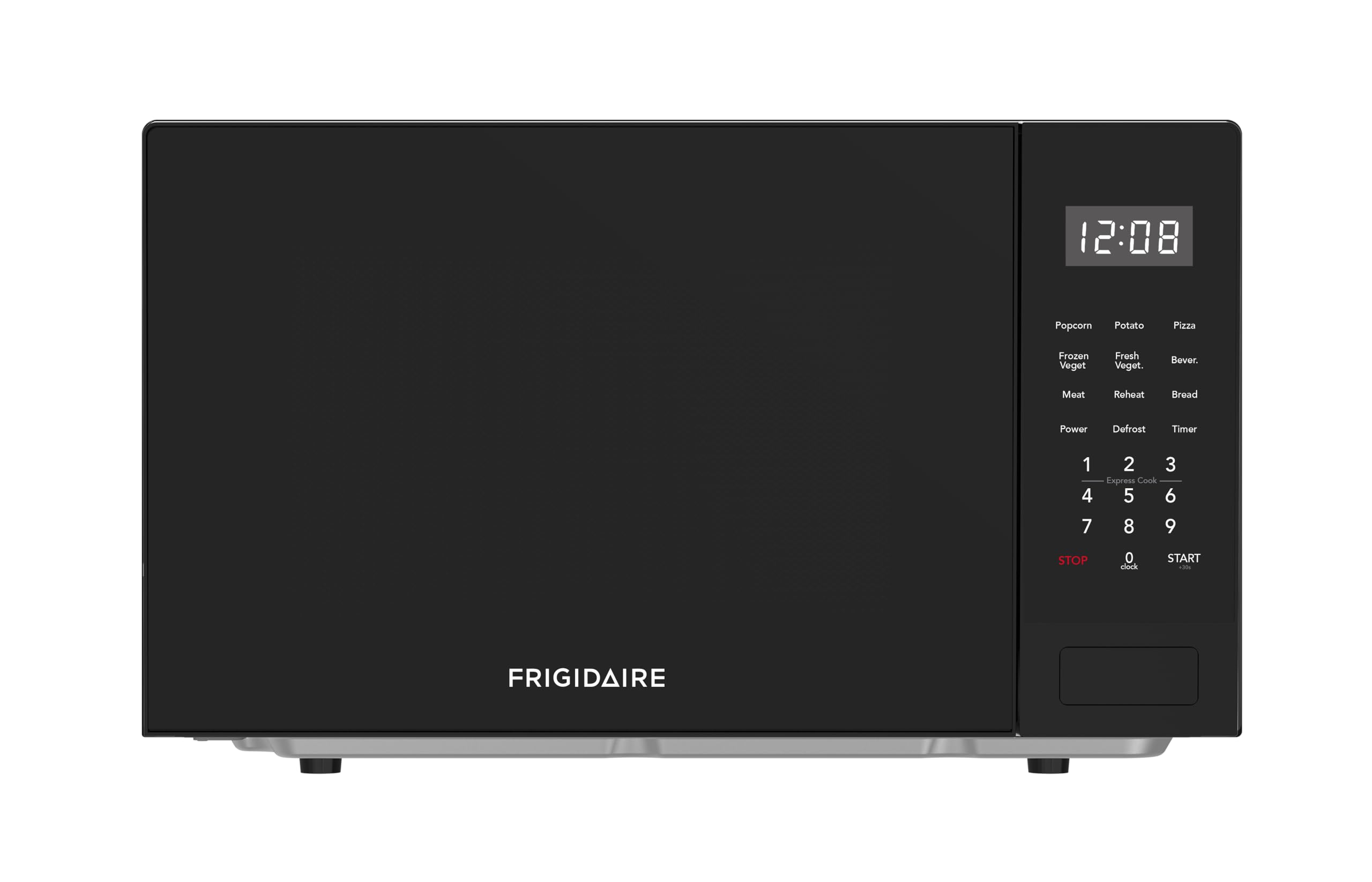
Image: The Frigidaire 0.9-Cubic-Foot Microwave Oven in black, showing its compact design suitable for countertop placement.
Operating Instructions
Basic Cooking
- Place food in a microwave-safe container on the glass turntable.
- Close the oven door securely.
- Press the 'Time Cook' button, then enter the desired cooking time using the number pad.
- To adjust power level, press the 'Power' button and select a level from 1 to 10 (10 being 100% power). If no power level is selected, the oven defaults to 100% power.
- Press 'Start' to begin cooking.
- To pause cooking, open the door or press 'Stop'. To resume, close the door and press 'Start'.
One-Touch Auto-Cook Menus
The microwave features six precision one-touch express cooking menu buttons for common items:
- Popcorn: For pre-packaged microwave popcorn.
- Potato: For baking potatoes.
- Pizza: For reheating pizza slices.
- Beverage: For heating drinks.
- Frozen Dinner: For typical frozen meals.
- Reheat: For warming up previously cooked food.
Simply press the corresponding button for the food item, and the oven will automatically set the optimal time and power level.
Defrost Options
This microwave offers two defrost methods:
- Defrost by Weight: Press the 'Defrost' button, enter the food's weight, and the oven calculates the defrost time.
- Speed Defrost: Press the 'Speed Defrost' button for a quick defrost cycle that alternates between defrost and stand times for efficient results.
Digital Clock and Kitchen Timer
- Setting the Clock: Press the 'Clock' button, enter the current time using the number pad, then press 'Clock' again to confirm.
- Using the Kitchen Timer: Press the 'Timer' button, enter the desired time, and press 'Start'. The timer will count down independently of cooking functions.
Child Safety Lock
To activate the child safety lock, press and hold the 'Stop' button for 3 seconds. The display will show a lock indicator. To deactivate, press and hold the 'Stop' button again for 3 seconds.
Video: This video demonstrates the basic operation of the microwave, including setting time and interacting with the control panel. It shows the internal light and turntable in action.
Maintenance
Cleaning the Microwave Oven
Regular cleaning helps maintain the performance and appearance of your microwave oven.
- Interior: Wipe the interior cavity with a damp cloth after each use. For stubborn food splatters, place a bowl of water with a few lemon slices inside and microwave for 2-3 minutes. The steam will loosen the residue, making it easier to wipe clean.
- Exterior: Clean the exterior surfaces with a soft, damp cloth and mild detergent. Avoid abrasive cleaners or scouring pads.
- Glass Turntable and Roller Ring: The glass turntable and roller ring can be removed for cleaning. Wash them in warm, soapy water or in the dishwasher. Ensure they are completely dry before placing them back in the oven.
- Door Seals: Keep the door seals clean to ensure proper closure and efficient operation. Wipe with a damp cloth.
General Care
Do not operate the microwave when empty, as this can damage the appliance. Always ensure the turntable and roller ring are correctly positioned before use.

Image: The Frigidaire microwave oven positioned on a kitchen countertop, demonstrating its integration into a home environment.
Troubleshooting
If you encounter issues with your microwave oven, refer to the following common problems and solutions:
| Problem | Possible Cause | Solution |
|---|---|---|
| Oven does not start | Power cord not plugged in; Door not closed properly; Fuse blown or circuit breaker tripped. | Ensure power cord is securely plugged in; Close door firmly; Check household fuse or reset circuit breaker. |
| Food not heating | Incorrect cooking time or power level set; Microwave-safe dish not used. | Adjust cooking time and power level; Use only microwave-safe cookware. |
| Turntable not rotating | Turntable or roller ring not correctly positioned; Debris under turntable. | Reposition turntable and roller ring; Clean any debris from under the turntable. |
| Unusual noises during operation | Food container touching oven walls; Turntable not seated correctly. | Ensure food container does not obstruct rotation; Re-seat turntable and roller ring. |
If the problem persists after attempting these solutions, please contact customer support.
Specifications
| Feature | Specification |
|---|---|
| Model Number | EMW0953BBLK |
| Capacity | 0.9 Cubic Feet |
| Wattage | 900 Watts |
| Voltage | 120 Volts |
| Product Dimensions (D x W x H) | 16"D x 19"W x 11"H (40.64 cm D x 48.26 cm W x 27.94 cm H) |
| Item Weight | 25 Pounds (11.34 kg) |
| Color | Black |
| Material | Aluminum |
| Installation Type | Countertop |
| Manufacturer | CURTIS INTERNATIONAL LTD |
Warranty and Support
This Frigidaire microwave oven comes with a manufacturer's warranty. Please refer to the warranty card included with your product for specific terms, conditions, and duration of coverage. Keep your purchase receipt as proof of purchase for warranty claims.
For technical assistance, troubleshooting beyond this manual, or to inquire about warranty service, please contact Frigidaire customer support. Contact information can typically be found on the manufacturer's website or on the product packaging.
When contacting support, please have your model number (EMW0953BBLK) and serial number ready to expedite service.


