
Viper 5908V
Viper 5908V 2-Way LCD Security and Remote Start System User Manual
This manual provides detailed instructions for the operation and maintenance of your Viper 5908V system.
Introduction
The Viper 5908V is an advanced 2-way security and remote start system designed to protect your vehicle and offer convenient remote control functions. It includes a 2-way color LCD remote for command confirmation and a 1-way 5-button remote for essential operations. This system provides up to 1 mile range for enhanced control and feedback.
Key Features
- Remote Controls: Includes one 2-Way Color LCD Command Confirming Transmitter and one 1-Way 5-Button Transmitter.
- Smart Start Compatibility: Compatible with the Viper SmartStart Pro System for remote vehicle starting (sold separately).
- Impact Sensor: Alerts you when your vehicle experiences an impact.
- Door Locks: Integrates with your vehicle's door locks for automatic locking and unlocking during arming and disarming.
- Six-Tone Siren: A distinctive siren to differentiate your alarm from others.
System Components
Your Viper 5908V system includes the following primary components:
- 2-Way Color LCD Remote: Provides visual and audible confirmation of commands and vehicle status.
- 1-Way 5-Button Remote: A secondary remote for basic control functions.
- Control Module: The central processing unit of the system (typically installed covertly).
- Impact Sensor: Detects physical impacts to the vehicle.
- Siren: Produces audible alarm signals.
- Wiring Harnesses: For connecting the system components to your vehicle's electrical system.
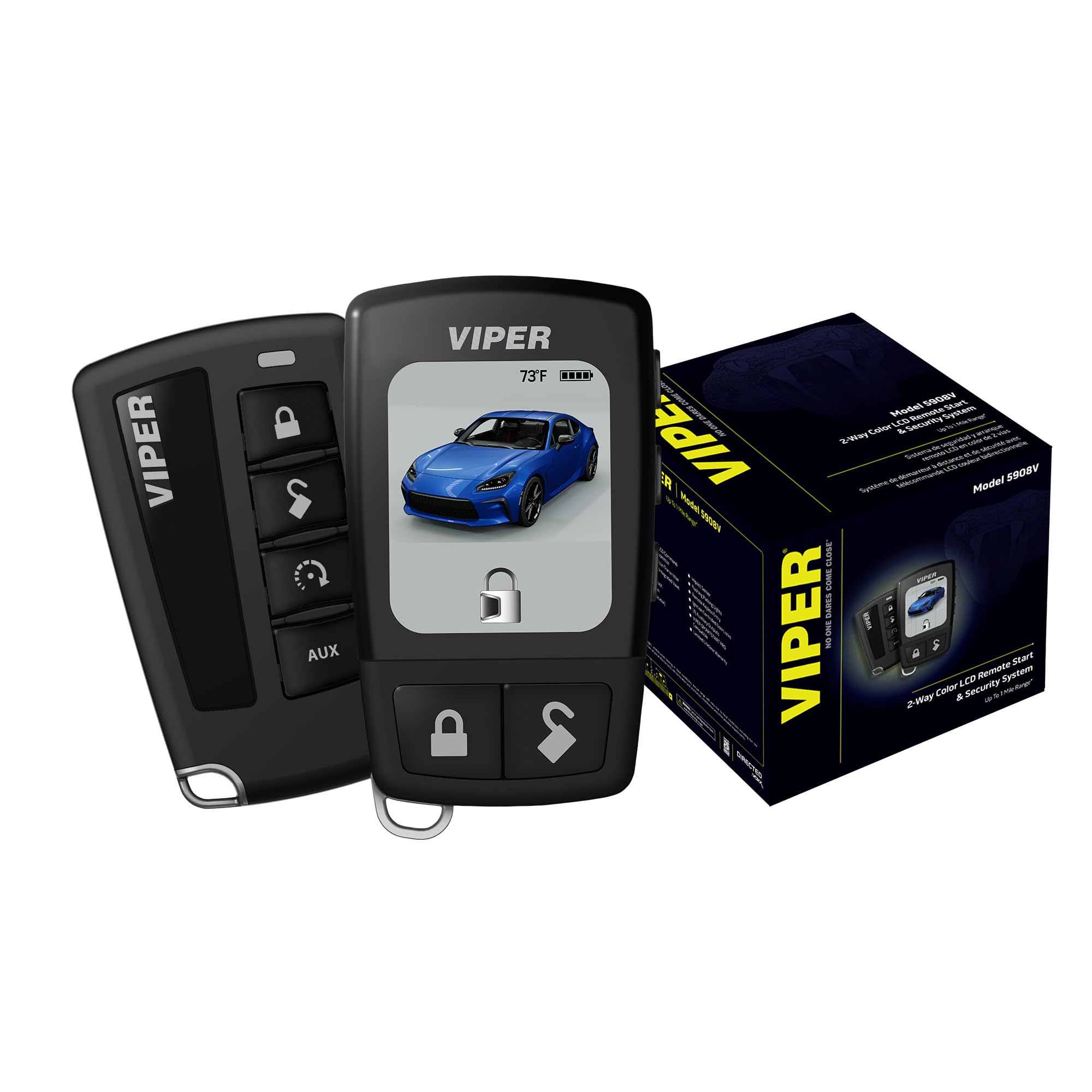
Image: The Viper 5908V 2-Way Color LCD Remote, displaying a blue car and a locked icon, indicating vehicle status and temperature.

Image: The Viper 5908V 1-Way 5-Button Remote, featuring lock, unlock, remote start, and auxiliary buttons.
Setup and Installation
Professional installation by an authorized Viper dealer is highly recommended for the Viper 5908V system. Improper installation can lead to vehicle damage or system malfunction.
Initial Remote Pairing (for authorized installers)
Refer to the detailed installer's guide for specific steps on programming remotes to the control module. This process typically involves placing the system into programming mode and pressing buttons on the new remotes.
Battery Installation/Replacement for Remotes
The 2-Way LCD remote and 1-Way remote require batteries for operation. When the remote's battery indicator is low or the remote stops responding, replace the batteries. Consult the remote's specific instructions for battery type and replacement procedure.
Operating Instructions
This section outlines the basic functions of your Viper 5908V system using the provided remote controls.
Remote Control Functions
| Button/Action | Function | 2-Way LCD Remote Feedback |
|---|---|---|
| Lock Button (Press) | Arms the security system and locks the vehicle doors. | Displays locked icon, confirms arming. |
| Unlock Button (Press) | Disarms the security system and unlocks the vehicle doors. | Displays unlocked icon, confirms disarming. |
| Remote Start Button (Press and Hold) | Starts the vehicle engine remotely. | Confirms engine start, displays run time. |
| AUX Button (Press) | Activates an auxiliary function (e.g., trunk release, power sliding door) if installed and programmed. | Confirms auxiliary function activation. |
| Panic (Press Lock/Unlock simultaneously) | Activates the siren and flashes parking lights for emergency signaling. | Displays panic icon. |
2-Way LCD Remote Operation
The 2-Way Color LCD remote provides visual and audible feedback on your vehicle's status. When you send a command (e.g., lock, unlock, remote start), the remote will confirm the action on its screen and often with a chirp or vibration. It can also display vehicle temperature, battery level, and alert you to security breaches.
Video: This video demonstrates the features and functionality of Viper color remotes, including models like the 5908V, 7957V, and D9957V, highlighting their ease of use and total control capabilities.
Video: An overview of the Viper 5908V 2-Way Color LCD Remote Start & Security System, showcasing its key features such as remote keyless entry, SmartStart Pro compatibility, and integrated valet switch.
SmartStart Pro Compatibility
The Viper 5908V system is compatible with the Viper SmartStart Pro system (sold separately). SmartStart Pro allows you to control your vehicle from your smartphone, offering features like remote start, lock/unlock, vehicle location, and security alerts from virtually anywhere.
Maintenance
Remote Battery Replacement
The 2-Way LCD remote uses a rechargeable battery or replaceable standard batteries (refer to your remote's specific model for details). The 1-Way remote typically uses a coin-cell battery. Replace batteries when the remote's range decreases significantly or the low battery indicator appears on the LCD remote.
- Open the remote casing carefully using a small screwdriver or coin.
- Note the battery type and orientation.
- Replace with a new battery of the same type and ensure correct polarity.
- Close the remote casing securely.
System Cleaning
Wipe the remote controls with a soft, dry cloth. Avoid using harsh chemicals or abrasive cleaners, as these can damage the remote's finish or electronic components. The main control module is typically installed in a protected area and requires no regular cleaning.
Troubleshooting
If you experience issues with your Viper 5908V system, refer to the following common troubleshooting steps:
| Problem | Possible Cause | Solution |
|---|---|---|
| Remote not responding / Short range | Low remote battery, interference, out of range. | Replace remote battery. Move closer to the vehicle. Avoid areas with high radio frequency interference. |
| Vehicle does not remote start | Hood open, vehicle not in park, low fuel, system in Valet Mode. | Ensure hood is closed, vehicle is in park, adequate fuel. Check if system is in Valet Mode (refer to installer for exiting Valet Mode). |
| Alarm triggers unexpectedly | Impact sensor sensitivity too high, faulty sensor, open door/trunk/hood. | Consult installer to adjust impact sensor sensitivity. Ensure all doors, trunk, and hood are securely closed. |
| No LCD display on 2-Way remote | Dead battery, remote malfunction. | Recharge or replace remote battery. If problem persists, contact support. |
For more complex issues, it is recommended to contact an authorized Viper dealer or customer support.
Specifications
- Model Number: 5908V
- Brand: Viper
- Maximum Range: Up to 1 mile
- Audible Noise (Siren): 85 dB
- Compatible Devices: Cars, trucks, motorcycles
- Item Weight: 2.4 pounds
- UPC: 044476160585
Warranty Information
The Viper 5908V system comes with a Lifetime Warranty Against Manufacturer's Defects. This warranty covers defects in materials and workmanship under normal use. Please retain your proof of purchase for warranty claims. For full warranty terms and conditions, please refer to the documentation provided with your product or visit the official Viper website.
Customer Support
For technical assistance, installation inquiries, or warranty service, please contact Viper customer support or visit an authorized Viper dealer. You can find more information and support resources on the official Viper website:
Ask a question about this manual
Ask about setup, troubleshooting, compatibility, parts, safety, or missing instructions. Manuals+ will review the question and use this page’s manual context to help answer it.