
1. Introduction
The FrSky VANTAC RF007 is a state-of-the-art flybarless (FBL) helicopter flight controller designed for precision and control. It integrates a powerful flight control system with a built-in FrSky receiver, offering seamless compatibility with ETHOS radios for intuitive configuration and real-time tuning.
Powered by an STM32F722 MCU, the RF007 features an ICM42688P gyro/accelerometer and an SPL06 barometer for accurate flight data. A 128MB Blackbox is included for comprehensive flight data logging, aiding in fine-tuning and troubleshooting.
2. Safety Information
Warning: This product is not intended for use by children. It is a sophisticated electronic device for remote-controlled aircraft and requires careful handling and understanding.
- Always ensure correct polarity and voltage when connecting power to the RF007. Incorrect connections can cause permanent damage.
- When powering the RxUG port for internal receiver firmware upgrades, do not introduce additional power input from other ports simultaneously. This ensures safe operation and prevents damage to connected devices.
- Always perform pre-flight checks to ensure all connections are secure and all control surfaces respond correctly.
- Operate RC helicopters in open areas, away from people, animals, and obstacles.
- Familiarize yourself with the Rotorflight 2.x software and your FrSky transmitter's operation before attempting flight.
3. Package Contents
Verify that all items listed below are present in your package:
- VANTAC RF007 Archer Plus Flybarless System
- USB-C to A Cable
- JST Cable Wire
- Firmware Cable
- Double-sided Tape (for mounting)
- Instruction Manual (this document)

Figure 3.1: Package Contents. Shows the RF007 unit, USB-C cable, JST cable, firmware cable, and double-sided tape.
4. Product Overview
The VANTAC RF007 is designed for high-performance RC helicopter applications, offering robust features and flexible connectivity.
Key Features:
- Runs Rotorflight 2.x Helicopter Control Software.
- Built-In FrSky FBUS-Capable Receiver (TW or AP Protocol options).
- Robust CNC Aluminum Case with functional heatsink for the MCU.
- STM32F722 Microcontroller for powerful processing.
- Precision Barometer, 3-Axis Gyroscope, and 3-Axis Accelerometer.
- 128MB Blackbox function for detailed flight data logging.
- 9 Primary Main Header Pins for flexibility in connecting servos and auxiliary equipment.
- Supports external receiver connections via main header or two UART/I2C expansion ports.
- ETHOS telemetry connectivity with a user-friendly Lua-based interface for tuning and programming directly from your FrSky transmitter.
- ESC configuration support for select ESCs.
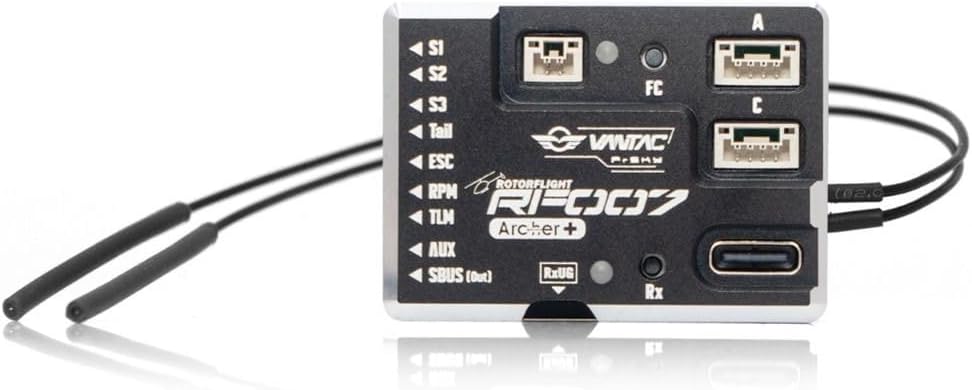
Figure 4.1: Top view of the RF007 unit, highlighting the S1, S2, S3, Tail, ESC, RPM, TLM, AUX, SBUS ports, and expansion ports A and C.
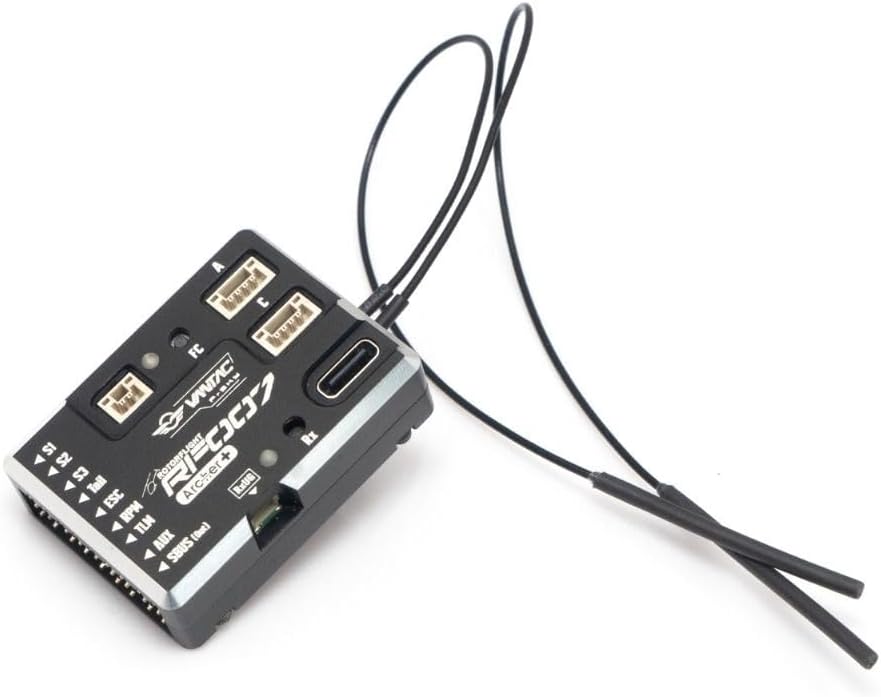
Figure 4.2: Angled view of the RF007, illustrating the dual antennas for the built-in receiver and the USB-C configuration port.
5. Setup
Setting up your VANTAC RF007 involves physical installation, wiring, and software configuration. Refer to the detailed Rotorflight 2.x documentation for comprehensive software setup guides.
5.1 Physical Installation
- Mount the RF007 securely to your helicopter frame using the provided double-sided tape. Ensure it is mounted horizontally and as close to the center of gravity as possible.
- Ensure the unit is isolated from vibrations.
- Position the receiver antennas at a 90-degree angle to each other, away from carbon fiber or metal parts, for optimal signal reception.
5.2 Wiring Connections
Connect your servos, ESC, and other peripherals to the RF007 as follows:
- Servo Ports (S1, S2, S3, Tail): Connect your cyclic and tail servos.
- ESC Port (Throttle): Connect your Electronic Speed Controller.
- RPM (Sensor): Connect an external RPM sensor if used.
- TLM (ESC Telemetry or other functions): Connect for ESC telemetry data or other auxiliary functions.
- AUX and SBUS Out/In: For additional auxiliary connections or SBUS input/output.
- Expansion Ports (A, C): These UART/I2C ports can be used for external receivers or other compatible devices.
- RxUG Port: Used for upgrading the internal receiver firmware.
5.3 Initial Software Configuration
Connect the RF007 to your computer using the USB-C to A cable. Use the Rotorflight 2.x configurator software to:
- Update firmware to the latest version.
- Calibrate the accelerometers and gyroscopes.
- Configure receiver type and channels.
- Set up servo directions, limits, and trim.
- Configure flight modes and PID settings.
6. Operating Instructions
Once the RF007 is installed and configured, you can operate your RC helicopter using your FrSky transmitter.
6.1 Pre-Flight Checks
- Ensure your transmitter and helicopter batteries are fully charged.
- Verify that all control surfaces move freely and in the correct direction relative to your stick inputs.
- Check for any loose wires or connections.
- Confirm that the FBL system initializes correctly and indicates readiness for flight.
6.2 In-Flight Tuning (ETHOS Lua Interface)
The RF007 leverages ETHOS' powerful telemetry connectivity, offering a streamlined Lua-based interface for tuning and programming directly from your FrSky transmitter. This allows for real-time adjustments without needing a computer.
- Access the Lua script on your FrSky transmitter to enter the tuning menu.
- Adjust PIDs (Proportional, Integral, Derivative gains) to optimize flight characteristics.
- Fine-tune servo trims, rates, and mixing settings.
- Modify filter settings to reduce noise and improve stability.
- ESC configuration is also supported for select ESCs through this interface.
7. Maintenance
Proper maintenance ensures the longevity and reliable performance of your VANTAC RF007.
- Keep Clean: Regularly inspect the unit for dust, dirt, or debris. Clean gently with a soft, dry brush or compressed air.
- Avoid Moisture: Protect the unit from moisture and extreme temperatures.
- Inspect Connections: Periodically check all wiring connections for signs of wear, corrosion, or looseness.
- Firmware Updates: Keep the Rotorflight 2.x firmware updated to benefit from performance improvements and bug fixes. Use the USB-C port for FC firmware updates and the RxUG port for internal receiver firmware updates.
8. Troubleshooting
If you encounter issues with your VANTAC RF007, consider the following troubleshooting steps:
- No Power/No LED Activity: Check power connections, battery voltage, and ensure no short circuits.
- No Receiver Link: Ensure the receiver is properly bound to your transmitter. Check antenna placement and connections. Verify the correct receiver protocol is selected in the configurator.
- Incorrect Servo Response: Verify servo directions and limits in the Rotorflight configurator. Check wiring for correct pin assignments.
- Unstable Flight: Review PID settings. Ensure the unit is securely mounted and isolated from vibrations. Check for any mechanical issues with the helicopter.
- Blackbox Data: Utilize the 128MB Blackbox for flight data logging. Analyze the logs using Rotorflight tools to identify performance issues or anomalies.
- Firmware Issues: If experiencing unexpected behavior, try reflashing the latest stable firmware.
- Consult Documentation: Refer to the extensive Rotorflight 2.x online documentation and community forums for specific software-related troubleshooting.
9. Specifications
| Feature | Specification |
|---|---|
| Flight Controller Firmware | Rotorflight 2.x |
| Dimensions | 43.5 × 31.2 × 13.7 mm |
| Weight | 25.2 g |
| Receiver Options | RF007 ARCHER+: Built-In 2.4G Archer Plus RS Receiver RF007 TWIN: Built-In Dual 2.4G TW R6 Receiver |
| Operating Voltage Range | 5-16V |
| Operating Current (FC Only) | 125mA@5V |
| Voltage Measurement Range (AIN) | 0-80V (for external devices) |
| MCU | STM32F722RET6 |
| Gyroscope (IMU) | ICM-42688P |
| Barometer | SPL06-001 |
| Blackbox Flash | 128MB |
| Servo Ports | Servo 1, Servo 2, Servo 3, Tail |
| ESC Ports | ESC (Throttle), RPM (Sensor), TLM (ESC Telemetry or other functions) |
| Other Ports | AUX and SBUS Out/In |
| Expansion Ports | Port A, C, and RxUG |
10. Warranty Information
Specific warranty terms for the FrSky VANTAC RF007 are typically provided by the retailer or manufacturer at the time of purchase. Please retain your proof of purchase for any warranty claims.
Generally, warranties cover manufacturing defects. Damage resulting from improper installation, misuse, unauthorized modifications, or accidents is typically not covered. For detailed warranty information, please contact your point of purchase or the official FrSky support channels.
11. Support
For technical assistance, product inquiries, or support related to your FrSky VANTAC RF007, please use the following resources:
- Retailer Support: Contact HeliDirect, the seller, for purchase-related issues or initial support.
- FrSky Official Support: Visit the official FrSky website for product documentation, firmware downloads, and direct manufacturer support.
- Rotorflight Community: For software-specific questions, configuration guides, and community-driven troubleshooting, refer to the Rotorflight 2.x official website and forums.


