1. Introduction
The ARENTI P3TT is a modern dual-band WiFi security camera featuring two lenses for simultaneous panoramic and detailed surveillance. It records in 2K 3MP UHD resolution, providing clear images and comprehensive coverage with its 360° pan and tilt function. This camera is suitable for monitoring children, pets, and is ideal for homes, offices, or commercial premises. It includes innovative features such as automatic tracking, noise detection, and customizable patrol points for seamless monitoring.
2. Product Overview
Familiarize yourself with the components and features of your ARENTI P3TT camera.
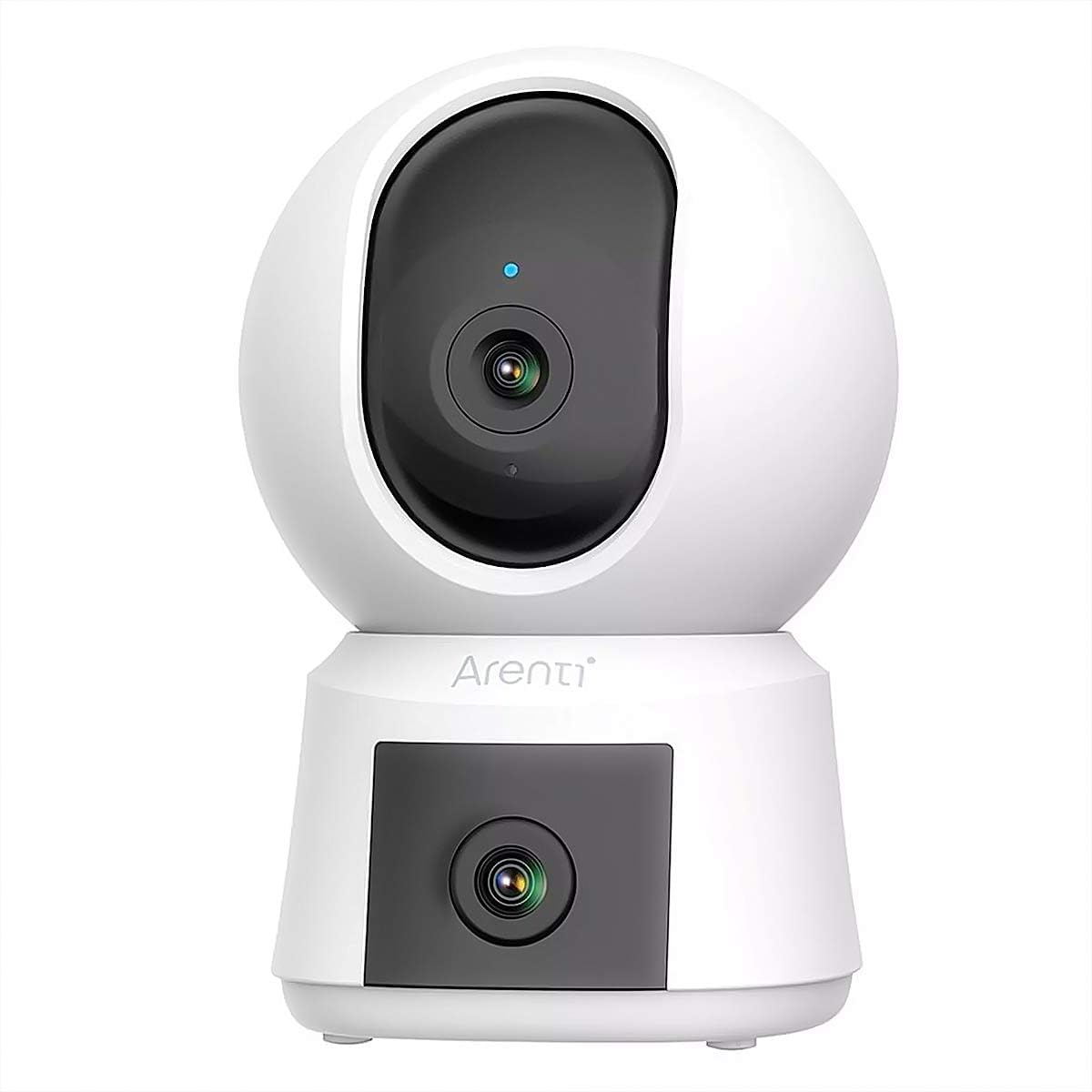
Figure 2.1: Front view of the ARENTI P3TT camera, showing the upper pan-tilt lens and the lower fixed lens.

Figure 2.2: Rear view of the ARENTI P3TT camera, highlighting the speaker grille and the DC 5V power input port.
Key Features:
- 2K 3MP resolution for high-quality, detailed images.
- 360° pan and tilt function for complete coverage.
- Two-way audio for real-time, interference-free communication.
- Automatic tracking and noise detection.
- Infrared night vision up to 10 meters.
- Dual-band Wi-Fi (2.4 GHz and 5 GHz) with Wi-Fi 6 support.
- AES128 encryption for secure data transfer.
- Intuitive Arenti application for easy control and monitoring.
- Local storage via microSD card (up to 256 GB) and cloud storage options.
- Compatibility with Google Assistant and Amazon Alexa.
3. Package Contents
Ensure all items are present in your package:
- ARENTI P3TT Surveillance Camera
- Power Adapter
- Power Cable
- Screw Pack (for mounting)
- Mounting Bracket
- Quick Start Guide
4. Setup
4.1. Placement
The camera offers versatile mounting options and can be placed on walls, ceilings, or shelves. Choose a location that provides the best perspective for your surveillance needs.

Figure 4.1: The camera positioned on a table, ready for setup.
4.2. Power Connection
- Connect the power cable to the DC 5V port on the back of the camera.
- Plug the power adapter into a standard electrical outlet.
- The camera will power on and initiate its startup sequence.
4.3. App Installation and Pairing
- Download the "Arenti" app from your smartphone's app store (iOS or Android).
- Create an account or log in if you already have one.
- Follow the in-app instructions to add your P3TT camera. The camera supports Bluetooth pairing for quick and secure connection.
- Ensure your Wi-Fi network (2.4 GHz or 5 GHz) is available and you have the password ready.
5. Operating Instructions
5.1. Live View and Pan/Tilt Control
Once connected, open the Arenti app to access the live view. Use the on-screen controls to pan (horizontal movement) and tilt (vertical movement) the camera to adjust its viewing angle. The 360° pan and tilt function allows for comprehensive coverage without blind spots.

Figure 5.1: The Arenti app displaying simultaneous monitoring from both the pan-tilt and fixed lenses, providing a dual-camera view.
5.2. Two-Way Audio
The full-duplex two-way audio feature enables real-time communication. Tap the microphone icon in the app to speak through the camera's speaker, and listen through your phone. This is ideal for interacting with family members or pets.

Figure 5.2: The camera positioned in a living room, suitable for monitoring pets like the dog shown.
5.3. Automatic Tracking and Noise Detection
Enable automatic tracking in the app settings. The camera will automatically follow detected motion. When unusual sounds are detected, the camera activates an automatic patrol function for comprehensive capture. The main pan-tilt lens performs the patrol, while the fixed lens continues to monitor important areas.

Figure 5.3: The camera providing surveillance in a child's room, demonstrating its use for monitoring children.
5.4. Customizable Patrol Points
Within the Arenti app, you can set up to 6 customizable viewpoints. These preset positions allow you to quickly navigate the camera to specific areas with a single tap, ensuring you have total control over important zones at all times.

Figure 5.4: The camera placed on a shelf, suitable for monitoring pets or specific areas.
5.5. Night Vision
The camera features powerful infrared night vision, providing detailed black and white recordings up to 10 meters even in low-light conditions. This feature activates automatically.
5.6. Storage Options
- MicroSD Card: Insert a microSD card (up to 256 GB, not included) into the designated slot for local storage of recordings.
- Cloud Storage: Secure cloud storage options are available through the Arenti app, allowing you to access your recordings anytime, anywhere.
5.7. Voice Control
The camera is compatible with Amazon Alexa and Google Assistant. Link your Arenti account to your smart home platform to control the camera using voice commands.

Figure 5.5: The camera on a desk, illustrating its use in various indoor settings.
6. Maintenance
- Cleaning: Use a soft, dry cloth to clean the camera lens and body. Avoid using harsh chemicals or abrasive cleaners.
- Firmware Updates: Regularly check the Arenti app for firmware updates to ensure optimal performance and security.
- Power Supply: Use only the provided power adapter to prevent damage to the device.
- Environment: Ensure the camera is used indoors and kept away from extreme temperatures, humidity, and direct sunlight.
7. Troubleshooting
| Problem | Possible Cause | Solution |
|---|---|---|
| Camera not powering on | Power cable loose or adapter faulty | Check power connections. Try a different outlet. |
| Unable to connect to Wi-Fi | Incorrect Wi-Fi password, weak signal, or wrong band (2.4/5GHz) | Verify Wi-Fi password. Move camera closer to router. Ensure router supports dual-band and camera is connecting to the correct band. Reset camera and try pairing again. |
| Video feed is blurry or dark | Protective film on lens, dirty lens, or insufficient lighting | Remove any protective film. Clean the lens with a soft cloth. Ensure night vision is enabled in low light. |
| Two-way audio not working | Microphone/speaker muted in app, or network issues | Check app settings for audio mute. Ensure stable internet connection. |
| Automatic tracking not functioning | Feature disabled in app, or object too far/fast | Enable auto-tracking in the Arenti app settings. Ensure adequate lighting and proximity for detection. |
8. Specifications
| Model Name | ARENTI P3TT |
| Video Recording Resolution | 3 Megapixel (2K UHD) |
| Color | White |
| Wireless Communication Technology | Wi-Fi (Dual-band 2.4 GHz & 5 GHz, Wi-Fi 6 support) |
| Viewing Angle | 135 Degrees |
| Night Vision Range | 10 Meters |
| Frame Rate | 20 Frames per Second |
| Voltage | 5 Volts |
| Power | 6 Watts |
| Dimensions (L x W x H) | 7.6 x 7.3 x 11.7 cm |
| Weight | 210 Grams |
| Special Features | 6 customizable viewpoints, Two-way audio, Local recording, 360° pan and tilt, Panoramic view with detailed shots |
| Usage | 360-degree coverage, Surveillance, Pet monitoring, Indoor security |
| Compatible Devices | Smartphone, Tablet |
| Power Source | Electric cable |
| Connectivity Protocol | Arenti Private Cloud Protocol, RTSP |
| Mounting Type | Versatile mounting options |
9. Warranty and Support
9.1. Warranty Information
For warranty details, please refer to the specific warranty card included in your product packaging or visit the official ARENTI website. Keep your purchase receipt as proof of purchase for warranty claims.
9.2. Customer Support
If you encounter any issues or have questions regarding your ARENTI P3TT camera, please contact ARENTI customer support through the Arenti app or their official website. Support resources often include FAQs, troubleshooting guides, and contact information for technical assistance.


