
realme Realme 14 Pro
Contents
realme 14 Pro Smartphone User Manual
Model: 631011005073
Introduction
This user manual provides essential information for the safe and efficient operation of your realme 14 Pro smartphone. Please read this manual thoroughly before using the device to ensure proper functionality and to avoid damage.
The realme 14 Pro is a powerful 5G smartphone featuring a 2.5 GHz Octa-core processor, 8GB of RAM, and 256GB of internal storage. It runs on Android 15 and is equipped with a 6000mAh non-removable battery, designed for extended usage.
Package Contents
Upon unboxing your realme 14 Pro, please verify that all items are present and in good condition:
- realme 14 Pro Smartphone
- USB Cable
- Power Adapter (if included in your region's package)
- SIM Ejector Tool
- Quick Start Guide
- Safety Information Booklet

Image: The realme 14 Pro smartphone in Pearl White, shown alongside its included USB cable and power adapter.
Device Layout
Familiarize yourself with the physical components of your realme 14 Pro.
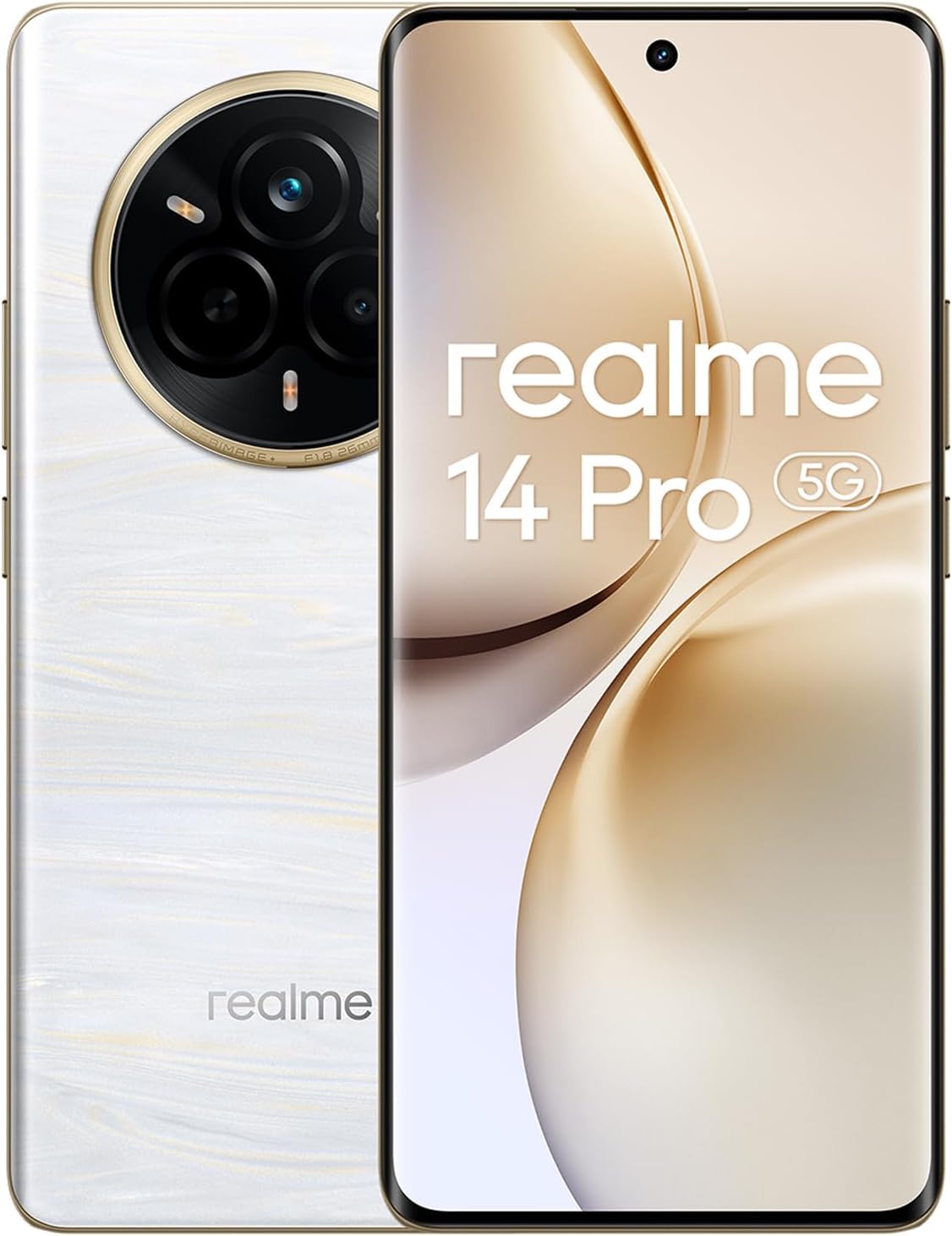
Image: Front and back view of the realme 14 Pro smartphone, highlighting the display and the rear camera module.

Image: Side view of the realme 14 Pro, illustrating the placement of the power button and volume rocker.

Image: Top and bottom views of the realme 14 Pro, detailing the USB-C port, speaker grille, microphone, and SIM card tray.
- Front: Display, Front Camera, Earpiece.
- Right Side: Power Button, Volume Up/Down Buttons.
- Bottom: USB-C Port, Speaker, Microphone, SIM Card Tray.
- Top: Secondary Microphone (if applicable).
- Rear: Main Camera Module (Multiple Lenses, Flash), realme Logo.
Setup
1. Inserting SIM Cards
The realme 14 Pro supports Dual-SIM functionality. Use the provided SIM ejector tool to open the SIM card tray located on the bottom of the device.
- Locate the small hole on the SIM card tray.
- Insert the SIM ejector tool into the hole and gently push until the tray pops out.
- Place your Nano-SIM cards into the designated slots on the tray, ensuring the gold contacts face downwards.
- Carefully reinsert the tray into the phone.
2. Initial Charge and Power On
Before first use, it is recommended to fully charge your device.
- Connect the USB cable to the phone's USB-C port.
- Connect the other end of the USB cable to the power adapter.
- Plug the power adapter into a wall outlet.
- Once sufficiently charged, press and hold the Power button on the right side of the phone until the realme logo appears.
3. Initial Setup Wizard
Follow the on-screen instructions to complete the initial setup, which includes:
- Selecting your language and region.
- Connecting to a Wi-Fi network.
- Signing in with your Google account or creating a new one.
- Setting up screen lock (PIN, pattern, password, fingerprint, face unlock).
- Reviewing and accepting terms and conditions.
Operating Instructions
Basic Navigation
- Touch: Tap an icon to open an app or select an item.
- Swipe: Move your finger across the screen to scroll or navigate between screens.
- Pinch: Use two fingers to zoom in or out on photos and web pages.
- Long Press: Press and hold an item for more options or to move it.
Making Calls
- Open the Phone app.
- Enter the phone number using the dial pad or select a contact.
- Tap the call icon to initiate the call.
Using the Camera
The realme 14 Pro features a versatile camera system, including a 50 MP wide lens, a 50 MP periscope telephoto lens with 3x optical zoom, and an 8 MP ultrawide lens.
- Open the Camera app.
- Select your desired mode (Photo, Video, Portrait, Night, etc.).
- Tap the shutter button to capture a photo or start/stop recording a video.

Image: A detailed view of the realme 14 Pro's advanced rear camera module, featuring multiple lenses and flash.
Connectivity
- Wi-Fi: Go to Settings > Network & internet > Wi-Fi to connect to available networks.
- Bluetooth: Go to Settings > Connected devices > Bluetooth to pair with other devices.
- Mobile Data: Ensure your SIM card is active and mobile data is enabled via Settings > Network & internet > Mobile network. The device supports 2G, 3G, 4G LTE, and 5G networks.
Maintenance
Battery Care
- Avoid extreme temperatures (hot or cold) as they can degrade battery life.
- Use only the original or certified compatible charger and USB cable.
- Do not fully discharge the battery regularly; try to keep it between 20% and 80%.
Software Updates
Regularly check for and install software updates to ensure optimal performance, security, and access to new features. Go to Settings > About phone > Software update.
Cleaning the Device
- Use a soft, lint-free cloth to clean the screen and body.
- Avoid using harsh chemicals, abrasive materials, or aerosol sprays.
- For stubborn smudges, slightly dampen the cloth with water or a screen cleaner.
Troubleshooting
| Problem | Possible Solution |
|---|---|
| Device not powering on | Ensure the battery is charged. Press and hold the Power button for at least 10 seconds to force a restart. |
| Apps crashing or freezing | Close the app and reopen it. Clear the app's cache (Settings > Apps > [App Name] > Storage & cache > Clear cache). Restart the phone. |
| Poor network signal | Check SIM card insertion. Move to an area with better coverage. Restart the phone. Verify network settings. |
| Battery drains quickly | Reduce screen brightness. Close background apps. Disable unnecessary features like GPS or Bluetooth when not in use. Check battery usage in settings to identify power-hungry apps. |
| Cannot connect to Wi-Fi | Ensure Wi-Fi is enabled. Restart your router. Forget the network and reconnect. |
Specifications
| Feature | Detail |
|---|---|
| Model Name | Realme 14 Pro |
| Model Number | 631011005073 |
| Operating System | Android 15, Realme UI 6.0 |
| Processor | Qualcomm SM7635 Snapdragon 7s Gen 3 (4 nm), Octa-core (1x2.5 GHz Cortex-A720 & 3x2.4 GHz Cortex-A720 & 4x1.8 GHz Cortex-A520) |
| RAM | 8GB |
| Internal Storage | 256GB (non-expandable) |
| Display | 6.77 inches OLED, 1080 x 2392 pixels |
| Rear Camera | 50 MP (wide, OIS), 50 MP (periscope telephoto, 3x optical zoom, OIS), 8 MP (ultrawide) |
| Front Camera | 32 MP (wide, AF) |
| Battery Capacity | 6000 mAh (non-removable) |
| Connectivity | 5G, 4G LTE, 3G, 2G, Wi-Fi, Bluetooth |
| SIM Support | Dual-SIM (Nano-SIM) |
| Dimensions | 3.94 x 59.06 x 5.91 inches |
| Weight | 1.32 pounds (0.6 kg) |
| Color | Pearl White |
Warranty and Support
Warranty Information
Specific warranty terms and conditions for your realme 14 Pro may vary by region and retailer. Please refer to the warranty card included in your product packaging or visit the official realme website for detailed warranty information.
Customer Support
For technical assistance, troubleshooting beyond this manual, or service inquiries, please contact realme customer support. You can typically find contact information on the official realme website or in the support section of your device's settings.
Visit the official realme store for more information: realme Official Store
Ask a question about this manual
Ask about setup, troubleshooting, compatibility, parts, safety, or missing instructions. Manuals+ will review the question and use this page’s manual context to help answer it.