1. Introduction
This manual provides instructions for the VINABTY BN59-00516A replacement remote control. This remote is designed to function as a direct replacement for the original Samsung BN59-00516A remote, offering full compatibility with specified Samsung HD LCD Television models without requiring any programming or setup.
2. Setup
2.1 Battery Installation
To begin using your remote control, you must install two AAA batteries (not included). Follow these steps:
- Locate the battery compartment cover on the back of the remote control.
- Press down on the tab and slide the cover downwards to open the compartment.
- Insert two AAA batteries, ensuring the positive (+) and negative (-) terminals align correctly with the markings inside the compartment.
- Slide the battery compartment cover back into place until it clicks securely.

Image: Battery compartment with AAA batteries inserted.
2.2 Initial Use
This VINABTY remote control requires no programming or pairing. Once batteries are installed, it is ready for immediate use with compatible Samsung HD LCD Televisions. Simply point the remote at your television and begin operating.
3. Operating Instructions
3.1 Remote Control Layout
Familiarize yourself with the buttons and their functions on your remote control.
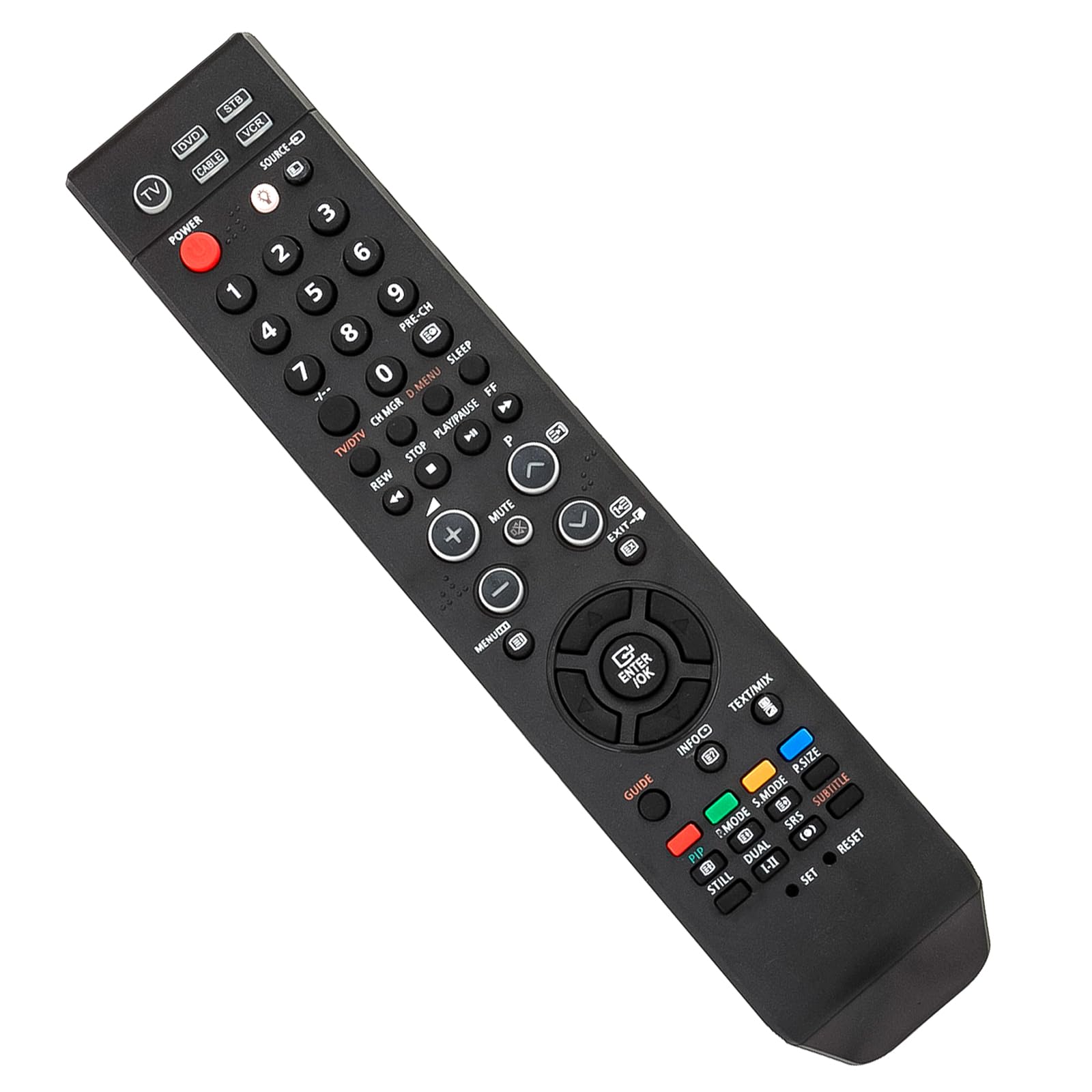
Image: VINABTY BN59-00516A Remote Control.
3.2 Basic Functions
- Power (⑁): Turns the television on or off.
- CH +/-: Changes the television channel up or down.
- VOL +/-: Adjusts the volume level up or down.
- Mute (🔇): Mutes or unmutes the television sound.
- Number Pad (0-9): Directly enters channel numbers.
- Menu: Accesses the television's main menu.
- Navigation Buttons (▲ ▼ ◄ ►): Navigates through menus and options.
- Enter/OK: Confirms selections in menus.
- Source/Input: Selects the input source (e.g., HDMI, AV).
3.3 Compatible Television Models
This remote control is compatible with the following Samsung HD LCD Television models:
- LA26R71BD
- LA32R71BD
- LA37R71BD
- LA40R71BD
- PS-50Q7HD
- LA26R71BDX/XSA
- LA32R71BDX/XSA
- LA37R71BDX/XSA
- LA40R71BDX/XSA
- PS50Q7HDX/XSA
4. Maintenance
4.1 Cleaning
To clean your remote control, use a soft, dry cloth. For stubborn dirt, slightly dampen the cloth with water or a mild, non-abrasive cleaner. Avoid using harsh chemicals or abrasive materials, as these can damage the remote's surface or buttons.
4.2 Battery Replacement
Replace the batteries when the remote control's response becomes sluggish or stops working. Always replace both batteries at the same time with new AAA batteries. Do not mix old and new batteries, or different types of batteries, as this can lead to leakage or improper function. Dispose of used batteries responsibly according to local regulations.
5. Troubleshooting
5.1 Common Issues and Solutions
- Remote not responding:
- Check if the batteries are inserted correctly with the correct polarity.
- Replace old batteries with new AAA batteries.
- Ensure there is a clear line of sight between the remote control and the television's infrared sensor. Remove any obstructions.
- Try moving closer to the television.
- Some buttons not working:
- This remote is a direct replacement. If specific buttons do not work, ensure your TV model is listed in the compatible models section.
- Clean the remote control, especially around the buttons, to ensure no debris is interfering with their operation.
6. Specifications
| Feature | Detail |
|---|---|
| Model Number | BN59-00516A |
| Brand | VINABTY |
| Compatible Devices | Samsung HD LCD Televisions |
| Power Source | 2 x AAA Batteries (not included) |
| Color | Black |
| Special Feature | Ergonomic |
| Product Dimensions | 5 x 1 x 0.5 inches |
| Item Weight | 1.9 ounces |
7. Warranty and Support
For any questions, concerns, or support regarding your VINABTY BN59-00516A remote control, please refer to the retailer or manufacturer's customer service channels. Specific warranty information may vary by retailer or region. Please retain your proof of purchase for any warranty claims.


