
1. Overview
The Kiwibit Smart Bird Feeder (Model BW511) is designed to enhance your birdwatching experience with advanced features. It includes a 4K AI camera, solar panel for continuous power, and lifetime AI bird species identification. This manual provides detailed instructions to help you set up, operate, and maintain your smart bird feeder effectively.
Key Features:
- Lifetime Advanced AI Feature: Real-time identification of over 10,000 bird species, smart filtering to reduce false alerts, auto-capture of key moments, and detailed bird information. Includes 60-day cloud storage (up to 30 GB) without subscription.
- True 4K Ultra UHD: 4K live streaming and 8MP photos with HDR enhancement, 130° wide-angle lens, and IR night vision.
- Smart & Reliable Connectivity: Easy setup, stable 2.4GHz Wi-Fi, instant real-time motion detection alerts via the Kiwibit App, and multi-user sharing (up to 20 users).
- Power & Durability: 3W solar panel, long-lasting removable battery, durable ABS body, and IP65 waterproof design for all-year outdoor use.
- User-Friendly Physical Design: 1.5L dual-compartment seed container for fewer refills, drainage tray, detachable parts for easy cleaning, and multiple mounting options (wall, pole, tree strap).
2. Setup
2.1 Unboxing and Initial Preparation
Before starting the installation, ensure all components are present and the battery is fully charged.
- Charge the Battery: Locate the removable battery. Fully charge it using the provided USB-C charging cable until the indicator light turns green.
- Attach the Roof: Securely attach the roof to the main unit. Ensure it opens and closes properly.
- Install the Perch: Place the perch with the designated side facing up and insert it into the slot on the base of the feeder. Tighten the four screws to secure it.
2.2 Mounting Options
The Kiwibit Smart Bird Feeder offers versatile mounting options to suit your outdoor space.
2.2.1 Pole Mount
For pole mounting, attach the pole mount bracket to the bird feeder using the provided screws. Turn the knob clockwise to tighten and secure the feeder to a feeder pole (use a 1-inch (25mm) diameter pole for best fit).

Image: Kiwibit Smart Bird Feeder shown with pole mount installation.
2.2.2 Wall Mount
To wall mount, use the positioning sticker to mark the drill holes. Secure the wall mount bracket to the wall using a 5/16 inch (8mm) drill bit and screws. Slide the bird feeder onto the wall mount bracket and secure the hex screws.
2.2.3 Strap Mount (Tree Mount)
For tree mounting, fasten the wall mount bracket to a tree using the provided strap. Slide the bird feeder onto the wall mount bracket and tighten hex screws clockwise.
Image: Kiwibit Smart Bird Feeder shown with tree strap mount installation.
2.2.4 Complete Kit for Outdoors
Image: The complete kit for outdoor installation, including wall mount, pole mount, and tree strap accessories.
2.3 Solar Panel Installation
The 3W solar panel ensures continuous power for your feeder. For wall or strap installation, simply secure the solar panel in a suitable position with direct sunlight exposure. For pole installation, assemble the solar panel bracket and attach it to the pole mount, then secure the solar panel to the bracket using hex screws.
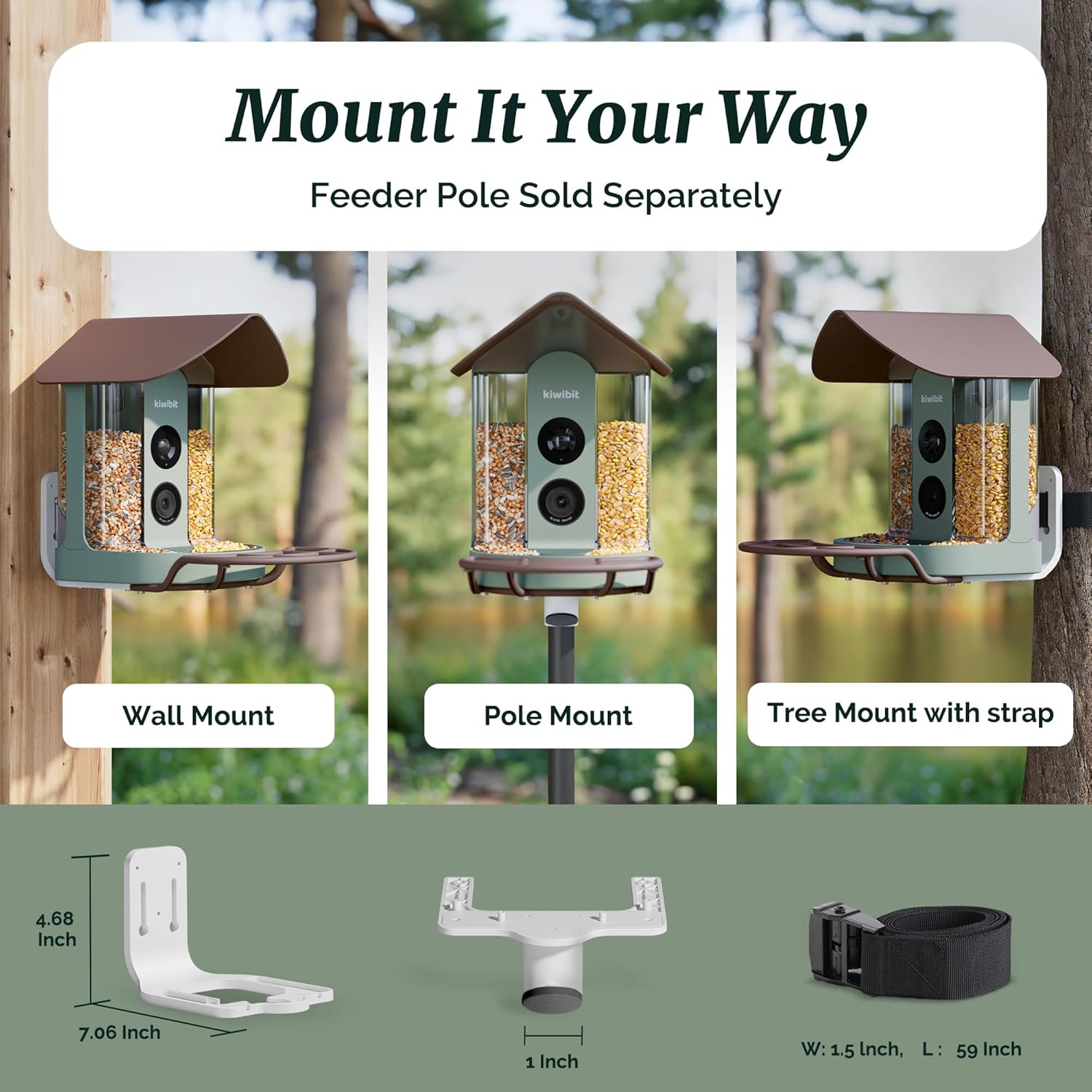
Image: Kiwibit Smart Bird Feeder with the solar panel attached, providing continuous power.
2.4 App Pairing and Connectivity
Download the Kiwibit App from your device's app store. Follow the in-app instructions to connect your feeder to your 2.4GHz Wi-Fi network. This typically involves scanning a QR code and entering your Wi-Fi password.
Video: This video demonstrates the 4K live stream feature of the Kiwibit Smart Bird Feeder, showing real-time bird activity.
3. Operation
3.1 Live Streaming and Recording
Access the Kiwibit App to view live 4K video from your feeder. The camera captures sharp 8MP photos and records video clips when motion is detected. You can manually record or take screenshots from the live view.

Image: Screenshot showing the 4K video and live stream capabilities of the Kiwibit Smart Bird Feeder.
3.2 AI Bird Identification and Notifications
The feeder's AI feature identifies over 10,000 bird species and sends real-time notifications to your phone when a bird visits. Key moments are auto-captured and organized by species within the app. You can also access a 'Bird Wiki' for detailed information on identified species.

Image: The app interface displaying AI bird species recognition and access to the Bird Wiki.

Image: Example of a smart bird notification received on a mobile device.
3.3 Cloud Storage and Sharing
The feeder includes 60-day cloud storage (up to 30 GB) for your captured photos and videos. You can easily share bird activity with up to 20 other users through the app.

Image: Illustration of multi-user access for sharing birdwatching experiences.
Video: This video provides a general overview of the Kiwibit Smart Bird Feeder's real-time birdwatching capabilities and app features.
4. Maintenance
4.1 Refilling Bird Seed
The feeder features a 1.5L dual-compartment seed container, reducing the frequency of refills. To refill, open the roof and pour new seed into the compartments. When refilling, ensure to clean any remaining seeds at the hopper tray connection to prevent the dual seed hopper from blocking the roof. After refilling, slowly pull out the feed switch valve to let the seeds flow into the tray.

Image: Demonstrates the easy refill design of the Kiwibit Smart Bird Feeder.
Video: This video illustrates the ease of refilling the Kiwibit Smart Bird Feeder.
4.2 Cleaning
The detachable parts and drainage tray make cleaning quick and hassle-free. Regularly clean the feeder to ensure a healthy environment for birds.
5. Troubleshooting
- Connectivity Issues: Ensure your Wi-Fi is 2.4GHz. If experiencing unstable connection, try moving the feeder closer to your Wi-Fi router or using a Wi-Fi extender.
- Solar Panel Not Charging: Ensure the solar panel is positioned in direct sunlight and is free from obstructions. Check the cable connection to the feeder.
- False Alerts: The AI smart filtering reduces false alerts from wind or rain. If you still receive excessive false alerts, adjust the motion detection sensitivity settings in the app.
- 4K Video Quality: For optimal 4K results, ensure sufficient sunlight. On cloudy days, video quality may be affected.
- Waterproof Seal: Ensure all connections, especially the charging port, are fully inserted and sealed to maintain IP65 waterproof rating.

Image: Visual guide for ensuring the waterproof seal is correctly engaged.
Video: This video demonstrates the durability and waterproof features of the Kiwibit Smart Bird Feeder.
6. Specifications
| Brand | Kiwibit |
| Model Number | BW511 |
| Target Species | Northern Cardinal, Bluejay, and Others (Over 10,000 Wild Bird Species) |
| Recommended Uses | Wild Birdwatching |
| Material | Reinforced Plastic Frame & Alloy Holder |
| Special Features | 4K UHD Live Stream & Photos, AI Identification (10,000+ Species), Bird Keyshot, Real-Time Bird Visit Notification, Easy-to-Refill 1.5L Feed Chambers, IR Night Vision, HDR |
| Mounting Type | Pole Mount (Included), Wall Mount (Included), Tree Strap (Included) |
| Power Source | Solar Panel & Battery Powered (5200 mAh removable battery) |
| Smart Home Compatibility | Smart Home Compatible (e.g., Alexa) |
| Item Dimensions (L x W x H) | 8.73"L x 7.09"W x 11.02"H |
| Capacity | 1.5 Liters |
| Item Weight | 3.3 Pounds |
| Connectivity | 2.4GHz Wi-Fi |
| Storage | 60-day Cloud Storage (up to 30 GB included), Micro SD card (up to 512GB, not included) |
| Waterproof Rating | IP65 |
7. Warranty & Support
The Kiwibit Smart Bird Feeder comes with a 1-year warranty. For customer support, please refer to the contact information provided in your product packaging or visit the official Kiwibit website.
8. Safety Information
- Avoid feeding harmful food types to birds.
- Secure the feeder properly to prevent access by larger animals.
- Ensure all electrical connections are secure and protected from moisture.
- Keep the solar panel clean for optimal charging performance.


