
1. Introduction
Thank you for purchasing the U`King 40W LED Moving Head Light. This manual provides essential information for the safe and efficient operation of your new lighting fixture. Please read these instructions thoroughly before installation and use, and retain them for future reference.
2. Product Features
- Powerful Light Source: Equipped with a 40-watt RGBW (Red, Green, Blue, White) LED, offering independent control for each LED.
- Long Lifespan: LED light source lasts up to 10,000 hours.
- Sharp Beam: Produces a sharp 3-degree beam for precise lighting effects.
- High Color Rendering Index (CRI): Unique color engine provides a CRI of 90+ for vivid hues.
- Multiple Operating Modes: Supports Sound Activated, Automatic, Master-Slave, and DMX (13 channels) modes.
- Professional Effects: Features 0-100% dimming, strobe effect, pan and micro pan, tilt and micro tilt, and pan/tilt inversion mode.
- DMX Daisy Chaining: Includes power connection and 3-pin DMX In/Out for linking multiple fixtures.
- User-Friendly Interface: Integrated LED display with a 4-button menu system for DMX addressing and parameter customization.
- Compact and Lightweight: Weighs only 2.87 pounds, making it portable and easy to install in various settings.
3. What's in the Box
- U`King 40W LED Moving Head Light (2 units for 2-pack model)
- Omega Bracket with two hanging points
- Mounting Screws
- Power Cable
- User Manual

Figure 3.1: Package Contents
4. Setup and Installation
4.1 Safety Precautions
- Ensure the fixture is securely mounted to a truss or ceiling using the provided Omega bracket and appropriate clamps (not included).
- Always disconnect power before performing any installation or maintenance.
- Ensure adequate ventilation around the fixture to prevent overheating.
4.2 Mounting the Fixture
- Unscrew the two screws at the bottom of the fixture.
- Secure the Omega bracket to the bottom of the fixture using the provided screws.
- Attach the fixture to a truss or suitable mounting surface using appropriate clamps (not included) that fit the Omega bracket.
4.3 Power and DMX Connections
Connect the power cable to the 'POWER' input (100-240V) on the rear panel of the fixture. For DMX control, connect a DMX cable from your DMX controller to the 'DMX IN' port. To daisy-chain multiple fixtures, connect a DMX cable from the 'DMX OUT' port of the first fixture to the 'DMX IN' port of the next fixture.
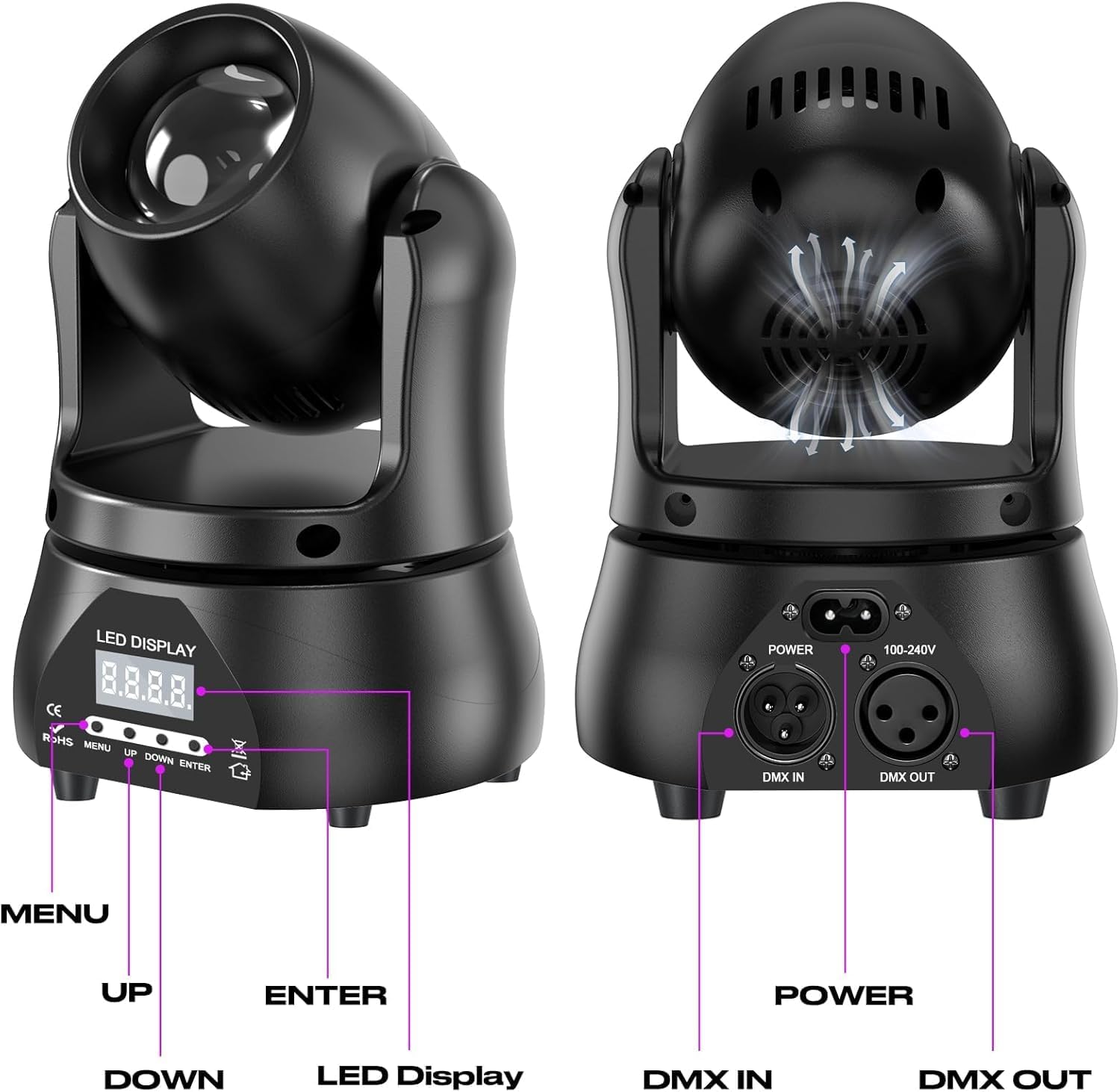
Figure 4.1: Rear Panel Connections and Controls
Video 4.1: Demonstrates DMX settings, auto mode, sound sensitivity, and installation steps for the U`King 40W LED Moving Head Light.
5. Operating Modes
The U`King 40W LED Moving Head Light features an LED display and a 4-button menu system (MENU, UP, DOWN, ENTER) for selecting and adjusting operating modes.
5.1 DMX Mode
In DMX mode, the fixture is controlled by an external DMX controller. This model utilizes 13 DMX channels. To set the DMX address:
- Press the MENU button until 'd001' (or similar DMX address) appears on the display.
- Use the UP/DOWN buttons to select the desired DMX starting address.
- Press ENTER to confirm.
5.2 Automatic Mode
The fixture can operate autonomously through pre-programmed light shows. There are typically multiple auto programs. To select an auto program:
- Press the MENU button until 'A.XX' (e.g., 'A.01', 'A.02') appears on the display.
- Use the UP/DOWN buttons to cycle through the available automatic programs.
- Press ENTER to confirm the selection.
5.3 Sound Activated Mode
In sound activated mode, the light patterns and movements respond to ambient sound. To activate sound mode:
- Press the MENU button until 'Sn.oF' (Sound On/Off) appears on the display.
- Use the UP/DOWN buttons to select 'Sn.on' for sound activated mode.
- You may also adjust sound sensitivity (e.g., 'S.90' to 'S.99') using the UP/DOWN buttons after selecting sound mode.
- Press ENTER to confirm.
5.4 Master-Slave Mode
This mode allows multiple fixtures to synchronize their operation without a DMX controller. Connect the DMX OUT of the master unit to the DMX IN of the first slave unit, and continue daisy-chaining. Set the master unit to an automatic or sound-activated mode, and set all slave units to 'SLAV' mode (refer to the display menu for exact setting).
Video 5.1: Demonstrates various RGBW beam patterns and movement capabilities of the U`King 40W LED Moving Head Light.
6. Specifications
| Feature | Detail |
|---|---|
| Model Number | ZQ02319X2 |
| Light Source Type | Light Emitting Diode (LED) |
| Light Source Wattage | 40 Watts |
| Color | RGBW |
| Material | Acrylonitrile Butadiene Styrene (ABS) |
| Finish Type | Painted |
| Power Source | Corded Electric (100-240V) |
| Mounting Type | Bracket Mount |
| Special Features | Dimmable, Strobe Effect, Pan and Tilt Movement, Sound Activated, Inversion Mode |
| Item Dimensions (L x W x H) | 5.31" x 4.72" x 7.28" (13.5cm x 12.0cm x 18.5cm) |
| Weight | 2.87 pounds (approx.) |

Figure 6.1: Product Dimensions and Movement Range
7. Maintenance
7.1 Cleaning
- Regularly clean the exterior of the fixture with a soft, dry cloth.
- Keep the lens free of dust and debris to maintain optimal light output. Use a soft, lint-free cloth and a mild lens cleaning solution if necessary.
- Ensure all ventilation openings are clear and unobstructed.
7.2 Storage
When not in use, store the fixture in a cool, dry place away from direct sunlight and extreme temperatures. Use original packaging for protection during storage or transport.
8. Troubleshooting
| Problem | Possible Cause | Solution |
|---|---|---|
| Fixture does not power on | No power supply or faulty cable. | Check power connection, wall outlet, and power cable. Try a different power source or cable. |
| No light output | Fixture is in standby mode, dimmer is at 0%, or internal fault. | Check operating mode and dimmer settings. If using DMX, ensure DMX signal is present and channels are correctly set. |
| No DMX control | Incorrect DMX address, faulty DMX cable, or incorrect DMX mode. | Verify DMX address on fixture matches controller. Check DMX cable connections. Ensure fixture is set to DMX mode. |
| Light not responding to sound | Sound activated mode not enabled or sensitivity too low. | Ensure 'Sn.on' is selected in the menu. Adjust sound sensitivity ('S.XX') to a higher value. |
9. Warranty and Support
This U`King product comes with a 180-day warranty from the date of purchase. This warranty covers manufacturing defects and material faults under normal use. It does not cover damage caused by misuse, accidents, unauthorized modifications, or improper installation.
For warranty claims, technical support, or any questions regarding your product, please contact the seller or manufacturer directly with your purchase details.


