1. Introduction
This instruction manual provides essential information for the safe and effective use of your JANGKLIFE 3.7V Mini Cordless Rotary Tool Kit. Designed for precision and quality, this tool is suitable for various light-duty DIY projects. Please read this manual thoroughly before operation and retain it for future reference.
Note: This cordless rotary tool is intended for light-duty projects only and should not be used for heavy-duty applications.
2. Product Overview and Key Features
The JANGKLIFE Cordless Rotary Tool is a versatile device offering convenience and control for detailed work. Its compact design allows for comfortable handling, similar to holding a pen, ensuring precision in various tasks.
- Multi-Functionality: Equipped with 31 popular power tool accessories, this kit supports a wide range of applications including polishing, sanding, grinding, drilling, engraving, and deburring.
- Three-Speed Adjustment: Easily switch between three distinct speed settings (6000 RPM, 11000 RPM, 14000-16000 RPM) to match the power requirements of different materials and tasks, allowing for meticulous step-by-step work.
- USB Fast Charging & Long Life: Powered by a 3.7V rechargeable lithium battery, the tool offers safe operation and can work continuously for approximately 90 minutes on a single charge. It features a Type-C charging port for convenient recharging.
- Compact and Quiet Design: The tool is lightweight and portable, designed for ultimate control and precision. Its rubber-wrapped handle provides a non-slip, comfortable grip.

Figure 1: Key features of the JANGKLIFE Cordless Rotary Tool.

Figure 2: Compact dimensions of the rotary tool for easy handling.
Video 1: Overview of the JANGKLIFE Multi-Function Cordless Rotary Tool Kit, demonstrating its various features and applications.
3. Package Contents
Your JANGKLIFE Cordless Rotary Tool Kit includes the following items:
- Cordless Rotary Tool x1
- Multi-functional accessories (31 pieces)
- Accessory Storage Case x2
- Type-C Charging Cable x1
- User Manual x1

Figure 3: All included accessories and components.
4. Setup
4.1 Charging the Tool
Before first use, fully charge the rotary tool. Connect the provided Type-C charging cable to the tool's charging port and a suitable USB power source. The indicator lights will show charging status.
4.2 Installing/Changing Accessories
To install or change an accessory:
- Press and hold the spindle locking button located on the tool.
- Unscrew the nut at the tip of the tool.
- Insert the desired accessory into the collet, ensuring it is seated correctly.
- While still holding the spindle locking button, tighten the nut securely in the direction of the arrow.
- Release the spindle locking button. Ensure the accessory is firmly held before operation.
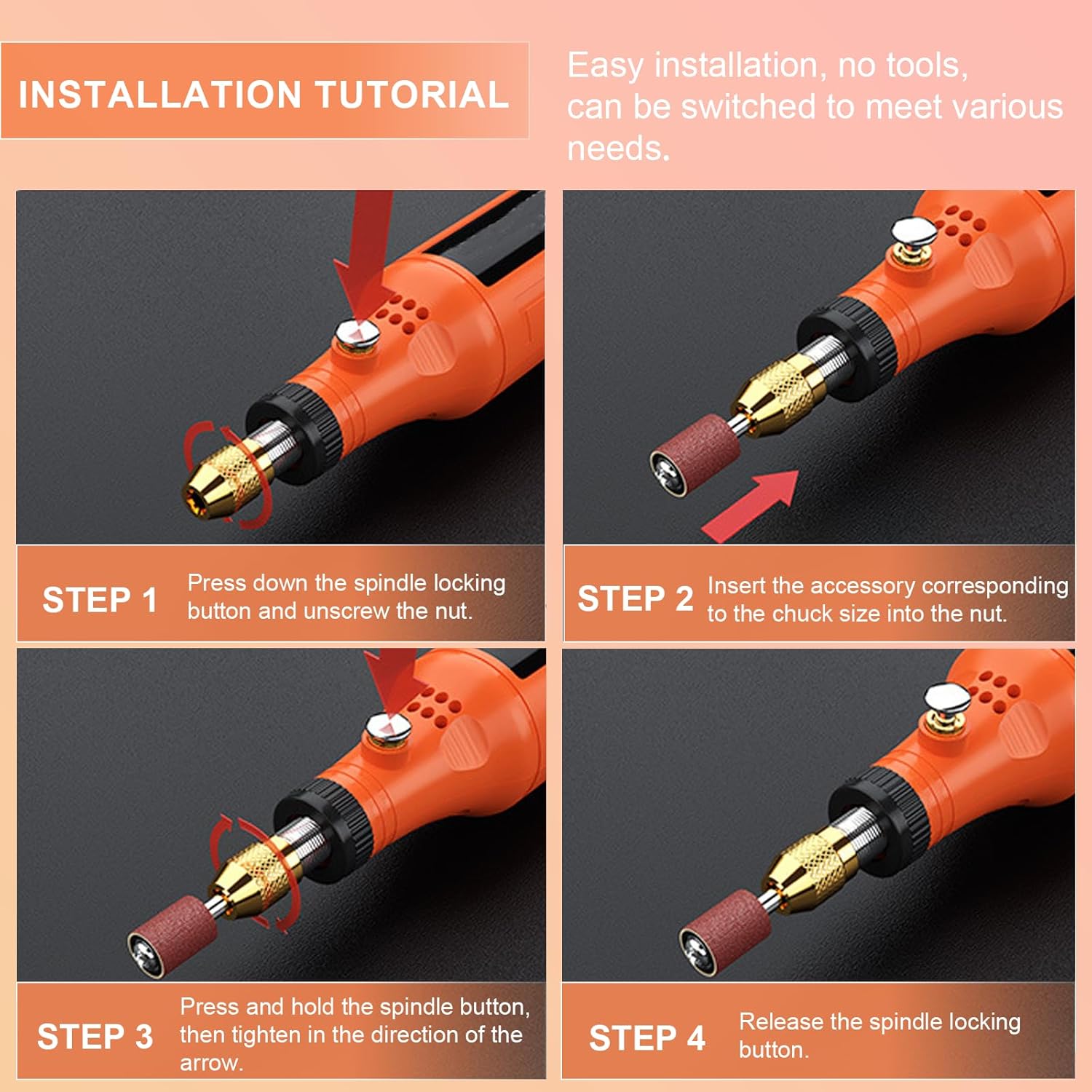
Figure 4: Accessory installation tutorial.
5. Operating Instructions
5.1 Power On/Off and Speed Adjustment
The tool features a single power button for operation and speed control:
- Press the power button once to turn on the tool at the lowest speed setting (6000 RPM). One indicator light will illuminate.
- Press the power button a second time to switch to the medium speed setting (11000 RPM). Two indicator lights will illuminate.
- Press the power button a third time to activate the highest speed setting (14000-16000 RPM). Three indicator lights will illuminate.
- Press the power button a fourth time to turn off the tool.
5.2 Applications
Select the appropriate accessory and speed for your task. Always wear appropriate safety gear, such as eye protection, when operating the tool.
- Polishing: Use felt wheels with polishing compound for a smooth finish on various materials.
- Sanding: Attach sanding bands for shaping, smoothing, or removing material from wood, plastic, or soft metals.
- Grinding: Utilize grinding stones for sharpening, deburring, or shaping harder materials.
- Drilling: Employ small drill bits for creating precise holes in soft materials.
- Engraving: Use specialized engraving bits for detailed designs on surfaces like wood, metal, or glass.
- Cutting: Attach cutting wheels for small, precise cuts on thin materials.

Figure 5: Examples of multiple uses for the rotary tool.
6. Maintenance
Regular maintenance ensures optimal performance and extends the lifespan of your tool.
- Cleaning: After each use, disconnect the tool from any charging source and clean the tool body and accessories. Use a soft, dry cloth to wipe away dust and debris. For stubborn residue, a slightly damp cloth can be used, ensuring no moisture enters the internal components.
- Accessory Storage: Store all accessories in their designated storage cases to prevent damage and loss. Keep them in a dry, clean place.
- Battery Care: To maintain battery health, avoid completely draining the battery frequently. Recharge the tool when power levels are low. Store the tool in a cool, dry place when not in use for extended periods.
7. Troubleshooting
If you encounter issues with your JANGKLIFE Cordless Rotary Tool, refer to the following common solutions:
| Problem | Possible Cause | Solution |
|---|---|---|
| Tool does not turn on | Low battery; Power button not pressed correctly | Charge the tool fully; Press the power button firmly. |
| Reduced power/speed during operation | Low battery; Excessive pressure applied | Recharge the tool; Reduce pressure on the workpiece. This tool is for light-duty tasks. |
| Accessory wobbles or falls out | Nut not tightened sufficiently; Incorrect collet size | Ensure the nut is securely tightened while holding the spindle lock; Use the correct collet for the accessory shank size. |
| Tool overheats | Prolonged heavy use; Blocked cooling vents | Allow the tool to cool down; Ensure cooling vents are clear of debris. |
If the problem persists after attempting these solutions, please contact JANGKLIFE customer support.
8. Specifications
| Feature | Detail |
|---|---|
| Brand | JANGKLIFE |
| Model Number | AC-101 |
| Voltage | 3.7 Volts |
| Power Source | Battery Powered (Rechargeable Lithium Battery) |
| Maximum Rotational Speed | 15000 RPM (Note: Feature bullets state 14000-16000 RPM for highest speed) |
| Minimum Speed | 5000 RPM (Note: Feature bullets state 6000 RPM for lowest speed) |
| Item Weight | 8 ounces |
| Product Dimensions (L x W x H) | 5.9 x 1.6 x 1.2 inches |
| Material | Plastic |
| Special Feature | Cordless |
| Recommended Uses | Cutting, Deburring, Grinding, Polishing, Sanding |
9. Warranty and Support
JANGKLIFE provides a 6-month after-sales service for this product. Should you encounter any issues during use, or have questions regarding the tool's operation or maintenance, please do not hesitate to contact JANGKLIFE customer support. Refer to the product packaging or official JANGKLIFE website for contact details.


