
1. Introduction
The Sperax Walking Vibration Pad is a versatile 4-in-1 fitness device designed for home use, offering walking, jogging, manual incline, and vibration modes. This compact treadmill features a powerful yet quiet motor, remote control operation, and connectivity with the Sperax Fitness App for enhanced workout tracking. Its design prioritizes comfort and space-saving storage, making it suitable for various living environments.

Image: Sperax Walking Vibration Pad in use, demonstrating walking and vibration exercises.
2. Safety Information
Please read all instructions carefully before using the Sperax Walking Vibration Pad. Adhering to safety guidelines is crucial for preventing injury and ensuring proper operation.
- Consult a physician before starting any new exercise program.
- Keep children and pets away from the equipment during operation.
- Place the treadmill on a flat, stable surface, ensuring adequate clearance around the device.
- Wear appropriate athletic footwear during use.
- Do not operate the treadmill if it is damaged or malfunctioning.
- Unplug the power cord from the outlet when not in use or before cleaning/maintenance.
- Do not use outdoors or in wet conditions.
3. Package Contents
Verify that all components are present in the package:
- Sperax Walking Vibration Pad (Main Unit)
- Remote Control x1
- User Manual x1
- Power Cord x1
- L-Shaped Wrench x1

Image: Included accessories for the Sperax Walking Vibration Pad.
4. Setup
The Sperax Walking Vibration Pad requires no assembly. Follow these steps for initial setup:
- Placement: Choose a flat, stable, and non-slippery surface for the treadmill. Ensure there is sufficient space around the unit for safe operation and movement.
- Power Connection: Connect the power cord to the treadmill's power input port and then plug it into a standard electrical outlet.
- Power On: Locate the main power switch (usually near the power cord input) and turn it to the 'ON' position. The LED display on the treadmill should illuminate.
5. Operating Instructions
5.1 Remote Control Usage
The included remote control allows for easy adjustment of speed and mode selection. Ensure the remote has working batteries.
- Start/Stop: Press the 'Start' button to begin operation and 'Stop' to pause or end your workout.
- Speed Adjustment: Use the '+' and '-' buttons to increase or decrease the walking/jogging speed. The speed range is 0.2 to 3.8 MPH.
- Mode Selection: Specific buttons on the remote may allow switching between walking, jogging, and vibration modes. Refer to the remote's labels.

Image: Remote control and LED display showing workout metrics.
5.2 Sperax Fitness App & LED Display
Enhance your fitness monitoring by connecting the treadmill to the Sperax Fitness App via Bluetooth. The integrated LED display also provides real-time data.
- App Connection: Download the Sperax Fitness App from your device's app store. Follow the in-app instructions to pair your treadmill.
- Data Tracking: The app and LED display show training data such as time, speed, distance, and calories burned.
- Workout Programs: The app may offer various course categories and personalized exercise plans.

Image: Sperax Fitness App interface and treadmill in use.
5.3 Manual Incline Adjustment
The treadmill features a two-stage manual incline mechanism, allowing you to increase workout intensity and calorie burn.
- Adjustment Levels: The incline can be set to approximately 5% or 10%.
- How to Adjust: To change the incline, ensure the treadmill is stopped and unplugged. Manually lift the rear of the treadmill and adjust the support legs to the desired incline level. Ensure the legs are securely locked in place before use.

Image: Demonstrating the manual incline adjustment feature.
5.4 Vibration Mode
The vibration function offers additional benefits for relaxation and muscle stimulation. It includes four distinct modes:
- Light Vibration Mode: Suitable for meditation and body stretching.
- Strong Vibration Mode: Engages muscles throughout the body.
- Light Superposition Mode: Designed to relax hands and legs.
- Strong Superposition Mode: Aims for better body shaping and enhanced metabolism.

Image: Overview of the four vibration modes and their applications.
5.5 Running Belt Features
The treadmill is equipped with a multi-layer running belt designed for comfort and durability.
- 5-Layer Shock-Absorbing Belt: Includes a wear-resistant surface, noise reduction layer, high-strength reinforced layer, EVA shock absorption layer, and high-strength support layer.
- Running Area: The running belt area measures 42 x 105 cm (16.5" x 41.3"), providing ample space for walking and jogging.
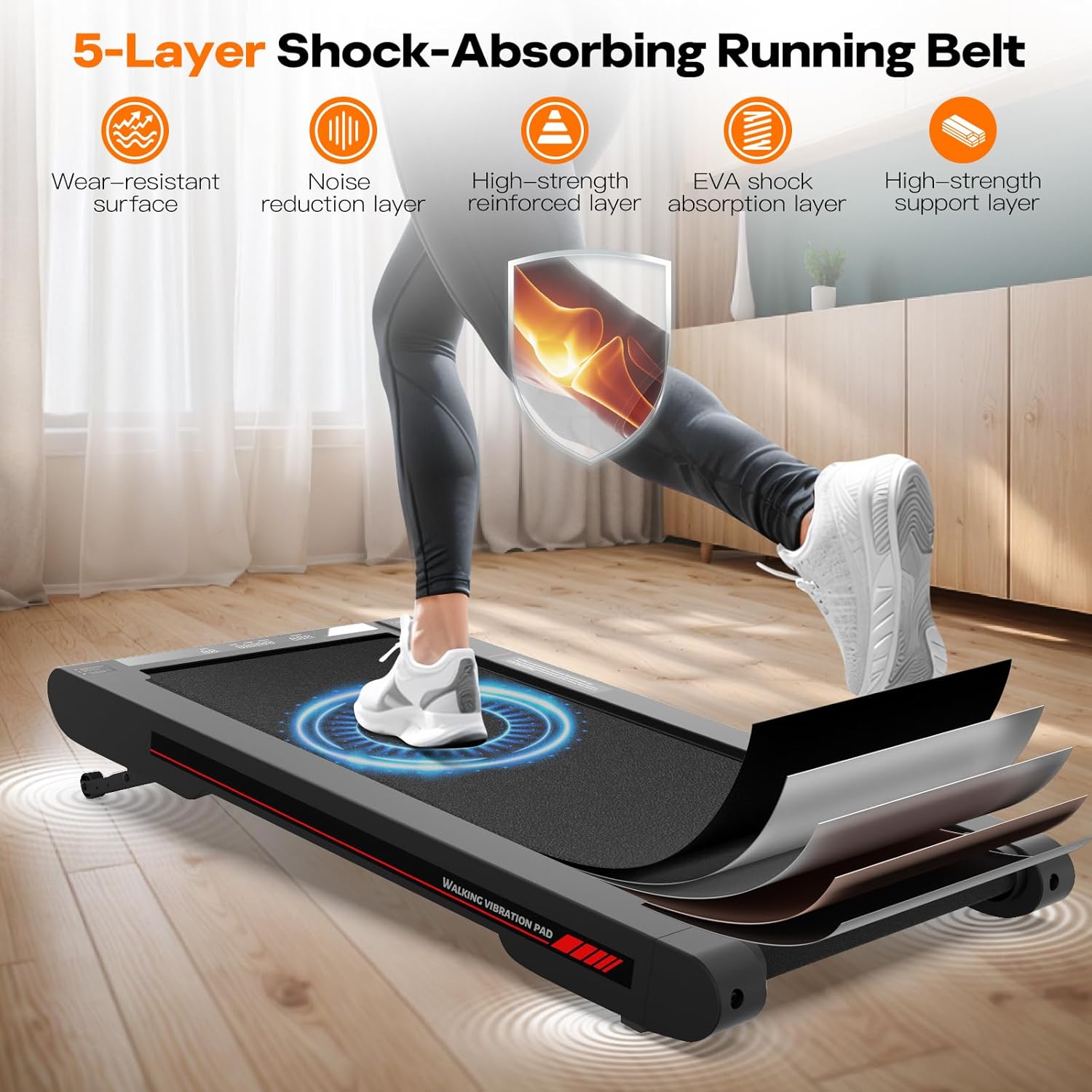
Image: Illustration of the 5-layer shock-absorbing running belt construction.
5.6 Quiet Motor Technology
The Sperax Walking Vibration Pad features a 2.5-horsepower servo motor designed for quiet operation, minimizing disturbance during use.

Image: Depiction of the quiet servo motor technology.
6. Maintenance
Regular maintenance ensures the longevity and optimal performance of your treadmill.
- Cleaning: Wipe down the treadmill surface with a damp cloth after each use. Avoid using abrasive cleaners or solvents.
- Lubrication: Periodically check the running belt for proper lubrication. If the belt feels dry or friction increases, apply silicone lubricant as directed in the full user manual (if provided separately). Use only treadmill-specific silicone lubricant.
- Storage: When not in use, the compact design allows for storage under a sofa, bed, or against a wall to save space.
7. Troubleshooting
If you encounter issues with your Sperax Walking Vibration Pad, refer to the following common solutions:
- Treadmill Not Turning On: Ensure the power cord is securely plugged into both the treadmill and a working electrical outlet. Check that the main power switch is in the 'ON' position.
- Belt Slipping: The running belt may require tension adjustment or lubrication. Refer to the full user manual for specific instructions on belt adjustment.
- Unusual Noise: Check for any loose parts or foreign objects under the belt. If the noise persists, discontinue use and contact customer support.
- Remote Control Not Responding: Replace the batteries in the remote control. Ensure there are no obstructions between the remote and the treadmill's receiver.
For issues not covered here, please contact Sperax customer support.
8. Specifications
| Product Dimensions | 112.5 x 57.3 x 9.5 cm (44.3 x 22.6 x 3.7 inches) |
| Item Weight | 14.1 kg (31 lbs) |
| Colour | Red Manual Incline |
| Frame Material | Alloy |
| Running Belt Material | Acrylonitrile Butadiene Styrene (ABS) |
| Motor Horsepower | 2.5 HP |
| Speed Range | 0.2 to 3.8 MPH |
| Maximum Load Capacity | 350 LBS |
| Running Belt Area | 42 x 105 cm (16.5 x 41.3 inches) |
| Maximum Incline Percentage | 10% (Manual, Two-Stage) |
| Special Features | Noise Reduction Layer, Shock Absorption Layer, Water Resistant Surface |
| Assembly Required | No |
9. Warranty and Support
For warranty information, product support, or any inquiries not addressed in this manual, please refer to the official Sperax website or contact their customer service directly. Keep your purchase receipt as proof of purchase for warranty claims.
Sperax Customer Support: Please visit the Sperax Store on Amazon or their official website for contact details.


