
Electactic OL-BA012C-10CD/C
Electactic 14000 BTU Portable Air Conditioner User Manual
Model: OL-BA012C-10CD/C
Brand: Electactic
Introduction
This user manual provides comprehensive instructions for the Electactic 14000 BTU Portable Air Conditioner. Designed to efficiently cool spaces up to 700 sq.ft, this 3-in-1 unit combines cooling, fan, and dehumidifier functions, ensuring optimal comfort in various environments. Please read this manual thoroughly before operation to ensure proper use, maintenance, and safety.
Key Features
- Powerful Cooling: Delivers 14000 BTU cooling capacity, effectively covering areas up to 700 sq.ft with temperatures as low as 61°F.
- 4-in-1 Multifunctional Design: Offers Cooling, Dehumidification, Fan, and Sleep modes to adapt to different seasonal needs.
- High Dehumidification Capacity: Capable of removing up to 73 pints of moisture per day, ensuring a dry and comfortable environment.
- Convenient Control: Features a user-friendly LED display and includes a remote control for easy operation from a distance.
- 24-Hour Timer: Allows for pre-setting cooling schedules for maximum comfort and energy efficiency.
- Easy Mobility: Equipped with 4 smooth-rolling caster wheels and hidden side handles for effortless movement between rooms.
- Quick & Tool-Free Setup: Comes with an adjustable window mounting kit and a 59-inch hose for simple installation within minutes.
- Automatic Louver: Ensures wide-angle airflow distribution for consistent cooling throughout the room.
Setup Guide
Follow these steps for quick and easy installation of your portable air conditioner:
- Unpack the Unit: Carefully remove the air conditioner and all accessories from the packaging. Ensure all components listed in the packing list are present.

Image: The Electactic portable AC unit and its components after unpacking.
- Attach Exhaust Hose: Connect the exhaust hose to the air conditioner's exhaust port. Twist securely until it locks into place.

Image: Step-by-step visual guide for connecting the exhaust hose to the unit.
- Install Window Kit: Insert the adjustable window bracket into your window opening. Extend it to fit the window width or height and secure it.

Image: Illustration of window kit installation for both sliding and hanging windows.
- Connect Hose to Window Kit: Attach the other end of the exhaust hose to the opening in the window kit. Ensure a tight seal to prevent air leakage.
- Position the Unit: Place the unit on a flat, stable surface, ensuring there is at least 20 inches of space around it for proper airflow. The unit features caster wheels and side handles for easy positioning.
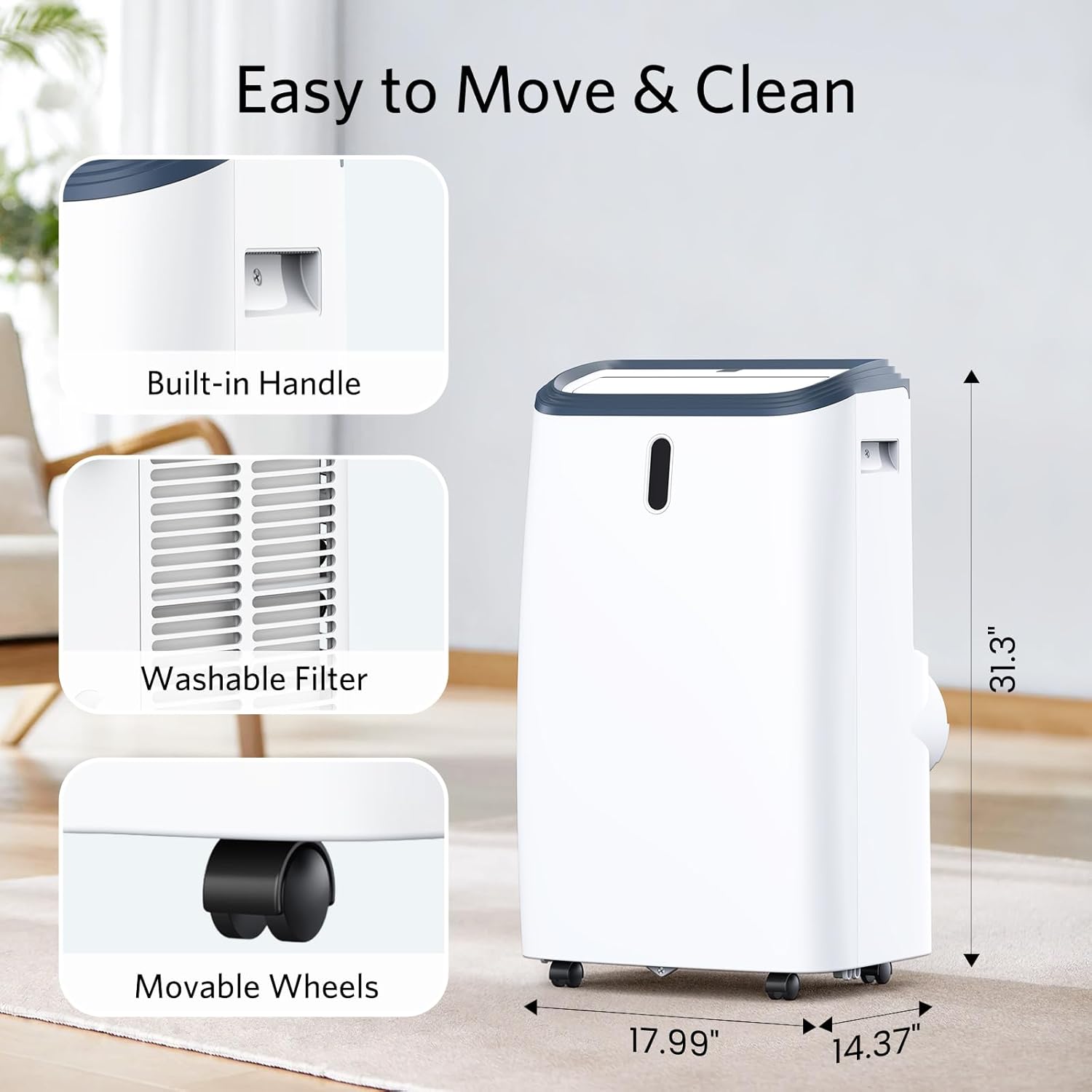
Image: Close-up of the unit's built-in handle and movable wheels, highlighting its portability.
- Plug In: Connect the power cord to a grounded electrical outlet.
Operating Instructions
Your Electactic Portable Air Conditioner can be operated using the top LED control panel or the included remote control.
Control Panel & Remote Control

Image: Detailed view of the unit's LED control panel and the remote control, showing various function buttons.
- Power Button: Press to turn the unit ON or OFF.
- Mode Button: Cycle through Cooling, Dehumidifier, Fan, and Sleep modes.
- Temperature Adjustment: Use the UP and DOWN arrows to set your desired temperature (61°F-90°F).
- Fan Speed: Select High, Medium, or Low fan speed to adjust airflow intensity.
- Timer Function: Set the 1-24 hour auto on/off timer for scheduled operation.
- Sleep Mode: Activates quiet operation for undisturbed rest.
- Swing Function: Engages the automatic louver to distribute air vertically for wider coverage.
Understanding Modes:
- Cool Mode: Provides powerful cooling to lower room temperature.
- Dehumidifier Mode: Removes excess moisture from the air, ideal for humid conditions.
- Fan Mode: Circulates air without cooling, useful for general air circulation.
- Sleep Mode: Operates quietly with reduced fan speed and adjusted temperature for comfortable sleep.
Official Product Video:
Video: An official product video demonstrating the portable air conditioner's cooling, fan, and dehumidifier functions, showcasing its versatility and ease of use.
Maintenance
Filter Cleaning:
Regular cleaning of the air filter is essential for optimal performance and air quality. The filter is washable and easily accessible.
- Turn off and unplug the unit before cleaning.
- Remove the air filter from the back of the unit.
- Wash the filter with warm, soapy water. Rinse thoroughly and allow it to air dry completely before reinserting.
- Clean the filter every two weeks or more frequently depending on usage and air quality.
Water Drainage:
When operating in Dehumidifier mode or in very humid conditions, the unit will collect water. The unit has a 73-pint capacity and will indicate when the water tank is full.

Image: Visual representation of the unit's 73-pint daily dehumidification capacity.
- Manual Drain: When the "Water Full" indicator lights up, turn off the unit and carefully move it to a drain location. Remove the drain plug and allow water to empty.
- Continuous Drain: For continuous operation in high humidity, attach the included drain hose to the continuous drain port and direct it to a floor drain or suitable container.
Troubleshooting
| Problem | Possible Cause | Solution |
|---|---|---|
| Unit does not turn on. | No power supply; Power cord not plugged in; "Water Full" indicator is on. | Check power outlet; Plug in power cord securely; Drain water tank. |
| Unit does not cool effectively. | Air filter is dirty; Room size too large; Doors/windows open; Exhaust hose not properly installed. | Clean air filter; Ensure room size is within specified range (700 sq.ft); Close all doors/windows; Check exhaust hose connection. |
| Unit is noisy. | Unit is not on a flat surface; Air filter is dirty. | Place unit on a flat, stable surface; Clean air filter. |
| Water leaks from the unit. | Drain plug is loose; Unit is tilted. | Ensure drain plug is securely in place; Place unit on a level surface. |
Specifications
| Feature | Detail |
|---|---|
| Model Name | Portable Air Conditioners |
| Model Number | OL-BA012C-10CD/C |
| Cooling Power | 14000 British Thermal Units |
| Coverage Area | Up to 700 sq.ft |
| Dehumidification Capacity | 73 Pints/day |
| Temperature Range | 61°F-90°F |
| Fan Speeds | 3 (High, Medium, Low) |
| Noise Level | 54 dB |
| Voltage | 115V |
| Wattage | 1138 watts |
| Product Dimensions (D x W x H) | 14.37 x 17.99 x 31.3 inches |
| Item Weight | 67.5 pounds |
| Color | White |
Warranty & Support
Warranty Information:
This Electactic Portable Air Conditioner comes with a 1-Year Limited Warranty from the date of purchase. This warranty covers defects in materials and workmanship under normal use. Please retain your proof of purchase for warranty claims.
Customer Support:
For any questions, technical assistance, or warranty claims, please contact Electactic Customer Support. Refer to the contact information provided on the product packaging or the official Electactic website.
Ask a question about this manual
Ask about setup, troubleshooting, compatibility, parts, safety, or missing instructions. Manuals+ will review the question and use this page’s manual context to help answer it.