
1. Important Safety Information
Please read this entire manual carefully before operating the Sperax Vibration Plate Exercise Machine. Keep this manual for future reference.
- Consult your physician before starting any new exercise program, especially if you have pre-existing health conditions.
- This appliance is not intended for use by persons with reduced physical, sensory, or mental capabilities, or lack of experience and knowledge, unless they have been given supervision or instruction concerning use of the appliance by a person responsible for their safety.
- Do not use the machine if you are pregnant, have a pacemaker, or have recently undergone surgery.
- Ensure the machine is placed on a stable, level surface.
- Keep children and pets away from the machine during operation.
- Do not insert any objects into the machine's openings.
- Unplug the machine from the power outlet when not in use or before cleaning.
- Maximum user weight capacity: 400 pounds.
2. Package Contents
Verify that all components are present in the package:
- Vibration Plate (x1)
- Remote Control (x1)
- Resistance Bands (x2)
- User Manual (x1)
- Power Cord (x1)

Image: All items included in the Sperax Vibration Plate Exercise Machine package.
3. Product Overview
The Sperax Vibration Plate Exercise Machine is designed for full-body workouts and relaxation through high-frequency vibrations. It features a compact design, multiple modes, and user-friendly controls.
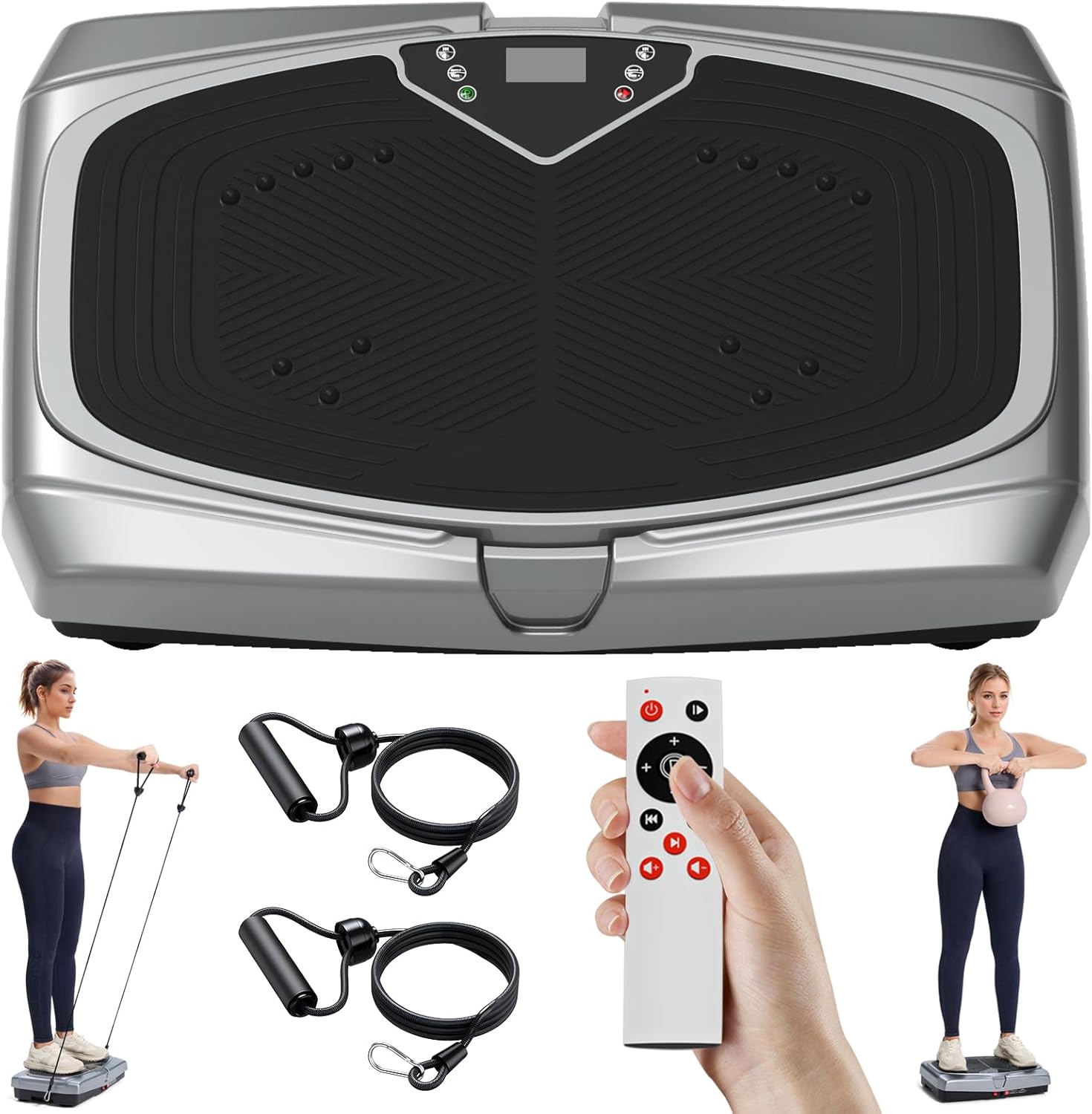
Image: The Sperax Vibration Plate Exercise Machine, remote control, and resistance bands.
Key Components:
- Vibration Platform: The main surface where you stand or perform exercises.
- Control Panel: Integrated LED screen and buttons for direct control.
- Remote Control: Allows for convenient adjustment of settings during use.
- Resistance Band Hooks: Located on the sides for attaching resistance bands.
- Non-slip Suction Cups: Four suction cups on the base ensure stability and reduce noise.

Image: Detailed view of the machine's features: Elasti Rope Hook, Non-slip Suction Cup, Powerful Motor, and LED Display.

Image: Illustration of the strong rubber feet and anti-slip surface for enhanced stability and safety.
4. Setup Instructions
Follow these steps to set up your Sperax Vibration Plate for first use:
- Unpack: Carefully remove all components from the packaging.
- Placement: Place the vibration plate on a firm, level, and non-slip surface. Ensure there is enough clear space around the machine for safe operation. The four suction cups on the base will help secure the unit.
- Connect Power: Insert the power cord into the machine's power input port, then plug the other end into a standard electrical outlet.
- Resistance Bands (Optional): If desired, attach the resistance bands to the designated hooks on the sides of the machine.
5. Operating Instructions
The Sperax Vibration Plate can be operated using its integrated touch control panel or the included remote control.

Image: Control options and storage convenience of the Sperax Vibration Plate.
Getting Started:
- Power On: Press the power button on the control panel or remote control to turn on the machine. The LED display will illuminate.
- Select Mode: The machine offers both manual and smart modes.
- Manual Mode (HR): Allows you to freely adjust the vibration intensity from 1 to 250 gears. Use the '+' and '-' buttons on the control panel or remote to adjust.
- Smart Modes (P1-P9): These are pre-programmed modes with varying speeds and durations. Cycle through them using the 'Mode' button.
- Set Time: Some modes may allow time adjustment. Refer to the display for current time settings.
- Start Exercise: Step onto the platform. You can stand, sit, or perform various exercises as desired.
- Power Off: Press the power button again to turn off the machine when finished.
Bluetooth Connectivity:
The Sperax Vibration Plate features Bluetooth connectivity, allowing you to play music through its integrated speakers during your workout.
- Activate Bluetooth: Ensure the machine is powered on.
- Pair Device: On your smartphone or other Bluetooth-enabled device, search for available Bluetooth devices and select 'Sperax Vibration Plate' (or similar name).
- Play Music: Once paired, you can play music from your device, and it will output through the machine's speakers.

Image: Bluetooth connection for music playback during exercise.
6. Exercise Modes and Programs
The Sperax Vibration Plate offers a variety of modes to suit different fitness goals, from relaxation to intense workouts.
Manual Mode (HR):
This mode provides full control over the vibration intensity, allowing you to select from 1 to 250 gears. This is ideal for users who want precise control over their workout or relaxation session.
Smart Modes (P1-P9):
These 9 pre-set programs offer varied vibration patterns and intensities, designed for specific benefits such as fat burning, muscle strengthening, or relaxation. Each program has a unique sequence of speed changes.

Image: Overview of the 9 unique vibration modes and manual speed adjustment.
Suggested Usage:
Even short sessions on the vibration plate can be beneficial. A 10-minute session can be equivalent to longer periods of other exercises.

Image: Comparison of 10 minutes on the vibration plate to other exercise durations.
The vibration plate can help with:
- Relieving fatigue
- Strengthening bones
- Relieving joint and back pain
- Improving balance
- Boosting metabolism
- Supporting weight loss

Image: Benefits of using the Sperax Vibration Plate, including improved circulation and overall wellness.
7. Maintenance and Care
Proper maintenance ensures the longevity and optimal performance of your Sperax Vibration Plate.
- Cleaning: Wipe the machine with a soft, damp cloth after each use. Do not use abrasive cleaners or solvents. Ensure the machine is unplugged before cleaning.
- Storage: Store the machine in a cool, dry place away from direct sunlight and moisture. Its flat design allows for convenient storage under a sofa or bed.
- Inspection: Periodically check the power cord for any damage. If damaged, discontinue use and contact customer support.
8. Troubleshooting
If you encounter issues with your Sperax Vibration Plate, refer to the following common problems and solutions:
| Problem | Possible Cause | Solution |
|---|---|---|
| Machine does not power on. | Power cord not properly connected; Power outlet not working; Machine's power switch is off. | Ensure power cord is securely plugged into both the machine and a working outlet. Check the power switch on the machine. |
| Remote control not working. | Remote battery is low or dead; Obstruction between remote and machine; Remote not pointed correctly. | Replace remote control battery. Ensure no obstructions. Point remote directly at the machine's sensor. |
| Vibration is weak or inconsistent. | Incorrect mode or intensity setting; Machine overloaded. | Adjust to a higher intensity setting or different mode. Ensure user weight does not exceed maximum capacity. |
| Unusual noise during operation. | Machine not on a level surface; Loose components. | Ensure the machine is on a flat, stable surface. If noise persists, discontinue use and contact customer support. |
If the problem persists after attempting these solutions, please contact Sperax customer support for assistance.
9. Specifications
| Brand | Sperax |
| Model Number | YHNF-V01 |
| Product Dimensions | 53 x 34 x 12.5 cm (20.87 x 13.39 x 4.92 inches) |
| Item Weight | 8.9 kg (19.62 lbs) |
| Colour | Grey Black-008 |
| Material | Acrylonitrile Butadiene Styrene (ABS) |
| Included Components | Remote control unit |
| Maximum Load Capacity | Approximately 400 lbs (based on feature bullets) |
10. Warranty and Support
Sperax is committed to providing high-quality products and customer satisfaction. While specific warranty details are not provided in this manual, please retain your proof of purchase for any warranty claims.
For technical support, troubleshooting assistance, or warranty inquiries, please contact Sperax customer service through the retailer's platform or the official Sperax website.
We recommend visiting the official Sperax website for the most up-to-date support information and contact methods.

