Introduction
This manual provides comprehensive instructions for the LOMCA Replacement Air Conditioner Remote Control, model RG10A-BGEF. This remote is designed as a direct replacement for various Midea Air Conditioner models, ensuring seamless operation without the need for complex programming.
The remote control operates using two 1.5V AAA alkaline batteries (not included). Its intuitive design and durable construction provide a reliable solution for controlling your air conditioning unit.

Image: Front and side view of the LOMCA RG10A-BGEF replacement remote control. The remote is white with a clear LCD screen displaying temperature and mode settings. Buttons for power, mode, fan speed, swing, and other functions are visible.
Setup
The LOMCA RG10A-BGEF remote control is designed for immediate use with compatible Midea Air Conditioner models. No programming or pairing is required.
Battery Installation
- Locate the battery compartment on the back of the remote control.
- Slide open the battery cover.
- Insert two new 1.5V AAA alkaline batteries, ensuring the correct polarity (+ and -) as indicated inside the compartment.
- Close the battery cover securely.
Once batteries are installed, the remote control is ready to operate your air conditioner.
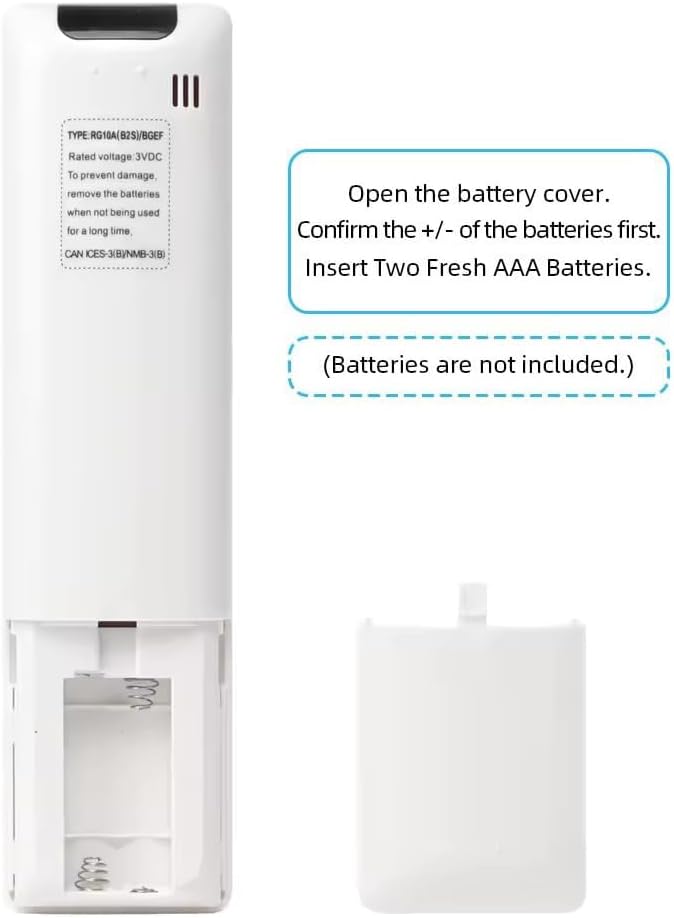
Image: Back view of the LOMCA remote control with the battery cover removed, revealing the empty battery compartment. Instructions for battery insertion are visible on the remote's casing.

Image: The LOMCA remote control positioned next to an air conditioning unit. Text overlays highlight key features: "NO Need to Set Up" emphasizing ease of use, "Soft Plastic Button" indicating comfortable tactile feedback, and "ABS Material" for durability.
Operating Instructions
Basic Operation
- Power Button: Press the orange power button to turn the air conditioner ON or OFF.
- Mode Button: Press the "Mode" button to cycle through operating modes (e.g., Cool, Heat, Fan, Dry, Auto).
- Temperature Adjustment: Use the "SET" up (^) and down (v) arrow buttons to adjust the desired temperature.
- Fan Speed: Use the fan icon button to adjust the fan speed.
- Swing: Use the "Swing" button to control the louver movement.
- Boost: Activates a rapid cooling/heating function.
- LED: Controls the display light on the air conditioner unit.
- Clean: Activates the self-clean function (if supported by your AC unit).
Changing Temperature Unit (Celsius to Fahrenheit)
The remote control supports display in both Celsius (℃) and Fahrenheit (℉). To switch between these units:
- Ensure batteries are installed and the remote is powered on (press the power button).
- Simultaneously press and hold the "temp +" (up arrow) and "temp -" (down arrow) buttons for approximately 5 seconds.
- The temperature unit on the remote's display will switch from Celsius to Fahrenheit, or vice versa.

Image: A hand holding the LOMCA remote control, with the LCD screen displaying "78 ℉". Red circles highlight the "temp +" (up arrow) and "temp -" (down arrow) buttons, indicating they should be pressed simultaneously to change the temperature unit.
Compatibility
This LOMCA remote control (Model: RG10A-BGEF) is a replacement for Midea Air Conditioner remote controls and is compatible with the following models:
- RG10A1(E2S)/BGEF
- RG10A10(E2S)/BGEF
- RG10B10(E2)/BGEF
- RG10B(E2)/BGEF
- RG10B1(E2)/BGEF
- RG10A5(B1)/BGCEFU1
- RG10A2(E2S)/BGCEF
- RG10A(E2S)/BGEFU1
- RG10A2(E2S)/BGEFU1
- RG10B10(E2)/BGCEF
- RG10B2(E2)/BGCEF
- RG10A(B2S)/BGEFU1
- RG10A2(E2S)/BGCEFU1
If your original remote control model number matches any of the above, this replacement remote should function correctly.
Specifications
| Model Number | RG10A-BGEF |
| Brand | LOMCA |
| Power Supply | 2 x 1.5V AAA Alkaline Batteries (not included) |
| Connectivity Technology | Infrared |
| Compatible Devices | Air Conditioner (Specific Midea models) |
| Special Feature | No Programming Required |
| Item Weight | 0.705 ounces |
| Package Dimensions | 7.87 x 3.15 x 0.39 inches |
Maintenance
To ensure the longevity and optimal performance of your remote control, follow these maintenance guidelines:
- Battery Replacement: Replace batteries when the remote's response becomes sluggish or the display dims. Always use new, high-quality AAA alkaline batteries.
- Cleaning: Wipe the remote control with a soft, dry cloth. Do not use liquid cleaners, sprays, or abrasive materials, as these can damage the remote's surface or internal components.
- Storage: If the remote control will not be used for an extended period, remove the batteries to prevent leakage and potential damage. Store the remote in a cool, dry place away from direct sunlight and extreme temperatures.
- Avoid Drops: Protect the remote from physical impact. Dropping the remote can damage its internal circuitry or external casing.
Troubleshooting
| Problem | Solution |
| Remote control is not working. |
|
| Display is dim or flickering. | This usually indicates low battery power. Replace the batteries with new ones. |
| Remote works intermittently. |
|
| Cannot change temperature unit (℃/℉). | Ensure you are pressing both the "temp +" and "temp -" buttons simultaneously and holding them for at least 5 seconds after the remote is powered on. |
Warranty and Support
While specific warranty details are not provided in this manual, LOMCA products are generally covered by standard consumer protection laws and return policies. For any issues or inquiries regarding your LOMCA Replacement Air Conditioner Remote Control, please refer to the retailer's return policy or contact the seller directly through your purchase platform.
For Amazon purchases, you can typically find return and support information by visiting your order details page on Amazon.com.