
1. Introduction
Welcome to the user manual for your NZXT N9 X870E AM5 ATX Motherboard. This document provides essential information for setting up, operating, and maintaining your motherboard, ensuring optimal performance and longevity. Please read through this manual carefully before installation and use.
2. Key Features
- AMD AM5 Socket: Ready for AMD Ryzen 9000, 8000, and 7000 series desktop processors.
- Superior Power Delivery: 20+2+1 power phase design with 110A Smart Power Stages and an 8-layer, 2-ounce copper PCB for stable, overclocking-ready power.
- Advanced Cooling: VRM heatsink array with thermal pads, dual PWM fans, and four dedicated M.2 heatsinks.
- PCIe 5.0 Expansion: One PCIe 5.0 x16 slot for next-gen GPUs and one PCIe 3.0 x16 slot for additional high-speed expansion cards.
- DDR5 Memory Support: Four dual-channel DIMM slots supporting DDR5 RAM speeds of 8000+ MT/s for faster multitasking and improved system responsiveness.
- High-Speed Storage: Four M.2 slots, including one PCIe 5.0 and three PCIe 4.0, with quick-release latches for ultra-fast storage speeds.
- Next-Gen Connectivity: USB 4 (40 Gbps), Wi-Fi 7, and 5GbE for blazing-fast data transfers and ultra-low latency networking.
- Sleek & Stylish Design: Premium full-metal cover concealing the PCB for a clean aesthetic, enhanced by onboard customizable RGB lighting.
3. Package Contents
The following items are typically included with your NZXT N9 X870E motherboard. Please verify all components upon unboxing.

Figure 3.1: A visual representation of the items included with your NZXT N9 X870E motherboard. This typically includes the motherboard itself, two wireless antennas, four SATA cables, two NZXT 8-pin splitters, and the user manual.
- NZXT N9 X870E Motherboard
- 2 x Wireless Antennas
- 4 x SATA Cables
- 2 x NZXT 8-pin Splitters
- User Manual
4. Setup Guide
4.1. Physical Installation
Before installing any components, ensure your system is powered off and unplugged. Handle the motherboard by its edges to avoid static discharge.
- CPU Installation: Carefully open the AM5 socket lever. Align the triangular marker on your AMD Ryzen processor with the marker on the socket, then gently place the CPU into the socket. Close the lever to secure the CPU.
- RAM Installation: Open the clips on the DDR5 DIMM slots. Align the notch on your DDR5 memory modules with the key in the slot. Press down firmly on both ends of the module until the clips snap into place. For dual-channel performance, refer to your motherboard's specific manual for recommended slot population.
- M.2 SSD Installation: The NZXT N9 X870E features quick-release latches for M.2 SSDs. Locate the desired M.2 slot. Remove the M.2 heatsink cover. Insert your M.2 SSD into the slot at an angle, then gently push it down until it clicks into place with the quick-release latch. Reattach the heatsink cover.
- GPU Installation: Open the retention clip on the PCIe 5.0 x16 slot. Align your graphics card with the slot and press down firmly until it is fully seated and the retention clip locks. Secure the graphics card to your chassis with screws.
4.2. Power Connections
Connect the main 24-pin ATX power cable from your power supply to the motherboard. Connect the 8-pin (and optionally the second 8-pin) CPU power cable(s) to the corresponding headers at the top of the motherboard.
4.3. Front Panel and Rear I/O Connections
Connect your chassis's front panel cables (power button, reset button, USB, audio) to the appropriate headers on the motherboard. Refer to the detailed diagram in your physical user manual for exact pin layouts.

Figure 4.1: Detailed view of the rear input/output panel of the NZXT N9 X870E motherboard, highlighting various USB ports (including USB 4), Wi-Fi 7 antenna connectors, 5GbE LAN, and audio jacks.
4.4. BIOS/UEFI Initial Setup
After assembling your system, power it on and enter the BIOS/UEFI setup. Configure basic settings such as boot order, date/time, and enable XMP/EXPO for your DDR5 memory. Ensure all installed components are recognized. It is recommended to update the BIOS to the latest version for optimal compatibility and performance.
5. Operating Your Motherboard
The NZXT N9 X870E is designed for high performance and user customization.
5.1. Software and Control
Utilize the NZXT CAM software for managing onboard RGB lighting, monitoring system temperatures, and controlling fan speeds. This software provides a centralized interface for optimizing your system's aesthetics and thermal performance.
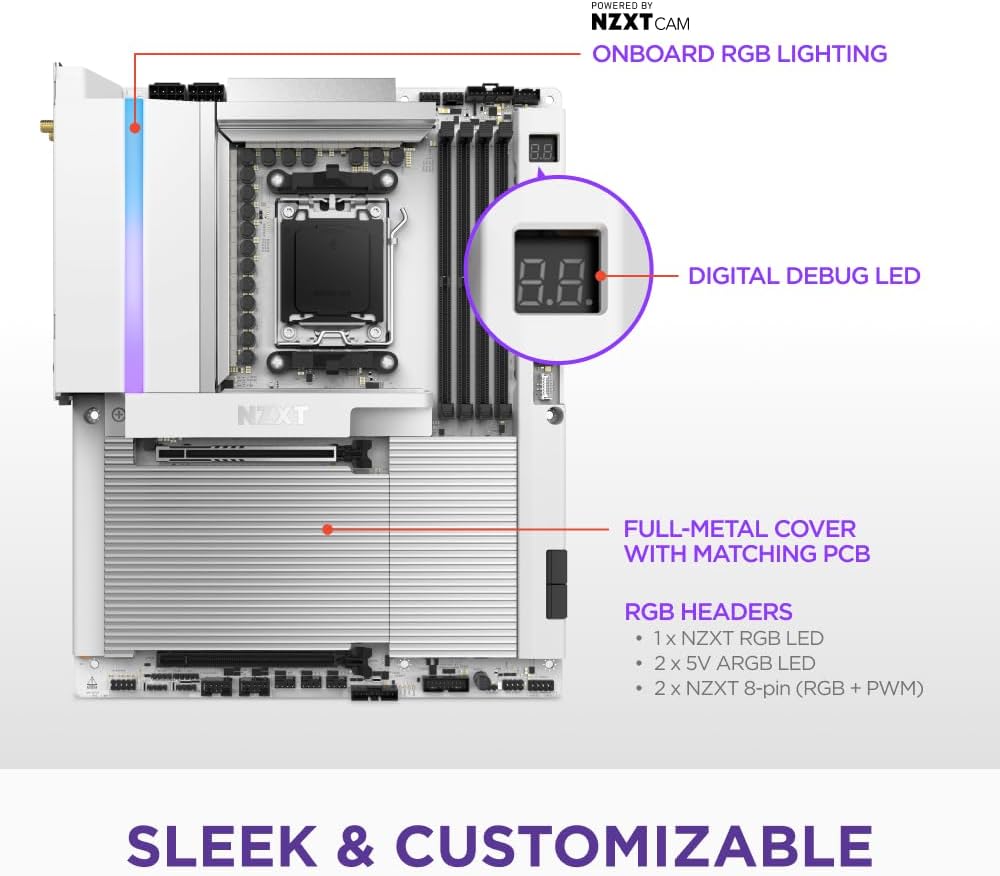
Figure 5.1: The NZXT N9 X870E motherboard showcasing its sleek design with a full-metal cover, customizable onboard RGB lighting, and a digital debug LED for system status.
6. Maintenance
Regular maintenance helps prolong the life and performance of your motherboard.
- Cleaning: Periodically clean dust from the motherboard and heatsinks using compressed air. Ensure the system is powered off and unplugged before cleaning.
- BIOS Updates: Check the NZXT support website regularly for the latest BIOS/UEFI updates. Updating the BIOS can improve system stability, compatibility, and performance. Follow the instructions provided by NZXT for the update process.
- Component Checks: Ensure all cables and components are securely seated. Loose connections can lead to system instability.
7. Troubleshooting
If you encounter issues, consider the following common troubleshooting steps:
- No POST/Display: Double-check all power connections (24-pin ATX, 8-pin CPU). Reseat RAM modules and the graphics card. Check the digital debug LED on the motherboard for error codes.
- System Instability: Ensure your BIOS is up to date. Verify RAM stability (e.g., disable XMP/EXPO to test). Check CPU and GPU temperatures.
- M.2 SSD Not Detected: Ensure the M.2 SSD is fully seated in its slot. Check BIOS settings to confirm M.2 slot detection.
- Connectivity Issues (Wi-Fi/Ethernet): Ensure antennas are securely connected for Wi-Fi. Check Ethernet cable connection. Update network drivers.
8. Specifications
Detailed technical specifications for the NZXT N9 X870E Motherboard:

Figure 8.1: An overview of the NZXT N9 X870E motherboard highlighting its 20+2+1 power phases, AM5 socket, 4 DDR5 DIMM slots, 4 M.2 slots with quick-release latches, and 2 expansion slots.
| Category | Specification |
|---|---|
| Brand | NZXT |
| Model Name | N9 X870E |
| Item Model Number | N9-X87XT-W1 |
| CPU Socket | Socket AM5 |
| Compatible Processors | AMD Ryzen™ 9000/ 8000 / 7000 Series |
| Chipset Type | AMD X870E |
| RAM Memory Technology | DDR5 |
| Memory Speed | 8200 MHz (OC) |
| M.2 Slots | 4 (1x PCIe 5.0 x4, 3x PCIe 4.0 x4) with Quick-Release Latches |
| PCIe Expansion Slots | 1x PCIe 5.0 x16, 1x PCIe 3.0 x16 |
| USB Ports | USB 4 (40 Gbps), USB 3.2 Gen 2, USB 3.2 Gen 1, USB 2.0 |
| Wireless Connectivity | Wi-Fi 7, Bluetooth 5.4 |
| Ethernet | 5GbE |
| Color | White |
| Form Factor | ATX |
| Item Weight | 5.62 pounds |
| Package Dimensions | 13.79 x 11.23 x 3.11 inches |
9. Warranty and Support
Your NZXT N9 X870E Motherboard comes with a manufacturer's warranty. For detailed information regarding warranty terms, technical support, and service, please visit the official NZXT support website or refer to the warranty card included in your package. Keep your proof of purchase for warranty claims.
