
Introduction
Thank you for choosing the Aroepurt BF-05 Flip Stand Wallet Phone Case. This product is designed to provide comprehensive protection and enhanced functionality for your FOXXD Foxx HTH S67 smartphone. It features a durable PU leather exterior, a soft TPU inner shell, integrated card slots, a convenient stand function, and includes a tempered glass screen protector for additional display safeguarding. This manual provides instructions for proper installation, usage, and maintenance.
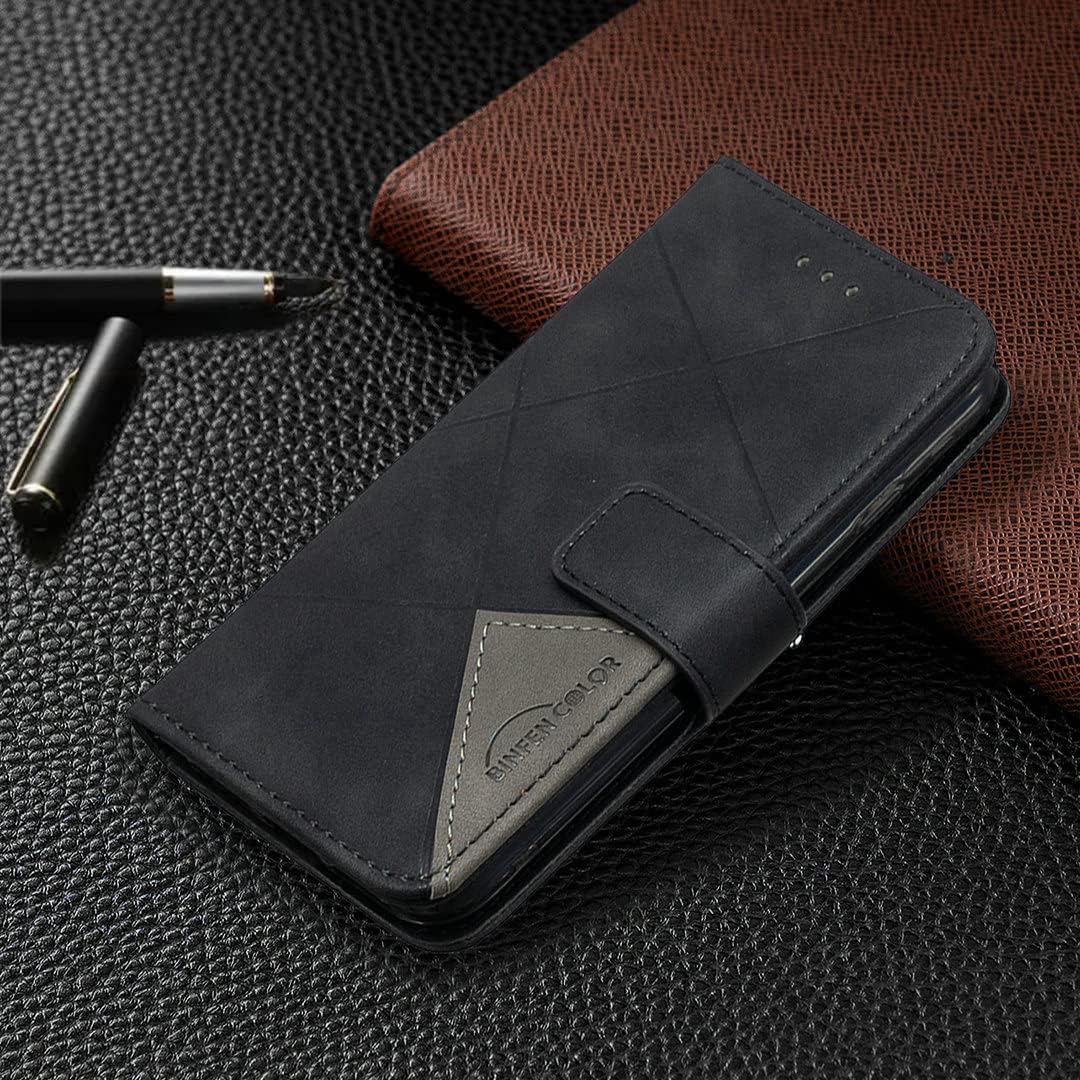
Image: The Aroepurt BF-05 Flip Stand Wallet Phone Case in its closed position, showcasing its sleek design and protective form factor.
What's Included
Please verify that all items are present in the package:
- 1 x Aroepurt BF-05 Flip Stand Wallet Phone Case
- 1 x Tempered Glass Screen Protector
Features
- Enhanced Protection: The case combines a thickened anti-drop design with a durable PU leather exterior and a soft TPU silicone inner shell, offering robust protection against drops, bumps, and scratches.
- Integrated Wallet Function: Features multiple card slots and a dedicated pocket for cash, allowing you to carry essential cards and money conveniently with your phone.
- Adjustable Stand Feature: The flip cover can be folded into a stable kickstand, providing multiple adjustable viewing angles for hands-free media consumption, video calls, or reading.
- High-Quality Materials: Crafted from premium PU leather with a contrasting color design and a flexible TPU inner case, ensuring a comfortable grip and a stylish appearance.
- Tempered Glass Screen Protector: Includes a high-hardness (9H) tempered glass screen protector that offers scratch resistance, shatterproof properties, and 99.9% transparency for optimal screen clarity and touch sensitivity.

Image: The interior of the phone case displaying three card slots and a larger pocket for cash, designed for convenient storage.

Image: A smartphone securely placed within the case, which is folded into a horizontal stand position for hands-free viewing.
Setup Instructions
1. Installing the Phone Case
- Ensure your FOXXD Foxx HTH S67 phone is clean and free of dust or debris.
- Gently insert your phone into the soft TPU inner shell of the case, starting with one side and then pressing the other side into place.
- Verify that all ports, buttons, and camera cutouts align correctly with your phone.
2. Installing the Tempered Glass Screen Protector
- Clean the Screen: Use the provided alcohol wipe to thoroughly clean your phone's screen. Follow with the microfiber cloth to dry and remove any lint or smudges. Ensure the screen is completely dry and dust-free.
- Align the Protector: Carefully peel off the protective film from the adhesive side of the tempered glass. Align the screen protector with your phone's screen, paying close attention to the edges, camera, and speaker cutouts.
- Apply the Protector: Once aligned, gently lower the protector onto the screen. It will begin to adhere automatically.
- Remove Bubbles: If any small bubbles appear, gently push them towards the edges of the screen using the microfiber cloth or a soft card.

Image: An illustration highlighting the key features of the tempered glass screen protector, including 9H high hardness, perfect adhesion, shatterproof, case friendly design, 99.9% super transparency, and anti-fingerprint properties.

Image: A demonstration of the screen protector's scratch-proof capability, showing a hammer impacting the glass without causing damage to the underlying screen.
Operating Instructions
Using the Stand Feature
To activate the stand function, simply fold the back cover of the case outwards and position it to support your phone at your desired viewing angle. This allows for hands-free viewing in landscape mode.
Using the Card Slots and Wallet Pocket
Insert your credit cards, ID cards, or other small items into the designated card slots. Use the larger pocket behind the card slots to store folded cash or notes. Ensure not to overfill the slots to maintain the case's slim profile and magnetic closure functionality.
Maintenance
Cleaning the Phone Case
- Wipe the PU leather exterior with a soft, damp cloth.
- For stubborn stains, use a mild soap solution and then wipe clean with a dry cloth.
- Avoid using harsh chemicals, abrasive cleaners, or solvents, as these can damage the material.
- The TPU inner shell can be cleaned with a damp cloth.
Cleaning the Tempered Glass Screen Protector
- Use a microfiber cloth to gently wipe away fingerprints and smudges.
- For deeper cleaning, a screen cleaner spray designed for electronics can be used. Apply to the cloth, not directly to the screen.
Troubleshooting
Case Does Not Fit My Phone
Ensure that your phone model is specifically the FOXXD Foxx HTH S67. This case is designed exclusively for this model. Check the packaging or product description for compatibility.
Bubbles Under Screen Protector
Small bubbles can often be smoothed out by gently pushing them towards the edges with a microfiber cloth. If large bubbles persist, it may indicate dust particles. Carefully lift a corner of the protector, remove any dust with a dust-absorber sticker, and reapply.
Stand Feature is Unstable
Ensure the case is folded correctly to form a stable triangular stand. The magnetic closure or specific grooves are designed to hold the stand in place. Adjust the angle until it feels secure.
Specifications
| Product Model | BF-05 |
| Compatible Phone Model | FOXXD Foxx HTH S67 |
| Material | PU Leather (Exterior), TPU Silicone (Inner Case), Tempered Glass (Screen Protector) |
| Color | Black (BF-05 Black variant) |
| Product Dimensions | 0.39 x 0.39 x 0.39 inches |
| Item Weight | 2.46 ounces |
| Special Features | Card insertion, Cash pocket, Flip Stand, Anti-drop design, Magnetic closure |
Warranty Information
Aroepurt products are manufactured to high-quality standards. For specific warranty details, including coverage and duration, please refer to the warranty information provided at the point of purchase or contact your retailer. Please retain your proof of purchase for any warranty claims.
Customer Support
If you encounter any issues or have questions regarding your Aroepurt BF-05 Phone Case or Tempered Glass Screen Protector, please contact the retailer from whom you purchased the product. For general inquiries, you may also visit the official Aroepurt website for potential support resources.