
1. Product Overview
This instruction manual provides detailed information on the Aroepurt Case Compatible for spectramobile Spectra J1 Pro Phone Case Cover, which includes a tempered glass screen protector. This product is designed to offer comprehensive protection for your device while enhancing its functionality and aesthetic appeal.

Image 1.1: Complete product kit including the phone case, ring stand, and tempered glass screen protector.
1.1. What's in the Box
- 1 x Phone Case
- 1 x Tempered Glass Screen Protector
2. Key Features
- Dual-Layer Protection: Constructed with a hard PC back panel and a soft silicone frame for enhanced durability and shock absorption.
- Shock Airbags: Features four-corner shock airbags designed to absorb impact from drops and bumps, providing superior protection.
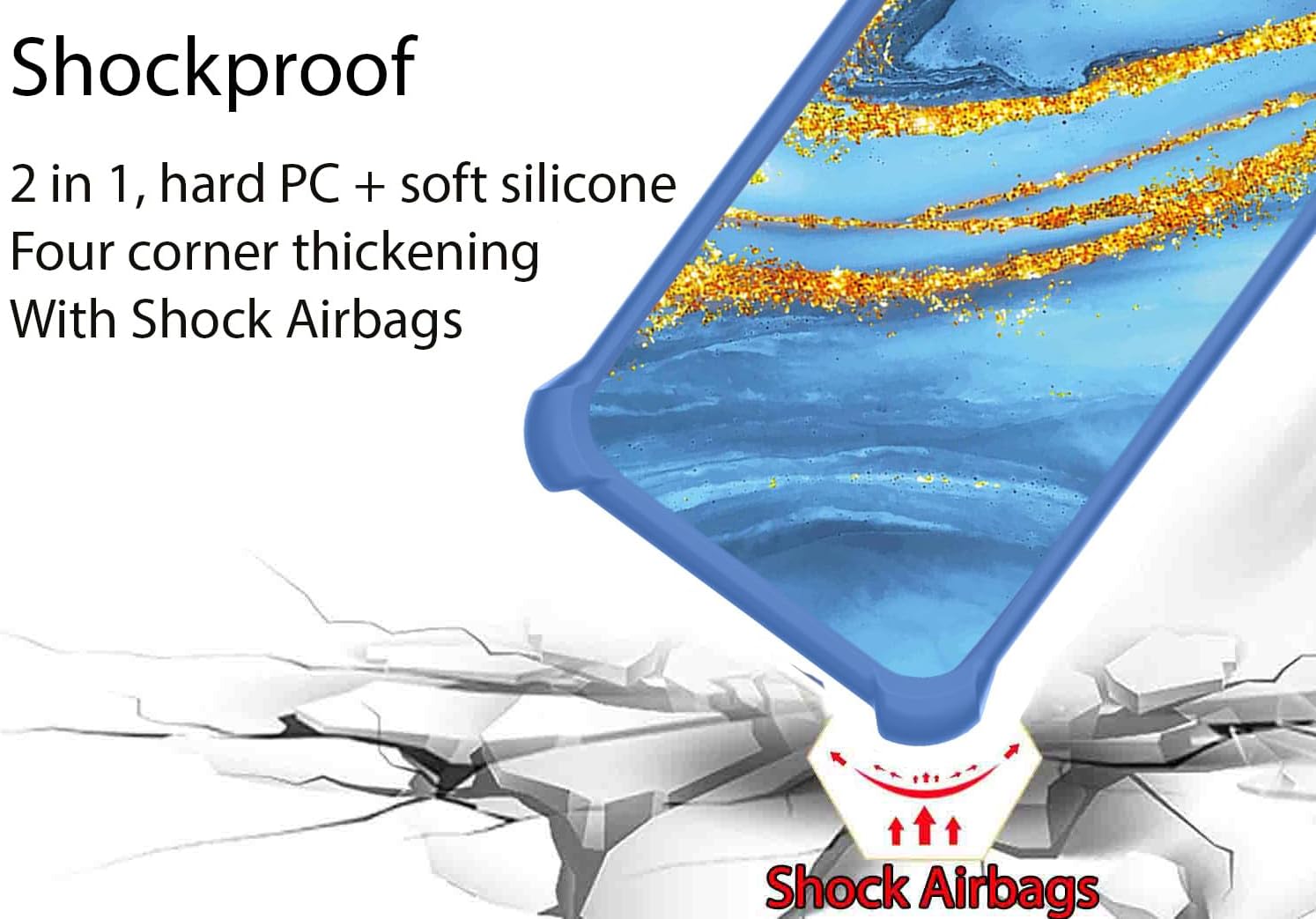
Image 2.1: Illustration highlighting the shock-absorbing airbags located at the corners of the phone case.
- Gold Glitter & Luminous Effect: The case incorporates a gold powder layer that produces a shining effect under light and sunlight, along with a luminous effect in dark environments due to light absorption.

Image 2.2: Diagram showing the multi-layered back panel construction, including the gold glitter and light-absorbing layers.
- Integrated Ring Support: An adhesive metal finger ring support is included, offering 360-degree rotation for comfortable grip and use as a kickstand. It also supports magnetic car mounts.
- Camera and Screen Protection: The case design ensures that it is higher than both the camera lens and the screen, providing elevated protection against scratches and direct impact on flat surfaces.
- High-Definition Pattern Layer: The back features an ultra-high definition pattern layer, protected by a clear and scratch-resistant surface layer.
2.1. Tempered Glass Screen Protector Features
- 9H High Hardness: Provides robust protection against scratches and impacts.
- Shatterproof Design: Engineered to resist shattering into sharp pieces upon impact.
- 99.9% Super Transparency: Ensures original screen clarity and brightness.
- Perfect Adhesion: Designed for a bubble-free installation and secure fit.
- Case Friendly: Specifically designed to be compatible with phone cases, preventing lifting or peeling.
- Anti-fingerprint: Features a coating to reduce smudges and fingerprints.

Image 2.3: Visual representation of the key features of the tempered glass screen protector.
- Scratch Proof: Effectively prevents sharp objects from scratching or abrading the screen.

Image 2.4: Demonstration of the screen protector's scratch-proof capabilities.
3. Setup and Installation
3.1. Installing the Phone Case
- Ensure your phone is clean and free of dust or debris.
- Align the phone with the case, starting with the top or bottom edge.
- Gently press the phone into the case, ensuring all corners and edges are securely fitted.
- Verify that all ports, buttons, and camera cutouts align correctly with the phone.
3.2. Installing the Tempered Glass Screen Protector
- Clean the Screen: Use a microfiber cloth to thoroughly clean your phone's screen, removing all dust, smudges, and fingerprints. Ensure no particles remain.
- Align the Protector: Carefully peel off the protective film from the adhesive side of the screen protector. Align the protector with your phone's screen, paying attention to the cutouts for the speaker and camera.
- Apply: Once aligned, gently lower the screen protector onto the screen. It will begin to adhere automatically.
- Remove Bubbles: If any bubbles appear, gently push them towards the edges of the screen using a soft cloth or a squeegee (not included).
4. Operating Instructions
4.1. Using the Ring Support
The adhesive metal finger ring support can be attached to the back of the phone case or used separately. It provides multiple functionalities:
- Secure Grip: Insert your finger through the ring for a more secure hold, reducing the risk of accidental drops.
- Kickstand Function: Rotate the ring to a desired angle to prop up your phone horizontally or vertically for hands-free viewing.
- One-Hand Operation: The ring allows for easier reach across the entire screen, improving one-handed usability.
Image 4.1: Illustration demonstrating improved one-hand reach with the use of the ring support.
4.2. Magnetic Car Mount Compatibility
The ring support features a metal plate that is compatible with magnetic car mounts (magnetic car mount not included). Simply attach your phone to a magnetic car mount for secure navigation or hands-free calls while driving.
Note: This product does not support wireless charging when the case is on or when the ring is attached, due to the metal component of the ring support.

Image 4.2: Depiction of the phone case with ring support being used with a magnetic car mount.
5. Maintenance and Care
- Cleaning the Case: To clean the phone case, gently wipe it with a soft, damp cloth. Avoid using harsh chemicals or abrasive cleaners, as these may damage the finish or the luminous/glitter effect.
- Cleaning the Screen Protector: Use a clean, dry microfiber cloth to wipe the screen protector. For stubborn smudges, a slightly damp cloth with water can be used, followed by drying with a clean cloth.
- Ring Support: Ensure the ring support is kept clean to maintain its smooth rotation. If it becomes loose over time, ensure it is securely re-adhered if it was applied separately.
- Storage: When not in use, store the case and screen protector in a clean, dry environment away from direct sunlight and extreme temperatures.
6. Troubleshooting
- Screen Protector Bubbles: If bubbles appear after installation, gently lift the nearest edge of the protector and re-apply, pushing the air out with a soft cloth. Small bubbles may disappear on their own within 24-48 hours.
- Case Fit Issues: If the case does not fit perfectly, ensure you have the correct model for your spectramobile Spectra J1 Pro phone. Double-check that the phone is fully seated within the case.
- Ring Support Looseness: If the ring support becomes loose, ensure the adhesive is clean and dry before re-applying pressure to secure it. If it was pre-attached, avoid excessive force that could damage the swivel mechanism.
- Luminous Effect Not Visible: The luminous effect requires exposure to light (sunlight or artificial light) to charge. Ensure the case is exposed to light for a period before expecting it to glow in the dark.
7. Specifications
| Feature | Detail |
|---|---|
| Product Dimensions | 0.39 x 0.39 x 0.39 inches |
| Item Weight | 2.46 ounces |
| ASIN | B0DZDFKSKM |
| Special Features | 360 Rotating Ring, Car Magnetic Fixing, Stylish Design |
| Form Factor | Basic Case |
| Color | JSL-LDL (Gold Glitter+Luminous) |
| Material | Hard PC + Soft Silicone |
| Manufacturer | GX2503-75 ARO-JS |
| Date First Available | March 5, 2025 |
8. Warranty and Support
For any questions, concerns, or support regarding your Aroepurt phone case and screen protector, please refer to the seller's contact information on the platform where the purchase was made. Please retain your proof of purchase for any warranty claims.
This product is designed for durability and protection. In case of manufacturing defects, please contact the seller for assistance.