
Introduction
The ORARAER Smart Biometric Safe LX-11 is designed to provide secure storage for your valuables while offering convenient features such as wireless charging and environmental monitoring. This manual provides detailed instructions for setup, operation, and maintenance to ensure optimal performance and security.
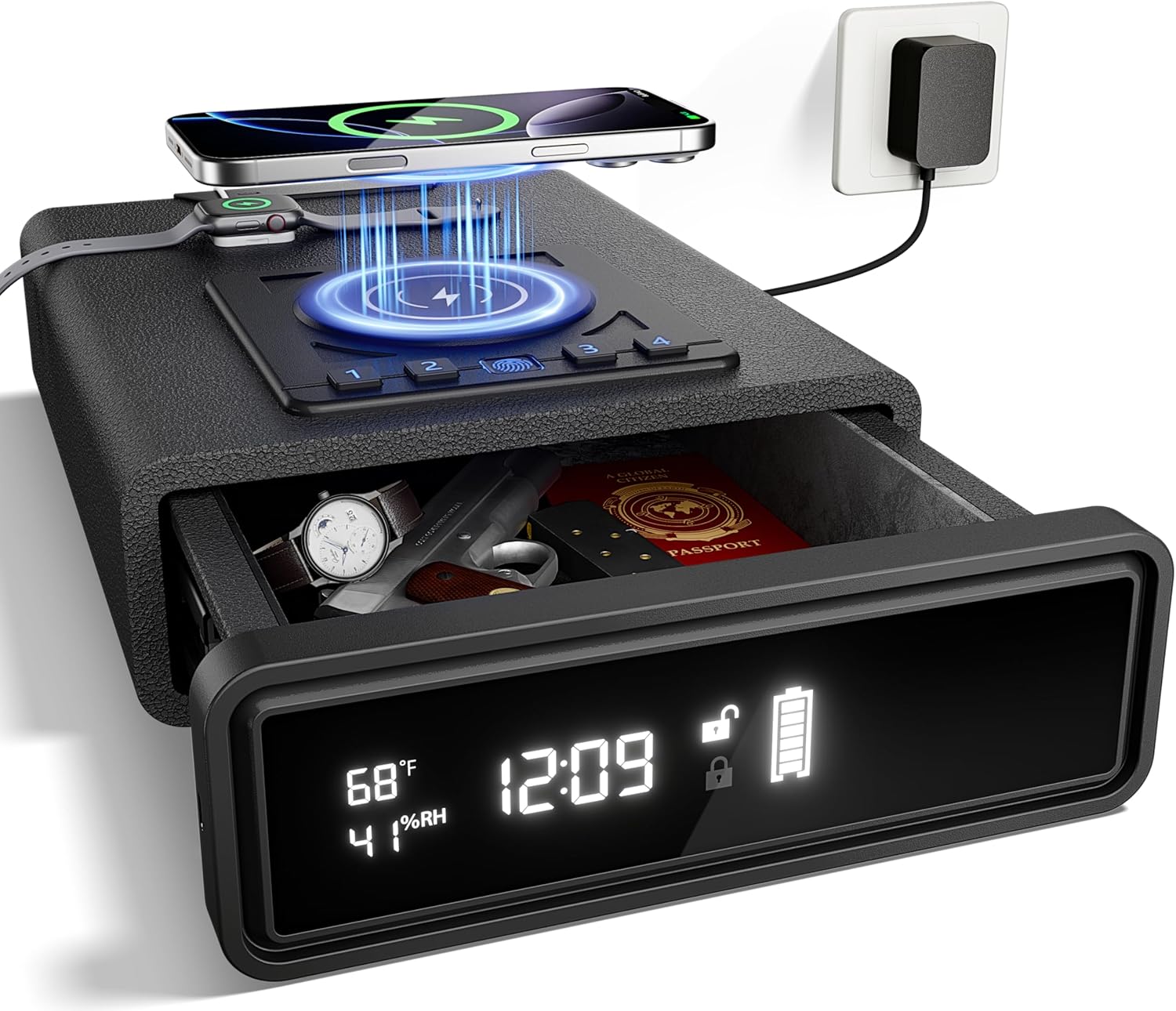
Image: The ORARAER Smart Biometric Safe LX-11, showcasing its wireless charging pad for a phone and smartwatch, and the open drawer revealing stored items like a watch, passport, and a firearm.
Key Features
- Wireless Charging: Simultaneously charge compatible phones and smartwatches. FCC-qualified for safe wireless charging.
- Smart LED Display: Continuously displays time, humidity, temperature, battery life, and lock status.
- Multiple Access Options: High-resolution fingerprint scanner (FAR < 0.02%, FRR < 2%, response < 500ms), 3-6 digit code, and two backup keys.
- Enhanced Functions: Alarm clock, clock format switch, screen luminance adjustment, power-saving or constant display mode.
- Access in the Dark & Silent Mode: Integrated LED light for visibility and silent mode activation by holding the "4" key.
- Spacious Capacity: Internal dimensions of 8.86"D x 7.28"W x 1.97"H, providing 0.71 cubic feet of secure storage.
Package Contents
Verify that all items listed below are included in your package:
- ORARAER Smart Biometric Safe LX-11
- AC Adapter
- Watch Charging Base
- User Manual
- Type-C Power Cord
- Steel Wire Rope
- Mounting Screws (x2)
- Expansion Tubes (x2)
- Backup Keys (x2)

Image: A visual representation of the safe's package contents, including the safe unit, AC adapter, watch base, manual, Type-C power cord, steel wire rope, screws, expansion tubes, and backup keys.
Setup Instructions
- Power Connection: Connect the provided AC adapter to the safe's power input and plug it into a wall outlet. The LED display will activate.
- Initial Unlock: Use one of the backup keys to open the safe for the first time. The keyhole is typically located discreetly on the front panel or side.
- Install Watch Charging Base: If applicable, attach the watch charging base to the designated area on the safe's top surface.
- Set Time and Date: Follow the on-screen prompts or refer to the display settings section to set the correct time and date.
- Register Fingerprints:
- With the safe open, locate the fingerprint registration button (refer to the diagram in the operating section).
- Press the button and follow the display instructions to scan your finger multiple times from different angles until registration is complete.
- You can register up to 30 fingerprints.
- Set Passcode:
- Locate the passcode setting button (refer to the diagram in the operating section).
- Enter a new 3- to 6-digit code and confirm it as per the display instructions.
- Mounting (Optional): If desired, use the provided steel wire rope or mounting screws and expansion tubes to secure the safe to a fixed object or surface.

Image: An illustration highlighting the external features and ports of the safe, such as the battery slot, key slot, USB interface, adapter connection, and security cable hole.
Operating Instructions
Unlocking the Safe
The safe offers three methods for quick and secure access:
- Fingerprint Unlock:
- Place a registered finger firmly on the fingerprint scanner.
- The safe will unlock within 0.25 seconds if the fingerprint is recognized.
- Passcode Unlock:
- Enter your 3- to 6-digit passcode using the keypad.
- Press the confirmation button (usually '#') after entering the code.
- Key Unlocking:
- Insert one of the backup keys into the keyhole.
- Turn the key to unlock the safe. This method is primarily for initial access or in case of battery depletion/forgotten codes.
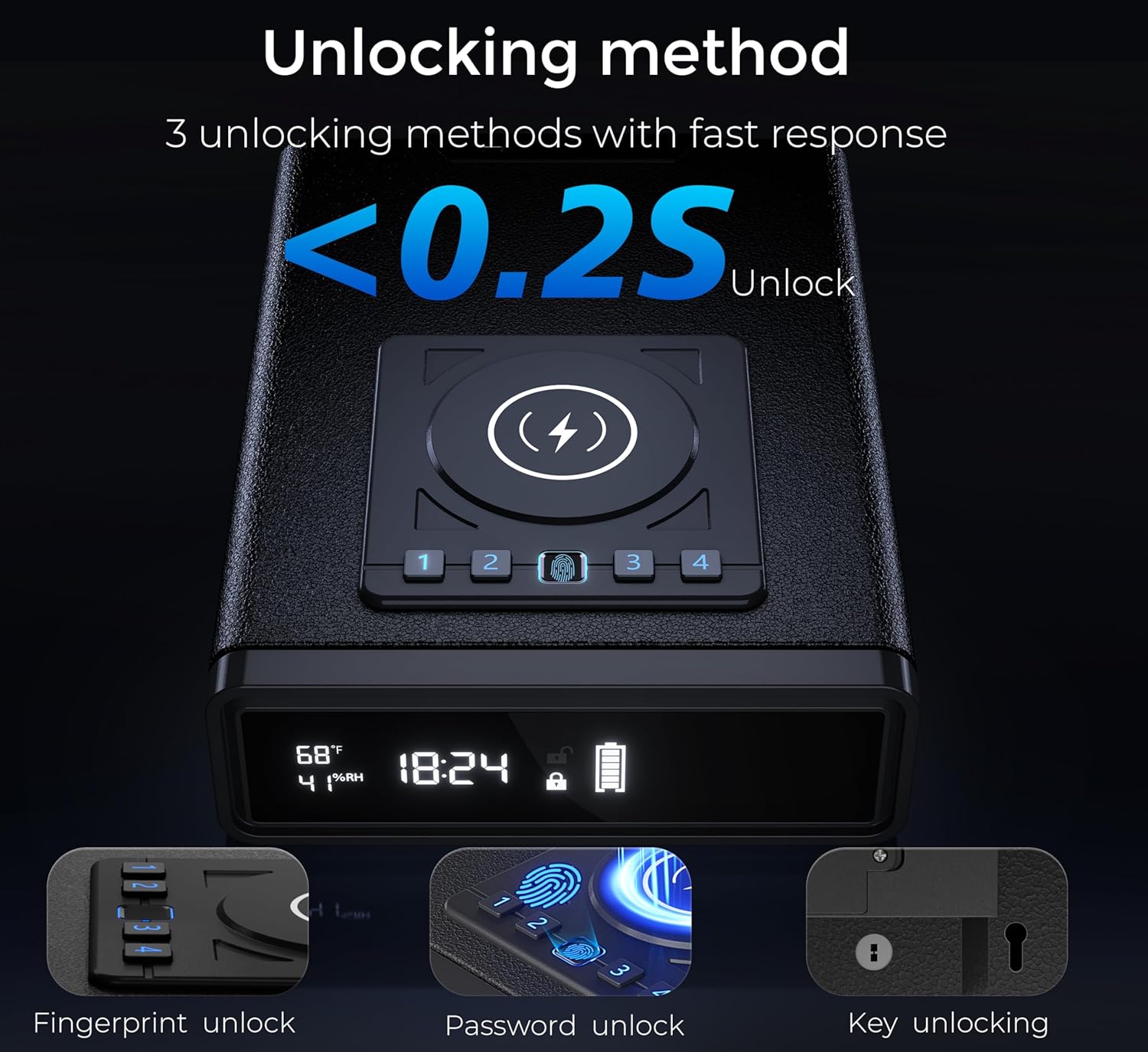
Image: A visual guide demonstrating the three secure unlocking methods: fingerprint recognition, numerical passcode entry, and traditional key access.
Wireless Charging
The top surface of the safe features a wireless charging pad for compatible devices.
- Place your wireless charging compatible smartphone on the designated charging area.
- Place your smartwatch on the installed watch charging base.
- Ensure devices are properly aligned for optimal charging. A charging indicator may appear on the safe's display or your device.
- Note: Phone cases may affect wireless charging efficiency.

Image: A smartphone and smartwatch are shown simultaneously charging wirelessly on the top surface of the safe, indicating its dual charging capability.
LED Display Functions
The 8.86" LED display provides real-time information and allows for various settings adjustments.
- Time Display: Shows current time. Can be switched between 12-hour and 24-hour formats.
- Humidity & Temperature Monitoring: Displays ambient humidity and temperature inside the safe.
- Battery Life Indicator: Shows the current battery level of the safe.
- Lock Status: Indicates whether the safe is locked or unlocked.
- Screen Luminance Adjustment: Adjust the brightness of the LED display.
- Power-saving / Constant Mode: Switch between a power-saving mode (display turns off after inactivity) and a constant display mode.
- Alarm Clock: Set and manage alarms directly from the display.

Image: A detailed view of the safe's LED display, clearly showing the time, temperature, humidity percentage, and battery icon, along with icons representing clock/alarm, screen luminance, humid-temp monitor, and constant/power-saving modes.
Silent Mode
To operate the safe without audible feedback:
- Press and hold the "4" key on the keypad until the display indicates silent mode activation.
- Repeat the process to deactivate silent mode.
Maintenance
- Cleaning: Wipe the exterior with a soft, damp cloth. Avoid abrasive cleaners or solvents.
- Fingerprint Sensor: Keep the fingerprint sensor clean and dry for optimal performance.
- Battery: While primarily powered by the AC adapter, ensure the internal battery (if applicable) is charged or replaced as needed to maintain functionality during power outages.
- Key Storage: Store backup keys in a secure location away from the safe.
Troubleshooting
| Problem | Possible Cause | Solution |
|---|---|---|
| Safe does not open with fingerprint. | Finger not properly placed, unregistered fingerprint, dirty sensor. | Ensure finger covers the sensor completely. Re-register fingerprint if needed. Clean the sensor. Try another registered finger or access method. |
| Wireless charging not working. | Device not compatible, misaligned, thick phone case, safe not powered. | Verify device compatibility. Realign device on the charging pad. Remove thick phone case. Ensure safe is connected to power. |
| LED display is blank or dim. | Power-saving mode active, power disconnected, luminance set too low. | Tap the display or press a button to wake from power-saving mode. Check power connection. Adjust screen luminance settings. |
| Cannot set or change passcode/fingerprint. | Incorrect procedure, safe not in programming mode. | Refer to the "Setup Instructions" for correct programming steps. Ensure the safe is open when attempting to program. |
Specifications
- Brand: ORARAER
- Model Number: LX-11
- Lock Type: Biometric, Digital Keypad, Key
- Color: BLACK
- Capacity: 0.71 Cubic Feet
- Material: Alloy Steel
- Mounting Type: Freestanding (Mounting hardware included for optional securing)
- Item Weight: 12.56 pounds (5.71 Kilograms)
- Product Dimensions: 12.8 x 9.4 x 3 inches
- Internal Dimensions: 8.86"D x 7.28"W x 1.97"H
- Wireless Charging: FCC-qualified for phone and smartwatch
- Display: 8.86" LED, real-time monitoring (time, humidity, temperature, battery, lock status)
- Fingerprint Sensor: FAR < 0.02%, DPI 500+, FRR < 2%, Response < 500ms
Warranty and Customer Support
The ORARAER Smart Biometric Safe LX-11 comes with a 1-year warranty from the date of purchase.
For any setup questions, inquiries, or technical assistance, please contact our dedicated customer support team. We are committed to assisting you within 48 hours to ensure your complete satisfaction.
Please visit the ORARAER Store on Amazon for more information or to contact support.