Important Safety Information
Please read all instructions before assembly and use of the Angelbliss 3D-Motion Electric Baby Swing. Keep this manual for future reference. Failure to follow these warnings and instructions could result in serious injury or death.
- WARNING: Never leave child unattended.
- WARNING: Stop using the product when the child attempts to climb out or reaches 19.8 lbs (9 kg), whichever comes first.
- WARNING: This product is not intended for prolonged periods of sleep. If your child falls asleep, move them to a firm, flat sleep surface such as a crib or bassinet.
- WARNING: Always use the restraint system. Adjust to fit snugly.
- WARNING: Do not use this product if it is damaged or broken.
- WARNING: Do not use accessories or replacement parts other than those approved by the manufacturer.
- Ensure the swing is placed on a flat, stable surface.
- Keep children and pets away from the swing during operation.
- Do not lift or move the swing with the child in it.
Product Overview
The Angelbliss 3D-Motion Electric Baby Swing is designed to provide a soothing and engaging environment for your infant. It features innovative motion technology, multiple speed settings, built-in sounds, and smart control options.

Figure 1: Angelbliss 3D-Motion Electric Baby Swing (Black)
This image displays the complete Angelbliss 3D-Motion Electric Baby Swing in black, featuring its ergonomic seat, sturdy base, and overhead toy bar with a plush toy.
Key Features:
- Innovative Patented 3D Swing Technology: Offers 6 parent-inspired motions with 4 speeds for gentle rocking.
- Customizable Motions: Allows personalization of soothing motions to suit individual baby preferences.
- Ergonomic Seat: Supports newborns up to 19.8 lbs (9 kg) with removable, machine-washable padding.
- Recline Position: Features 3-position recline for comfort during lounging, feeding, or play.
- Quiet Operation: Equipped with an ultra-quiet motor to avoid disturbing naps.
- 180° Rotation: Seat rotates 180 degrees, allowing you to face your child or optimize space without heavy lifting.
- Smart Control: Adjust settings via touch panel, remote control, or Bluetooth.
- Sound and Timer: Includes 10 melodies, 3 nature sounds, and 5 timer settings.
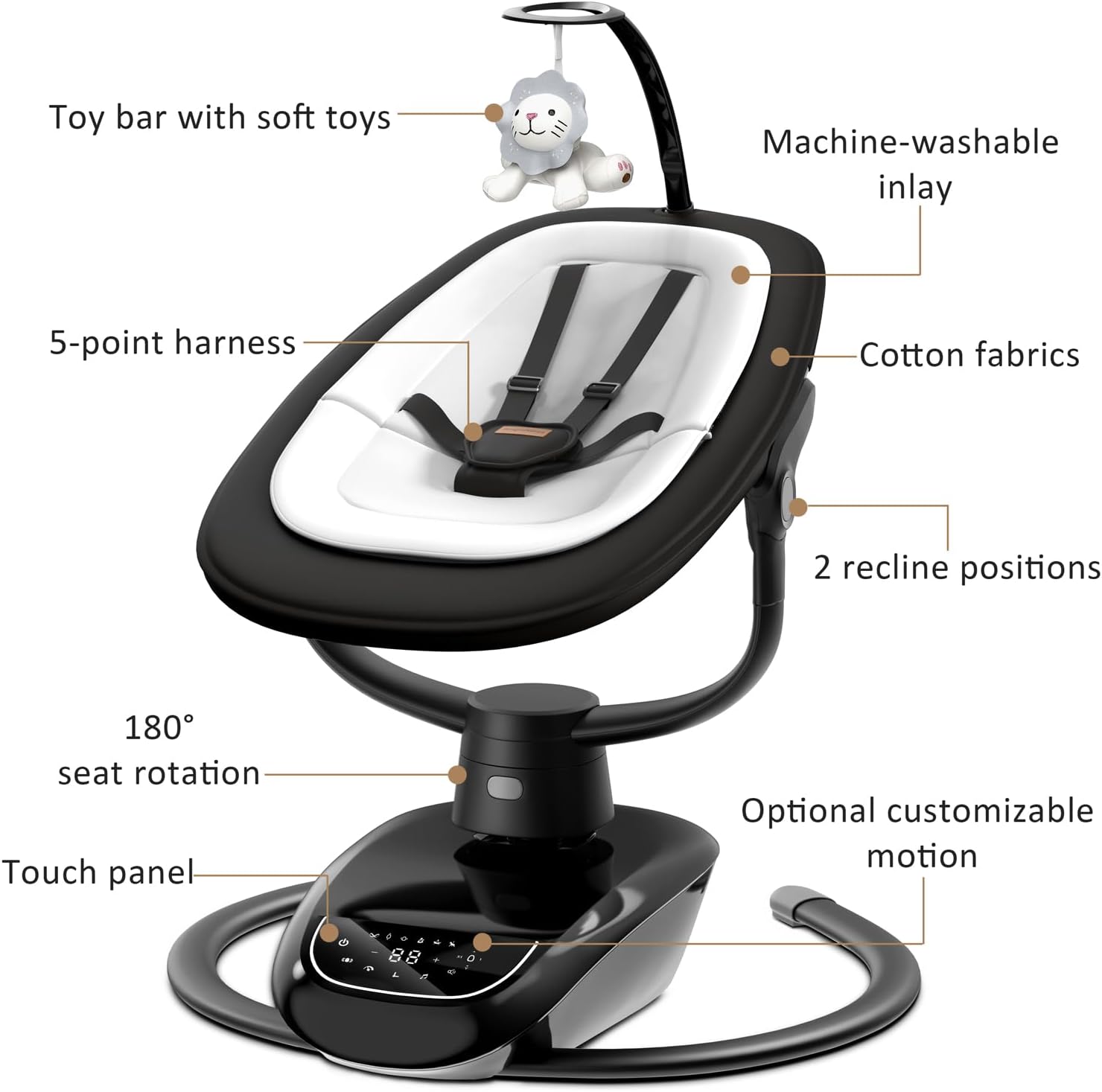
Figure 2: Key Components of the Angelbliss Baby Swing
This diagram labels the main parts of the swing, including the toy bar with soft toys, machine-washable inlay, 5-point harness, cotton fabrics, 2 recline positions, 180° seat rotation, touch panel, and optional customizable motion.
Assembly Instructions
Before assembly, ensure all parts are present and undamaged. Refer to the parts list provided in the packaging. Assembly is required.
- Unpack Components: Carefully remove all parts from the packaging and lay them out on a clean, flat surface.
- Assemble Base: Connect the two curved base supports to the central base unit. Ensure they click securely into place.
- Attach Seat Frame: Insert the seat frame into the central base unit. Listen for a click to confirm it is locked.
- Install Seat Pad: Place the ergonomic seat pad onto the seat frame. Secure it using the integrated fasteners.
- Secure Harness: Thread the 5-point harness straps through the designated slots in the seat pad and adjust for proper fit.
- Attach Toy Bar: Insert the toy bar into the slot at the top of the seat frame. Ensure it is firmly attached.
- Power Connection: Connect the power adapter to the swing and plug it into a suitable electrical outlet.

Figure 3: Base Assembly Detail
This image shows a close-up of the central base unit where the seat frame connects, illustrating the secure attachment mechanism.
Operating Instructions
The Angelbliss Baby Swing can be operated using the integrated touch panel or the included remote control. Bluetooth connectivity allows for additional control via a compatible device.
1. Powering On/Off
- Press the Power Button on the touch panel or remote control to turn the swing on or off.
2. Motion Settings
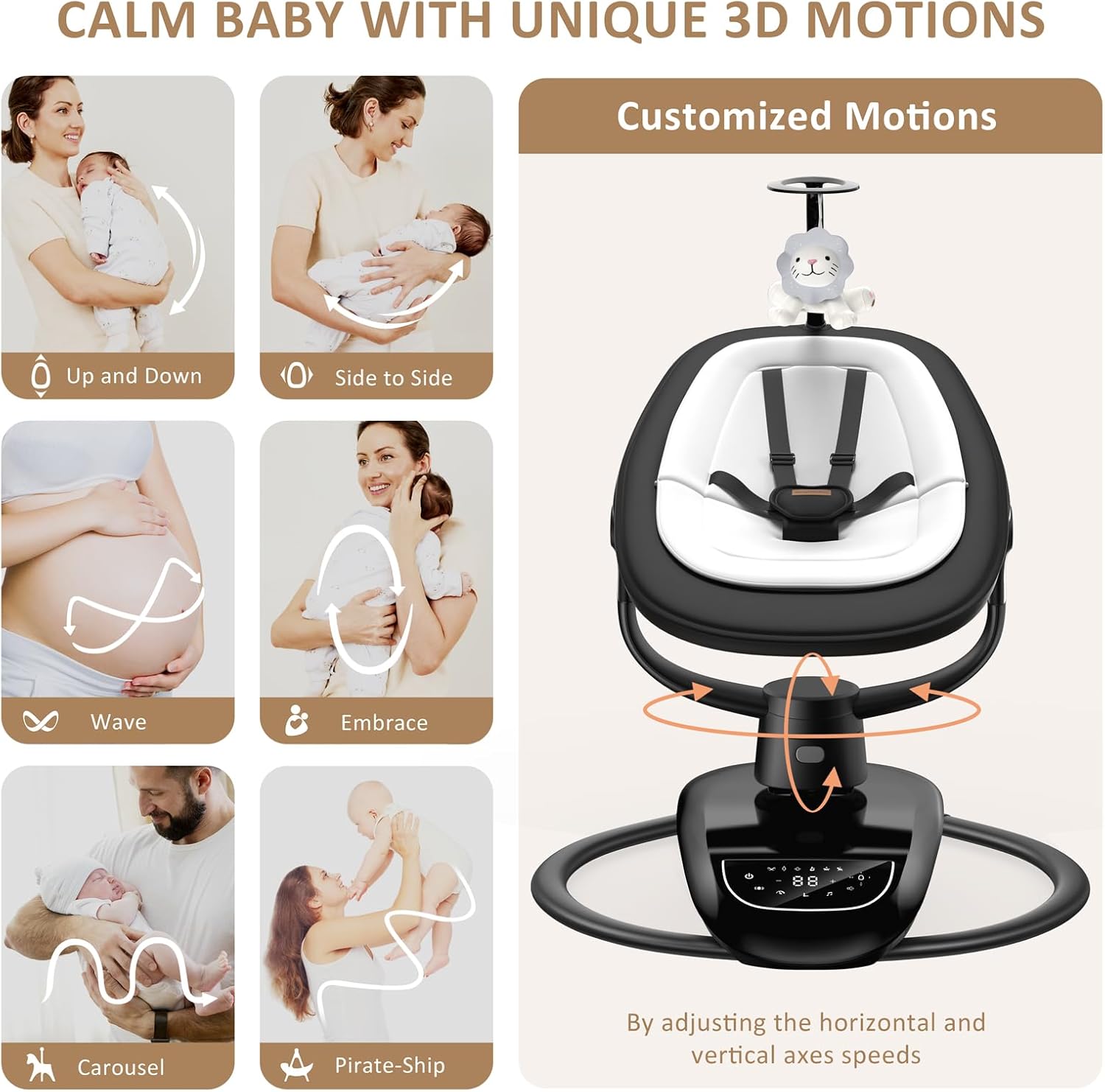
Figure 4: 3D Motion Types and Customization
This image displays the six distinct 3D motion patterns (Up and Down, Side to Side, Wave, Embrace, Carousel, Pirate-Ship) and explains how motions can be customized by adjusting horizontal and vertical axis speeds.
- Select Motion Type: Use the Motion Mode Button on the control panel or remote to cycle through the 6 unique 3D motions.
- Adjust Speed: Use the Speed +/- Buttons to select one of the 4 available swing speeds.
- 180° Seat Rotation: Manually rotate the seat to face different directions. This feature allows you to keep your child in view or optimize space.

Figure 5: 180° Seat Rotation
This image demonstrates the swing's ability to rotate its seat 180 degrees, providing flexibility in positioning the baby.
3. Sound and Music
- Preset Lullabies/Sounds: Press the Music Button to cycle through 10 melodies and 3 nature sounds.
- Adjust Volume: Use the Volume +/- Buttons to increase or decrease the sound level.
- Bluetooth Connectivity: Activate Bluetooth on the swing and your device. Pair your device to play custom audio through the swing's speakers.
4. Timer Settings
- Press the Timer Button to select from 5 preset timer durations. The swing will automatically stop after the selected time.

Figure 6: Control Panel Interface
This image provides a detailed view of the swing's touch control panel, showing icons for power, motion modes, speed, volume, music, and timer settings.
Care and Maintenance
Cleaning
- Seat Pad: The seat padding is removable and machine-washable. Use a gentle cycle with cold water and mild detergent. Air dry or tumble dry on low heat. Do not bleach.
- Frame and Plastic Parts: Wipe clean with a damp cloth and mild soap. Do not use abrasive cleaners or solvents.
- Toy Bar and Toys: Wipe with a damp cloth.

Figure 7: Removable Seat Padding
This image highlights the removable seat padding, indicating its ease of removal for cleaning.
Storage
- When not in use, store the swing in a clean, dry place away from direct sunlight and extreme temperatures.
- Ensure the swing is fully dry before storing to prevent mold or mildew.
Troubleshooting
| Problem | Possible Cause | Solution |
|---|---|---|
| Swing does not turn on. | No power connection; power adapter faulty. | Ensure power adapter is securely plugged into the swing and a working electrical outlet. Check for power outages. |
| Swing motion is weak or inconsistent. | Child exceeds weight limit; obstruction; low power. | Verify child's weight is within the 19.8 lbs (9 kg) limit. Check for any obstructions. Ensure stable power supply. |
| Sound/Music not playing. | Volume too low; Bluetooth not connected; incorrect mode. | Increase volume. Ensure Bluetooth is correctly paired if using external audio. Select the correct music/sound mode. |
| Remote control not working. | Batteries depleted; obstruction; out of range. | Replace remote control batteries. Ensure no obstructions between remote and swing. Operate within recommended range. |
Product Specifications
| Brand | ANGELBLISS |
| Model Number | BY083B |
| Color | Black |
| Product Dimensions | 27.76"D x 35.94"W x 28.15"H |
| Frame Material | Aluminum |
| Finish Type | Metallic and Fabric |
| Item Weight | 18.08 pounds (8.2 kg) |
| Maximum Child Weight | 19.8 lbs (9 kg) |
| Assembly Required | Yes |
Warranty and Support
For warranty information, technical support, or replacement parts, please contact ANGELBLISS customer service. Refer to the contact details provided with your product packaging or visit the official ANGELBLISS website.
You can also visit the official ANGELBLISS store on Amazon for more information: ANGELBLISS Store


