
Introduction
This manual provides instructions for the XINFUTE HUAYU RM-L890+ Universal Remote Control, designed as a replacement for various Toshiba LCD TV models. This remote control offers a convenient and ergonomic solution for managing your television functions. Please read this manual carefully to ensure proper setup and operation.
Setup
1. Battery Installation
The remote control requires two (2) AAA batteries (not included) for operation. Follow these steps to install the batteries:
- Locate the battery compartment on the back of the remote control.
- Slide the battery compartment cover downwards or outwards to open it.
- Insert two AAA batteries, ensuring the positive (+) and negative (-) terminals align correctly with the markings inside the compartment.
- Close the battery compartment cover by sliding it back into place until it clicks securely.
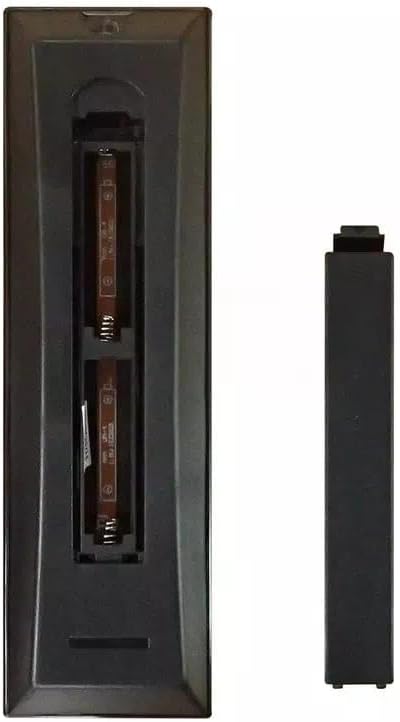
Image: Back view of the RM-L890+ remote control with the battery compartment open, illustrating the correct orientation for AAA battery insertion.
2. Initial Use
This remote control is designed as a universal replacement for specific Toshiba LCD TV models. In most cases, no programming is required. Simply install the batteries, point the remote at your TV, and begin using it. If the remote does not respond, ensure your TV model is listed in the compatibility section.
Operating Instructions
The RM-L890+ remote control features a standard layout for easy navigation of your Toshiba LCD TV. Below is a general overview of key button functions:

Image: Front view of the RM-L890+ remote control, displaying the full button layout.
- Power Button (⏻): Turns the TV on or off.
- Number Buttons (0-9): Directly select channels.
- Volume Up/Down (+/-): Adjusts the sound volume.
- Channel Up/Down (P+/P-): Changes channels sequentially.
- Mute Button (🔇): Mutes or unmutes the TV sound.
- Menu Button: Accesses the TV's main menu.
- Navigation Buttons (Up, Down, Left, Right, OK): Navigate through menus and confirm selections.
- Back/Exit Button: Returns to the previous screen or exits the current menu.
- Input/Source Button (TV): Selects different input sources (e.g., HDMI, AV).
- Subtitle Button: Toggles subtitles on or off.
- Guide Button: Displays the electronic program guide (if available).
- Media Control Buttons (Play, Pause, Stop, Rewind, Fast Forward, Skip): Controls media playback.
Compatible TV Models
This remote control is compatible with a wide range of Toshiba LCD TV models, including but not limited to:
- CT-90126, CT-90128, CT-9493, CT-9712, CT-9879
- CT-90146, CT-90163, CT-9507, CT-9730, CT-9880
- CT-90237, CT-90166, CT-9510, CT-9731, CT-9881
- CT-90252, CT-90198, CT-9511, CT-9734, CT-9911S
- CT-90128, CT-90199, CT-9545, CT-9736, CT-9914
- CT-90210, CT-9185, CT-9565, CT-9737, CT-9922
- CT-90230, CT-9186, CT-9573, CT-9931, CT-9760
- CT-90296, CT-9193, CT-9576, CT-9777, CT-9932
- CT-90229, CT-9199, CT-9584, CT-9778, CT-9942
- CT-8006, CT-9207, CT-9596, CT-9782, CT-9944
- CT-9289, CT-90287, CT-9599, CT-9784, CT-9968
- CT-90288, CT-9292, CT-9619, CT-9785, CT-9969
- CT-90298, CT-9293, CT-9621, CT-9785, CT-865, CT-9975
- CT-9335, CT-9623, CT-9787, CT-9992
- CT-849, CT-9340, CT-9626, CT-9801, CT-9995
- CT-848, CT-9347, CT-9630, CT-9818, CT-5900
- CT-871, CT-9359, CT-9632, CT-9840
- CT-90126, CT-7160, CT-9369, CT-9640, CT-9843
- CT-90142, CT-7180, CT-9381, CT-9642, CT-9844
- CT-9086, CT-90004, CT-9396, CT-9643, CT-9851
- CT-9200, CT-90013, CT-9430, CT-9665, CT-9852
- CT-9246, CT-90014
Maintenance
Cleaning the Remote
To clean the remote control, use a soft, dry cloth. For stubborn dirt, slightly dampen the cloth with water or a mild cleaning solution. Avoid using harsh chemicals or abrasive materials, as these can damage the remote's surface or internal components.
Battery Replacement
Replace the batteries when the remote control becomes unresponsive or its range decreases significantly. Always replace both batteries at the same time with new AAA batteries. Do not mix old and new batteries, or different types of batteries, as this can lead to leakage or malfunction.
Troubleshooting
- Remote not responding:
- Ensure batteries are installed correctly with the correct polarity.
- Replace old batteries with new ones.
- Ensure there are no obstructions between the remote control and the TV's infrared receiver.
- Confirm your TV model is listed as compatible.
- Buttons are sticky or unresponsive:
- Clean the remote control surface, especially around the buttons, to remove any dirt or residue.
- Limited range:
- Replace batteries.
- Ensure you are within a reasonable distance and line of sight to the TV.
Specifications
| Feature | Specification |
|---|---|
| Model Number | RM-L890+ |
| Product Dimensions | 6 x 3 x 1 inches |
| Item Weight | 2.82 ounces |
| Batteries Required | 2 AAA batteries (not included) |
| Compatible Devices | Toshiba LCD Televisions |
| Special Feature | Ergonomic design |
Warranty and Support
Warranty Information
This product comes with a one-year warranty from the date of purchase. This warranty covers manufacturing defects and ensures the product will function as intended under normal use. Please retain your proof of purchase for warranty claims.
Customer Support
If you encounter any issues or have questions regarding your XINFUTE HUAYU RM-L890+ Universal Remote Control, please contact our customer support. All goods are inspected before shipment. If you are not satisfied with your purchase, you may contact us within 24 hours of receipt for assistance.