
1. Introduction
Thank you for choosing the SIHOO Doro C500 Ergonomic Office Chair. This manual provides essential information for the safe and efficient use of your new chair. Please read these instructions carefully before assembly and use, and retain them for future reference. The SIHOO Doro C500 is designed to provide superior comfort and support for long hours of sitting, featuring advanced ergonomic adjustments.
2. Safety Information
- Do not stand on the chair.
- Do not use the chair if any parts are damaged or missing.
- Ensure all bolts and screws are securely tightened before use. Periodically check and re-tighten as necessary.
- The maximum recommended weight capacity for this chair is 135 kg (297 lbs).
- Keep children away from moving parts during adjustment.
- Use the chair on a level surface to prevent tipping.
3. Package Contents
Before beginning assembly, please verify that all components are present and undamaged. The package should include:
- Chair components (backrest, seat, armrests, base, casters, gas lift, headrest)
- Assembly tools (Allen wrench, etc.)
- Auxiliary parts (spare screws, washers)
- Gloves for assembly
- Instruction Manual
4. Setup and Assembly
The SIHOO Doro C500 chair is designed for straightforward assembly. Follow these steps carefully. It is recommended to assemble the chair on a soft, clean surface to prevent damage.
- Attach Casters to Base: Insert the five casters into the holes at the end of each leg of the chair base. Push firmly until they click into place.
- Insert Gas Lift: Place the gas lift cylinder into the center hole of the assembled base.
- Attach Mechanism to Seat: Align the seat mechanism with the screw holes on the underside of the seat cushion. Secure it with the provided screws and the Allen wrench. Ensure the front of the mechanism faces the front of the seat.
- Attach Armrests: Secure the armrests to the seat mechanism using the designated screws. Note that some users have reported minor alignment challenges; ensure screws are loosely fitted before fully tightening to allow for minor adjustments.
- Attach Backrest: Connect the backrest to the seat assembly. Align the backrest frame with the mounting points on the seat mechanism and secure with screws.
- Attach Headrest: Slide the headrest into the top of the backrest frame.
- Connect Seat to Gas Lift: Carefully place the assembled seat and backrest onto the gas lift cylinder, ensuring it is centered.


5. Operating Instructions and Adjustments
The SIHOO Doro C500 offers multiple adjustment options to customize your seating experience. All primary controls are conveniently located under the seat.
5.1. Seat Height Adjustment
To adjust the seat height, pull the lever located on the right side under the seat upwards while taking your weight off the chair to raise it, or while sitting on it to lower it. Release the lever at your desired height.
5.2. Reclining Function
The chair features a 3-stage reclining function, allowing adjustment up to 135 degrees. Use the lever on the left side under the seat to engage or disengage the recline lock. Push the lever down to lock the recline at your desired angle (105°, 120°, or 135°), and pull it up to unlock and recline freely.

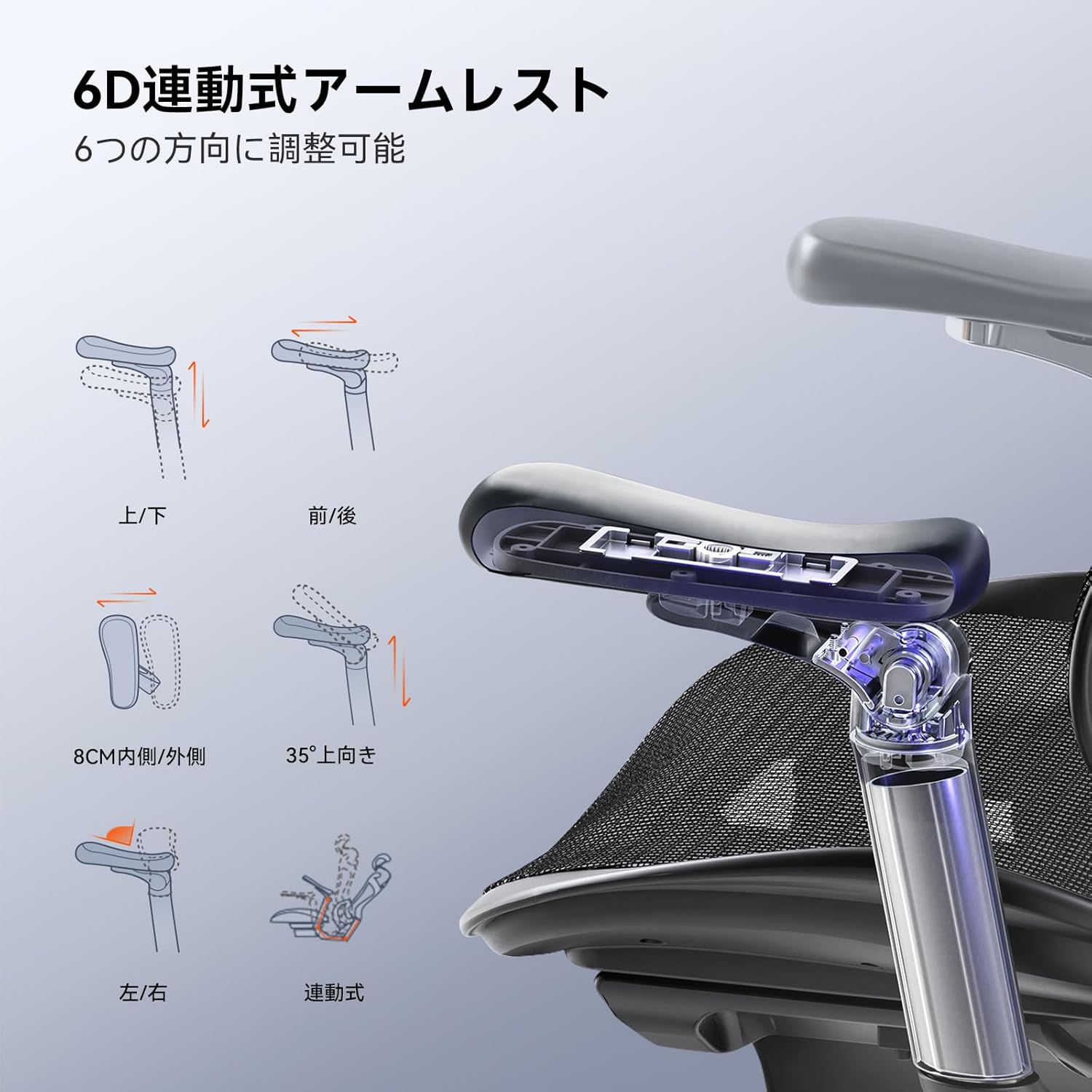
5.3. 6D Linked Armrests
The 6D armrests provide extensive adjustability to suit various postures and body types. They can be adjusted in six directions:
- Up/Down: Adjust height by 6.5 cm.
- Front/Back: Slide forward or backward by 5 cm.
- Left/Right Rotation: Rotate the armrest pads up to 75°.
- Tilt Angle: Tilt the armrest pads upwards by 35°.
- Inward/Outward: Adjust the width by 8 cm.
- Linked Movement: The armrests move in conjunction with the backrest when reclining.

5.4. 3D Headrest Adjustment
The 3D headrest is designed to support your neck comfortably. It can be adjusted in multiple ways:
- Height Adjustment: Move the headrest up or down by 4.5 cm.
- Depth Adjustment: Adjust the depth by 25°.
- Angle Adjustment: Tilt the headrest forward or backward by 45°.

5.5. Automatic Adaptive Lumbar Support
The SIHOO Doro C500 features a unique 'domino' automatic adaptive lumbar support system. This system automatically adjusts to your lower back as you recline, providing continuous support and reducing pressure. The backrest itself also offers 4-stage height adjustment to align the lumbar support with your spine's natural curve.

5.6. Seat Depth Adjustment
The seat depth can be adjusted to accommodate different leg lengths. Use the lever located on the left side under the seat (often combined with the recline lever or a separate lever nearby) to slide the seat forward or backward. Adjust until your back is fully supported by the backrest and there is a comfortable gap between the edge of the seat and the back of your knees.
5.7. Integrated Control Levers
The SIHOO Doro C500 features an intuitive control system where seat height, recline angle, and seat depth adjustments are consolidated for easy access and operation.

6. Maintenance
Regular maintenance will prolong the life and appearance of your SIHOO Doro C500 chair.
- Cleaning Mesh Fabric: Use a soft brush or vacuum cleaner to remove dust and debris from the mesh backrest and seat. For stains, gently wipe with a damp cloth and mild soap, then blot dry. Avoid harsh chemicals.
- Cleaning Frame and Base: Wipe metal and plastic parts with a soft, damp cloth.
- Casters: Periodically clean hair and debris from the casters to ensure smooth movement.
- Fasteners: Check all screws and bolts every few months and re-tighten if necessary to maintain stability.
7. Troubleshooting
If you encounter any issues with your SIHOO Doro C500 chair, refer to the following common problems and solutions:
| Problem | Possible Cause | Solution |
|---|---|---|
| Chair does not adjust height | Gas lift malfunction or lever not engaged. | Ensure the height adjustment lever is fully pulled. If the issue persists, the gas lift may need replacement. Contact support. |
| Chair wobbles or is unstable | Loose screws or uneven floor. | Check and tighten all assembly screws. Ensure the chair is on a flat, even surface. |
| Armrests are loose or difficult to adjust | Loose fasteners or debris in the mechanism. | Tighten the screws securing the armrests. Clean any visible debris from the adjustment mechanisms. |
| Recline function is stiff or not locking | Recline mechanism needs lubrication or is obstructed. | Check for any obstructions. Apply a silicone-based lubricant to the moving parts of the recline mechanism if accessible. |
| Casters not rolling smoothly | Hair or debris caught in casters. | Remove any hair or debris from the caster wheels. |
If you are unable to resolve an issue using these steps, please contact SIHOO customer support for assistance.
8. Specifications
- Brand: SIHOO
- Model: Doro C500 (C500-M101-JT-JP, A3-C500)
- Color: Black (Urusu Black)
- Material: Polypropylene, High-elasticity Mesh
- Product Dimensions (D x W x H): 117 cm x 75 cm x 65 cm (46.1 x 29.5 x 25.6 inches)
- Item Depth: 117 cm
- Chair Backrest Width: 54.2 cm
- Seat Depth: 45.1 cm
- Seat Height: 56.7 cm
- Backrest Interior Height: 72.6 cm
- Item Weight: 16.5 kg (36.4 lbs)
- Maximum Recommended Weight: 135 kg (297 lbs)
- Special Features: 3D Headrest, 6D Armrests, Ergonomic Design, 3-stage Reclining (up to 135 degrees), High-elasticity Mesh
- Reclining Stages: 3
- Height Positions: 2 (for seat height adjustment)
- Assembly Required: Yes
- Usage: Indoor
- Country of Origin: China
9. Warranty and Support
The SIHOO Doro C500 office chair comes with a 3-year quality guarantee from the date of purchase. This warranty covers manufacturing defects and ensures the product meets our quality standards.
If you encounter any product defects, have questions, or require assistance, please do not hesitate to contact our customer support team. Our dedicated Japanese support team is available to provide prompt and courteous assistance.
For support, please visit the SIHOO store on Amazon or refer to the contact information provided with your purchase documentation.


