Introduction
This manual provides detailed instructions for the assembly, operation, and maintenance of your YITAHOME Farmhouse Lift Top Coffee Table. Designed for versatility and convenience, this coffee table features a lift-top mechanism, hidden storage compartments, and an integrated charging station with USB ports. Please read thoroughly before beginning assembly or use to ensure proper setup and safe operation.
Safety Information
Warning:
- Use caution when operating the lifting mechanism to avoid pinch points.
- Do not exceed the weight limits of 220 pounds (approximately 100 kg) when the desktop is closed, and 50 pounds (approximately 22.7 kg) when the desktop is raised.
- Always secure the lifting top when in use, especially with heavy items on top, to prevent tipping.
- Ensure all screws and fasteners are securely tightened before and during use.
- Keep children and pets away from the table during assembly and when operating the lift-top mechanism.
Package Contents
Before assembly, ensure all parts are present and undamaged. If any parts are missing or damaged, please contact YITAHOME customer support.
- Table Panels (various sizes for base, sides, and top)
- Lift-Top Mechanism (metal elevating device)
- Charging Station (with 2 AC outlets, 2 USB ports, and 1 Type-C port)
- Power Cord Hole Grommet
- Hinges (for flip-top storage)
- Hardware Pack (screws, dowels, cam locks, etc.)
- Assembly Guide
- Installation Tool (e.g., Allen wrench, screwdriver)

Figure 1: Overview of all package contents.
Assembly Instructions
Follow these steps carefully for proper assembly. It is recommended to have two people for certain steps.
Video 1: Step-by-step assembly guide for the YITAHOME Farmhouse Lift Top Coffee Table.
- Prepare Base Panels: Lay out the bottom panel and two side panels. Insert the cam dowels into the designated holes on the edges of the bottom panel. (Refer to video 0:08 - 0:16)
- Attach Side Panels: Align the side panels with the bottom panel, ensuring the cam dowels fit into the corresponding holes. Secure them by inserting and tightening the cam locks. (Refer to video 0:17 - 0:29)
- Install Inner Divider: Insert the inner divider panel into the pre-drilled holes on the bottom panel and secure it to the side panels using cam locks. (Refer to video 0:30 - 0:40)
- Insert Cable Grommet: Place the cable management grommet into the circular opening on the designated side panel. (Refer to video 0:41 - 0:45)
- Attach Remaining Side Panels: Attach the remaining side panels and the top frame pieces, securing them with cam locks and screws as shown. (Refer to video 0:46 - 1:09)
- Mount Charging Station: Carefully insert the charging station into the rectangular cutout on the side panel and secure it with the provided screws. Ensure the power cord is routed through the cable grommet. (Refer to video 1:10 - 1:17)
- Install Lift Mechanism: Attach the metal lift-top mechanisms to the inside of the table frame using the specified screws. Ensure they are securely fastened and operate smoothly. (Refer to video 1:18 - 1:32)
- Attach Table Tops: Secure the two table top panels to the lift mechanisms and the fixed hinges. The larger panel attaches to the lift mechanism, and the smaller panel attaches with standard hinges to allow access to the hidden compartment. (Refer to video 1:33 - 1:47)
- Final Check: Verify all connections are tight and the lift-top mechanism operates correctly.
Operating Instructions
Lift-Top Function
To raise the tabletop, gently pull the front edge of the larger top panel upwards. The spring-loaded mechanism will assist in lifting it to a comfortable height for working or dining. To lower, gently push the tabletop down until it rests securely in its original position. Ensure no objects are obstructing the mechanism during operation.

Figure 2: The lift-top in its raised position, ideal for work or dining.
Charging Station
The integrated charging station includes 2 standard AC power outlets, 2 USB-A ports, and 1 USB-C port. Plug the table's power cord into a wall outlet. You can then connect your electronic devices (laptops, phones, tablets, etc.) directly to the charging station for convenient power access.

Figure 3: The convenient charging station for your devices.
Hidden Storage
The table features two large hidden storage compartments beneath the lift-top and the hinged flip-top. Lift the respective top panels to access space for blankets, pillows, books, remotes, and other items, helping to keep your living area tidy.

Figure 4: Hidden storage compartments for organization.
Maintenance
To ensure the longevity and appearance of your coffee table, follow these simple maintenance guidelines:
- Cleaning: Wipe with a soft, damp cloth. Avoid using harsh chemicals or abrasive cleaners, as they may damage the finish.
- Spills: Promptly clean up any spills to prevent staining, especially on the wood surfaces.
- Heat and Moisture: Avoid placing hot items directly on the surface. Use coasters for drinks to prevent water rings.
- Tighten Fasteners: Periodically check and tighten all screws and fasteners to maintain stability.
- Mechanism Care: The lift mechanism is designed for durability. Avoid forcing it or placing excessive weight on the raised top.
Troubleshooting
If you encounter any issues with your coffee table, refer to the following common problems and solutions:
- Lift-Top Mechanism is Stiff or Uneven:
- Ensure all screws securing the lift mechanism are properly tightened.
- Check for any obstructions or debris within the mechanism.
- Apply a small amount of silicone-based lubricant to the moving parts if necessary (avoid oil-based lubricants).
- Charging Station Not Working:
- Verify that the table's power cord is securely plugged into a functional wall outlet.
- Check if the wall outlet itself is receiving power (test with another device).
- Ensure devices are properly connected to the USB ports or AC outlets.
- Table Feels Wobbly:
- Re-tighten all assembly screws, especially those connecting the side panels and base.
- Ensure the table is placed on a flat, even surface.
Specifications
| Feature | Detail |
|---|---|
| Brand | YITAHOME |
| Model Name | MAYIHCfVfE |
| Product Dimensions (D x W x H) | 31.5"D x 31.5"W x 19.7"H (80cm x 80cm x 50cm) |
| Item Weight | 54.23 Pounds (24.6 kg) |
| Maximum Weight Recommendation (Closed) | 220 Pounds (100 kg) |
| Maximum Weight Recommendation (Raised) | 50 Pounds (22.7 kg) |
| Color | Pure White |
| Material Type | Engineered Wood, Plastic, Metal |
| Style Name | Farmhouse |
| Table Design | Coffee Table with Lift Top and Storage |
| Charging Station | 2 AC Outlets, 2 USB-A Ports, 1 Type-C Port |
| Indoor/Outdoor Usage | Indoor |
| Product Care Instructions | Wipe with cloth |
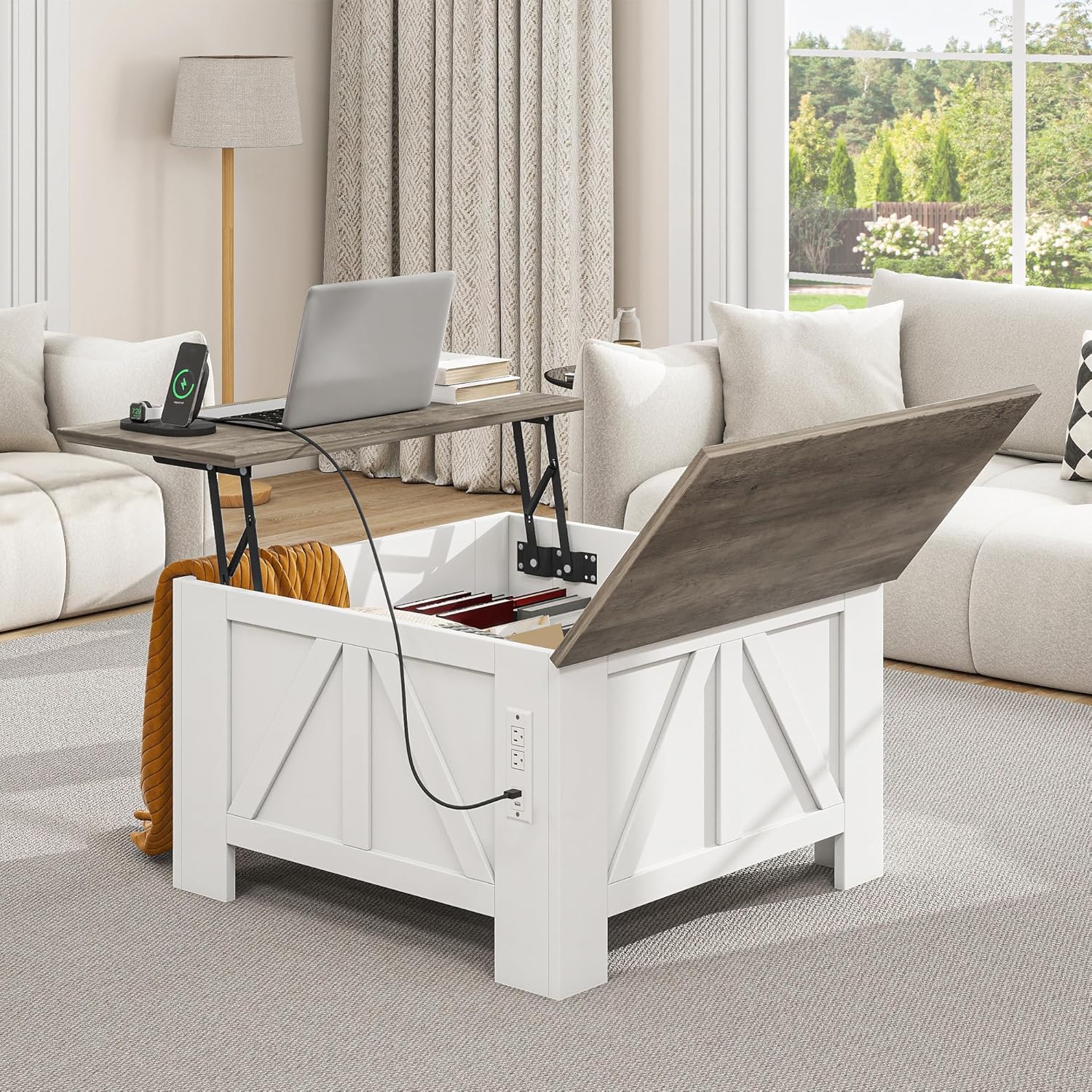
Figure 5: Detailed product dimensions.
Warranty and Support
YITAHOME stands behind the quality of its products. For any warranty claims, missing parts, or technical support, please contact YITAHOME customer service directly. Refer to the contact information provided with your purchase or visit the official YITAHOME website for assistance.
Website: YITAHOME Official Store


