1. Important Safety Information
Please read all instructions carefully before assembly and use. Retain this manual for future reference.
- Weight Limit: Do not exceed the desktop weight limit of 100.53 pounds (45.6 kg). Overloading can cause instability and damage.
- Assembly: Ensure all components are securely assembled before use. Loose parts can lead to injury or product failure.
- Electrical Safety: Keep power outlets and LED lights away from water and other potential hazards. Do not use in wet environments.
- Power Cord: Ensure the 6.56ft power cord is not pinched or damaged during assembly or use.
- Ventilation: Do not block ventilation openings on electrical components.
- Children: Keep small parts and packaging materials away from children during assembly.
- Tools: Use appropriate tools as recommended in the assembly instructions.
2. Product Overview
The DWVO L Shaped Desk is designed for home office and gaming environments, offering a spacious work area combined with integrated storage and modern features. This desk includes a convenient charging station, smart LED lighting, and ample storage solutions.
Key Features:
- Convenient Charging Station: Features 2 USB ports and 4 power outlets with a 6.56ft power cord for charging various devices.
- Smart LED Light Strips: RGB LED lighting controllable via a phone app or switch, offering customizable colors, music sync, and timer functions.
- L-Shaped Design with Storage: Combines a computer desk with file cabinets, including 1 file drawer (for letter, A4, legal size files), 2 utility drawers, and 4 open storage shelves.
- Integrated Printer Stand: A dedicated space for printers, scanners, or other office machines.
- Sturdy Construction: Made from high-grade P2 MDF board with a scratch-resistant finish and a heavy-duty metal frame (1.57" x 0.78") for stability and durability.
- Monitor Elevation Stand: Designed to promote a correct and comfortable sitting posture.
3. Package Contents
Before beginning assembly, please verify that all parts listed below are present and undamaged. If any parts are missing or damaged, please contact customer support.
- 1 x L Shaped Desk (components)
- 1 x Packet of Fittings (screws, dowels, connectors, etc.)
- 1 x Instructions Manual (this document)
- Assembly Tools (e.g., screwdriver)
Note: The L shaped computer desk comes in 2 packages, which might not arrive at the same time.
4. Setup and Assembly Instructions
Assembly is required for this product. It is recommended that two people assemble the desk to ensure safety and ease of construction. A screwdriver is recommended for assembly, and basic tools are included in the fittings packet.
General Assembly Steps:
- Unpack and Identify Parts: Carefully unpack all components and lay them out on a clean, soft surface to prevent scratches. Identify each part using the labels and the included parts list.
- Assemble Base Structures: Begin by assembling the main frame and the side storage units (shelves and drawer cabinets) according to the detailed diagrams in the included manual.
- Install Drawers: Assemble the three drawers (two utility, one file drawer) and install the drawer glides into the cabinet. Ensure smooth operation.
- Attach Desktop and Monitor Stand: Secure the desktop panels and the elevated monitor stand to the assembled base structures.
- Install Power Outlets and LED Lights: Mount the power strip with USB ports and AC outlets in the designated area. Attach the LED light strips to the underside of the monitor stand or other specified locations.
- Final Checks: Ensure all screws are tightened, and the desk is stable. Place the desk in its desired location, ensuring adequate space for movement and cable management.

Figure 4.1: Desk Dimensions and Component Layout

Figure 4.2: Drawer Assembly and Storage Options
Video 4.1: Assembly overview for the DWVO L Shaped Desk. This video demonstrates key steps in putting together the desk components, including the frame, storage units, and desktop.
5. Operating Instructions
5.1. Power Outlets and USB Ports
The desk is equipped with a built-in power strip for convenient device charging and power supply.
- Connection: Plug the desk's 6.56ft power cord into a standard wall outlet.
- AC Outlets: Use the 4 AC outlets (120V/12A) to power your computer, monitor, printer, or other office equipment.
- USB Ports: Use the 2 USB ports (5V/2A) to charge smartphones, tablets, or other USB-powered devices.
- Safety: Do not overload the power strip. Ensure devices are compatible with the provided voltage and current.

Figure 5.1: Integrated Power Outlets and USB Ports
5.2. LED Lights
The desk features RGB LED light strips to enhance your workspace ambiance.
- Control: The LED lights can be controlled via a dedicated light strip switch or a smartphone application. Refer to the separate LED light manual (if provided) for app download and pairing instructions.
- Customization: Use the app to customize colors, adjust brightness, and select from various lighting modes.
- Music Sync: Some modes allow the lights to sync with music, creating a dynamic visual experience.
- Timer Function: Set timers for the lights to turn on or off automatically.
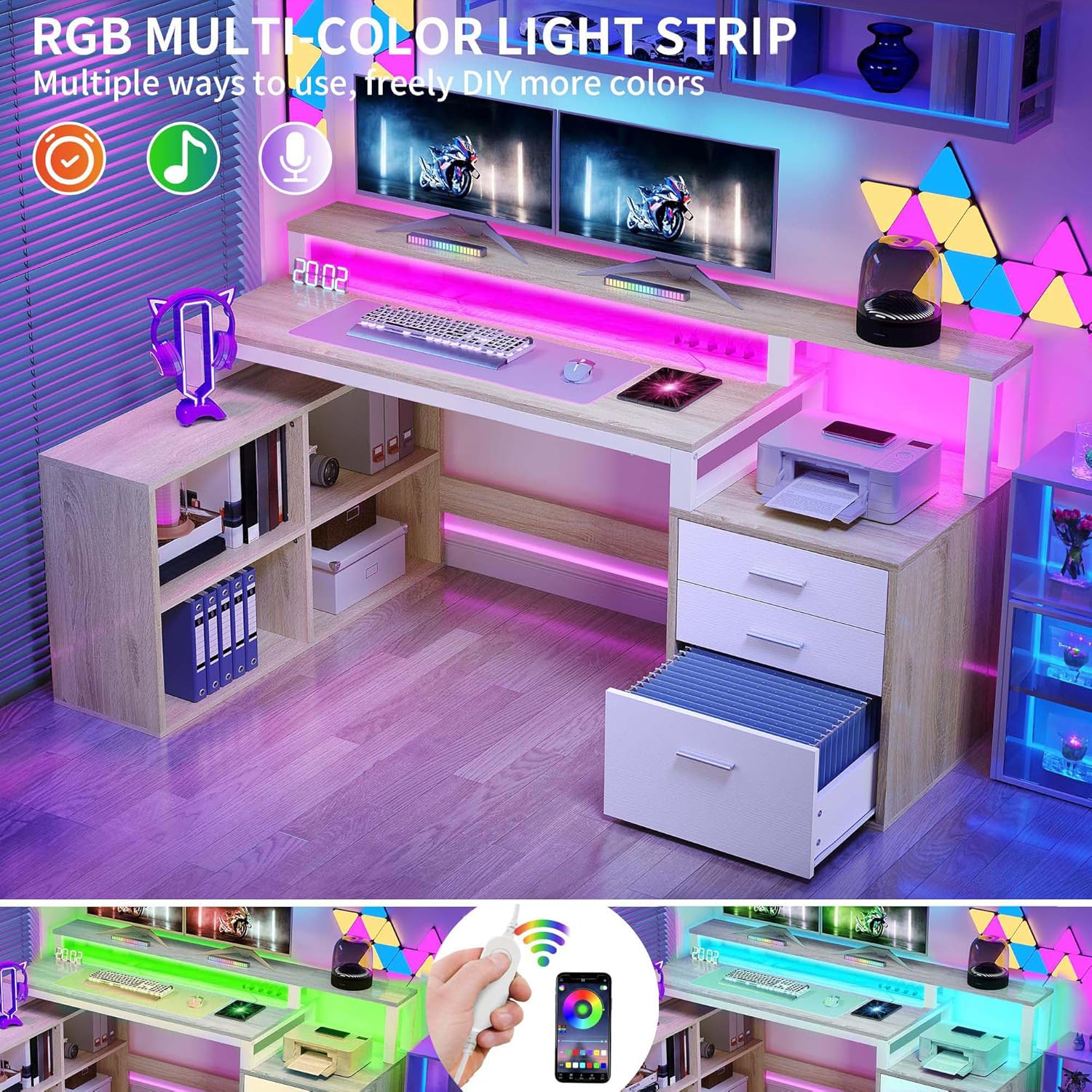
Figure 5.2: RGB LED Light Features
6. Maintenance
Proper maintenance will ensure the longevity and appearance of your DWVO L Shaped Desk.
- Cleaning: Wipe the desk surfaces with a damp cloth. Avoid using harsh chemicals, abrasive cleaners, or excessive moisture, which can damage the finish.
- Spills: Clean up spills immediately to prevent staining or damage to the engineered wood.
- Electrical Components: Ensure power outlets and LED lights are kept dry and free from dust. Do not attempt to clean electrical components with liquids while plugged in.
- Hardware: Periodically check all screws and fasteners to ensure they remain tight. Re-tighten if necessary to maintain stability.
- Drawer Glides: If drawers become stiff, a small amount of silicone lubricant can be applied to the glides.
7. Troubleshooting
If you encounter issues with your desk, refer to the following common troubleshooting tips:
| Problem | Possible Cause | Solution |
|---|---|---|
| Desk is wobbly or unstable. | Loose fasteners; uneven floor. | Check and tighten all screws and bolts. Ensure the desk is on a level surface; use shims if needed. |
| LED lights are not turning on. | Power cord not plugged in; loose connection; faulty light strip. | Ensure the desk's main power cord is securely plugged into a working outlet. Check the connection of the LED strip to its power source. If issues persist, contact support. |
| Power outlets/USB ports not working. | Desk's power cord unplugged; circuit breaker tripped; faulty power strip. | Verify the desk's power cord is plugged in. Check your home's circuit breaker. Test with another device. If still not working, contact support. |
| Drawers are difficult to open/close. | Misaligned glides; obstruction; worn glides. | Ensure drawers are correctly seated on glides. Check for any obstructions. Apply silicone lubricant to glides if needed. |
If these solutions do not resolve the issue, please contact DWVO customer support for further assistance.
8. Specifications
| Brand | DWVO |
| Model Number | MADWVfnadw |
| Product Dimensions (D x W x H) | 35.4" x 65.4" x 36" (90cm x 166cm x 91.4cm) |
| Item Weight | 92.6 Pounds (42 kg) |
| Desktop Weight Limit | 100.53 Pounds (45.6 kg) |
| Material | Engineered Wood (P2 MDF), Metal Frame |
| Color | Oak & White |
| Power Outlets | 4 AC Outlets (120V/12A) |
| USB Ports | 2 USB Ports (5V/2A) |
| Power Cord Length | 6.56 ft (2 meters) |
| Number of Drawers | 3 (1 file drawer, 2 utility drawers) |
| Number of Shelves | 4 open storage shelves |
| Assembly Required | Yes (Recommended 2 people) |
9. Warranty and Support
9.1. Warranty Information
This DWVO L Shaped Desk comes with a Limited Warranty. Please note that the monitor stand component is excluded from this limited warranty. For specific details regarding warranty coverage, duration, and terms, please refer to the warranty card included with your purchase or contact DWVO customer support.
9.2. Customer Support
If you have any questions, require assistance with assembly, or need to report missing/damaged parts, please contact DWVO customer support. Have your model number (MADWVfnadw) and purchase information ready when contacting support.
For the most up-to-date contact information, please visit the official DWVO website or refer to your purchase documentation.


