
1. Introduction
Welcome to the realme 14 Pro 5G Smartphone user manual. This guide provides essential information to help you get started with your new device, understand its features, and ensure optimal performance. The realme 14 Pro 5G combines advanced technology with a unique design, offering a powerful and reliable mobile experience.
Key features of your realme 14 Pro 5G include:
- Sony IMX882 OIS Camera: 50MP Ultra-Clear OIS camera with AI Clarity for stunning photos and a triple MagicGlow flash.
- Dimensity 7300 Energy 5G Chipset: An ultra-fast and energy-efficient 4nm processor for smooth daily use.
- AI Ultra Clarity 2.0: Enhances every shot with advanced AI for natural lighting, improved night noise reduction, and ultra-clear zoom.
- Maximum Water Resistance: IP69, IP68, and IP66 ratings ensure durability against water and dust.
- Unique Design: A pearl-inspired design with cold-sensitive fusion fibers that allow for a color-changing effect.
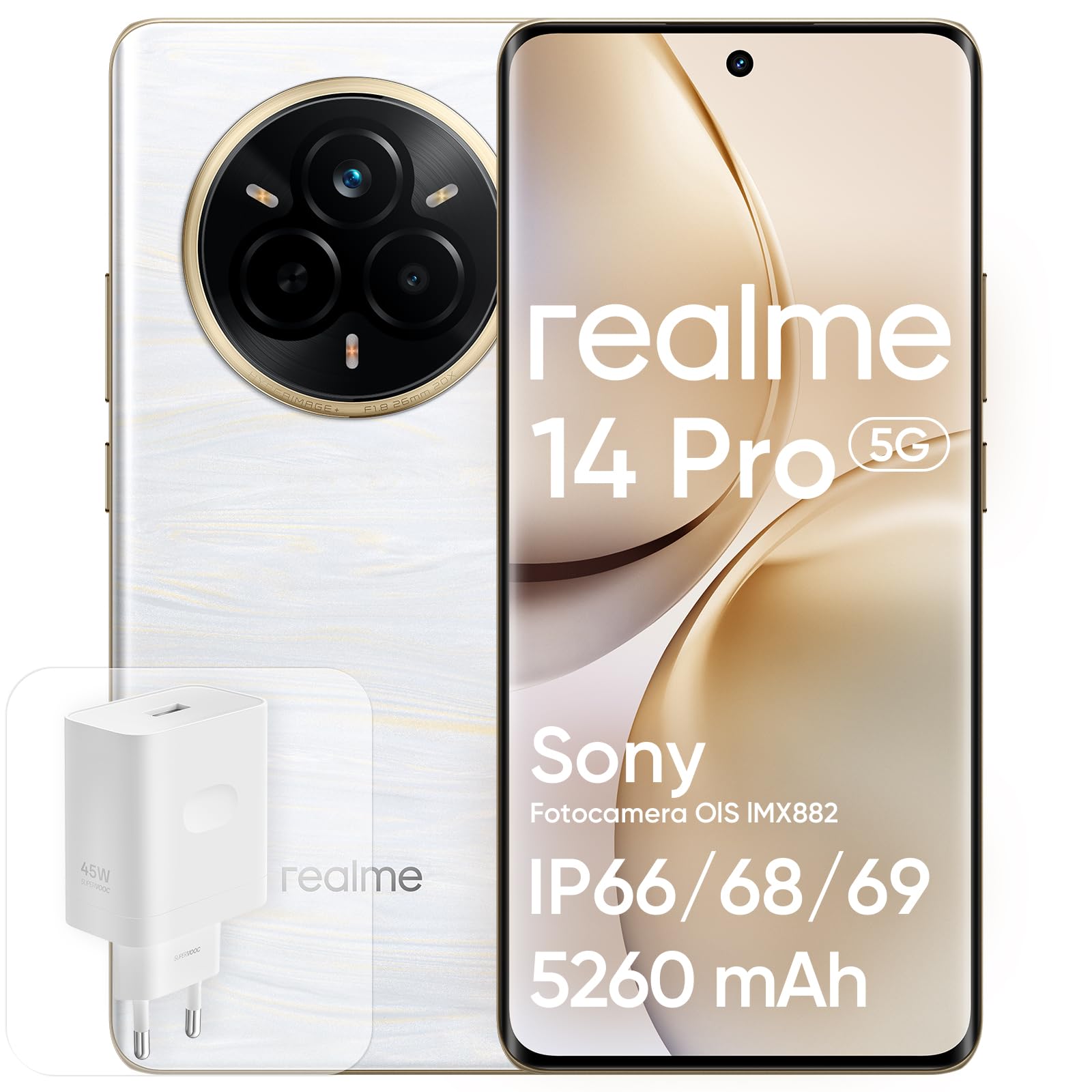
Figure 1: realme 14 Pro 5G Smartphone. This image shows the elegant design of the device, highlighting its display and camera module.
2. Setup
2.1 Unboxing and Initial Inspection
Upon opening the package, ensure all components are present and undamaged. The box should contain:
- realme 14 Pro 5G Smartphone
- USB Cable
- Phone Case
- Protective Film (pre-applied or separate)
- Charging Head (Adapter)

Figure 2: Rear view of the realme 14 Pro 5G, showcasing its camera array and unique back panel design.
2.2 Inserting the SIM Card
- Locate the SIM card tray on the side of your device.
- Use the provided SIM ejector tool to open the tray.
- Place your Nano SIM card into the tray, ensuring the gold contacts face downwards and the card is correctly oriented.
- Gently push the tray back into the slot until it is flush with the phone's body.
2.3 Initial Power-On and Basic Setup
- Press and hold the Power button until the realme logo appears.
- Follow the on-screen prompts to select your language, region, and connect to a Wi-Fi network.
- Sign in with your Google account or create a new one to access Android services and the Google Play Store.
- Set up your screen lock method, such as PIN, pattern, or password.
2.4 Fingerprint Recognition Setup
Your realme 14 Pro 5G features an in-display fingerprint sensor for secure and quick unlocking.
- Navigate to Settings > Security & privacy > Fingerprint.
- Follow the on-screen instructions to register your fingerprint. Ensure your finger covers the sensor completely during the process.
- You can register multiple fingerprints for convenience.
2.5 Charging the Device
Before first use, it is recommended to fully charge your device. Use the provided 45W SUPERVOOC charging head and USB cable for optimal charging speed.
- Connect the USB cable to the charging head and then to a power outlet.
- Plug the other end of the USB cable into the USB-C port at the bottom of your phone.
- The charging indicator will appear on the screen.

Figure 3: Visual representation of the 5260mAh battery and 45W SUPERVOOC charging technology.
Video 1: An overview of the realme 14 Pro 5G Smartphone, demonstrating its design and user interface. This video provides a visual guide to the phone's features and initial interaction.
3. Operating Your realme 14 Pro 5G
3.1 Display Features
The realme 14 Pro 5G features a 6.77-inch 120Hz 3D Curved Vision OLED Display with a resolution of 2392x1080 pixels. This display offers vibrant colors, deep blacks, and smooth scrolling for an immersive visual experience.
- 120Hz Refresh Rate: Provides fluid animations and a responsive touch experience.
- 3D Curved Vision: Enhances immersion and provides a comfortable grip.
- OLED Technology: Delivers excellent contrast and color accuracy.

Figure 4: The 6.77-inch 120Hz 3D Curved Vision Display in action, showcasing its vibrant colors and immersive viewing experience.
3.2 Camera Usage
Your device is equipped with a powerful Sony IMX882 OIS 50MP Ultra-Clear camera system, designed to capture stunning photos and videos in various conditions.
- 50MP Main Camera: Captures high-resolution images with optical image stabilization (OIS).
- AI Ultra Clarity 2.0: Automatically enhances photo quality, especially in low light, by reducing noise and improving detail.
- MagicGlow Triple Flash: Provides enhanced illumination for portraits and close-up shots.
- 50MP Front Camera: For high-quality selfies and video calls.
To open the camera, tap the camera icon on your home screen or swipe left from the lock screen. Explore various modes like Photo, Portrait, Night, and Video.

Figure 5: Demonstrates the 50MP+16MP camera capabilities, including night portraits, underwater mode, and Livephoto features.
3.3 Performance and Connectivity
Powered by the Dimensity 7300 Energy 5G chipset, your realme 14 Pro 5G delivers robust performance for multitasking, gaming, and demanding applications. With 12GB of RAM and 512GB of internal storage, you have ample space and speed for all your needs.
- 5G Connectivity: Enjoy ultra-fast download and upload speeds, and low latency for streaming and online gaming.
- Wi-Fi and Bluetooth: Standard wireless connectivity for internet access and connecting accessories.

Figure 6: The realme 14 Pro Series, highlighting its powerful performance and AI capabilities.
4. Maintenance
4.1 Water and Dust Resistance
The realme 14 Pro 5G boasts IP69, IP68, and IP66 ratings, providing excellent resistance against dust and water. This means your phone can withstand high-pressure, high-temperature water jets (IP69), continuous immersion in water (IP68), and powerful water jets (IP66).
- While highly resistant, avoid intentional submersion in harsh conditions or prolonged exposure to water.
- Ensure all ports are dry before charging to prevent damage.

Figure 7: The realme 14 Pro 5G submerged in water, illustrating its robust IP69, IP68, and IP66 water resistance ratings.
4.2 Cleaning Your Device
To keep your phone clean and extend its lifespan:
- Use a soft, lint-free cloth to wipe the screen and body.
- Avoid using harsh chemicals, abrasive materials, or aerosol sprays.
- For stubborn smudges, slightly dampen the cloth with water or a screen cleaner designed for electronics.
4.3 Battery Care
The 5260mAh battery provides extended usage. To maintain battery health:
- Avoid extreme temperatures, both hot and cold.
- Use only the original charger and cable provided with your device.
- For long-term storage, charge the battery to around 50% and power off the device.
5. Troubleshooting
This section addresses common issues you might encounter with your realme 14 Pro 5G.
5.1 Device Not Turning On
- Check Battery: Ensure the device has sufficient charge. Connect it to the charger for at least 15-30 minutes.
- Force Restart: Press and hold the Power button and Volume Down button simultaneously for about 10-15 seconds until the realme logo appears.
5.2 Screen Freezing or Unresponsive
- Force Restart: Perform a force restart as described above.
- Close Apps: If the screen is partially responsive, try closing recent applications.
- Software Update: Ensure your device's software is up to date via Settings > About device > realme UI version.
5.3 Camera Not Opening or Functioning
- Restart Device: A simple restart can often resolve temporary software glitches.
- Clear Camera App Cache: Go to Settings > Apps > Camera > Storage usage > Clear cache and Clear data. Note: This will reset camera settings.
- Check Permissions: Ensure the camera app has necessary permissions via Settings > Apps > Camera > Permissions.
5.4 Connectivity Issues (Wi-Fi, Bluetooth, 5G)
- Toggle On/Off: Turn Wi-Fi, Bluetooth, or Mobile Data off and then back on.
- Restart Router/Modem: For Wi-Fi issues, restart your router.
- Network Settings Reset: Go to Settings > System settings > Back up and reset > Reset phone > Reset network settings. This will reset Wi-Fi, Bluetooth, and mobile network settings.
6. Specifications
Here are the detailed technical specifications for the realme 14 Pro 5G Smartphone:
| Feature | Specification |
|---|---|
| Brand | realme |
| Model | 14 Pro 5G |
| CPU Speed | 2.5 GHz |
| Memory Capacity (RAM) | 12 GB (as per product title, though not explicitly in specs list) |
| Storage Capacity (ROM) | 512 GB |
| Screen Size | 6.77 Inches |
| Resolution | 2392x1080 |
| Refresh Rate | 120 Hz |
| Cellular Technology | 5G |
| Connectivity Technology | 5G |
| Color | White (Bianco) |
| SIM Card Slots | Single SIM (Nano SIM) |
| Biometric Identification | Fingerprint Recognition |
| Water Resistance Level | Waterproof (IP69, IP68, IP66) |
| Headphone Jack | Absent |
| Front Camera Resolution | 50 MP |
| Rear Camera Resolution | 50 MP (Dual Rear Cameras) |
| Battery Capacity | 5260 Milliamper-hour (mAh) |
| Item Dimensions | 16.3 x 7.5 x 0.8 cm |
| Talk Time | 20 Hours |
| GPS Functionality | True |
| Display Type | OLED |
| Display Pixel Density | 386 Pixels per inch (PPI) |
| Video Capture Resolution | 1080p at 120 fps |
| Video Frame Rate | 60 fps |
7. Warranty and Support
7.1 Product Warranty
realme products come with a one-year warranty. We adhere to strict standards in every phase, from design to production, to ensure that every product meets our commitment to quality. This warranty covers manufacturing defects and ensures that your product performs as expected under normal use.

Figure 8: Details regarding realme's one-year warranty and commitment to quality.
7.2 Customer Support
We are committed to providing high-quality goods and services to ensure a worry-free shopping experience. If you have any questions or require assistance, please do not hesitate to contact us. We will respond within 24 hours.
- Quick Response: Support available with a response within 24 hours.
- Free Returns & Exchanges: Within 30 days of purchase.
- After-Sales Support: One year of dedicated after-sales support.
For further assistance, please visit the official realme support website or contact your retailer.

Figure 9: realme's promise of service, including 24-hour response, 30-day returns, and 1-year after-sales support.