
ENDYSHOW S-960
Contents
ENDYSHOW S-960 LED Stage Strobe Light User Manual
Model: S-960
1. Important Safety Instructions
Please read and understand all safety instructions before installing or operating the ENDYSHOW S-960 LED Stage Strobe Light. Retain this manual for future reference.
- Electrical Safety: Ensure the power supply voltage matches the product's requirements. Always disconnect power before cleaning, servicing, or moving the fixture.
- Ventilation: Do not block ventilation openings. Ensure adequate airflow around the fixture to prevent overheating.
- Mounting: Securely mount the fixture using appropriate hardware. Ensure the mounting surface can support the weight of the fixture.
- Eye Protection: Avoid direct eye exposure to the light source, as it can cause eye damage.
- Environment: Do not expose the fixture to rain, moisture, or extreme temperatures. This product is designed for indoor use unless otherwise specified.
- Servicing: Refer all servicing to qualified personnel. Do not attempt to repair the unit yourself.
2. Product Overview
The ENDYSHOW S-960 is a high-performance LED stage strobe light designed for various event lighting applications. It features a combination of RGB and white LEDs for dynamic effects.
2.1 Features
- Bright LED Output: Equipped with 848 SMD 5050 RGB 3-in-1 LEDs and 112 white SMD 5050 LEDs, totaling 960 LEDs for powerful light output.
- Segment Control: Features 48 independently controllable RGB segments and 8 independently controllable white segments for intricate lighting patterns.
- Versatile Control Modes: Supports Auto Play, Show, Master-Slave, Static Color, and DMX512 control modes.
- Dynamic Effects: Capable of producing wash, strobe, and chasing effects with adjustable frequency, speed, and dimming.
- Daisy Chain Functionality: Power out port allows for daisy-chaining up to 6 lights in series.
- Durable Construction: Housed in a sturdy aluminum casing for efficient heat dissipation and durability.
2.2 Package Contents
- LED Stage Strobe Light (S-960) x 1
- Power Cord x 1
- Metal Bracket x 1
- User Manual x 1
- Screws Knobs x 2
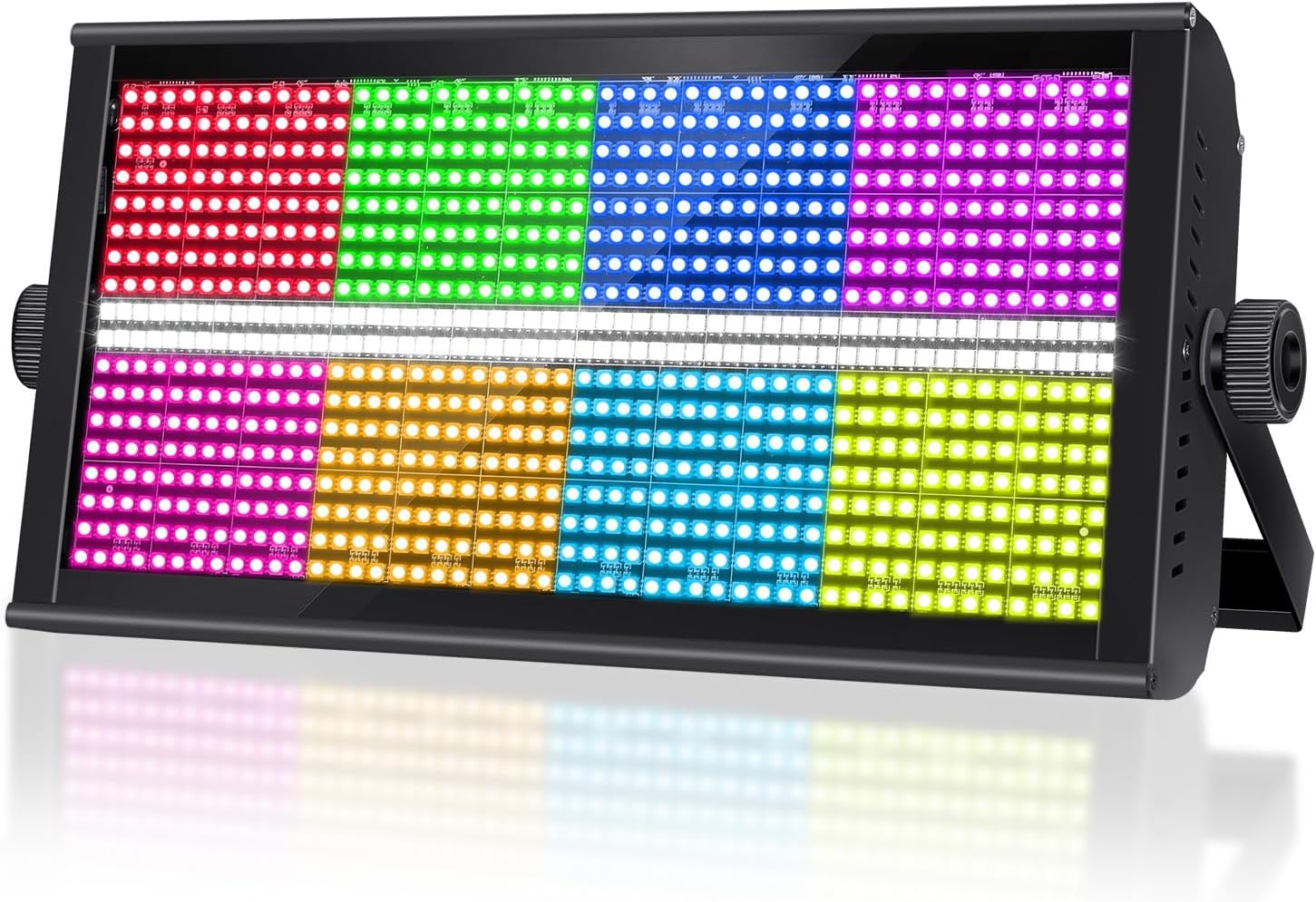
Image 2.1: The ENDYSHOW S-960 LED Stage Strobe Light. This image displays the front of the light, showcasing its rectangular design with multiple colored LED segments.

Image 2.2: Breakdown of LED segments. This image illustrates the 48 RGB segments and 8 white segments that comprise the light's display, highlighting their independent control capabilities.
3. Setup and Installation
3.1 Mounting Options
The S-960 LED Stage Strobe Light offers flexible mounting options to suit various stage and event setups.
- Wall Mount: Securely attach to a vertical surface using the provided bracket.
- Ceiling Mount: Hang from a truss or ceiling structure.
- Floor Mount: Position directly on the floor or stage.
- Table Mount: Place on a stable table or elevated surface.
Always ensure the fixture is stable and securely fastened to prevent accidental falls.
3.2 Connections
Connect the power and DMX cables as described below.

Image 3.1: Rear panel of the S-960 light, showing Power IN/OUT, DMX IN/OUT, Cooling Fan, and LED Display. Dimensions are also indicated.
- Power Connection: Connect the supplied power cord to the 'POWER IN' port (1) on the rear panel and then to a suitable power outlet.
- Power Daisy Chain: To connect multiple units, use a power link cable from the 'POWER OUT' port (2) of one fixture to the 'POWER IN' port of the next. Up to 6 lights can be connected in series.
- DMX Connection: For DMX control, connect a DMX cable from your DMX controller's output to the 'DMX IN' port (4) of the first fixture. To daisy chain DMX, connect from the 'DMX OUT' port (5) of one fixture to the 'DMX IN' port of the next.
4. Operating Instructions
4.1 Control Panel Overview
The rear panel features an LED display (6) and a 4-button menu (7) for navigating settings and selecting operating modes.

Image 4.1: Detailed view of the rear panel with numbered labels for Power IN, Power OUT, Cooling Fan, DMX IN, DMX OUT, LED Display, and 4-Button Menu.
- MENU: Accesses the main menu or cycles through options.
- UP: Increases values or moves up through menu options.
- DOWN: Decreases values or moves down through menu options.
- ENTER: Confirms selection or saves settings.
4.2 Operating Modes
The S-960 offers several operational modes to suit different lighting needs.
- Auto Play Mode: The fixture will automatically cycle through its built-in programs and effects. Use the menu buttons to select different auto programs or adjust speed.
- Master-Slave Mode: Connect multiple S-960 units via DMX cables. Set one unit as the 'Master' and the others as 'Slave'. The slave units will synchronize their effects with the master unit.
- DMX512 Control Mode: For advanced control, connect the fixture to a DMX controller. Set the DMX address on the fixture using the menu. The S-960 supports DMX channels CH04, CH15, and CH152, allowing for detailed control over color, intensity, and effects.
- Static Color Mode: Select a single static color from the available options.

Image 4.2: An example of the light operating in Auto Program mode, displaying various dynamic lighting effects.

Image 4.3: Illustration of multiple S-960 lights connected in a Master-Slave configuration, synchronizing their lighting effects.

Image 4.4: A DMX 512 lighting controller connected to multiple S-960 lights, demonstrating professional control over various lighting effects.
4.3 Adjusting Settings
To adjust settings such as DMX address, mode selection, or effect parameters:
- Press the MENU button to enter the main menu.
- Use the UP and DOWN buttons to navigate through the menu options.
- Press ENTER to select an option or confirm a setting.
- Use UP and DOWN to change values, then press ENTER to save.
- Press MENU again to exit the current menu level or return to the main display.

Image 4.5: A display of various RGBW lighting effects and patterns achievable with the S-960 light, demonstrating its versatility.
5. Maintenance
Regular maintenance ensures the longevity and optimal performance of your ENDYSHOW S-960 LED Stage Strobe Light.
- Cleaning: Periodically clean the exterior casing and lens with a soft, dry cloth. Do not use abrasive cleaners or solvents. Ensure the fixture is powered off and unplugged before cleaning.
- Fan and Vents: Check the cooling fan (3) and ventilation openings for dust accumulation. Use compressed air to gently clear any blockages to maintain proper airflow.
- Cable Inspection: Regularly inspect power and DMX cables for any signs of damage, fraying, or loose connections. Replace damaged cables immediately.
- Storage: When not in use for extended periods, store the fixture in a dry, dust-free environment.
6. Troubleshooting
If you encounter issues with your S-960 LED Stage Strobe Light, refer to the following table for common problems and solutions.
| Problem | Possible Cause | Solution |
|---|---|---|
| Light does not power on. | No power supply; faulty power cord; internal fuse blown. | Check power connection and outlet. Replace power cord if damaged. Contact support if fuse is suspected. |
| No DMX control. | Incorrect DMX address; faulty DMX cable; DMX controller issue; incorrect DMX mode selected. | Verify DMX address matches controller. Check DMX cable connections. Ensure DMX mode is active on fixture. Test with a different DMX cable/controller. |
| Lights in Master-Slave mode are not synchronized. | Incorrect Master/Slave setting; faulty DMX link cable. | Ensure one unit is set as Master and others as Slave. Check DMX link cables between units. |
| Light overheats or fan is excessively loud. | Blocked ventilation; fan malfunction. | Ensure ventilation openings are clear. Clean dust from fan. If problem persists, contact support. |
| Unexpected lighting patterns or colors. | Incorrect mode selected; DMX signal interference. | Verify the desired operating mode (Auto, Static, DMX). Check DMX connections for interference. |
7. Specifications
Technical specifications for the ENDYSHOW S-960 LED Stage Strobe Light.
| Feature | Detail |
|---|---|
| Model Number | S-960 |
| Light Source | 848x SMD 5050 RGB 3-in-1 LEDs, 112x SMD 5050 White LEDs (Total 960 LEDs) |
| Color | RGBW (Red, Green, Blue, White) |
| Control Modes | Auto Play, Show, Master-Slave, Static Color, DMX512 |
| DMX Channels | CH04, CH15, CH152 |
| Material | Aluminum |
| Product Dimensions | 8.75"L x 5.5"W x 8.75"H (22.23 cm L x 13.97 cm W x 22.23 cm H) |
| Item Weight | 9.18 pounds (4.16 kg) |
| Power Source | Corded Electric |
| Mounting Type | Wall Mount, Ceiling Mount, Floor Mount, Table Mount |
8. Warranty and Support
ENDYSHOW products are manufactured to high-quality standards and are backed by a manufacturer's warranty. For specific warranty details, please refer to the documentation included with your purchase or contact ENDYSHOW customer support.
If you require technical assistance or have questions regarding your S-960 LED Stage Strobe Light, please contact ENDYSHOW customer support through the retailer where the product was purchased or visit the official ENDYSHOW website for contact information.
Ask a question about this manual
Ask about setup, troubleshooting, compatibility, parts, safety, or missing instructions. Manuals+ will review the question and use this page’s manual context to help answer it.