
1. Introduction and Overview
The AIPER Scuba S1 Cordless Robotic Cleaner and AIPER Pilot X1 Handheld Pool Vacuums are designed to provide efficient and thorough cleaning for various pool types. This manual provides detailed instructions for setting up, operating, maintaining, and troubleshooting your pool cleaning system to ensure crystal-clear water and a pristine pool experience.
The Scuba S1 is a robotic cleaner specializing in floor, wall, and waterline cleaning with intelligent navigation, while the Pilot X1 offers powerful handheld suction for targeted cleaning of shallow areas, steps, and tight corners.
2. Product Components
Your AIPER pool cleaning system includes the following main components:
2.1. AIPER Scuba S1 Cordless Robotic Cleaner
- Scuba S1 Robotic Unit
- Charging Adapter
- Filter Basket
- User Manual

Figure 2.1: The Scuba S1 demonstrating its wall and waterline scrubbing capability, ensuring thorough cleaning from the pool bottom to the top.

Figure 2.2: WavePath Navigation 2.0 technology optimizes cleaning routes for complete pool coverage, minimizing cleaning time and avoiding unnecessary overlaps.

Figure 2.3: The Scuba S1's unparalleled cleaning performance effectively removes various debris types, including sand, twigs, leaves, and pet hair, from your pool.
2.2. AIPER Pilot X1 Handheld Pool Vacuum
- Pilot X1 Handheld Vacuum Unit
- Telescoping Pole
- 360µm Filter
- 100µm Filter Sleeve
- Charging Cable
- User Manual

Figure 2.4: The Pilot X1 features industry-leading suction power of 1260 GPH (21 GPM) for efficient debris removal.
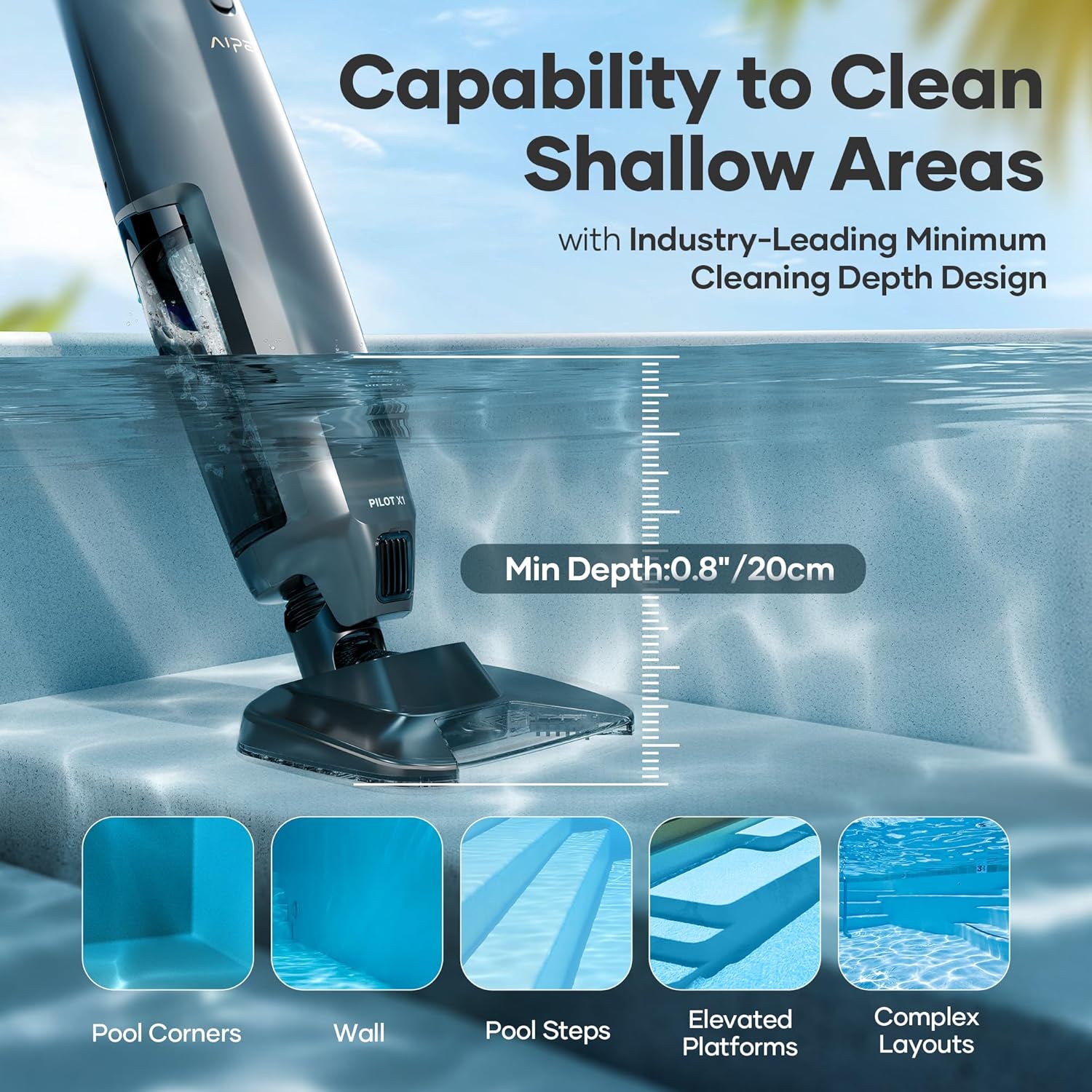
Figure 2.5: The Pilot X1's design allows it to clean shallow areas, including pool corners, walls, steps, elevated platforms, and complex layouts, with a minimum depth of 0.8 inches (20 cm).

Figure 2.6: The Pilot X1 offers two filtration options: a 360µm filter for large debris and a 100µm filter with a sleeve for finer particles like sand and dust.

Figure 2.7: The Pilot X1 is suitable for various pool types, including inground pools, above-ground pools, spas, and hot tubs (50-140°F).
3. Setup
3.1. Initial Charging
Before first use, fully charge both the Scuba S1 and Pilot X1 according to their respective charging instructions. Ensure the charging ports are dry before connecting the charger.
3.2. Pilot X1 Assembly
- Attach the desired filter (360µm for large debris, 100µm with sleeve for fine particles) to the Pilot X1 vacuum unit.
- Connect the telescoping pole to the Pilot X1 unit. Ensure it is securely fastened.
3.3. Scuba S1 Placement
- Place the Scuba S1 into the pool. It will automatically begin its cleaning cycle once submerged and activated.
4. Operating Instructions
4.1. Operating the AIPER Scuba S1
- Activation: Submerge the Scuba S1 into the pool. The unit will automatically detect water and initiate its cleaning cycle.
- Cleaning Modes: The Scuba S1 utilizes WavePath Navigation 2.0 to optimize its cleaning path for comprehensive coverage of the pool floor, walls, and waterline.
- Monitoring: Allow the robot to complete its cycle. It will typically return to a reachable area or float when the battery is low or the cycle is complete.
- Retrieval: Use the provided hook or a pool pole to retrieve the Scuba S1 from the pool.
4.2. Operating the AIPER Pilot X1
- Power On: Ensure the Pilot X1 is charged. Press the power button to turn on the unit.
- Submersion: Submerge the vacuum head into the water. The unit is designed to clean shallow areas and irregular shapes effectively.
- Cleaning: Use the telescoping pole to guide the vacuum head across the desired cleaning surfaces, such as steps, corners, and the pool floor. The powerful suction will collect debris into the filter canister.
- Dual Cleaning Modes: The Pilot X1 offers dual cleaning modes for tackling various debris types, from quick cleanups to deep scrubs.
- Power Off: Once cleaning is complete, remove the unit from the water and power it off.
5. Maintenance
5.1. Cleaning the Pilot X1 Filter Canister and Filters
Regular cleaning of the filter system is crucial for optimal performance.
- Remove Filter Canister: The 1L filter canister is designed for easy removal. Locate the release mechanism and detach the canister from the main unit.
- Empty Debris: Dispose of collected debris from the canister.
- Rinse Filters: Rinse the 360µm filter and the 100µm filter sleeve thoroughly with a water hose until clean. Ensure all trapped particles are removed.
- Reassemble: Allow filters to dry completely before reassembling them into the canister and attaching the canister back to the Pilot X1 unit.
5.2. Cleaning the Scuba S1 Filter Basket
- Remove Filter Basket: Open the Scuba S1 unit to access the generously sized filter basket.
- Empty and Rinse: Empty any collected large debris and fine particles. Rinse the filter basket under running water until it is clean.
- Reinstall: Ensure the filter basket is properly seated before closing the unit.
5.3. General Care
- Store both units in a cool, dry place away from direct sunlight when not in use.
- Periodically inspect the units for any signs of wear or damage.
- Keep charging ports clean and dry to prevent corrosion.
6. Troubleshooting
If you encounter issues with your AIPER pool vacuums, refer to the following common troubleshooting steps:
6.1. Scuba S1 Issues
- Robot not moving or cleaning:
- Check battery level; recharge if necessary.
- Ensure the pool water temperature is within the recommended operating range.
- Verify that the filter basket is not clogged.
- Poor cleaning performance:
- Clean the filter basket thoroughly.
- Check for large debris obstructing the suction inlet.
- Ensure the pool water chemistry is balanced.
6.2. Pilot X1 Issues
- No suction or weak suction:
- Check battery level; recharge if necessary.
- Clean the filter canister and filter sleeves.
- Ensure the suction head is fully submerged and properly sealed against the surface.
- Unit not turning on:
- Confirm the unit is fully charged.
- Press and hold the power button for a few seconds.
If issues persist, please contact AIPER customer support for further assistance.
7. Specifications
| Feature | AIPER Scuba S1 | AIPER Pilot X1 |
|---|---|---|
| Cleaning Performance | Floor, walls, and waterline scrubbing | 21 GPM (1260 GPH) suction power |
| Navigation | Upgraded WavePath Navigation 2.0 | Manual operation with telescoping pole |
| Mobility | Durable caterpillar treads | Designed for shallow areas, steps, corners |
| Filtration | Generously sized filter basket for large debris and fine particles | Two options: 360µm (large debris) & 100µm with sleeve (fine particles) |
| Debris Bin Capacity | Integrated filter basket | 1L filter canister |
| Pool Size/Type | Inground pools up to 1,600 Sq.ft | Inground & above-ground pools, spas, hot tubs (50-140°F) |
| Minimum Cleaning Depth | N/A | 0.8 inches (20 cm) |
8. Warranty and Support
The AIPER Pilot X1 comes with a 12-month protection warranty from the date of purchase. For warranty claims, technical support, or any inquiries regarding your AIPER Scuba S1 or Pilot X1 pool vacuums, please contact AIPER customer service through their official website or the contact information provided in your product packaging.
For more information and support, visit the official AIPER Store: AIPER Store on Amazon.