
KAIY JS4
KAIY JS4 Bluetooth Transmitter Receiver User Manual
Your comprehensive guide to operating your KAIY JS4 device.
1. Introduction
The KAIY JS4 is a compact and versatile 2-in-1 Bluetooth Transmitter and Receiver, designed to bring wireless audio capabilities to your devices. Whether you want to stream audio from non-Bluetooth sources like in-flight entertainment systems or TVs to your wireless headphones (TX Mode), or enable your wired speakers and car stereos to receive Bluetooth audio from your phone (RX Mode), the JS4 provides a seamless and high-quality audio experience. Its intuitive HD display and dual-link feature make sharing audio simple and convenient.
2. Product Features
- 2-in-1 Functionality: Operates as both a Bluetooth Transmitter (TX) and Receiver (RX).
- Dual Pairing: Connects up to two Bluetooth headphones or devices simultaneously in TX mode.
- Low Latency: Ensures synchronized audio and video for an optimal viewing experience.
- HD Display: Clear screen shows mode (TX/RX), battery life, and connection status.
- Long Battery Life: Up to 11 hours in TX mode and 11.5 hours in RX mode on a single charge.
- Fast Charging: Recharges in approximately 2 hours via Type-C.
- Hands-Free Calling: Built-in microphone with CVC noise reduction for clear calls in RX mode.
- Universal Compatibility: Works with any 3.5mm audio jack, compatible with various headphones and audio devices.
- Portable Design: Lightweight and small, ideal for travel.
3. Package Contents
Please check the box for the following items:
- KAIY Bluetooth AUX Adapter (JS4)
- USB Type-C Power Cable
- Dual 3.5mm Airplane Adapter (if included in your package)
4. Product Overview

Figure 4.1: KAIY JS4 Bluetooth Adapter Component Diagram
- AUX Cover: Protects the 3.5mm AUX Jack when not in use.
- 3.5mm AUX Jack: Connects to audio sources (TX mode) or audio receivers (RX mode).
- Adjustable Cable: Flexible braided cable for convenient connection.
- Mode Switch / Power Off: Slide switch to select TX (Transmitter), OFF, or RX (Receiver) mode.
- Current Mode Display: Indicates whether the device is in RX or TX mode.
- Connection Mode: Shows Bluetooth (BT) or TF Card mode.
- Connecting Devices: Icons indicate if Device 1 and/or Device 2 are connected.
- Power/Battery Display: Shows current battery level.
- TF Card Port: For inserting a TF (MicroSD) card (if supported by model for playback).
- Microphone: For hands-free calls in RX mode.
- Next Song / Press 3s Volume +: Button for track control and volume increase.
- Previous Song / Press 3s Volume -: Button for track control and volume decrease.
- Multi-function Button / Hands-free Button: Used for play/pause, answering/ending calls, and pairing.
- Type-C Charging Port: For charging the device.

Figure 4.2: KAIY JS4 Bluetooth Adapter
5. Setup and Operating Modes
5.1. TX (Transmitter) Mode
In TX mode, the KAIY JS4 transmits audio from non-Bluetooth devices to your Bluetooth headphones or speakers. This is ideal for in-flight entertainment, TVs, PCs, or gym equipment.
- Slide the mode switch to the TX position. The display will show "TX".
- Plug the 3.5mm AUX jack into the audio output port of your device (e.g., airplane seat, TV headphone jack). Use the dual 3.5mm adapter if required for airplane jacks.
- The JS4 will automatically enter pairing mode (indicated by a flashing Bluetooth icon on the display).
- Put your Bluetooth headphones or speaker into pairing mode.
- The JS4 will automatically connect to your headphones. Once connected, the Bluetooth icon will become solid.
- To connect a second pair of headphones, put the second pair into pairing mode, then short press the Multi-function Button on the JS4. The second device icon will light up upon successful connection.

Figure 5.1: Using the KAIY JS4 in TX mode on an airplane.
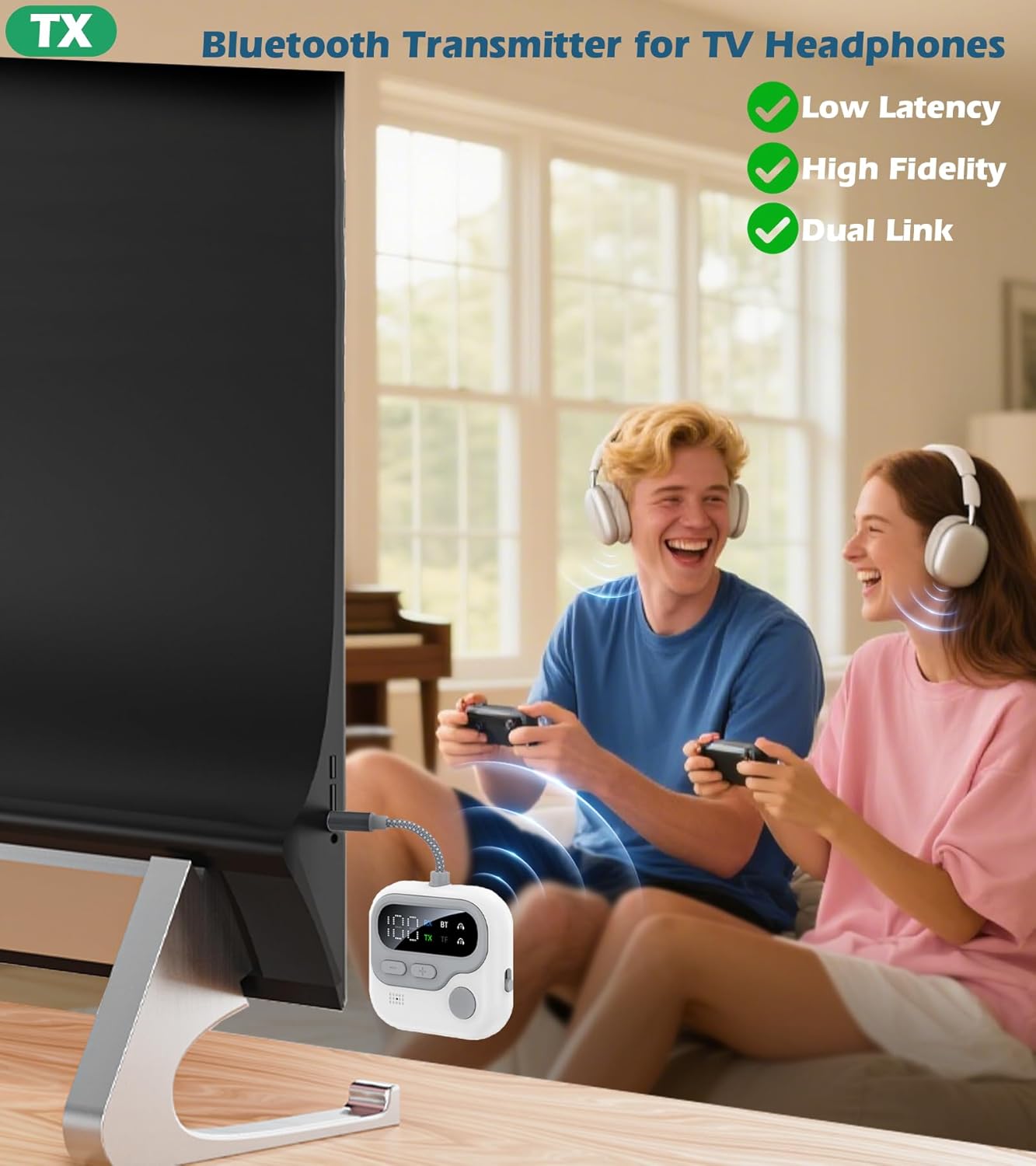
Figure 5.2: Using the KAIY JS4 in TX mode with a television.
5.2. RX (Receiver) Mode
In RX mode, the KAIY JS4 receives Bluetooth audio from your smartphone or tablet and transmits it to wired audio systems like car stereos, home speakers, or non-Bluetooth headphones.
- Slide the mode switch to the RX position. The display will show "RX".
- Plug the 3.5mm AUX jack into the audio input port of your wired speaker, car stereo, or wired headphones.
- The JS4 will automatically enter pairing mode (indicated by a flashing Bluetooth icon on the display).
- On your smartphone or tablet, enable Bluetooth and search for "JS4" in the list of available devices.
- Select "JS4" to connect. Once connected, the Bluetooth icon will become solid.
- You can now stream audio from your phone to your connected wired device.

Figure 5.3: Using the KAIY JS4 in RX mode in a car.

Figure 5.4: Using the KAIY JS4 in RX mode with a home stereo.
5.3. Official Product Video
Video 5.1: An official product video demonstrating the KAIY Bluetooth Transmitter Receiver 2-in-1 functionality.
6. AirPods & Headphone Pairing Guide
For optimal pairing with various headphones, follow these specific instructions:
- AirPods 1/2/3/Pro: Place your AirPods in their charging case. Open the lid and hold the button on the back of the case until the status light flashes white.
- AirPods 4: Double-tap the front of the charging case.
- AirPods Max: Press and hold the noise control button for 5 seconds until the status light flashes white.
- Other Headphones: Refer to your specific headphone's user manual for pairing instructions, or search online for quick fixes.
7. Charging and Battery Life
The KAIY JS4 is equipped with a rechargeable battery for extended use.
- The device recharges in approximately 2 hours via the included Type-C cable.
- A full charge provides up to 11 hours of use in TX (Transmitter) mode.
- A full charge provides up to 11.5 hours of use in RX (Receiver) mode.
- The HD display shows the current battery level, allowing you to monitor usage.

Figure 7.1: Charging the KAIY JS4 Bluetooth Adapter.
8. Hands-Free Calling (RX Mode)
When in RX mode and connected to a car stereo or home speaker, the KAIY JS4 can function as a hands-free calling kit.
- The built-in microphone and CVC noise reduction technology help block out ambient noise, ensuring clear call quality.
- Use the Multi-function Button to answer or hang up calls with a single touch.
- You can stream playlists from two paired devices without needing to switch connections.
9. Troubleshooting
If you encounter issues with your KAIY JS4, please refer to the following common solutions:
| Problem | Possible Cause / Solution |
|---|---|
| No audio or low volume after connecting. | Ensure the volume on both the JS4 and your connected headphones/speakers is turned up. For AirPods, check their touch controls for volume adjustment. |
| Device not pairing. | Ensure the JS4 is in the correct TX/RX mode. Make sure your headphones/device are in pairing mode. Try restarting both devices. Clear previous Bluetooth connections if necessary. |
| Audio only from one channel (e.g., left headphone) when charging in TX mode. | This may be a known limitation when charging while in TX mode. Try using the device on battery power for full stereo audio. |
| Significant audio delay (latency). | While the JS4 supports low latency, external factors or specific headphone models might introduce delays. Ensure no other strong wireless signals are interfering. Try re-pairing. |
| Device not turning on or charging. | Ensure the charging cable is securely connected to both the JS4 and a working power source. Try a different Type-C cable or power adapter. |
10. Specifications
| Feature | Detail |
|---|---|
| Model Number | JS4 |
| Product Dimensions | 2 x 0.57 x 4.88 inches |
| Item Weight | 1.76 ounces |
| Connectivity Technology | Bluetooth, Auxiliary |
| Power Source | Battery Powered (1 Nonstandard Battery included) |
| Material | Plastic, Metal |
| Manufacturer | Dongguan Jieshengda Intelligent Technology Co., Ltd. |
11. Safety Information
Please read and follow these safety guidelines to ensure proper and safe use of your KAIY JS4 Bluetooth Adapter:
- Battery Handling: The device contains a non-standard battery. Do not attempt to replace the battery yourself. Dispose of the device according to local regulations.
- Temperature and Humidity: Avoid exposing the device to extreme temperatures (hot or cold) or high humidity. Operate and store within recommended environmental conditions.
- Water Exposure: This device is not waterproof. Do not expose it to water or other liquids.
- Cleaning: Clean the device with a soft, dry cloth. Do not use harsh chemicals or abrasive materials.
- Disassembly: Do not attempt to disassemble, repair, or modify the device. This will void the warranty and may cause damage or injury.
- Interference: Keep the device away from strong magnetic fields or other electronic devices that may cause interference.
- Children: Keep out of reach of children. Small parts may pose a choking hazard.
12. Warranty and Support
KAIY products are designed for reliability and performance. For warranty information, technical support, or customer service inquiries, please contact the manufacturer or your point of purchase. Keep your purchase receipt as proof of purchase for warranty claims.
For further assistance, please visit the official KAIY store on Amazon: KAIY Store
Ask a question about this manual
Ask about setup, troubleshooting, compatibility, parts, safety, or missing instructions. Manuals+ will review the question and use this page’s manual context to help answer it.