
1. Introduction
Thank you for choosing the Lefant M330 Pro Robot Vacuum Cleaner and Mop. This intelligent 3-in-1 device is designed to simplify your home cleaning with advanced dToF laser navigation, precise mapping, and powerful suction and mopping capabilities. This manual provides essential information for setting up, operating, and maintaining your robot vacuum to ensure optimal performance and longevity.
2. Important Safety Information
Please read all safety instructions carefully before using the appliance and keep them for future reference. Failure to follow these instructions may result in electric shock, fire, or serious injury.
- This appliance can be used by children aged 8 years and above and persons with reduced physical, sensory or mental capabilities or lack of experience and knowledge if they have been given supervision or instruction concerning use of the appliance in a safe way and understand the hazards involved.
- Children shall not play with the appliance. Cleaning and user maintenance shall not be made by children without supervision.
- Do not use the robot in wet environments or near water.
- Ensure the charging station is placed on a flat, stable surface and away from heat sources.
- Do not use the robot to pick up large objects, sharp objects, or liquids.
- Regularly clean the brushes and filters to maintain optimal performance.
- Unplug the robot from the power source before cleaning or performing maintenance.
3. Package Contents
Verify that all components are present in the package:
- Lefant M330 Pro Robot Vacuum Cleaner
- 3-in-1 Water Tank + Dustbin
- Charging Station
- Power Adapter
- Cleaning Brush
- Mop Pad Holder
- Side Brushes (x2)
- Washable Mop Pad
- User Manual
- Disposable Mop Cloths (x5)
- HEPA Filter

Image: Lefant M330 Pro Robot Vacuum Cleaner with its main components and accessories.
4. Product Overview
The Lefant M330 Pro is a versatile robot vacuum designed for efficient and thorough cleaning. Its compact design allows it to navigate under furniture, while its advanced features ensure comprehensive coverage.
Key Features:
- dToF Laser Navigation: Provides precise mapping and efficient cleaning paths, even in low light conditions. Supports multi-level mapping for homes with multiple floors.
- 3-in-1 Cleaning: Sweeps, vacuums, and mops simultaneously, handling various floor types and messes.
- Smart Obstacle Avoidance: Utilizes advanced sensors to detect and avoid obstacles, preventing collisions and getting stuck.
- Carpet Boost: Automatically increases suction power when detecting carpets for deeper cleaning.
- Personalized Cleaning: Customize cleaning schedules, modes, and specific areas via the Lefant app.
- Compact Design: With a slim profile of 28 cm, it easily cleans under chairs, sofas, and beds.
- Long Runtime: Up to 150 minutes of cleaning on a single charge, suitable for large homes.
- App & Voice Control: Control your robot via the Lefant app or voice commands with Amazon Alexa and Google Assistant.

Image: The M330 Pro uses dToF navigation for precise mapping and supports multi-level mapping for different floors.
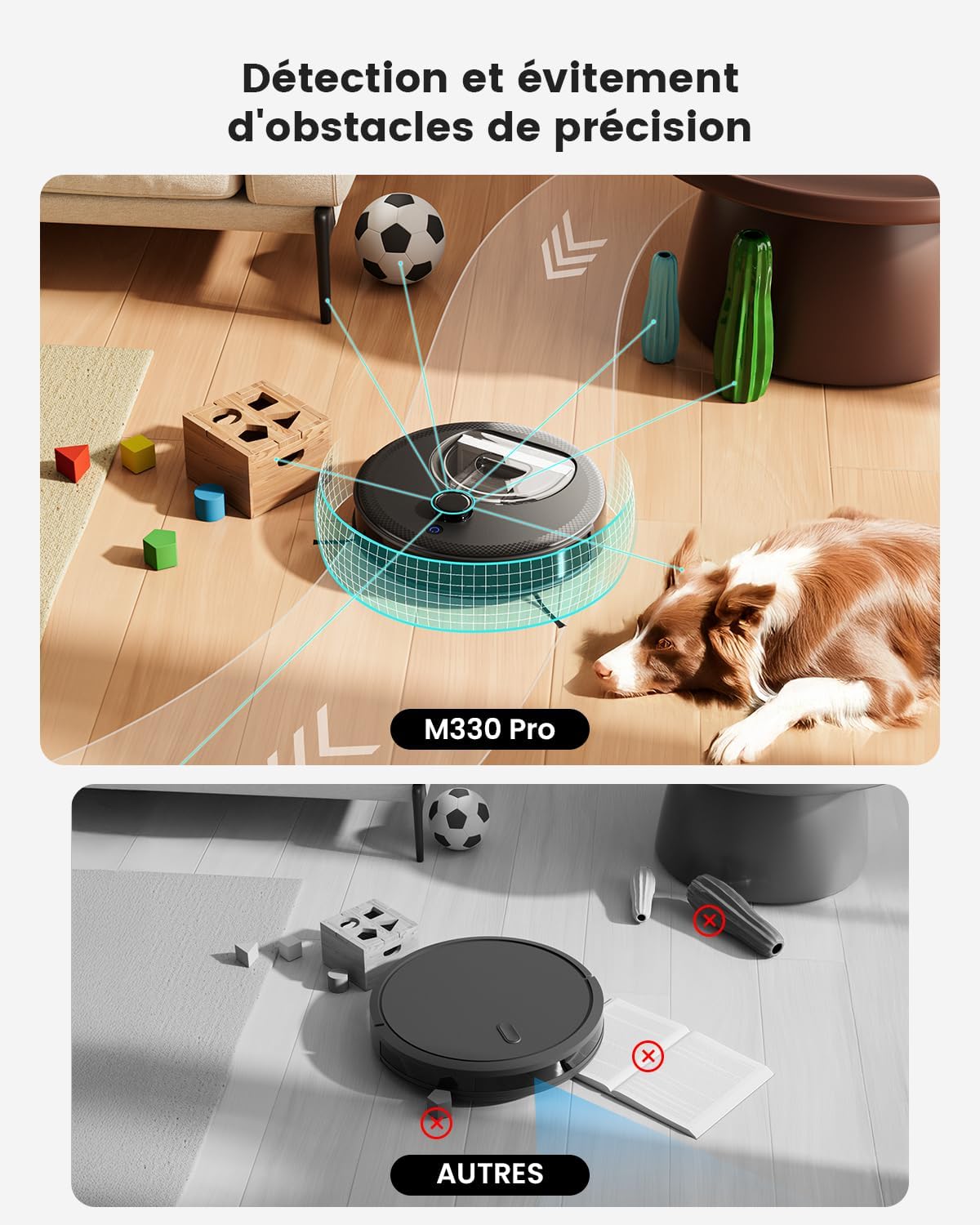
Image: The robot's advanced sensors enable precise obstacle detection and avoidance.

Image: The robot intelligently adapts to surfaces, boosting power on carpets for deeper cleaning.

Image: Its compact design allows the M330 Pro to clean effectively under furniture.
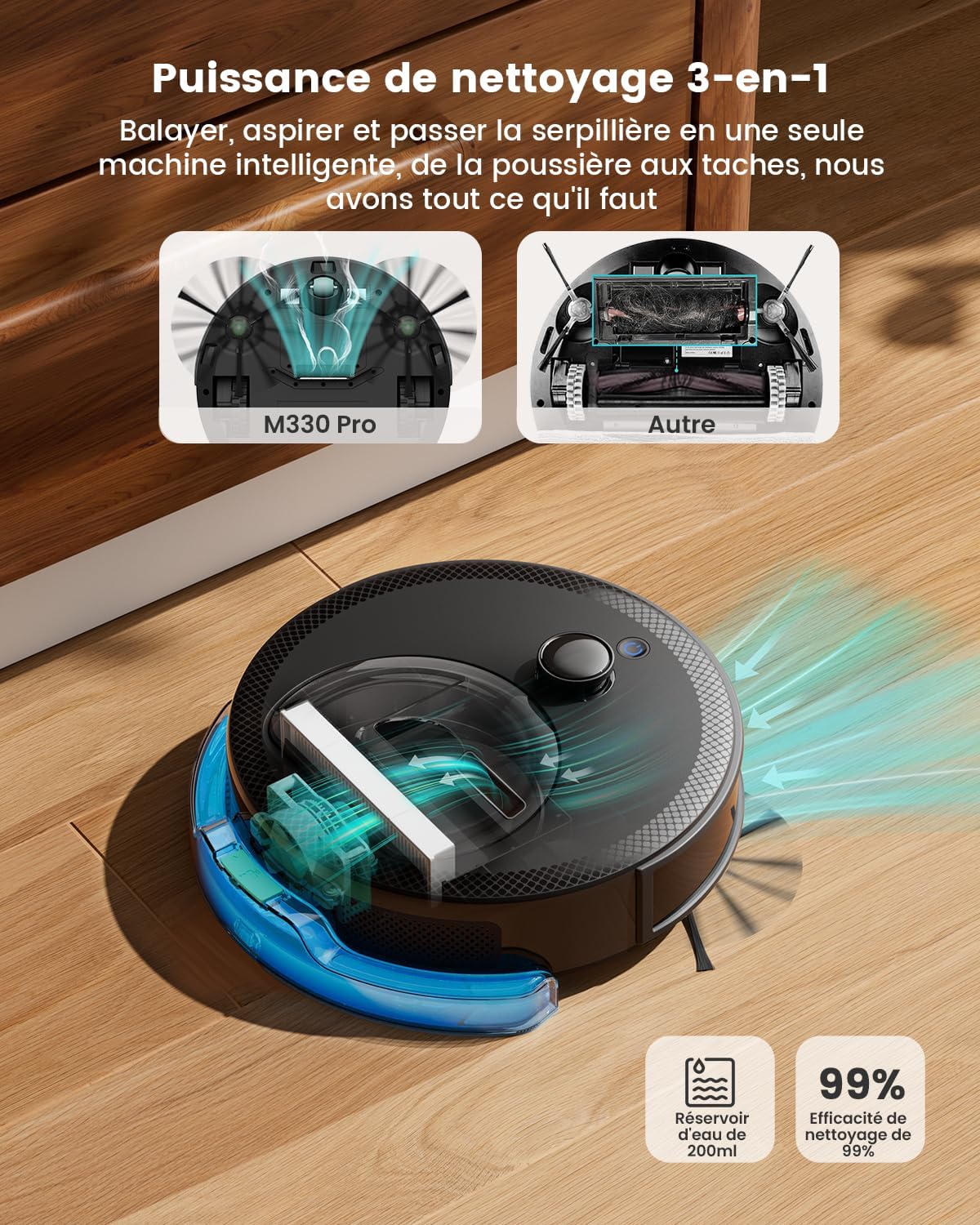
Image: The M330 Pro offers 3-in-1 cleaning: sweeping, vacuuming, and mopping.
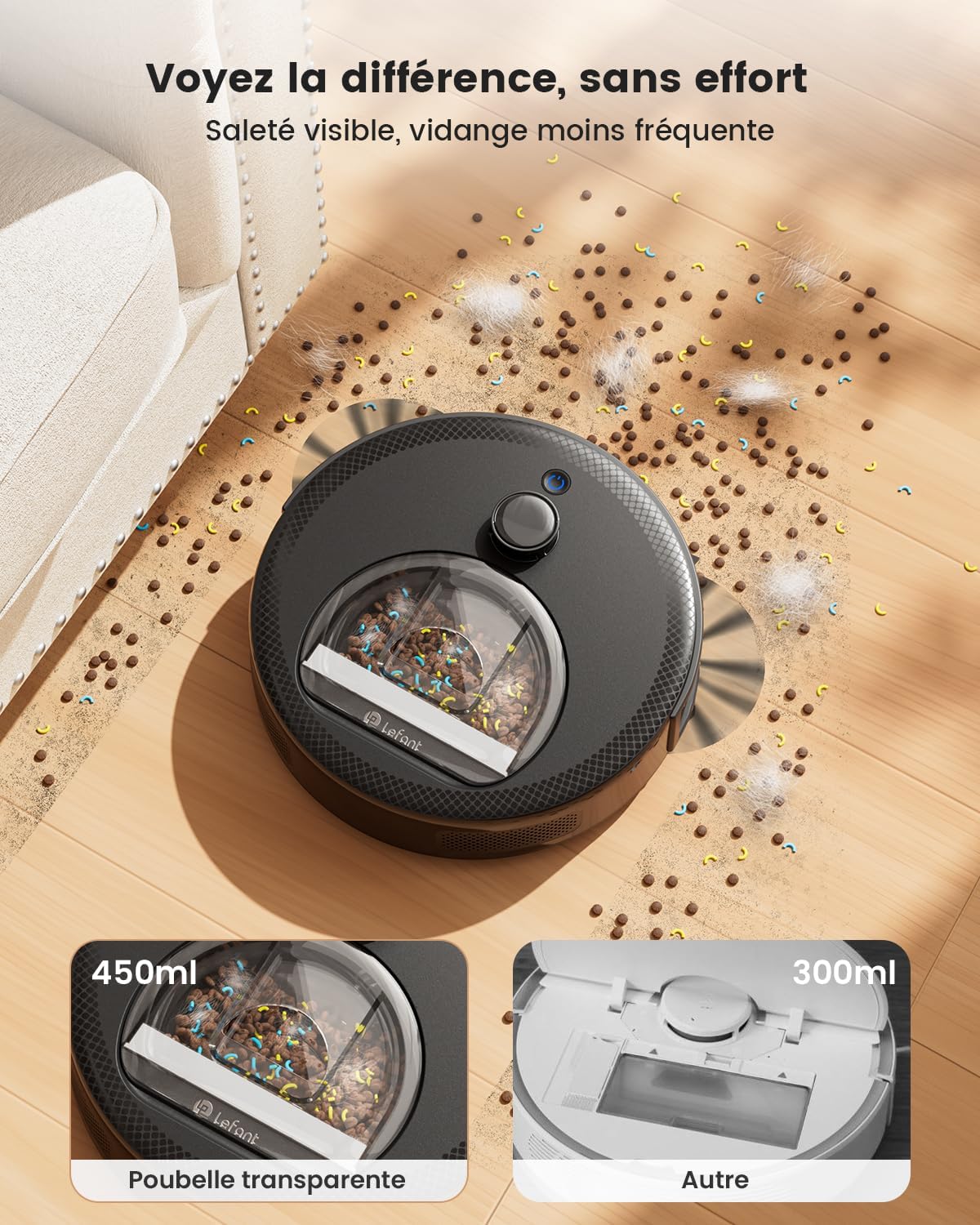
Image: The transparent dustbin allows for easy visual inspection of collected debris.
5. Setup
5.1 Charging Station Placement
Place the charging station against a wall in an open, uncluttered area. Ensure there is at least 0.5 meters (1.6 feet) of clear space on either side and 1.5 meters (4.9 feet) in front of the charging station for the robot to easily dock.
5.2 Initial Charge
Before first use, fully charge the robot. Place the robot on the charging station, ensuring the charging contacts align. The indicator lights will show charging status. A full charge typically takes several hours.

Image: The robot automatically returns to its charging station when the battery is low.
5.3 App Connection
To unlock the full potential of your M330 Pro, download and connect to the Lefant app:
- Download the 'Lefant' app from your app store.
- Add your M330 Pro robot vacuum to the app.
- Connect to a 2.4GHz/5GHz Wi-Fi network.
- Position the blue button on the robot to 'I'.
- Press and hold the start button for 6 seconds until the robot pairs successfully.
- Select M330 Pro and wait for successful pairing.

Image: Step-by-step guide for connecting your Lefant robot to the mobile application.
6. Operating Instructions
6.1 Starting a Cleaning Cycle
You can start a cleaning cycle in several ways:
- On-Device Button: Press the power button on the robot to start a standard cleaning cycle.
- Lefant App: Use the app to start, pause, or stop cleaning. You can also select specific cleaning modes or areas.
- Voice Control: Connect your robot to Amazon Alexa or Google Assistant (see 6.4 Voice Control) and use voice commands like "Alexa, start cleaning."
6.2 Cleaning Modes
The M330 Pro offers various cleaning modes to suit your needs:
- Auto Cleaning: The robot intelligently navigates and cleans your entire home.
- Spot Cleaning: Focuses on a specific dirty area for intensive cleaning.
- Edge Cleaning: Cleans along walls and furniture edges.
- Scheduled Cleaning: Set specific times for the robot to clean automatically.
- Customized Cleaning: Define specific rooms or zones for cleaning via the app.

Image: The robot supports personalized cleaning schedules and covers up to 150 m² on a single charge.
6.3 Setting Up No-Go Zones
Use the Lefant app to define virtual boundaries or no-go zones to prevent the robot from entering specific areas (e.g., pet bowls, fragile items, or rooms you don't want cleaned).
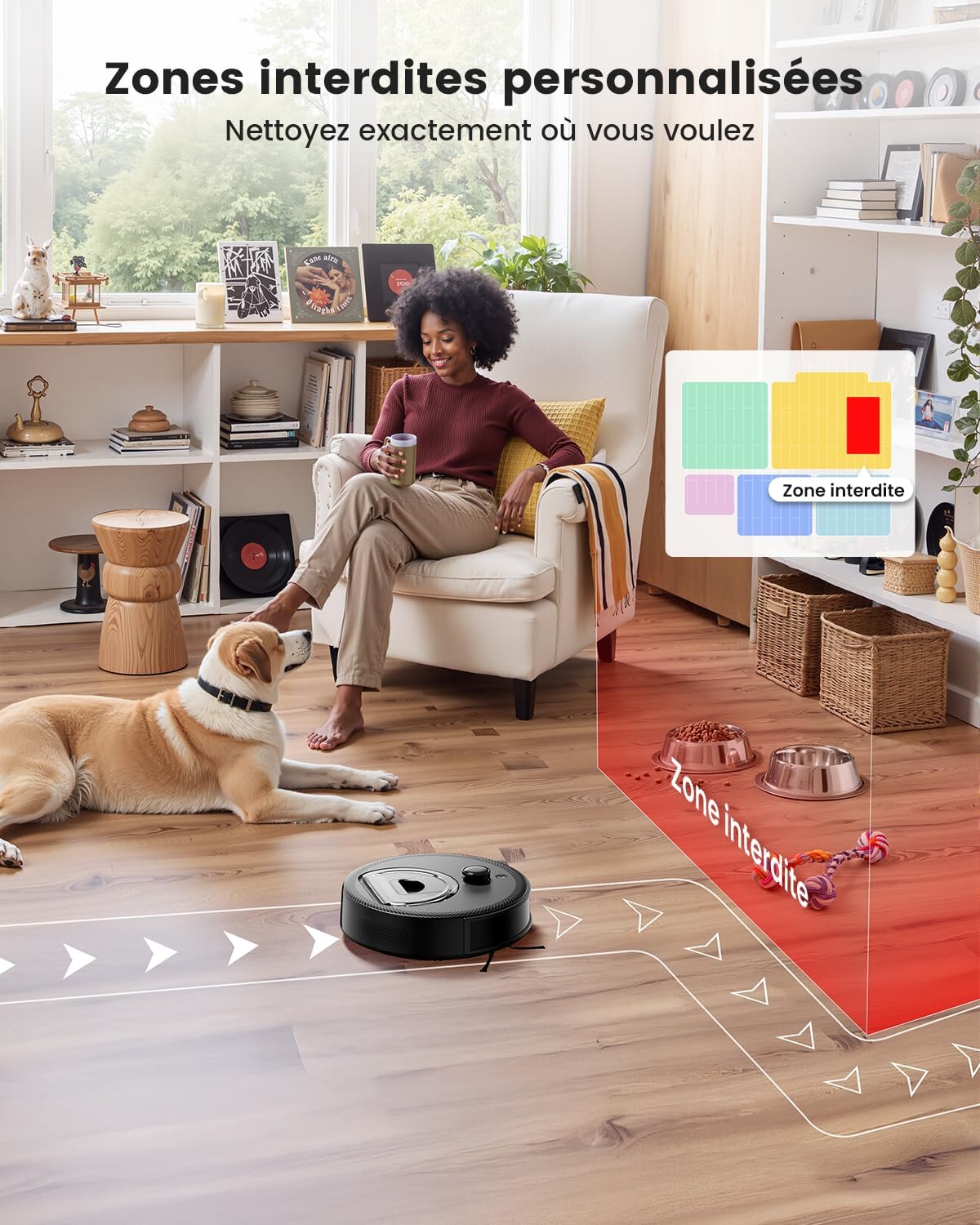
Image: Users can set personalized forbidden zones to restrict the robot's access to certain areas.
6.4 Voice Control
The M330 Pro is compatible with Amazon Alexa and Google Assistant. Follow these steps to enable voice control:
- Open the third-party 'Lefant APP' to access the service.
- Register your voice account and password.
- Open the 'Alexa APP' - Skills & Games.
- Search for 'Smart Life'.
- Click 'Enable to use'.
- Select the region - Enter the voice account and password from step 2.
- Wait for a successful connection.

Image: The robot can be conveniently controlled via the Lefant app or voice commands through Alexa and Google Assistant.

Image: Detailed steps for connecting your Lefant robot to Amazon Alexa for voice control.
7. Maintenance
Regular maintenance is crucial for your Lefant M330 Pro to perform at its best. Always turn off the robot and unplug it from the charging station before performing any maintenance.
7.1 Emptying the Dustbin
Empty the dustbin after each cleaning cycle or when the dustbin full indicator lights up. To empty, remove the 3-in-1 water tank/dustbin module, open the dustbin cover, and discard the debris.
7.2 Cleaning the Filters
The HEPA filter and sponge filter should be cleaned regularly (e.g., weekly) and replaced every 1-3 months depending on usage. Tap the filter to remove loose dirt, or use the cleaning brush. Do not wash the HEPA filter with water.
7.3 Cleaning the Side Brushes
Check the side brushes regularly for tangled hair or debris. Use the cleaning brush to remove any obstructions. If brushes are worn or damaged, replace them.
7.4 Cleaning the Water Tank and Mop Pad
After mopping, empty any remaining water from the tank. Remove and clean the washable mop pad. If using disposable mop cloths, discard them. The water tank can be rinsed with water.

Image: The robot features a 200ml water tank for effective mopping.
8. Troubleshooting
If you encounter issues with your Lefant M330 Pro, refer to the following common problems and solutions:
| Problem | Possible Cause | Solution |
|---|---|---|
| Robot does not turn on | Low battery; Power switch off | Charge the robot; Ensure power switch is ON |
| Robot cannot charge | Charging contacts dirty; Charging station not powered | Clean charging contacts on robot and station; Check power adapter connection |
| Robot gets stuck frequently | Too many obstacles; Robot stuck on high threshold | Clear obstacles; Use no-go zones; Manually move robot |
| Poor cleaning performance | Dustbin full; Filters clogged; Brushes tangled | Empty dustbin; Clean/replace filters; Clean side brushes |
| App connection issues | Incorrect Wi-Fi password; Router too far; Wrong Wi-Fi band | Re-enter password; Move robot closer to router; Ensure 2.4GHz/5GHz network is used |
For more detailed troubleshooting or persistent issues, please refer to the full user manual or contact Lefant customer support.
9. Specifications
| Model Number | M330 Pro |
| Dimensions (L x W x H) | 28 x 28 x 9.5 cm |
| Weight | 3.31 kg |
| Applicable Floor Types | Hard floor, Carpet, Parquet, Tile |
| Form Factor | Round |
| Battery Type | 1 Lithium-ion (included) |
| Filter Type | HEPA |
| Dustbin Capacity | 450 ml |
| Water Tank Capacity | 200 ml |
| Power Source | Battery powered |
| Special Features | Precision laser mapping and navigation, Programmable, Simultaneous vacuuming and mopping, Zone exclusion, Automatic recharge |
| Color | Black |
10. Warranty and Support
10.1 Warranty Information
The Lefant M330 Pro Robot Vacuum Cleaner comes with a 1-year warranty from the date of purchase. This warranty covers manufacturing defects and malfunctions under normal use. Please retain your proof of purchase for warranty claims.
10.2 Customer Support
For technical assistance, warranty claims, or any questions regarding your Lefant M330 Pro, please contact Lefant customer support through the official website or the contact information provided in your product packaging. You can also visit the Lefant Brand Store on Amazon for more information and resources.


