
1. Introduction
Thank you for choosing the RISOON Y100A-CR WiFi Carbon Monoxide Detector. This device is designed to provide reliable carbon monoxide (CO) detection and alerts, ensuring the safety of your home or other environments. Featuring a 10-year sealed battery, an LCD display, and smart connectivity via the Tuya Smart or SmartLife app, this detector offers continuous monitoring and real-time notifications.
Please read this manual thoroughly before installation and use to ensure proper operation and to understand all safety precautions.
2. Safety Information
- Carbon Monoxide (CO) Warning: CO is an invisible, odorless, and tasteless gas that can be fatal. This detector is designed to alert you to the presence of CO gas. It is not a substitute for proper maintenance of fuel-burning appliances or ventilation systems.
- Alarm Response: Never ignore a CO alarm. If the alarm sounds, immediately move to fresh air, call emergency services, and do not re-enter the premises until it has been deemed safe by professionals.
- Placement: Install detectors in appropriate locations as specified in this manual. Avoid placing near vents, windows, or in areas with high humidity or extreme temperatures.
- Testing: Test the detector regularly as instructed to ensure it is functioning correctly.
- Battery: The detector is equipped with a sealed 10-year lithium battery. Do not attempt to replace the battery. The unit must be replaced at the end of its service life.
3. Package Contents
Verify that all items are present in your package:
- Two (2) RISOON Y100A-CR WiFi Carbon Monoxide Detectors
- Two (2) User Manuals
- Two (2) Screw Kits (screws and wall plugs)

Image: Contents of the RISOON Y100A-CR Carbon Monoxide Detector package, showing one detector, a user manual, and mounting hardware.
4. Product Features
- 10-Year Sealed Battery: Provides long-term, maintenance-free power.
- High-Precision Electrochemical Sensor: Reliably detects carbon monoxide concentrations.
- LCD Digital Display: Shows real-time CO levels in parts per million (ppm).
- 85 dB Alarm: Loud audible alarm to alert occupants to dangerous CO levels.
- 2.4 GHz WiFi Connectivity: Connects directly to your home WiFi network without a hub.
- SmartLife/Tuya App Control: Receive real-time notifications, check battery status, and control test/mute functions remotely.
- EN50291 Certified: Complies with European safety standards for carbon monoxide alarms.
- Test/Hush Button: Allows for easy testing of the alarm and temporary silencing during non-critical events.
- Versatile Placement: Suitable for various locations including homes, offices, bedrooms, and RVs.
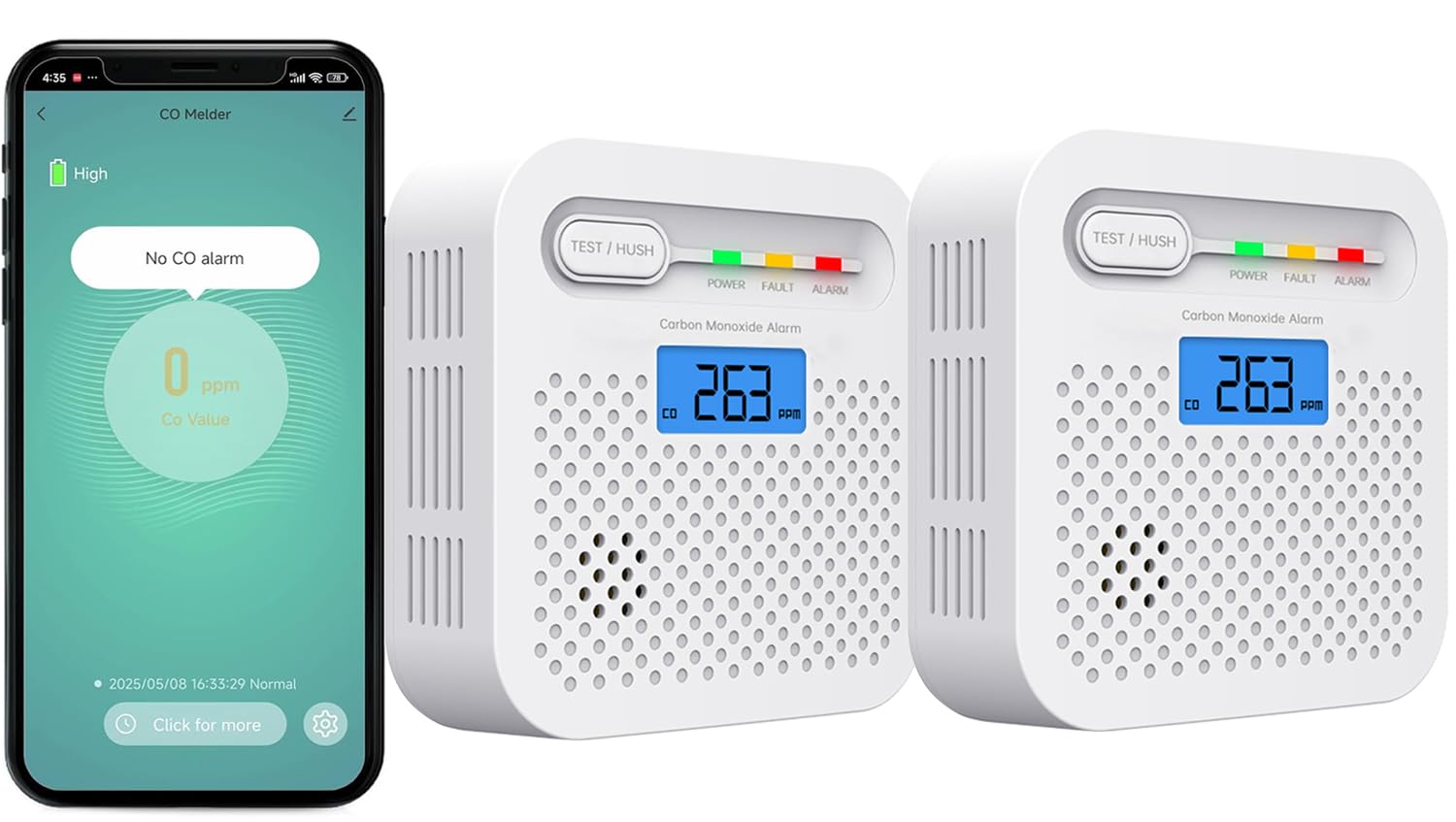
Image: The RISOON Y100A-CR detector showcasing its key features, including a 10-year sensing life, full view LCD screen, high sensitivity, 85 dB alarm, false alarm prevention, and a 3-color LED indicator.

Image: The detector displayed alongside an SGS certification document, confirming its compliance with EN50291-1:2018 European safety standards.
5. Setup
5.1 Installation Location
For optimal CO detection, install the detector in areas where CO is most likely to be present or where occupants spend significant time. Recommended locations include:
- Near sleeping areas (e.g., bedrooms).
- On every level of your home, including the basement.
- Near or in rooms with fuel-burning appliances (e.g., furnace, water heater, fireplace).
- In living rooms, offices, or recreational vehicles.
Avoid placing the detector:
- Within 1 meter (3 feet) of fuel-burning appliances.
- In direct sunlight or near heat sources.
- In areas with high humidity (e.g., bathrooms).
- Near windows, doors, or ventilation openings that could dilute CO concentrations.
- In dusty, dirty, or greasy areas.

Image: Two RISOON Y100A-CR detectors, one on a desk and one wall-mounted, illustrating flexible placement options.
5.2 Mounting the Detector
The detector can be placed on a flat surface or mounted on a wall.
- Wall Mounting: Use the provided screw kit. Mark two points on the wall, drill holes, insert wall plugs, and secure the mounting bracket (if applicable) or the detector directly with screws. Ensure the detector is firmly attached.
- Desktop Placement: Simply place the detector on a stable, flat surface where it will not be easily knocked over.
5.3 App Connection (Tuya Smart / SmartLife)
To enable smart features and receive real-time notifications, connect your detector to the Tuya Smart or SmartLife app.
- Download the App: Search for "Tuya Smart" or "SmartLife" in your smartphone's app store (iOS or Android) and download it.
- Register/Log In: Open the app and register a new account or log in with an existing one.
- Add Device: Follow the in-app instructions to add a new device. Ensure your smartphone is connected to a 2.4 GHz Wi-Fi network. This detector is not compatible with 5 GHz networks.
- Pairing Mode: The detector will automatically enter pairing mode when first powered on or after a reset. The app will guide you through the connection process.
- Confirmation: Once connected, the app will confirm successful pairing, and you can name your device.

Image: A smartphone displaying the Tuya app's Wi-Fi setup screen, emphasizing the need to connect to a 2.4 GHz network, positioned next to the CO detector.
6. Operating Instructions
6.1 Power On
The detector automatically powers on when the battery is activated. There is no manual power button. The LCD screen will light up, and the device will perform a self-test.
6.2 LCD Display
The LCD screen displays the current carbon monoxide concentration in parts per million (ppm). It also shows battery status and operational indicators.
| CO Concentration | Alarm Response Time |
|---|---|
| 30 ppm | No alarm within 120 minutes |
| 50 ppm | 60-90 minutes |
| 100 ppm | 10-40 minutes |
| 300 ppm | 0-3 minutes |

Image: The detector's digital display showing a CO reading of 263 ppm, alongside a graphic illustrating the detection range and alarm activation times for various CO concentrations.
6.3 Alarm Function
When CO levels reach dangerous concentrations, the detector will emit an 85 dB audible alarm and flash its LED indicators. The LCD will display the detected CO level.

Image: The detector on a nightstand, illustrating its 85 dB alarm sound and CO detection capability, designed to alert even a sleeping individual.
6.4 Test/Hush Button
- Test: Press the "TEST/HUSH" button to perform a self-test. The alarm will sound briefly, and the LEDs will flash, confirming proper operation.
- Hush: During a non-emergency alarm (e.g., due to temporary high CO from a faulty appliance that is quickly resolved), you can press the "TEST/HUSH" button to temporarily silence the alarm. Note: The alarm cannot be muted if the CO concentration exceeds 300 ppm, as this indicates a critical danger level.

Image: The detector on a wall, with a smartphone showing the app's mute feature, clarifying that muting is disabled above 300 PPM CO concentration.
6.5 App Notifications and Control
Once connected to the Tuya Smart or SmartLife app:
- Real-time Alerts: Receive instant notifications on your smartphone if CO is detected or if the battery is low.
- Battery Status: Monitor the detector's battery level directly from the app.
- Remote Test/Mute: Initiate a test or mute the alarm through the app (subject to CO concentration limits for muting).
- Share Control: Securely share access to the detector's controls and notifications with family members or trusted users via the app.

Image: A woman interacting with her smartphone, illustrating the smart features of the RISOON CO alarm, including easy pairing, family sharing, real-time notifications, and battery status checks through the Tuya app.
7. Maintenance
- Regular Testing: Test your CO detector weekly by pressing the "TEST/HUSH" button.
- Cleaning: Dust can accumulate on the detector and affect its performance. Gently vacuum the detector's vents and cover monthly using a soft brush attachment. Do not use cleaning solvents or sprays.
- Battery Life: The sealed lithium battery has a lifespan of approximately 10 years. The detector will indicate a low battery warning when it is nearing the end of its life.
- End of Life: After 10 years, the detector will signal its end-of-life. At this point, the entire unit must be replaced. Do not attempt to open or repair the detector.
8. Troubleshooting
| Problem | Possible Cause | Solution |
|---|---|---|
| Detector does not power on. | Battery not activated or depleted. | Ensure the battery is properly connected (if applicable for initial setup). If the unit is old, it may have reached its end-of-life. Replace the unit. |
| Alarm sounds intermittently or falsely. | Temporary CO presence, dust, or interference. | Ventilate the area. Clean the detector. Relocate the detector away from sources of interference or high humidity. If the alarm persists, treat it as a real CO event. |
| Cannot connect to Wi-Fi/App. | Incorrect Wi-Fi band (5 GHz), weak signal, or incorrect password. | Ensure your router is broadcasting a 2.4 GHz Wi-Fi signal. Move the detector closer to the router. Double-check your Wi-Fi password. Reset the detector and try pairing again. |
| Low battery warning (chirp/app notification). | Battery nearing end of 10-year life. | The battery is sealed and non-replaceable. Replace the entire detector unit immediately. |
| LCD display is blank or unreadable. | Unit malfunction or extreme temperatures. | Ensure the detector is within its operating temperature range. If the issue persists, the unit may be faulty and needs replacement. |
9. Specifications
| Feature | Specification |
|---|---|
| Model Number | Y100A-CR |
| Brand | RISOON |
| Dimensions (L x W x H) | 100 x 100 x 10 mm (approx. 3.94 x 3.94 x 0.39 inches) |
| Weight | 1 gram (Note: This weight seems unusually low and may be a data entry error. Actual product weight is typically higher.) |
| Color | White |
| Material | ABS Plastic |
| Power Source | Sealed 10-Year Lithium Battery (Non-replaceable) |
| Sensor Type | Electrochemical |
| Alarm Loudness | 85 dB at 1 meter (3 feet) |
| Wi-Fi Connectivity | 2.4 GHz (IEEE 802.11b/g/n) |
| Compatible Apps | Tuya Smart, SmartLife |
| Certification | CE, EN50291-1:2018 |
| Manufacturer | Shenzhen Ariza Electronic Co., Ltd |
| Country of Origin | China |
10. Warranty and Support
RISOON products are manufactured to high-quality standards. For warranty information or technical support, please refer to the contact details provided with your purchase documentation or visit the official RISOON website. Keep your purchase receipt as proof of purchase.