
INSKAM B0DZ8JW3N2
Contents
INSKAM Visual Ear Pick User Manual
Model: B0DZ8JW3N2
Introduction
Thank you for purchasing the INSKAM Visual Ear Pick. This device combines a high-definition camera with an ear pick, allowing for a clear view of the ear canal on your mobile phone during earwax removal. Please read this manual carefully before use to ensure safe and effective operation.
Safety Information
- This device is intended for personal use. Consult a medical professional if you experience ear pain, discharge, or hearing loss.
- Do not insert the ear pick too deeply into the ear canal to avoid injury to the eardrum.
- Always use the soft silicone ear pick covers provided.
- Keep the device clean and disinfected before and after each use.
- Do not use on infants or young children without professional supervision.
- Avoid using the device if you have an ear infection or any ear injury.
- Keep out of reach of children.
Package Contents

Image: The complete INSKAM Visual Ear Pick set, including the main device, a smartphone displaying the ear canal view, multiple ear pick covers, various ear cleaning tools, and a USB-C charging cable.
- Visual Ear Pick Device with Camera and Light
- 6 x Replaceable Silicone Ear Pick Covers
- 7 x Auxiliary Ear Cleaning Tools (various shapes)
- USB-C Charging Cable
- User Manual (this document)
Setup
1. Charging the Device
Before first use, fully charge the Visual Ear Pick device. Connect the provided USB-C charging cable to the device's charging port and plug the other end into a standard USB power adapter (not included).
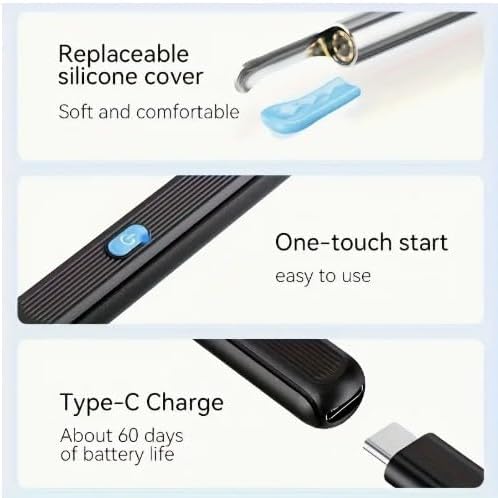
Image: A close-up showing the Type-C charging port at the bottom of the ear pick device, indicating its charging capability and long battery life.
The device has a built-in rechargeable lithium battery with a capacity of 130mAh, providing approximately 60 days of battery life on a single charge (usage dependent).
2. App Installation
Search for the dedicated INSKAM app on your mobile phone's app store (e.g., Apple App Store for iOS or Google Play Store for Android) and install it. Ensure your phone's operating system is compatible.
3. Connecting to Your Phone (WiFi Visualization)
- Power on the Visual Ear Pick device by pressing and holding the power button.
- On your mobile phone, go to your WiFi settings.
- Locate and connect to the WiFi network broadcast by the ear pick device (usually named something like "INSKAM_XXXX"). No password is typically required.
- Open the INSKAM app. The live view from the ear pick's camera should now be displayed on your phone screen.

Image: Two visual ear picking rods (black and white) highlighting features such as HD footage, WiFi visualization, and the inclusion of 6 silicone ear spoons.
Operating Instructions
1. Powering On/Off
Press the blue power button on the device to turn it on. The indicator light will illuminate. Press and hold the button again to turn it off.
Image: A close-up showing the blue one-touch start button on the ear pick device, indicating ease of use.
2. Attaching Silicone Ear Pick Covers
Gently push one of the soft silicone ear pick covers onto the tip of the device. Ensure it is securely attached before use. These covers are replaceable for hygiene and comfort.
3. Using the Visual Ear Pick
- With the device connected to your phone and the app open, carefully insert the tip of the ear pick into your ear canal.
- Observe the live feed on your phone screen to guide your movements. The device features a 5 Million High Definition Endoscope with a 3.5mm lens diameter, 10-50mm lens depth of field, and 1.4-2cm lens focal length for clear visualization.
- Gently maneuver the ear pick to remove earwax. Do not apply excessive force.
- The device incorporates intelligent temperature control, maintaining a temperature similar to the human body (around 32°C) at the tip to prevent discomfort or damage to the ear canal. The insensitivity temperature into the ear is approximately 25°C.
- Use the auxiliary ear cleaning tools for larger or harder-to-reach earwax, always with caution and visual guidance from the app.

Image: A detailed view of the 5 Million High Definition Endoscope lens, illustrating its internal components and specifications for restoring the situation inside the ear.

Image: A diagram illustrating the intelligent temperature control feature of the device, showing the 'Body' palm temperature at 32°C and the 'Into the ear' insensitive temperature at 25°C to prevent high temperature damage.
Maintenance
1. Cleaning the Device and Accessories
- After each use, remove the silicone ear pick cover and clean it with rubbing alcohol or soap and water. Allow it to air dry completely.
- Wipe the camera lens gently with a soft, dry cloth or a cotton swab. Do not use abrasive cleaners.
- Clean the auxiliary ear cleaning tools with rubbing alcohol or soap and water.
- Do not immerse the main device in water.
2. Storage
Store the device and all accessories in a clean, dry place, away from direct sunlight and extreme temperatures. Keep it in its original packaging or a protective case when not in use.
Troubleshooting
| Problem | Possible Cause | Solution |
|---|---|---|
| Device not powering on | Low battery | Charge the device fully. |
| Cannot connect to WiFi | Device not broadcasting WiFi; Incorrect WiFi selection | Ensure device is powered on. Restart device and phone. Select the correct INSKAM WiFi network. |
| No image in app | App not open; WiFi not connected; App permissions | Open the INSKAM app. Verify WiFi connection. Check app permissions for camera/network access. |
| Image blurry or unclear | Lens dirty; Incorrect focal distance | Clean the camera lens. Adjust the distance from the ear canal wall (optimal focal length 1.4-2cm). |
Specifications
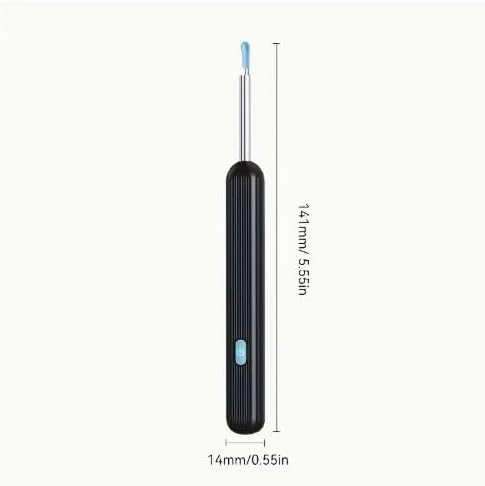
Image: A diagram showing the dimensions of the Visual Ear Pick device, measuring 141mm (5.55in) in length and 14mm (0.55in) in width.
- Product Model: B0DZ8JW3N2
- Manufacturer: INSKAM
- Material: Plastic
- Power Supply: USB Charging (built-in Battery)
- Battery Type: Rechargeable Lithium Battery
- Battery Capacity: 130mAh
- Approximate Battery Life: 60 days (standby/light use)
- Lens Diameter: 3.5mm
- Lens Depth of Field: 10-50mm
- Lens Focal Length: 1.4-2cm
- Camera Resolution: 5 Million High Definition
- Connectivity: WiFi (for mobile phone visualization)
- Charging Port: Type-C USB
- Dimensions: Approximately 141mm (5.55in) length x 14mm (0.55in) width
- Temperature Control: Intelligent, maintaining body-like temperature at tip
Warranty and Support
For warranty information and customer support, please refer to the product packaging or contact the manufacturer, INSKAM, directly through their official website or the contact information provided at the point of purchase. Specific warranty terms may vary by region and retailer.
Documents and downloads
Ask a question about this manual
Ask about setup, troubleshooting, compatibility, parts, safety, or missing instructions. Manuals+ will review the question and use this page’s manual context to help answer it.