1. Introduction
The ABB THQLSURGE2 is a Type 1 Surge Protective Device (SPD) engineered to safeguard your entire electrical system and connected electronics from damaging power surges. This device offers comprehensive protection for both residential and commercial applications, enhancing the longevity and reliability of your valuable equipment by diverting excess voltage away from sensitive circuits.
2. Important Safety Information
WARNING: Installation of this device involves working with high voltage electricity. To prevent electric shock, fire, or other hazards, installation must only be performed by a qualified and licensed electrician in accordance with all national and local electrical codes.
For your safety, it is crucial to purchase only genuine, ABB-manufactured electrical products (inclusive of those branded GE or GE by ABB and now manufactured by ABB). Counterfeit and non-authentic products may fail to meet safety standards, putting you at risk. To ensure you receive safe, reliable products, check the product description and photos and verify that the product is described as an ABB, GE, or GE by ABB product and has labels with an ABB, GE, or GE by ABB logo. Please also check the product description to see if the product has been certified by third-party certification bodies such as UL, IC and/or Intertek.
3. Setup and Installation
The THQLSURGE2 is designed for plug-on installation, making it suitable for service entrances, subpanel locations, or directly within compatible PowerMark™ load centers. This device requires two full panel spaces for proper installation.
Installation Steps (to be performed by a qualified electrician):
- Ensure all power to the electrical panel is turned off at the main breaker before beginning installation.
- Identify two adjacent, vacant breaker slots within the compatible load center.
- Carefully insert the THQLSURGE2 into the designated slots, ensuring a secure connection.
- Connect the pigtail wiring according to the wiring diagram provided with the product and local electrical codes. Typically, the white wire connects to the neutral bus bar and the bare copper wire connects to the ground bus bar.
- Verify all connections are tight and secure.
- Restore power to the electrical panel.
- Confirm the green LED indicator on the front of the device is illuminated, indicating proper operation.
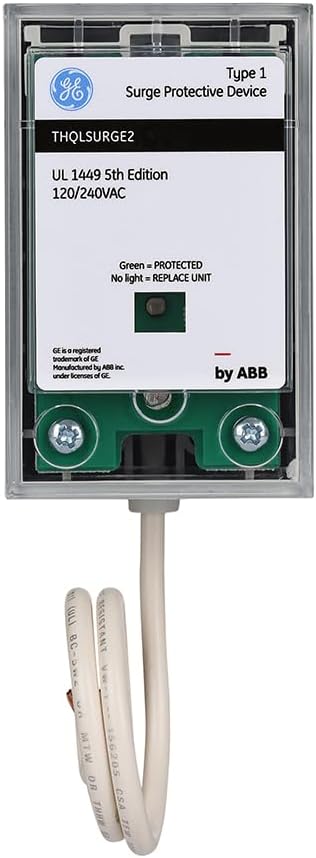
This image displays the front of the ABB THQLSURGE2 surge protector, highlighting its compact design and the visible status indicator. The label clearly states 'Type 1 Surge Protective Device', 'THQLSURGE2', 'UL 1449 5th Edition', and '120/240VAC'. It also indicates 'Green = PROTECTED' and 'No light = REPLACE UNIT', which are crucial for operational status checks.
4. Operating Instructions
The ABB THQLSURGE2 operates automatically to protect your electrical system from surges. Once installed and powered, it continuously monitors the incoming power lines.
- Green LED Indicator: A continuously illuminated green LED on the front of the device signifies that the surge protector is active and providing protection.
- No LED Light: If the green LED is off, it indicates that the surge protective device has absorbed a significant power surge and is no longer functional. In this state, the unit requires replacement to restore surge protection.
5. Maintenance
The ABB THQLSURGE2 is a maintenance-free device in terms of internal components. The primary maintenance task is to regularly check its operational status.
- Monthly Inspection: It is recommended to visually inspect the green LED indicator on the front of the device at least once a month.
- Replacement: If the green LED is off, the device has reached its end-of-life and must be replaced by a qualified electrician to ensure continued surge protection for your home or office.
6. Troubleshooting
Most issues related to the THQLSURGE2 can be identified by observing the LED indicator.
| Symptom | Possible Cause | Action |
|---|---|---|
| Green LED is off | Device has absorbed a significant surge and is no longer functional. | The unit requires replacement. Contact a qualified electrician. |
| Green LED is off immediately after installation | Improper installation or no power to the device. | Verify proper installation and ensure power is supplied to the panel. If issues persist, contact a qualified electrician. |
7. Specifications
Key technical specifications for the ABB THQLSURGE2 Surge Protective Device:
- Brand: ABB
- Model Number: THQLSURGE2
- Type: Type 1 Surge Protective Device (SPD)
- Nominal Voltage: 120/240VAC, 50/60Hz
- Current Rating: 20 Amps
- Circuit Breaker Type: Standard
- Mounting Type: Plug-In Mount
- Number Of Poles: 2
- Nominal Discharge Current (In): 10kA
- Maximum Discharge Current (Imax): 25kA
- Maximum Continuous Operating Voltage (MCOV): L-N 150V, L-L 300V
- Voltage Protection Rating (VPR): 1kV, 3kA: 600V (L-N), 1000V (L-L)
- Compliance: UL 1449 5th Edition, NEC 2023 Article 230.67
- Item Weight: 7 ounces
- Package Dimensions: 6.69 x 5.35 x 2.28 inches
- Color: White
- UPC: 783164678246

This image provides a side view of the THQLSURGE2, revealing additional technical specifications printed on the casing. Details include Nominal Voltage (120/240VAC 50/60Hz), In (10kA), Imax (25kA), MCOV (MAC) values for L-N and L-L, and VPR (1kV, 3kA) values. The attached wiring pigtail is also visible, indicating its connection method.

An angled view of the ABB THQLSURGE2, illustrating its physical dimensions and how the wiring pigtail extends from the bottom. This perspective helps in understanding the device's footprint for installation within an electrical panel.
8. Warranty Information
For detailed warranty information regarding your ABB THQLSURGE2 Surge Protective Device, please contact ABB customer service directly. Warranty details, terms, and conditions may also be available on the official ABB website.
9. Support and Contact
For technical assistance, product inquiries, or further support, please visit the official ABB website or contact their customer support department. Ensure you have your product model number (THQLSURGE2) available when seeking support.