
Introduction
Welcome to the user manual for your new CRKD Gibson Les Paul Guitar Controller. This guide provides essential information for setting up, operating, and maintaining your controller to ensure an optimal gaming experience. Designed for rhythm game enthusiasts, this controller offers multi-platform compatibility and innovative features to enhance your gameplay.

Image: Front view of the CRKD Gibson Les Paul Guitar Controller in Blueberry Burst Pro finish.
Product Overview
The CRKD Gibson Les Paul Guitar Controller is engineered for precision and versatility across various gaming platforms.
Key Features:
- Multi-Platform Compatibility: Works with PC, PC handhelds, Nintendo Switch 1|2, Android devices (Smart TVs, tablets, mobile), and cloud streaming services (Xbox Cloud Gaming, Luna).
- KEYJAM Mode (Mode 9): Transforms the controller into a keyboard and mouse for seamless compatibility with games like Fortnite Festival on PC, Xbox Series X|S, Xbox One, PlayStation 5, and PlayStation 4.
- Premium Frets & Strum Bar: Features mechanical frets for precision and responsiveness, and a Hall effect strum bar with customizable actuation points and haptic feedback for tactile play.
- Modular Design: Allows for interchangeable necks, including an optional solo neck with 5 additional frets.
- Easy Navigation: Equipped with two integrated Hall effect analog sticks, an ergonomic D-pad on the headstock, and an eight-button navigation hub.
- Flexible Connectivity: Supports wired (USB cable), Rapid polling low latency wireless (2.4GHz dongle), and Bluetooth connectivity. Includes tilt functionality for Star Power activation.
Components:

Image: Front view showcasing the main body, strum bar, and fret buttons.

Image: Rear view of the guitar controller, showing the battery compartment and general shape.

Image: Close-up of the USB-C port and switches for selecting connectivity modes (PC, NS, AN, PS).

Image: Detail of the analog stick surrounded by navigation buttons (Y, RB, B, RT, A, LT, X, LB).

Image: Close-up of the two golden control knobs on the guitar body, one with the CRKD logo.

Image: A mobile phone displaying the CRKD app, showing product recognition and rarity ranking.
Setup
1. Assembly:
Your CRKD Gibson Les Paul Guitar Controller features a modular design, allowing for easy assembly and customization.
- Carefully align the neck of the guitar controller with the main body.
- Gently push the neck into the designated slot until it clicks securely into place. Ensure a firm connection.
- If using the shoulder strap, attach it to the strap pins located on the guitar body.
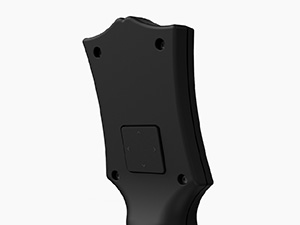
Image: Illustration of the modular neck detaching from the guitar body, highlighting the connection point.
2. Initial Connection:
The controller offers multiple connectivity options:
- Wired Connection: Connect the included 2.5m USB-C cable with its locking mechanism to the controller and your gaming device (PC, console, etc.).
- 2.4GHz Wireless (Dongle): Insert the 2.4GHz wireless dongle into an available USB port on your gaming device. Ensure the controller's mode switch is set to the appropriate wireless setting.
- Bluetooth: Switch the controller to Bluetooth mode. On your device, search for available Bluetooth devices and select the CRKD Gibson Les Paul Controller to pair.
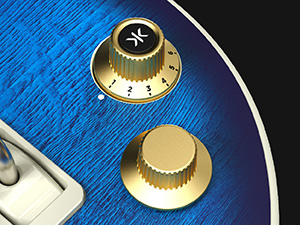
Image: Close-up of the USB wireless dongle being inserted into a port on the guitar controller.
Operating Instructions
1. Multi-Platform Use:
Use the mode switch located near the USB-C port to select the desired platform: PC, Nintendo Switch (NS), Android (AN), or PlayStation (PS). This ensures optimal compatibility and performance for your chosen device.
2. KEYJAM Mode (Mode 9):
Activate KEYJAM Mode (Mode 9) to transform your guitar controller into a keyboard and mouse. This mode is particularly useful for navigating menus and playing games like Fortnite Festival. The fret buttons, strum bar, and other inputs are mapped to keyboard controls, while the right thumbstick functions as a mouse.
3. Navigation and Controls:
- Fret Buttons: Press the colored fret buttons on the neck to hit notes in rhythm games.
- Strum Bar: Use the strum bar to activate notes. The Hall effect design provides precise and responsive feedback.
- Analog Sticks: Two integrated analog sticks provide precise movement and control.
- D-Pad: The ergonomic D-pad on the headstock allows for directional input and menu navigation.
- Navigation Hub: The eight-button navigation hub around the analog stick provides quick access to common in-game functions and menu navigation.
- Tilt Functionality: Tilt the guitar controller to activate "Star Power" or similar in-game abilities.

Image: Close-up view of the mechanical frets, showing their internal mechanism for enhanced responsiveness.
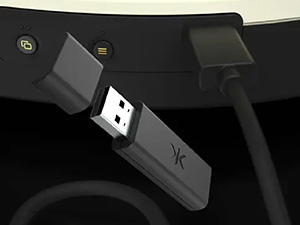
Image: Detailed view of the Hall effect strum bar mechanism, illustrating its durable and precise design.
4. CRKD CTRL Dashboard App:
For advanced customization and product details, download the CRKD CTRL Dashboard app. This app serves as a central hub for accessing product information, firmware updates, and customizable features. You can also use it to reveal your product number and rarity ranking.

Image: Screenshot of the CRKD CTRL Dashboard app interface, showing various settings and product details.
Maintenance
1. Cleaning:
To keep your controller in optimal condition, regularly wipe it down with a soft, dry cloth. Avoid using abrasive cleaners or solvents, as these can damage the finish and electronic components.
2. Battery Information:
The controller includes 1 Lithium Ion battery. Ensure the battery is charged for wireless operation. If the battery life diminishes significantly, it may be time for replacement or professional servicing. Refer to the CRKD website for battery replacement guidelines.
Troubleshooting
| Problem | Possible Cause | Solution |
|---|---|---|
| Controller not connecting wirelessly. | Low battery, incorrect mode selected, dongle not properly inserted, Bluetooth not paired. | Charge the battery. Ensure the mode switch is set correctly (2.4GHz or Bluetooth). Re-insert the wireless dongle. Re-pair via Bluetooth. |
| Buttons or strum bar unresponsive. | Loose connection, software glitch, physical obstruction. | Ensure the neck is securely attached. Restart the controller and gaming device. Check for any debris under buttons or strum bar. |
| Lag or input delay. | Interference, distance from receiver, low battery. | Move closer to the receiver/device. Ensure no strong wireless interference. Use wired connection if persistent. Charge battery. |
Specifications
- Model: Multi Platform Pro
- ASIN: B0DZ71SS97
- Manufacturer: CRKD
- Connectivity: Wired (USB-C), 2.4GHz Wireless, Bluetooth
- Compatibility: PC, PC handhelds, Nintendo Switch 1|2, Android devices (Smart TVs, tablets, mobile), Xbox Cloud Gaming, Luna, Fortnite Festival, classic Guitar Hero/Rock Band games, YARG, Clone Hero.
- Power: 1 Lithium Ion battery (included)
- Item Weight: 4.69 pounds
- Package Dimensions: 21.5 x 14.41 x 2.91 inches
- Release Date: August 8, 2025
Warranty and Support
For detailed warranty information and technical support, please visit the official CRKD website or contact their customer service. Keep your proof of purchase for any warranty claims.
CRKD Official Website: Visit the CRKD Store on Amazon