1. Introduction
Thank you for choosing the KOTLIE ST-550 4-in-1 Multi-Capsule Coffee Machine. This versatile appliance is designed to brew a variety of coffee types, including Nespresso Original, Dolce Gusto, A Modo Mio capsules, and ground coffee. With its 19-bar high-pressure system and customizable water volume, you can enjoy a rich and aromatic coffee experience. Please read this manual thoroughly before first use to ensure safe operation and optimal performance.
2. Important Safety Instructions
- Read all instructions before using the appliance.
- Do not immerse the appliance, power cord, or plug in water or other liquids.
- This appliance is for household use only. Do not use outdoors.
- Ensure the voltage indicated on the appliance corresponds to your local mains voltage before connecting.
- Always unplug the appliance from the power outlet before cleaning and when not in use.
- Do not operate any appliance with a damaged cord or plug, or after the appliance malfunctions or has been damaged in any manner.
- Keep children away from the appliance during operation.
- Avoid contact with hot surfaces. Use handles or knobs.
- Never use accessories not recommended by the manufacturer.
- Place the appliance on a stable, flat, heat-resistant surface.
- The appliance features an automatic shut-off after 15 minutes of inactivity for safety and energy saving.
3. Product Overview
3.1 Components
The KOTLIE ST-550 coffee machine includes the following main components:
- Water Tank (1 Liter capacity)
- Drip Tray
- Capsule Adapters (for Nespresso Original, Dolce Gusto, A Modo Mio)
- Ground Coffee Adapter
- Control Panel
- Brewing Outlet

Image 3.1: Front view of the KOTLIE ST-550 Multi-Capsule Coffee Machine. It shows the machine in black and metallic finish, with a glass cup receiving brewed coffee, and the water tank visible on the right side.
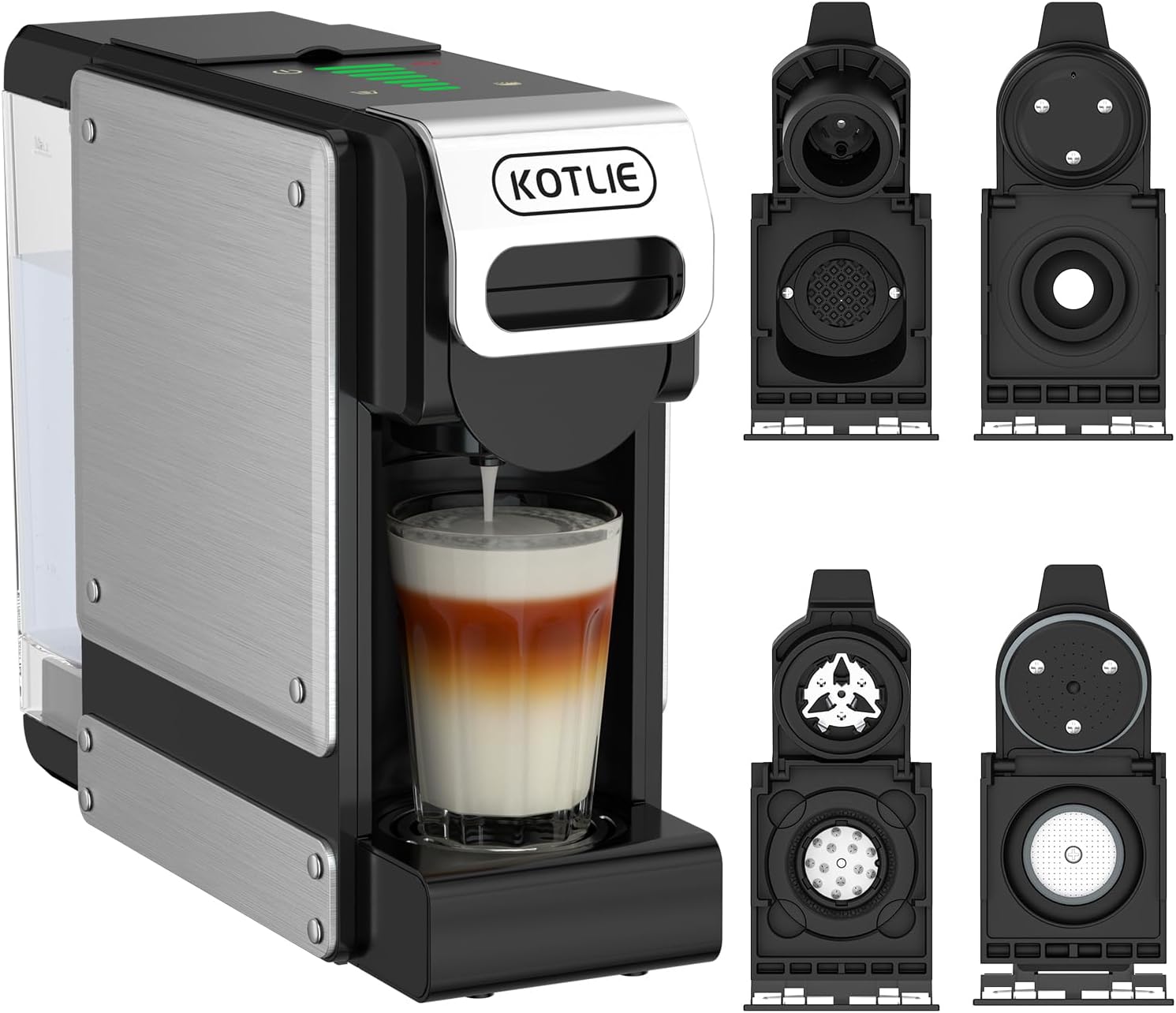
Image 3.2: The KOTLIE ST-550 coffee machine shown alongside its various capsule adapters. The main machine is on the left, brewing coffee into a glass. On the right, four different adapters are displayed, designed for various capsule types and ground coffee.
3.2 Control Panel and Indicators
The control panel is located on the top of the machine and features the following:
- Power Button: Turns the machine on/off.
- Brew Button: Initiates the brewing process.
- Pre-Soak Button: Activates a pre-soak function for enhanced flavor extraction (especially for ground coffee).
- Water Volume Selection Buttons: Allows selection of 7 different water levels for customized beverage size.
- Indicator Lights: Display power status, brewing status, and selected water volume.

Image 3.3: Detailed view of the KOTLIE ST-550's control panel and capsule container. The image highlights the power button, brew button, pre-soak button, and water volume selection buttons with their corresponding indicator lights. It also illustrates how to pull out the capsule container and shows the large volume wastewater containers.
4. Setup
4.1 Unpacking
- Carefully remove the coffee machine and all accessories from the packaging.
- Remove any protective films or stickers from the appliance.
- Check that all components are present and undamaged.
4.2 Initial Cleaning and Flushing
Before first use, it is essential to clean the machine and flush the internal system:
- Wash the water tank, drip tray, and all capsule adapters with warm, soapy water. Rinse thoroughly and dry.
- Fill the water tank with fresh, clean water up to the MAX level.
- Place an empty cup on the drip tray.
- Plug the machine into a power outlet. Press the Power Button to turn it on. The indicator lights will flash and then become steady when the machine is ready.
- Without inserting any capsule or ground coffee, select the maximum water volume and press the Brew Button. Allow the machine to run a full cycle, dispensing hot water into the cup.
- Repeat this flushing process 2-3 times to ensure the internal system is clean.
- Discard the water and clean the cup. The machine is now ready for use.
5. Operating Instructions
5.1 General Brewing Steps
- Ensure the water tank is filled with fresh water.
- Place a cup on the drip tray.
- Turn on the machine by pressing the Power Button. Wait for the indicator lights to become steady, indicating the machine is preheated.
- Select the appropriate capsule adapter or ground coffee adapter.
- Insert your chosen coffee (capsule or ground coffee) into the adapter.
- Place the loaded adapter into the machine's brewing chamber.
- Select your desired water volume using the Water Volume Selection Buttons.
- Press the Brew Button to start brewing. For ground coffee, you may optionally press the Pre-Soak Button before brewing for enhanced flavor.
- The machine will automatically stop when the selected volume is dispensed.
- Carefully remove the adapter and discard the used capsule/ground coffee.
5.2 Using Different Coffee Types
The KOTLIE ST-550 is compatible with several coffee formats:
- Nespresso Original Capsules: Use the dedicated Nespresso adapter.
- Dolce Gusto Capsules: Use the dedicated Dolce Gusto adapter.
- A Modo Mio Capsules: Use the dedicated A Modo Mio adapter.
- Ground Coffee: Use the ground coffee adapter. Fill with your preferred finely ground coffee.

Image 5.1: A compatibility chart illustrating the KOTLIE ST-550's ability to use various capsule types and ground coffee. It shows checkmarks for compatibility with Starbucks Large/Small, Nespresso Original, D&G, A Modo Mio, Pe*ts Nespresso, L'OR capsules, and coffee powder.
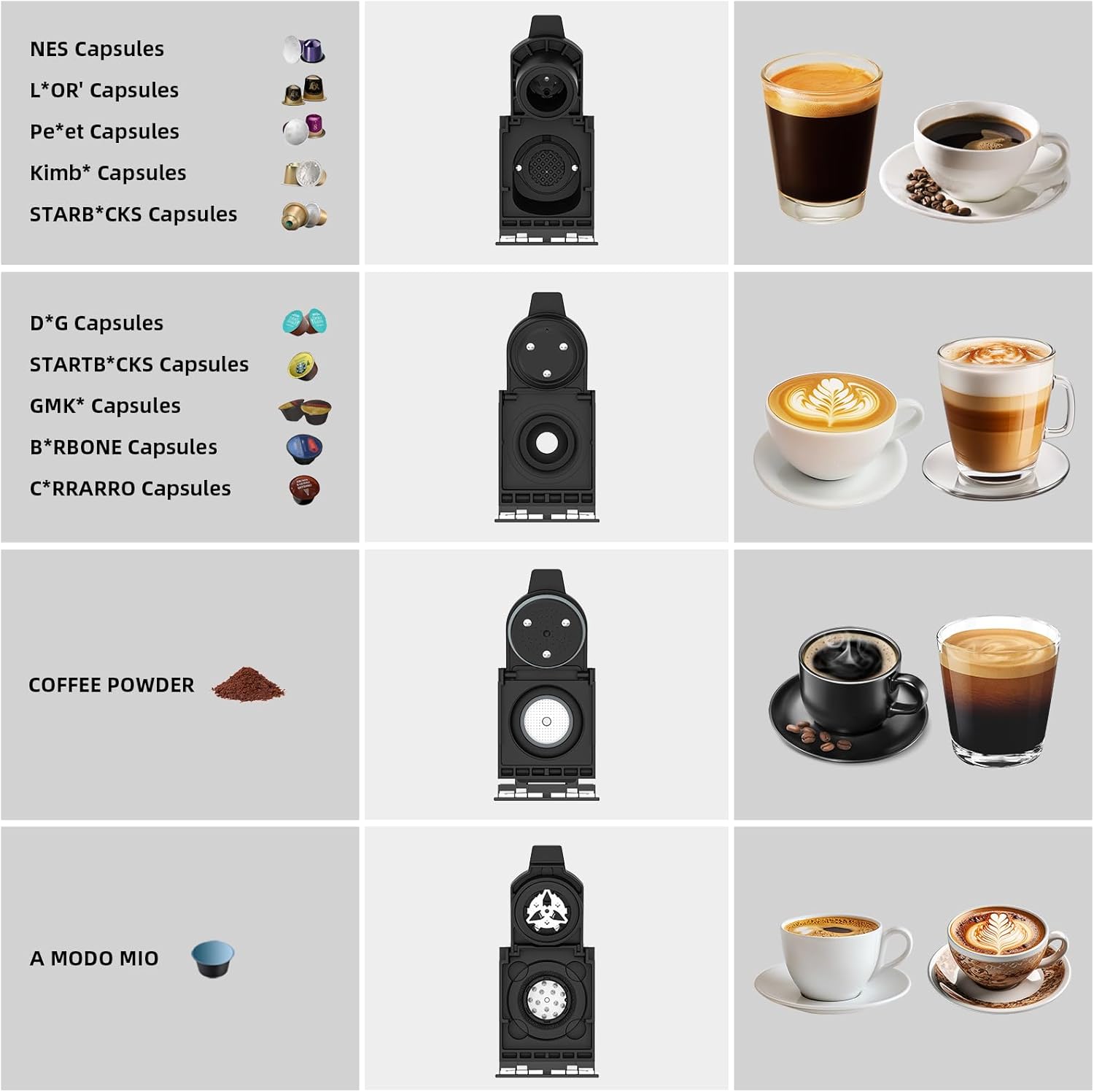
Image 5.2: This image displays the different capsule adapters for the KOTLIE ST-550 and the resulting coffee beverages. It shows adapters for NES capsules, D*G capsules, ground coffee, and A Modo Mio capsules, each paired with an image of a freshly brewed coffee.
5.3 Adjusting Water Volume
The machine offers 7 levels of water volume to customize your drink. Use the Water Volume Selection Buttons on the control panel to choose your desired amount before pressing the Brew Button. The selected level will be indicated by the corresponding light.
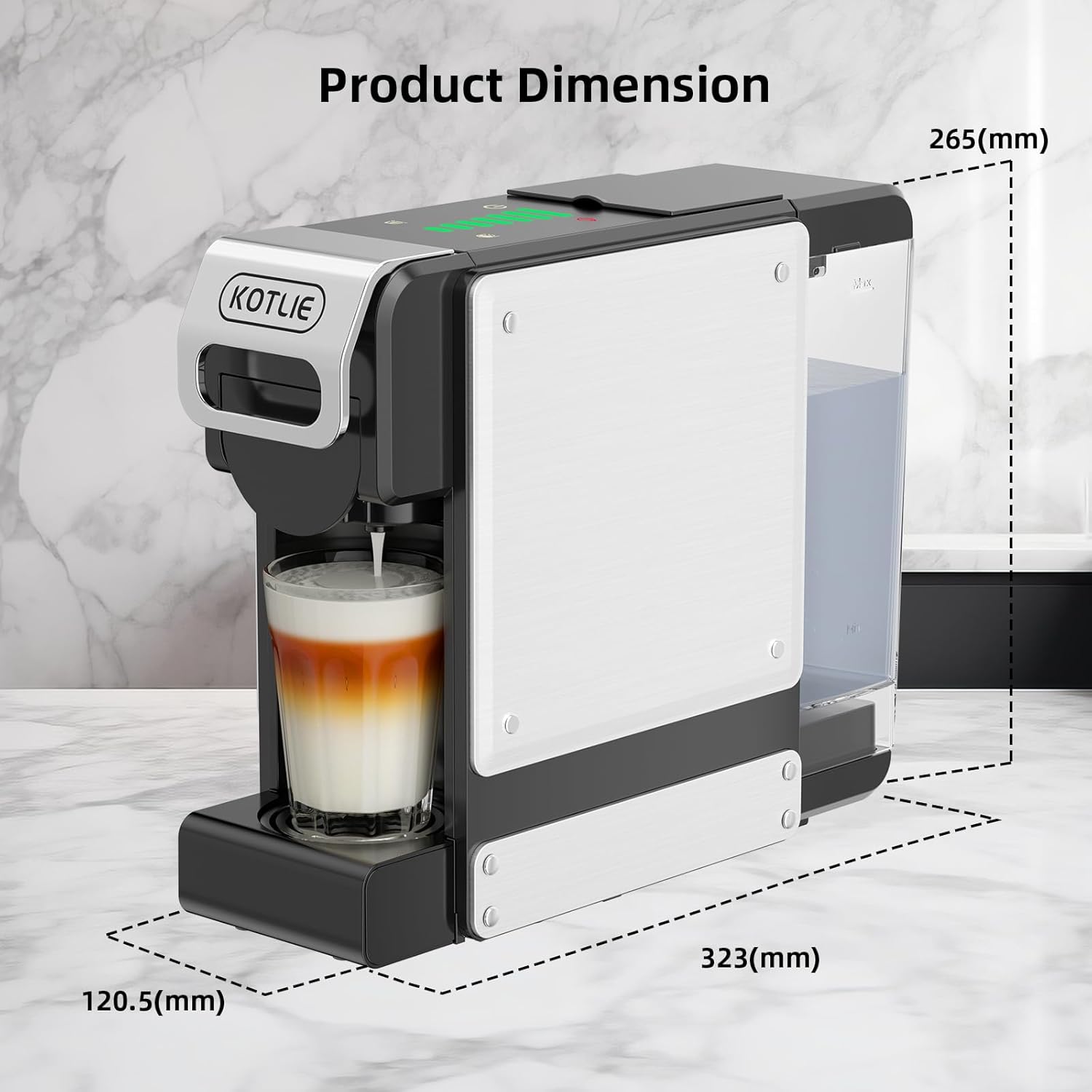
Image 5.3: An overhead view of the KOTLIE ST-550 coffee machine's control panel, surrounded by various cups of coffee. The image highlights the water volume selection buttons and their corresponding indicator lights, demonstrating the machine's ability to customize beverage size.
6. Cleaning and Maintenance
6.1 Daily Cleaning
- After each use, remove and empty the drip tray. Wash it with warm, soapy water and dry.
- Remove the used capsule/ground coffee adapter. Discard the contents and wash the adapter thoroughly.
- Wipe the exterior of the machine with a damp cloth. Do not use abrasive cleaners.
- Empty and rinse the water tank daily. Refill with fresh water.
6.2 Descaling
Regular descaling is crucial to maintain the machine's performance and extend its lifespan. The frequency depends on water hardness and usage. It is recommended to descale every 2-3 months.
- Use a commercially available descaling solution suitable for coffee machines, following the manufacturer's instructions.
- Fill the water tank with the descaling solution and water mixture as per the descaler's instructions.
- Place a large container under the brewing outlet.
- Run several brewing cycles without coffee until the water tank is empty.
- Rinse the water tank thoroughly and fill it with fresh water.
- Run several more cycles with fresh water to flush out any remaining descaling solution.
7. Troubleshooting
| Problem | Possible Cause | Solution |
|---|---|---|
| Machine does not turn on. | No power supply. | Check if the power cord is securely plugged into the outlet and the machine. |
| No coffee is dispensed. | Water tank empty; machine not preheated; brewing chamber blocked. | Fill water tank; wait for indicator lights to be steady; check for blockages in the capsule adapter or brewing outlet. |
| Coffee is too weak or watery. | Incorrect water volume selected; capsule/ground coffee not suitable; machine needs descaling. | Select a smaller water volume; ensure correct capsule type or ground coffee fineness; descale the machine. |
| Water leaks from the machine. | Water tank not properly seated; drip tray full; internal seal issue. | Ensure water tank is correctly positioned; empty drip tray; if problem persists, contact customer support. |
8. Specifications
| Brand | KOTLIE |
| Model Number | ST-550 |
| Dimensions (L x W x H) | 32.3 x 12.05 x 26.5 cm |
| Weight | 3 Kilograms |
| Water Tank Capacity | 1 Liter |
| Power | 1450 Watts |
| Voltage | 230 Volts |
| Material | Plastic, Stainless Steel, Metal |
| Special Features | One-cup brewing, Removable reservoir, Automatic shut-off (15 min) |
| Compatible Capsule Types | Nespresso Original, Dolce Gusto, A Modo Mio, Ground Coffee |

Image 8.1: A graphic displaying the key specifications of the KOTLIE ST-550 coffee machine, including model number, product size, weight, tank capacity, wattage, voltage, and compatible capsule types.
9. Warranty and Support
For warranty information and customer support, please refer to the documentation provided with your purchase or contact KOTLIE customer service directly. Keep your proof of purchase for any warranty claims.
For further assistance, please visit the official KOTLIE website or contact your retailer.