
1. Product Overview
The NICE-POWER R-SPS6030 is a high-power variable DC power supply designed for various applications including battery charging, laboratory use, electronics repair, and testing. It features a precise encoder knob for setting voltage and current, an output on/off switch for safety, and a clear 4-digit LED display.
This unit provides stable output with low noise and ripple, automatically switching between constant voltage (C.V) and constant current (C.C) modes. It incorporates multiple protection mechanisms and an intelligent cooling system to ensure reliable and safe operation.

Figure 1: Front view of the NICE-POWER R-SPS6030 DC Power Supply.
2. Key Features
- High-Precision Encoder Knob: Allows for precise digital adjustment of voltage (0-60V) and current (0-30A) with a maximum output power of 1800W. Press the knob to switch digits and rotate to set values from 0-9.
- Output On/Off Switch: Provides a safety mechanism to adjust voltage and current settings before applying power to a load, preventing potential damage from unexpected changes.
- Stable and Continuous Output: Features low noise and ripple, capable of operating at full load for extended periods. Automatically switches between Constant Voltage (C.V) and Constant Current (C.C) modes.
- 4-Digit LED Display: Backlit display shows voltage, current, and power values with high resolution (0.01V and 0.001A), ensuring clear readability in various lighting conditions.
- Comprehensive Protection: Equipped with built-in Over-Voltage Protection (OVP), Over-Current Protection (OCP), Over-Heating Protection (OTP), and Short-Circuit Protection (SCP).
- Intelligent Cooling Fan: Activates automatically when the internal temperature exceeds 50°C (122°F) to dissipate heat, extending the device's lifespan.
- Robust Design: Features shock-absorbing rubber feet for stable operation and a compact size (42×14×33 cm, 5 kg) for portability and space-saving.
3. Setup Instructions
- Unpacking: Carefully remove the power supply from its packaging. Inspect for any signs of damage.
- Placement: Place the unit on a stable, level surface with adequate ventilation. Ensure the cooling fan vents are not obstructed.
- Power Connection: Connect the provided AC power cord to the power input on the rear of the unit and then to a grounded 120V AC power outlet.
- Output Terminal Connection: Connect your load to the output terminals on the front panel. Ensure correct polarity (red for positive, black for negative). Use appropriate gauge wires for your application.
- Initial Power On: Press the power switch on the front panel to turn on the unit. The LED display will illuminate.

Figure 2: Front panel layout with voltage, current, and power displays, and encoder knobs.
4. Operating Instructions
4.1 Setting Voltage and Current
- Ensure the output is OFF by pressing the OUTPUT ON/OFF button.
- Rotate the VOLTAGE encoder knob to adjust the desired voltage. Press the knob to cycle through the digits (tens, units, tenths, hundredths) and rotate to change the value of the selected digit.
- Rotate the CURRENT encoder knob to adjust the desired current limit. Similar to voltage, press the knob to select digits and rotate to change their values.
- Once the desired voltage and current limits are set, press the OUTPUT ON/OFF button to enable the output. The display will show the actual output voltage, current, and power.

Figure 3: Detailed view of the encoder knob adjustment for precise setting of values.
4.2 Using the Output On/Off Switch
The OUTPUT ON/OFF switch is a critical safety feature. It allows you to set or modify voltage and current parameters without immediately applying power to your connected load. This prevents accidental over-voltage or over-current conditions that could damage sensitive components.
- When the output is OFF, you can safely adjust the voltage and current settings.
- Press the button once to turn the output ON, applying power to the load.
- Press the button again to turn the output OFF, disconnecting power from the load.
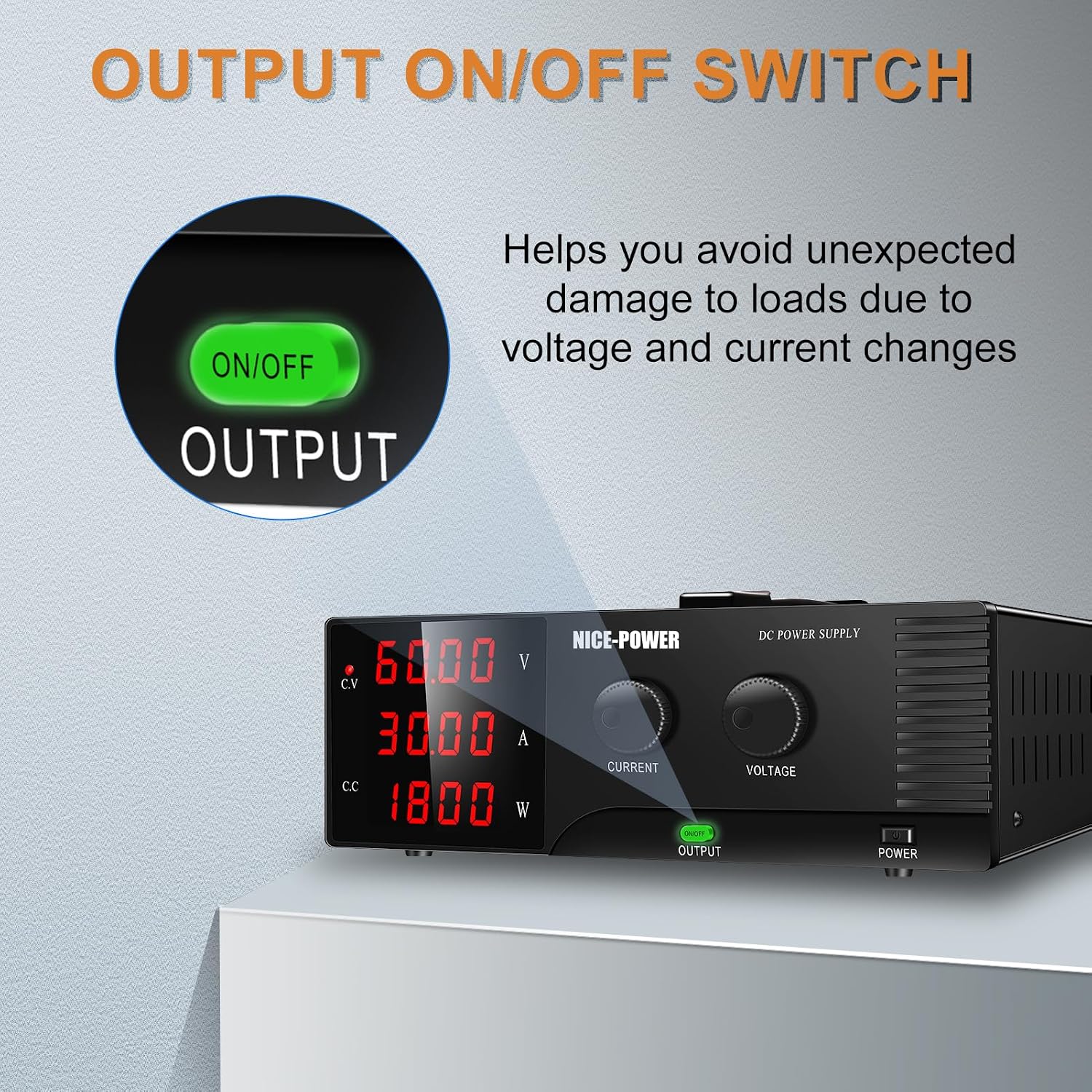
Figure 4: The Output ON/OFF switch for safe operation.
4.3 Display Interpretation
The 4-digit LED display provides real-time information:
- Voltage (V): Shows the output voltage in Volts.
- Current (A): Shows the output current in Amperes.
- Power (W): Shows the calculated output power in Watts.
- C.V / C.C Indicators: These indicators illuminate to show whether the unit is operating in Constant Voltage or Constant Current mode.
5. Maintenance
Proper maintenance ensures the longevity and optimal performance of your NICE-POWER R-SPS6030 DC Power Supply.
- Cleaning: Regularly clean the exterior of the unit with a soft, dry cloth. Do not use abrasive cleaners or solvents. Ensure no liquids enter the unit.
- Ventilation: Keep the ventilation openings on the sides and rear of the unit clear of dust and obstructions. Ensure sufficient airflow around the unit during operation.
- Storage: When not in use for extended periods, store the power supply in a cool, dry place, away from direct sunlight and excessive humidity.
- Inspection: Periodically check the power cord and output cables for any signs of damage or wear. Replace damaged cables immediately.

Figure 5: Rear view highlighting the intelligent cooling fans for effective heat dissipation.
6. Troubleshooting
| Problem | Possible Cause | Solution |
|---|---|---|
| No power/Display off | Power cord not connected; Power switch off; Outlet fault | Check power cord connection; Ensure power switch is ON; Test outlet with another device. |
| No output voltage/current | Output switch OFF; Output terminals incorrectly connected; Overload protection activated | Press the OUTPUT ON/OFF button; Verify terminal connections and polarity; Reduce load or check for short circuit. |
| Unit overheats | Blocked ventilation; Prolonged high-load operation in hot environment | Ensure vents are clear; Operate in a well-ventilated area; Reduce load if necessary. |
| Inaccurate readings | Faulty connection; External interference | Check all connections; Ensure proper grounding; Move away from strong electromagnetic fields. |
7. Specifications
| Feature | Specification |
|---|---|
| Model Number | R-SPS6030 |
| Output Voltage Range | 0-60V |
| Output Current Range | 0-30A |
| Maximum Output Power | 1800W |
| Input Voltage | 120 Volts (AC) |
| Display Type | 4-Digit LED |
| Voltage Resolution | 0.01V |
| Current Resolution | 0.001A |
| Cooling Method | Air Cooling (Intelligent Fan) |
| Protection Features | OVP, OCP, OTP, SCP |
| Dimensions (L×W×H) | 42 × 14 × 33 cm (approx. 16.5 × 5.5 × 13 inches) |
| Weight | 5 kg (approx. 11 lbs) |
| Certifications | UL & FCC Certified |
| Country of Origin | China |
8. Applications
The NICE-POWER R-SPS6030 DC Power Supply is suitable for a wide range of applications:
- Battery charging (e.g., LiFePO₄ and lead-acid batteries)
- Laboratory experiments and research
- Educational institutions
- Electronics repair and testing
- Electrolysis and electroplating
- Lamp testing and aging tests
- DIY projects

Figure 6: Examples of diverse applications for the DC power supply.
Demonstration Video: DC Power Supplies Applied to Children's Toys
This video demonstrates the application of DC power supplies in a simple context, such as powering children's toys, showcasing the adjustable voltage capabilities.
9. Warranty and Support
The NICE-POWER R-SPS6030 DC Power Supply comes with a 12-month repair policy from the date of purchase.
For any questions, technical assistance, or warranty claims, please contact NICE-POWER customer support. Our team is committed to providing professional assistance and will respond to inquiries within 24 hours.
Manufacturer Contact Information: NICE-POWER


