
ILIFE A30 Pro
ILIFE A30 Pro Robot Vacuum and Mop User Manual
Model: A30 Pro
1. Introduction
Welcome to the ILIFE A30 Pro Robot Vacuum and Mop user manual. This guide provides detailed instructions for setting up, operating, maintaining, and troubleshooting your new robotic cleaner. The ILIFE A30 Pro is designed to offer a hands-free cleaning experience with advanced features for efficient home maintenance.
Key features include:
- Precision LiDAR Navigation for accurate mapping and optimal cleaning routes.
- Self-Emptying Station with 2.5L dust bags, providing up to 280 days of hands-free cleaning.
- Powerful 5000Pa Suction for effective cleaning on carpets and hard floors.
- 3-in-1 Sweep, Vacuum, and Mop functionality with an integrated 200ml dustbin and 200ml water tank.
- Smart ILIFEClean App Control for customized cleaning, no-go zones, and scheduling.
- Convenient Voice Control (Alexa, Google Home) and Remote Control options.
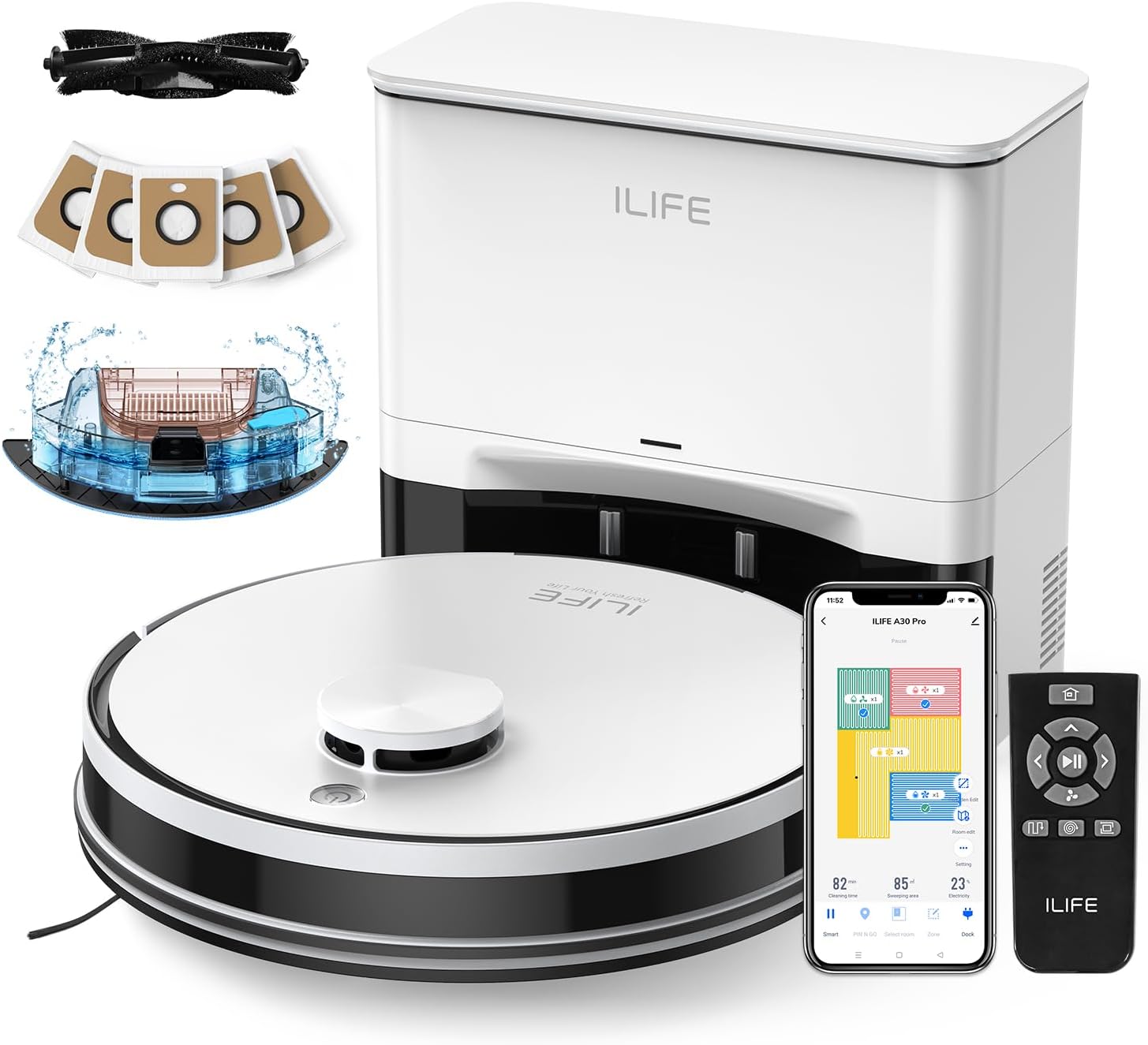
Figure 1: ILIFE A30 Pro Robot Vacuum, Mop, and Self-Emptying Station. This image displays the ILIFE A30 Pro robot vacuum, its self-emptying station, dust bags, water tank, remote control, and a smartphone showing the ILIFEClean app interface.
2. Setup
2.1 Unboxing and Initial Inspection
Carefully remove all components from the packaging. Ensure all items listed in the "What's in the Box" section are present and undamaged.
- 1 A30 Pro robot vacuum
- 1 Self-empty station
- 5 Dust bags
- 1 Remote control
- 1 2-in-1 dustbin and water tank combo
- 1 Mopping support
- 1 Mop cloth
- 1 Extra side brush
- 1 User manual
- 2 AAA battery
Video 1: ILIFE A30 Pro Robot Vacuum Unboxing. This video demonstrates the unboxing process and shows all included components of the ILIFE A30 Pro.
2.2 Charging the Robot Vacuum
Place the self-empty station against a wall in an open area with at least 1.5 meters (5 feet) of clear space in front and 0.5 meters (1.6 feet) on either side. Connect the power cord to the station and plug it into a wall outlet. Place the robot vacuum onto the charging contacts of the station. Ensure the charging indicator on the station illuminates.

Figure 2: Robot Vacuum charging at the self-emptying station. The robot is docked with the station, indicating proper charging setup.
2.3 App and Wi-Fi Connection
Download the "ILIFEClean" app from your smartphone's app store. Open the app and follow the on-screen instructions to connect your A30 Pro to your 2.4GHz Wi-Fi network. This enables smart control features.
Video 2: ILIFE A30 Pro App and Wifi Connection. This video guides users through the process of connecting the robot vacuum to the ILIFEClean app via Wi-Fi.

Figure 3: ILIFEClean App interface for connecting to Alexa. This image shows the step-by-step process within the app to link your ILIFE A30 Pro with Amazon Alexa for voice control.
3. Operating the Robot Vacuum
3.1 Cleaning Modes
The A30 Pro offers various cleaning modes to suit your needs:
- Quiet (500Pa): Ideal for light cleaning and quiet operation.
- Standard (1000Pa): Default mode for everyday cleaning.
- Strong (1800Pa): For deeper cleaning on hard floors and carpets.
- Max (5000Pa): Provides maximum suction for heavily soiled areas and pet hair.

Figure 4: ILIFE A30 Pro demonstrating 5000Pa suction power on carpet. The robot vacuum is shown effectively cleaning debris from a carpeted surface.
3.2 Navigation and Mapping
The robot uses LiDAR navigation to create detailed maps of your home, ensuring comprehensive coverage and efficient cleaning paths. It can store up to 5 floor maps for multi-floor homes.

Figure 5: ILIFE A30 Pro using LiDAR navigation for smart home mapping. Laser beams are depicted emanating from the robot, illustrating its mapping capabilities for efficient cleaning.

Figure 6: Multi-Floor Mapping capability of ILIFE A30 Pro. This diagram illustrates how the robot can navigate and save maps for multiple floors in a home.
3.3 Setting No-Go Zones and Virtual Walls
Using the ILIFEClean app, you can define specific areas where the robot should not clean by setting up no-go zones or virtual walls. This is useful for protecting delicate items or preventing access to certain rooms.

Figure 7: ILIFE A30 Pro with No-Go Zone and Virtual Wall settings. The image shows a robot vacuum avoiding a designated "No-Go Zone" and respecting a "Virtual Wall" boundary.
3.4 Sweep, Vacuum, and Mop Functionality
The A30 Pro can vacuum and mop simultaneously. To activate mopping, ensure the 2-in-1 dustbin and water tank combo is filled with water (do not add cleaning solution to avoid corrosion) and the mop cloth is attached to the mopping support.

Figure 8: ILIFE A30 Pro demonstrating 3-in-1 sweep, vacuum, and mop. The image highlights the robot, its integrated dustbin/water tank, and mopping attachment, highlighting its multi-functionality.
You can adjust the water level for mopping (Low, Middle, High) via the ILIFEClean app to suit different floor types and cleaning needs.
3.5 Voice and Remote Control
Control your A30 Pro using voice commands through Amazon Alexa or Google Home (after linking via the app), or use the included remote control for direct operation.

Figure 9: ILIFE A30 Pro controlled by app, voice, and remote. This image shows the robot vacuum being controlled by a smartphone app, a voice assistant speaker, and a physical remote control.
4. Maintenance
4.1 Self-Emptying Station and Dust Bags
The self-empty station automatically empties the robot's dustbin into a 2.5L dust bag after each cleaning cycle. Each dust bag can hold debris for up to 8 weeks, providing up to 280 days of hands-free cleaning with the included 5 bags.

Figure 10: ILIFE A30 Pro self-emptying station with 5 dust bags. The image highlights the self-emptying station and the included 5 dust bags, emphasizing the extended hands-free cleaning period.
Replace the dust bag in the self-empty station when full. The station's indicator light will signal when replacement is needed.
4.2 Cleaning the 2-in-1 Dustbin and Water Tank
Regularly empty and clean the 2-in-1 dustbin and water tank combo to prevent odors and maintain optimal performance. Remove the dustbin, empty debris, and rinse the water tank with clean water. Do not use cleaning solutions in the water tank to avoid corrosion.
4.3 Filter Maintenance
The robot vacuum uses a HEPA filter. Tap the filter clean against the inside of a garbage can to dislodge dust. Replace the filter periodically as recommended in the user manual to maintain suction efficiency.
4.4 Side Brush and Roller Brush Maintenance
Regularly inspect and clean the side brushes and roller brush for tangled hair or debris. Use the included cleaning tool to cut and remove any wrapped hair. Replace worn brushes as needed.
5. Troubleshooting
| Problem | Possible Cause | Solution |
|---|---|---|
| Robot does not start or respond. | Low battery; Power switch off; Robot stuck. | Charge the robot; Turn on power switch; Clear obstacles. |
| Poor cleaning performance. | Full dustbin/water tank; Clogged filter; Worn brushes. | Empty/clean dustbin/water tank; Clean/replace filter; Clean/replace brushes. |
| Robot cannot connect to Wi-Fi. | Incorrect Wi-Fi band (only 2.4GHz supported); Incorrect password; Router issues. | Ensure 2.4GHz network; Re-enter password; Restart router. |
| Robot gets stuck frequently. | Too many obstacles; Loose cables/rugs; No-go zones not set. | Clear clutter; Secure cables/rugs; Set no-go zones in app. |
| Self-empty station not emptying. | Dust bag full; Suction port blocked; Robot not docked correctly. | Replace dust bag; Clear suction port; Re-dock robot. |
For more detailed troubleshooting steps, refer to the full user manual or contact ILIFE customer support.
6. Specifications
- Brand: ILIFE
- Model Name: A30 Pro
- Special Features: 3-in-1 Robot Vacuum and Mop, 5000Pa Suction, App, Voice and Remote Control, Precision Laser Mapping & Navigation, Self-Emptying
- Color: White
- Product Dimensions: 12.6"L x 12.6"W x 3.7"H
- Filter Type: HEPA
- Battery Life: 150 minutes
- Voltage: 110 Volts
- Power Source: Battery Powered
- Control Method: App, Remote, Voice
- Item Weight: 7.1 ounces
- Manufacturer: Zhiyi (Zhongshan) Technology Co., Ltd
- Country of Origin: China
7. Warranty and Support
7.1 Warranty Information
The ILIFE A30 Pro comes with a standard manufacturer's warranty. Please refer to the warranty card included in your product packaging for specific terms and conditions. Protection plans are also available for extended coverage.
- 2-Year Protection Plan: $24.99
- 3-Year Protection Plan: $33.99
- Complete Protect: $16.99/month (renews monthly until cancelled)
7.2 Customer Support
For any questions, technical assistance, or warranty claims, please contact ILIFE customer support. You can find contact information in the user manual or on the official ILIFE website.
Visit the official ILIFE Store: ILIFE Official Store
Related documentsA30 Pro


Ask a question about this manual
Ask about setup, troubleshooting, compatibility, parts, safety, or missing instructions. Manuals+ will review the question and use this page’s manual context to help answer it.