
Introduction
The NEEWER Basics Magnetic Phone Cooler (Model PA069) is designed to prevent mobile devices from overheating during intensive use, such as gaming or video recording. It features advanced semiconductor cooling technology, a low-noise fan, smart temperature control, and customizable RGB lighting. This manual provides instructions for proper setup, operation, and maintenance to ensure optimal performance and longevity of your device.
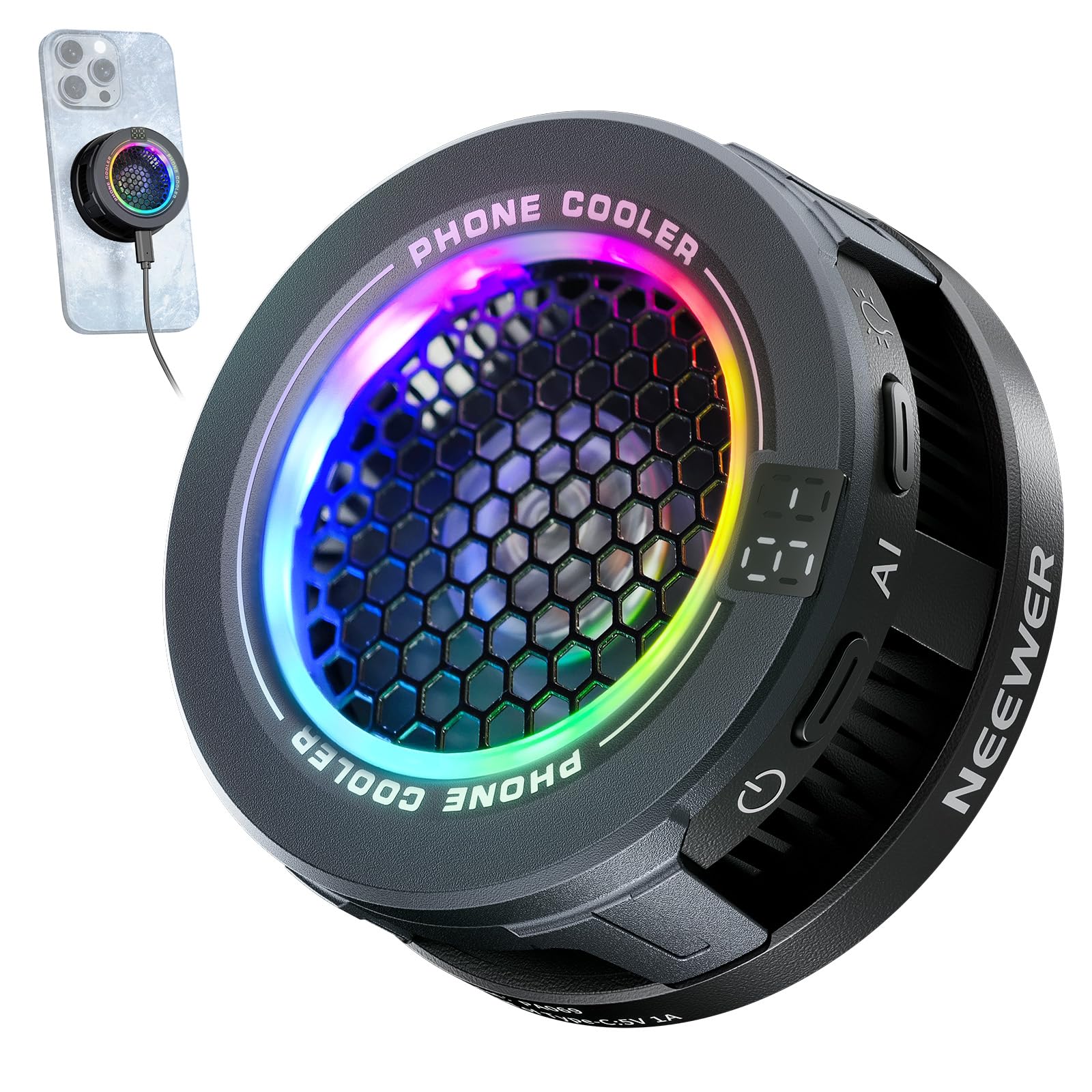
Figure 1: NEEWER Basics Magnetic Phone Cooler PA069 attached to a smartphone.
What's in the Box
Verify that all components are present in the package:
- 1 x Phone Cooling Fan
- 1 x Magnetic Ring
- 1 x Type C Cable
- 1 x Fixing Clip
- 1 x User Manual

Figure 2: Package Contents of the NEEWER Basics Magnetic Phone Cooler.
Features
- Efficient Cooling with Smart Temperature Control: Utilizes advanced semiconductor technology and a silent fan to reduce device temperature. Offers two modes: High Speed for rapid cooling during demanding tasks and Intelligent mode for balanced cooling with minimal noise.
- Magnetic Attachment & Clip Compatibility: Designed for direct magnetic attachment to MagSafe-compatible iPhones (e.g., iPhone 12-16 Pro Max Plus Mini). Includes an adhesive magnetic ring and a clip for secure attachment to other non-magnetic phones or tablets (e.g., iPad Pro, Samsung Galaxy, Google Pixel, Nintendo Switch).
- Quiet Operation: Equipped with a seven-blade hydraulic bearing fan, ensuring effective cooling with ultra-low noise levels, suitable for gaming or work without distraction.
- Vibrant RGB Lighting Effects: Features built-in RGB lighting that changes dynamically with the cooling mode. Users can cycle through running lights, gradient, breathing effects, or turn off the lighting.

Figure 3: Advanced Semiconductor Cooling Technology.

Figure 4: Efficient and Silent Use of the Phone Cooler.
Setup
- Power Connection: Connect the included Type-C cable to the cooler's Type-C port and a suitable USB power source (not included). The cooler requires a power source to operate.
- Magnetic Attachment (MagSafe Compatible Devices):
- Align the cooler with the MagSafe area on the back of your iPhone or MagSafe-compatible phone case. The cooler will magnetically snap into place.

Figure 5: Magnetic attachment to a MagSafe-compatible iPhone.
- Clip Attachment (Non-MagSafe Devices):
- For devices without MagSafe, first attach the provided adhesive magnetic ring to the back of your phone or tablet. Ensure the ring is centered for optimal contact.

Figure 6: Using the adhesive magnetic ring and fixing clip for non-MagSafe devices.
- Secure the phone cooler onto your device using the fixing clip. Ensure the clip holds the device firmly and the cooler makes good contact with the device's back.

Figure 7: Phone cooler secured with the fixing clip.
Operating Instructions
- Power On/Off: Once connected to a power source, the cooler will automatically power on. To turn off, disconnect the power cable.
- Mode Selection:
- The cooler offers two speed settings: High Speed (HI) and Intelligent Mode (AI).
- Press the mode button (labeled "AI" or similar) to switch between modes.

Figure 8: Two Speed Settings and Smart Temperature Control.
- High Speed Mode: Provides maximum cooling performance, ideal for intense gaming sessions or heavy processing tasks.
- Intelligent Mode: Automatically adjusts fan speed based on device temperature, balancing cooling efficiency with minimal noise.
- RGB Lighting Control:
- The cooler features built-in RGB lighting.
- Press the light button (sun icon or similar) to cycle through various lighting effects (running lights, gradient, breathing) or to turn the RGB function off.

Figure 9: RGB Lighting Effects and Control Buttons.
Video 1: Demonstration of the NEEWER BASICS Phone Cooler's features, including RGB lighting and attachment methods.
Specifications
| Brand | NEEWER |
| Model Name | PA069 |
| Main Material | ABS, Aluminum Alloy, Magnet |
| Dimensions (DxWxH) | 5.79"D x 2.05"W x 4.69"H (62x62x26mm) |
| Item Weight | 0.25 Pounds (82g) |
| Power Source | USB Powered |
| Voltage | 5 Volts (DC) |
| Wattage | 2.5 watts |
| Number of Speeds | 2 (High Speed, Intelligent Mode) |
| Noise Level | 45 Decibels |
| Mounting Type | Magnetic, Clip-on/Clamp Mount |
| Special Features | Smart Temp Control, Low Noise, RGB Lighting |
Maintenance
- Cleaning: Regularly wipe the cooler's surface with a soft, dry cloth to remove dust and debris. Ensure the fan vents are clear of obstructions for optimal airflow. Do not use liquid cleaners or abrasive materials.
- Storage: When not in use, store the cooler in a cool, dry place away from direct sunlight and extreme temperatures.
- Cable Care: Handle the Type-C cable gently to prevent damage. Avoid sharp bends or excessive pulling.
Troubleshooting
- Cooler Not Turning On:
- Ensure the Type-C cable is securely connected to both the cooler and a functional USB power source.
- Verify the power source is providing adequate power (5V DC).
- Insufficient Cooling:
- Check that the cooler is making firm and direct contact with the back of your device.
- Ensure the fan vents are not blocked.
- Switch to High Speed mode for maximum cooling.
- Excessive Noise:
- Ensure the cooler is securely attached and not vibrating against the device or surface.
- Check for any foreign objects obstructing the fan blades.
- Switch to Intelligent Mode for quieter operation.
- RGB Lights Not Working:
- Press the light control button to cycle through effects or turn them on.
- Ensure the cooler is powered on.
Warranty & Support
This NEEWER product is covered by a 1-Year Manufacturer's Warranty. For warranty claims, technical support, or further assistance, please contact NEEWER customer service through their official website or the platform where the product was purchased. Please retain your proof of purchase for warranty validation.