
K&F CONCEPT KF31.131
K&F CONCEPT 6-inch Magic Arm and Super Clamp Kit
Instruction Manual
Product Overview
The K&F CONCEPT 6-inch Magic Arm and Super Clamp Kit is a versatile accessory designed for mounting various photographic and video equipment. It provides flexible positioning for devices such as cameras, monitors, LED lights, webcams, and action cameras. The kit features a 360-degree adjustable magic arm with dual ball heads and a sturdy super clamp for secure attachment to a variety of surfaces.
Key Features:
- Multifunctional Combination: Designed for use with a wide range of camera accessories, enabling diverse shooting angles and creative setups.
- 360° Adjustable Magic Arm: Features a dual ball head design for enhanced flexibility, allowing easy adjustment to ideal positions. Both ends are equipped with 1/4" screws for attaching various devices.
- Sturdy Super Clamp: Can be mounted on poles, posts, tripods, tables, desks, and handlebars. It attaches to cages, monitors, lights, and cameras via 1/4" and 3/8" locating holes. The clamp opens from 15mm to 55mm.
- Anti-Scratch Design: Includes two cushions on the crab clamp and one circular rubber pad on the magic arm to increase friction and protect equipment from wear.
- Easy Adjustment: All joints of the magic arm and super clamp can be simultaneously loosened or tightened with a single thumbscrew for quick and secure positioning.

The K&F CONCEPT 6-inch Magic Arm and Super Clamp Kit, showing both the articulating arm and the versatile clamp.
Package Contents
Please verify that all items listed below are included in your package:
- 1 x K&F CONCEPT 6-inch Magic Arm
- 1 x K&F CONCEPT Super Clamp
Setup and Installation
1. Attaching the Super Clamp
- Identify a suitable mounting surface such as a tripod leg, desk edge, or pole.
- Loosen the orange thumbscrew on the super clamp to open its jaws.
- Position the clamp onto the desired surface, ensuring the non-slip pads make full contact.
- Tighten the orange thumbscrew until the clamp is securely fastened and does not move.

The super clamp is shown securely attached to a tripod leg, illustrating its use in filming setups. Detailed insets display the 1/4" and 3/8" thread screws for accessory attachment and the clamp's adjustable opening range of 15-55mm.
2. Connecting the Magic Arm
- Locate the 1/4" or 3/8" threaded holes on the super clamp.
- Screw one end of the magic arm (which has a 1/4" screw) into the desired threaded hole on the super clamp.
- Ensure the connection is finger-tight to prevent wobbling.

A close-up view of the product details, including the 1/4" screws, aluminum alloy construction, orange locking knob, non-slip tabs on the clamp, and the 1/4" and 3/8" screw threads on the clamp.
Operating Instructions
1. Adjusting the Magic Arm
- To adjust the angle and position of the magic arm, loosen the central orange locking knob.
- The dual ball heads will become free, allowing 360-degree rotation and 90-degree horizontal/vertical adjustment at each joint.
- Once the desired position is achieved, tighten the orange locking knob firmly to secure all joints simultaneously.

This diagram highlights the dual ball head design of the magic arm, allowing for 360-degree rotation and 90-degree horizontal and vertical adjustment. It also shows the 1/4" screw and non-slip rubber pads.
2. Mounting Devices
- The remaining 1/4" screw on the magic arm is used to attach your device (e.g., camera, monitor, LED light, webcam, action camera).
- Carefully screw your device onto the 1/4" thread until it is secure. Ensure it is finger-tight but do not overtighten.
- Verify the device is stable before use. The maximum load capacity for the magic arm is 2kg.
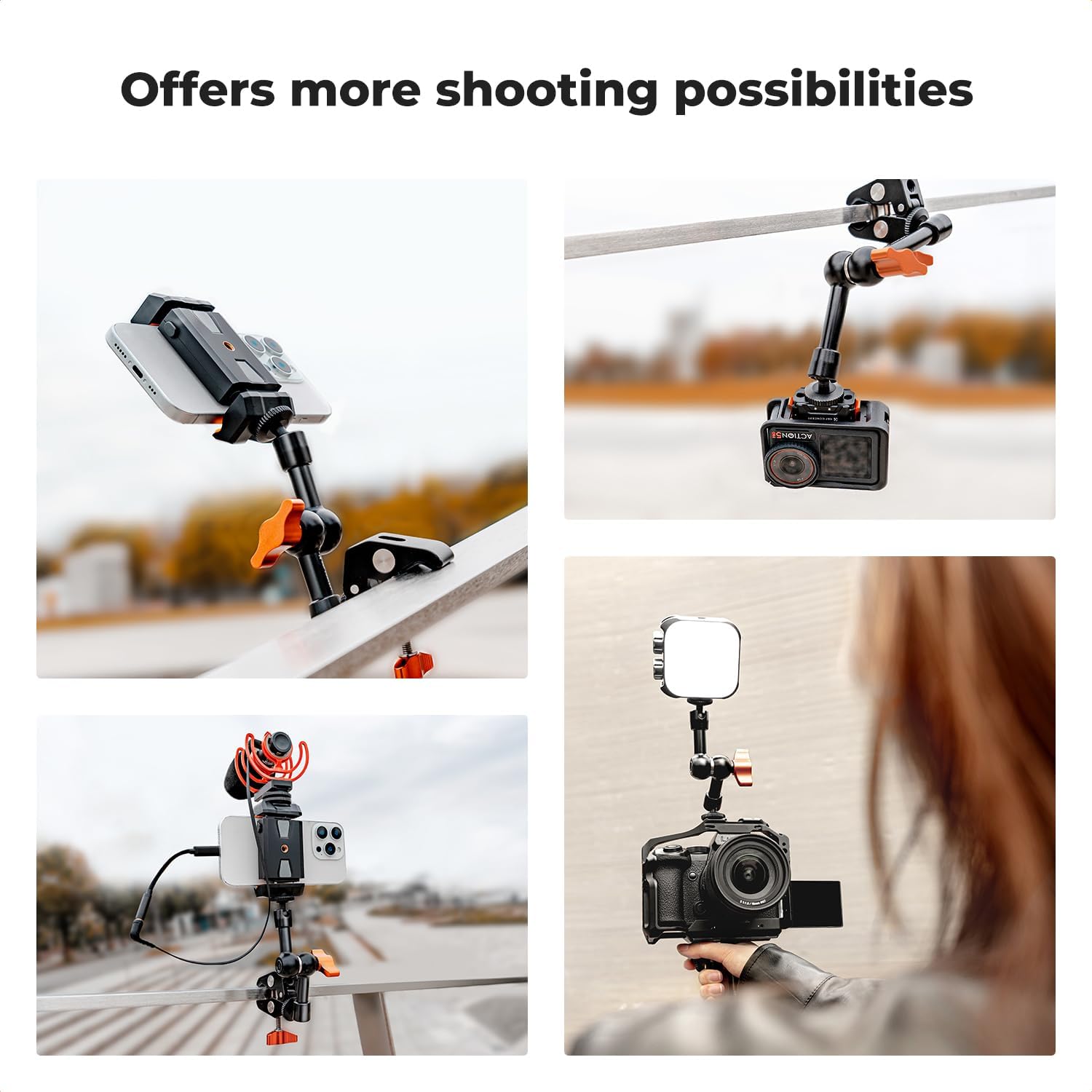
This collage illustrates diverse applications of the magic arm and super clamp, including mounting a smartphone to a table, an action camera to a railing, a microphone to a stand, and an LED light to a camera rig, showcasing its versatility.
Maintenance
To ensure the longevity and optimal performance of your K&F CONCEPT Magic Arm and Super Clamp Kit, follow these maintenance guidelines:
- Cleaning: Wipe the product with a soft, dry cloth after each use to remove dust and debris. For stubborn dirt, use a slightly damp cloth and then dry thoroughly. Avoid harsh chemicals or abrasive cleaners.
- Lubrication: The ball joints are designed for smooth operation. If you notice any stiffness, a small amount of silicone-based lubricant can be applied to the ball surfaces, avoiding the locking mechanism.
- Storage: Store the kit in a dry, cool place away from direct sunlight and extreme temperatures.
- Inspection: Periodically check all screws and joints for tightness. Ensure the non-slip pads on the clamp are intact and free from damage.
Troubleshooting
| Problem | Possible Cause | Solution |
|---|---|---|
| Magic arm does not hold position. | The central orange locking knob is not fully tightened. | Ensure the orange locking knob is tightened firmly until all ball joints are secure. |
| Super clamp slips on mounting surface. | Mounting surface is too smooth or dirty; clamp is not tightened sufficiently. | Clean the mounting surface. Ensure the clamp's non-slip pads are making full contact. Tighten the orange thumbscrew securely. |
| Attached device feels loose on the magic arm. | The 1/4" screw connecting the device is not fully tightened. | Carefully tighten the 1/4" screw until the device is securely attached to the magic arm. |
| Product exceeds maximum load capacity. | Attempting to mount equipment heavier than 2kg. | Do not exceed the maximum load capacity of 2kg. Use lighter equipment or a more robust mounting solution. |
Specifications
- Product Dimensions: 0.59 x 0.24 x 0.14 inches
- Item Weight: 9.3 ounces
- Model Number: KF31.131
- Brand: K&F CONCEPT
- Color: Black
- Compatible Devices: Monitor, Webcam, Action Camera, Camera
- Mounting Type: Tabletop Mount (via clamp)
- Maximum Load Capacity: 2kg
- Clamp Opening Range: 15mm - 55mm
- Screw Threads: 1/4" and 3/8"
Warranty and Support
K&F CONCEPT products are manufactured to high-quality standards. This product is covered by a manufacturer's warranty against defects in materials and workmanship. For specific warranty details, return policies, or technical support, please refer to the official K&F CONCEPT website or contact their customer service directly. Please retain your proof of purchase for warranty claims.
Related Documents - KF31.131
 |
K&F CONCEPT 70.9 inch Magnetic Selfie Stick Tripod User Manual User manual for the K&F CONCEPT 70.9 inch magnetic selfie stick tripod. Includes product overview, operating instructions, specifications, and precautions. |
 |
K&F Concept Tripod User Manual: Setup, Operation, and Care Comprehensive user manual for K&F Concept tripods, detailing setup, leg extension, angle adjustment, center column operation, inverted installation, and folding for transport. Includes important notes on load capacity, environmental conditions, cleaning, and safety precautions. |
 |
K&F CONCEPT 18L Backpack - Product Information and Care Guide Detailed product information, specifications, and care instructions for the K&F CONCEPT 18L Backpack, including material, dimensions, features, and warranty details. |
 |
K&F Concept Lens Adapter User Manual User guide for K&F Concept lens adapters, covering compatibility checks, installation, disassembly, and important usage tips. |
 |
K&F CONCEPT RGB Pocket Light KF34.036 User Manual User manual and operation guide for the K&F CONCEPT RGB Pocket Light model KF34.036. Includes setup, usage, and safety instructions. |
 |
K&F CONCEPT Video Pod Portable Aluminum Tripod Information about the K&F CONCEPT Video Pod, a portable aluminum tripod for cameras and phones. Includes manufacturer details, safety warnings, and product identification. |
Ask a question about this manual
Ask about setup, troubleshooting, compatibility, parts, safety, or missing instructions. Manuals+ will review the question and use this page’s manual context to help answer it.