
K&F CONCEPT KF31.131
Contents
K&F CONCEPT 9.8" Magic Arm Clamp Kit Instruction Manual
Model: KF31.131
Product Overview
The K&F CONCEPT 9.8" Magic Arm Clamp Kit (Model KF31.131) is a versatile mounting solution designed for photographers and videographers. It allows for flexible positioning of various camera accessories such as monitors, flashes, LED lights, microphones, camera cages, and action cameras. Constructed from durable aluminum alloy, this kit features a 360° adjustable dual ball head design and a super clamp for secure attachment to diverse surfaces.
Key Features:
- Multifunctional Combination: Compatible with a variety of camera accessories for diverse creative needs and shooting perspectives.
- 360° Adjustable Magic Arm: Dual ball head design offers enhanced flexibility, allowing precise device positioning. Equipped with 1/4" screws for attaching accessories.
- Flexible Mounting Options: The super clamp can be mounted on poles, posts, tripods, and tables, accommodating thicknesses from 15mm to 55mm.
- Superior Quality: All-metal construction ensures durability. Anti-slip design with cushion pads increases friction and protects equipment.
- Easy Adjustment: A single knob screw simultaneously tensions and loosens the magic arm, enabling 360° ball head rotation and secure locking.
Note: The magic arm is suitable for static or mildly dynamic scenarios with a maximum load capacity of 2 kg (4.41 lbs). Avoid using it with heavy cameras during vigorous movement.
Package Contents
Verify that all items are present in your package:
- 1 x Magic Arm
- 1 x Super Clamp

Image: The K&F CONCEPT Magic Arm and Super Clamp displayed next to their product packaging.
Setup Instructions
Attaching the Magic Arm to the Super Clamp:
- Identify the 1/4" screw on one end of the Magic Arm and the corresponding 1/4" screw hole on the Super Clamp.
- Screw the Magic Arm onto the Super Clamp until it is finger-tight.
- Ensure the connection is secure before attaching any equipment.
Mounting the Super Clamp:
The Super Clamp is designed to attach to various surfaces such as poles, posts, tripods, or table edges. Its opening range is 15mm-55mm.
- Turn the orange knob on the Super Clamp counter-clockwise to open the jaws to the desired width.
- Position the clamp around the desired object (e.g., tripod leg, table edge).
- Turn the orange knob clockwise to tighten the jaws securely onto the object. Ensure the clamp is firmly attached and does not wobble.

Image: The Super Clamp securely attached to a tripod leg, demonstrating its grip on a cylindrical object.

Image: A K&F CONCEPT Magic Arm with Super Clamp holding a camera, clamped to the edge of a table.
Attaching Accessories to the Magic Arm:
The Magic Arm features 1/4" screws on both ends for attaching various accessories.
- Identify the 1/4" screw on the free end of the Magic Arm.
- Screw your camera, monitor, flash, or other compatible accessory onto the 1/4" screw until it is finger-tight.
- Ensure the accessory is securely attached.

Image: A K&F CONCEPT Magic Arm holding a camera and a monitor, showcasing its multi-device compatibility.
Operating Instructions
Adjusting the Magic Arm:
The Magic Arm features a central orange knob that controls the tension of both ball heads simultaneously.
- To adjust the angle and position of your attached equipment, turn the central orange knob counter-clockwise to loosen the ball heads.
- Carefully reposition the Magic Arm and attached equipment to the desired angle. The dual ball heads allow for 360° rotation.
- Once the desired position is achieved, turn the central orange knob clockwise to tighten and lock the ball heads securely in place.
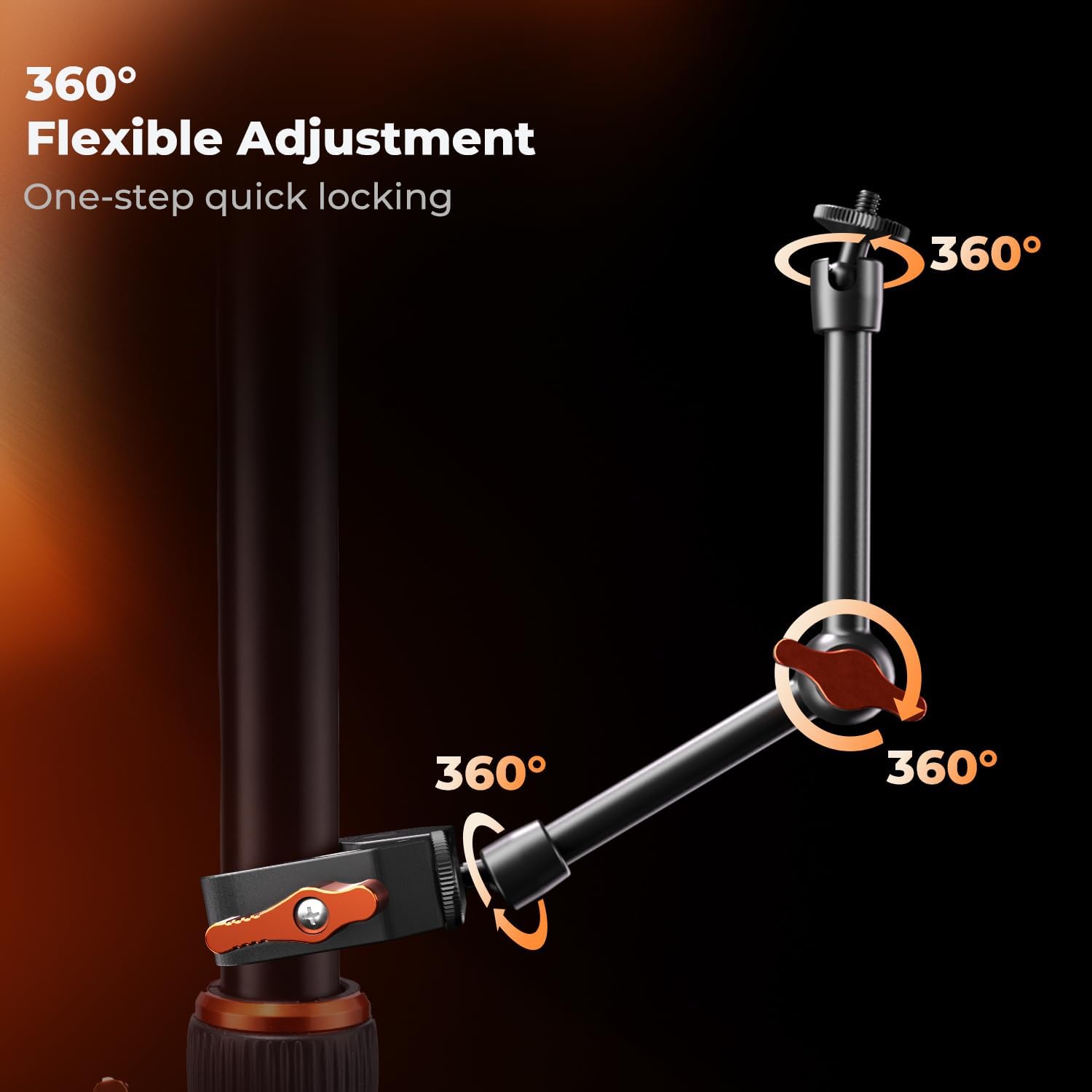
Image: A K&F CONCEPT Magic Arm illustrating its 360° flexible adjustment capabilities with a single locking knob.
Video: An official K&F CONCEPT video demonstrating the Magic Arm with Super Clamp Kit for camera use, highlighting its flexibility and secure locking mechanism.
Maintenance
- Regularly inspect all screws and joints for tightness.
- Clean the aluminum alloy surfaces with a soft, dry cloth. Avoid abrasive cleaners.
- Ensure the anti-slip cushion pads on the clamp are free from debris to maintain optimal grip.
- Store the Magic Arm Clamp Kit in a dry, clean environment when not in use.
Troubleshooting
| Problem | Possible Cause | Solution |
|---|---|---|
| Magic Arm slips or loses position. | Central knob not tightened sufficiently. Exceeded maximum load capacity. | Ensure the central orange knob is fully tightened. Verify that the total weight of attached equipment does not exceed 2 kg (4.41 lbs). |
| Super Clamp does not hold securely. | Clamp jaws not tightened enough. Object too thin or too thick for clamp range (15mm-55mm). | Tighten the orange knob on the Super Clamp firmly. Ensure the object's thickness is within the specified range. |
| Attached accessory wobbles. | 1/4" screw connection is loose. | Ensure the 1/4" screw connecting the accessory to the Magic Arm is fully tightened. |
Specifications
| Feature | Detail |
|---|---|
| Brand | K&F CONCEPT |
| Model Name | 9.8 Inch Magic Arm with Clamp |
| Model Number | KF31.131 |
| Color | Black |
| Material | Metal With Rubber |
| Mounting Type | Tabletop Mount |
| Compatible Devices | Action Camera, Camera Cage, Monitors, Phone |
| Weight Capacity Maximum | 2 kg (4.41 Pounds) |
| Item Dimensions | 0.57 x 0.31 x 0.14 inches |
| Item Weight | 0.68 Pounds |
| Super Clamp Opening Range | 15mm-55mm (0.59-2.16 inches) |
Warranty & Support
This K&F CONCEPT product comes with a 1 Year Warranty from the date of purchase.
For technical support, warranty claims, or further inquiries, please visit the official K&F CONCEPT website or contact their customer service directly. Keep your purchase receipt as proof of purchase for warranty services.
You can find more information and support at the K&F CONCEPT Store.
Ask a question about this manual
Ask about setup, troubleshooting, compatibility, parts, safety, or missing instructions. Manuals+ will review the question and use this page’s manual context to help answer it.