
1. Introduction
The MOOER Pitch Box is a compact guitar effects pedal offering three distinct pitch-based effects: Harmony, Pitch Shift, and Detune. Designed for ease of use and integration into any pedalboard, it provides versatile tonal options for guitarists.

Figure 1: MOOER Pitch Box pedal and accessories. This image shows the compact blue pedal alongside a 9V power supply, two footswitch toppers (yellow and white), and three black guitar picks.
2. Setup
2.1 Power Connection
Connect a standard 9V DC power supply (center negative, 300mA minimum) to the 'DC IN' jack located at the top of the pedal. Ensure the power supply meets the specified requirements to prevent damage.

Figure 2: DC IN power input. This image provides a close-up view of the power input jack located on the top edge of the pedal.
2.2 Audio Connections
- Connect your guitar or the output of a preceding pedal to the 'INPUT' jack on the right side of the pedal.
- Connect the 'OUTPUT' jack on the left side of the pedal to your amplifier or the input of the next pedal in your chain.
3. Operating Instructions
3.1 Controls Overview
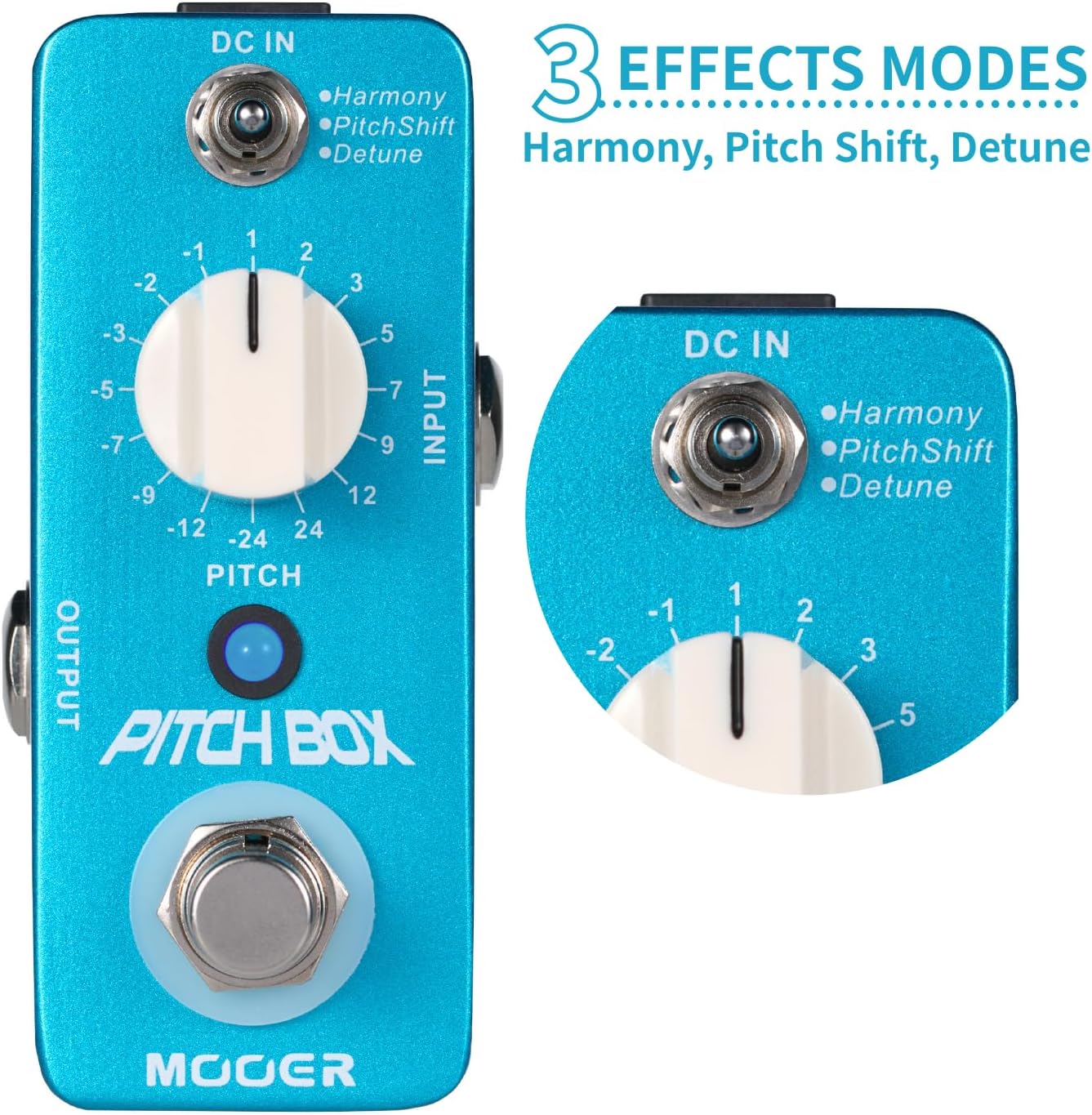
Figure 3: Pedal controls. This image highlights the Mode switch (Harmony, Pitch Shift, Detune), the Pitch knob (ranging from -24 to +24 semitones), and the footswitch.
- Mode Switch: A three-way toggle switch at the top selects between Harmony, Pitch Shift, and Detune modes.
- Pitch Knob: This large central knob adjusts the pitch interval. It ranges from -24 (two octaves down) to +24 (two octaves up) semitones. Specific intervals are marked.
- Footswitch: Engages or bypasses the effect. The LED indicator illuminates when the effect is active.
3.2 Effect Modes
The Pitch Box offers three distinct modes:
- Harmony: Adds a harmonized note to your original signal. The Pitch knob selects the interval of the harmony. This mode is best suited for single-note lines to avoid muddiness.
- Pitch Shift: Shifts your entire signal up or down by the selected interval. The Pitch knob controls the degree of shift. This mode provides a 100% wet signal, replacing your original pitch with the shifted one.
- Detune: Adds a slightly detuned version of your original signal, creating a chorus-like effect. The Pitch knob adjusts the degree of detuning in cents (small increments of pitch).
3.3 Tips for Best Performance
- For Harmony and Pitch Shift modes, playing single-note lines generally yields clearer and more articulate results. Playing chords may introduce unwanted artifacts or a 'muddy' sound, especially with larger intervals.
- The pedal tracks well with fast playing in single-note lines.
- When using Detune mode, subtle adjustments to the Pitch knob (in cents) can create a pleasing chorusing effect.
3.4 Official Product Video
Video 1: MOOER Pitch Box - Harmony Pitch Shifter Detune. This video demonstrates the various pitch shifting, harmony, and detune effects of the MOOER Pitch Box pedal in action.
4. Maintenance
- Keep the pedal clean by wiping it with a soft, dry cloth. Avoid using abrasive cleaners or solvents.
- Store the pedal in a dry environment away from extreme temperatures and humidity.
- Always use the specified 9V DC power supply to ensure optimal performance and prevent damage.
5. Troubleshooting
- No Sound: Check all cable connections, ensure the power supply is correctly connected, and verify that the pedal is engaged (LED illuminated).
- Muddy Sound (Harmony/Pitch Shift): These effects are generally designed for single-note lines. Playing complex chords may result in a less desirable sound. Try simplifying your playing or using the Detune mode for a subtle thickening effect.
- Unwanted Noise: Ensure all cables are in good condition and properly shielded. Test with a different power supply to rule out power-related noise.
6. Specifications
| Feature | Specification |
|---|---|
| Item Model Number | MPS1-US |
| Item Weight | 11.7 ounces (0.33 Kilograms) |
| Package Dimensions | 5.39 x 4.88 x 3.03 inches |
| Body Material | Metal |
| Color Name | Pitch Box |
| Connector Type | 1/4 inch (6.35mm) Audio Jack |
| Hardware Interface | 1/4-inch Audio |
| Signal Format | Analog |
| Power Source | DC Power Supply (9V) |
| Audio Output Effects | Pitch-Shifting |
| Controls Type | Footswitch, Rotary Knob, Toggle Switch |
7. Warranty and Support
This product may be eligible for extended protection plans. Please refer to your purchase documentation or retailer for details on available 3-Year or 4-Year Protection Plans. For technical support or further inquiries, please contact MOOER customer service.


