
Introduction
The Black Shark BS-SP1 Bluetooth Computer Speakers are designed to provide a high-quality audio experience for your desktop, laptop, or other compatible devices. Featuring dual 5W neodymium speakers, multiple connectivity options (Bluetooth and USB/USB-C), and dynamic LED lighting modes, these speakers offer immersive stereo sound for gaming, movies, and music. Their compact, space-saving design fits perfectly beneath your monitor, reducing desktop clutter.
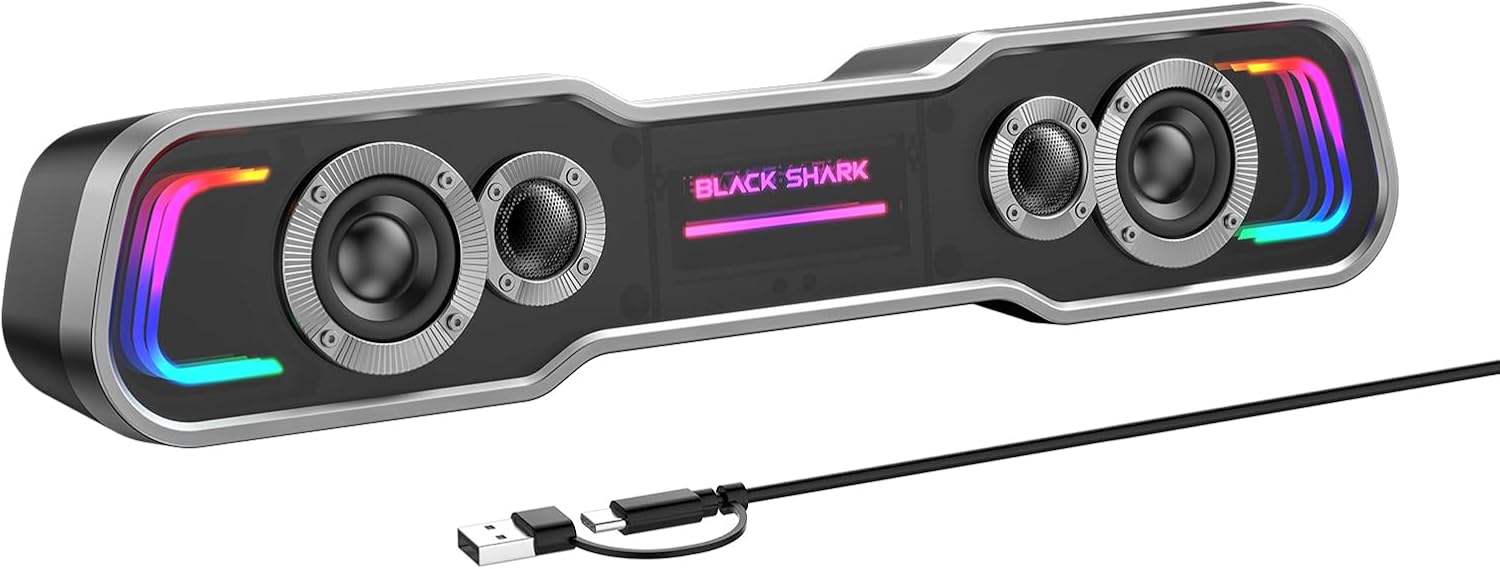
Image: The Black Shark BS-SP1 soundbar speaker, showcasing its sleek design and the included USB-C to USB-A power/audio cable.
Setup
The BS-SP1 speakers offer both wired (USB/USB-C) and wireless (Bluetooth) connection methods. Follow the instructions below for your preferred setup.
Wired Mode (Plug & Play)
This mode is ideal for PC, desktop, laptop, and MacBook Pro/Air connections, providing both audio and power through a single cable.
- Connect the USB/USB-C cable from the speaker to an available USB or USB-C port on your computer.
- The speaker will automatically power on and enter "PC Mode." You may hear an audible prompt "PC Mode."
- Adjust the volume using your computer's system controls or the speaker's integrated volume buttons. No driver installation is required.

Image: Illustration showing the speaker connected via USB/USB-C to a laptop for PC Mode, and wirelessly connected to a smartphone for Bluetooth Mode (still requiring USB power).

Image: The BS-SP1 speaker positioned on a desk next to a laptop, illustrating its simple plug-and-play setup via USB.
Bluetooth Mode
This mode is suitable for smartphones, tablets, and other Bluetooth-enabled devices. Note: Bluetooth Mode still requires the USB/USB-C cable for power.
- Ensure the speaker is powered on via the USB/USB-C cable.
- Press the power button on the speaker to switch to "Bluetooth Mode." You may hear an audible prompt "Bluetooth Mode."
- On your smartphone or other Bluetooth-enabled device, open Bluetooth settings.
- Search for and select "BS-SP1" from the list of available devices to pair.
- Adjust the volume on both your device and the speaker to a suitable level.
Operating Instructions
Controls Overview

Image: A detailed diagram illustrating the control buttons on the top of the Black Shark BS-SP1 speaker, including power, volume, pause/continue, and lighting mode switch.
- Power Button: Press for 3 seconds to power on/off. One click to switch between Bluetooth mode and wired mode.
- Volume +: Increase volume.
- Pause/Continue: Play or pause audio playback.
- Volume -: Decrease volume.
- Lighting Button: One click to switch between 5 different lighting effects.
Dynamic Lighting Modes
The BS-SP1 features five dynamic LED lighting modes to enhance your audio experience. Press the lighting button to cycle through them:
- Colorful Neon Lights: A vibrant, multi-color display.
- Breathing Light: Lights gently fade in and out.
- Colorful Gradient: Colors smoothly transition across the spectrum.
- Monochrome Fixed: A single, static color.
- Lights Follow Rhythm: Lights react to the beat of the audio.

Image: Visual representation of the five distinct LED lighting modes available on the BS-SP1 speaker: Colorful Neon Lights, Breathing Light, Colorful Gradient, Monochrome fixed, and Lights Follow Rhythm.
Maintenance
To ensure the longevity and optimal performance of your Black Shark BS-SP1 speakers, follow these simple maintenance guidelines:
- Cleaning: Use a soft, dry cloth to wipe down the speaker's exterior. Avoid using abrasive cleaners, solvents, or sprays directly on the unit.
- Placement: Place the speaker on a stable, flat surface. Avoid placing it in direct sunlight, near heat sources, or in areas with high humidity.
- Storage: When not in use for extended periods, store the speaker in a cool, dry place, away from dust.
- Cable Care: Handle the USB/USB-C cable gently. Avoid sharp bends or kinks that could damage the cable.
Troubleshooting
If you encounter any issues with your BS-SP1 speakers, refer to the following common problems and solutions:
| Problem | Possible Cause | Solution |
|---|---|---|
| No sound from speakers. | Speaker not powered on; incorrect mode selected; volume too low; cable not properly connected. |
|
| Bluetooth pairing fails. | Speaker not in Bluetooth pairing mode; device Bluetooth is off; "BS-SP1" not found. |
|
| Sound distortion at high volumes. | Volume set too high; audio source quality. |
|
| LED lights not working or stuck. | Lighting mode not selected; temporary software glitch. |
|
Specifications
| Feature | Detail |
|---|---|
| Model Name | BS-SP1 |
| Speaker Type | Soundbar |
| Material | Metal, Plastic |
| Connectivity Technology | Bluetooth, USB |
| Wireless Communication | Bluetooth |
| Power Source | Corded Electric (USB/USB-C Powered) |
| Speaker Maximum Output Power | 10 Watts (2x5W) |
| Frequency Response | 20 KHz |
| Surround Sound Channel Configuration | 2.0 |
| Compatible Devices | Desktop, Laptop, Smartphone, Tablet |
| Special Features | Bass Boost, LED Light, USB Port |
| Control Method | Push Button |
| Product Dimensions (L x D x H) | 16" x 2.62" x 2.75" (40.64 cm x 6.65 cm x 6.98 cm) |
| Item Weight | 2 Pounds (0.91 kg) |
| Included Components | Power Cable |

Image: A visual representation of the speaker's dimensions and key specifications, including speaker size, output power, audio input, and cable length.
Warranty and Support
Specific warranty details and direct support contact information are not available in the provided product data. For warranty claims or technical assistance, please refer to the product packaging or contact Black Shark customer support through their official website or the retailer from whom the product was purchased.
For general inquiries, you may visit the Black Shark Store on Amazon.