
HomeTro HM3
Contents

HomeTro 3.0HP Walking Pad with 9% Incline
User Manual
1. Introduction
Thank you for choosing the HomeTro 2-in-1 Walking Pad Treadmill. This compact and versatile fitness equipment is designed for both walking and running, making it ideal for home or office use. It features adjustable speeds, a manual incline, and smart control options to enhance your workout experience.
Key features include a powerful yet quiet 3.0 HP motor, a maximum weight capacity of 265 LBS, and a speed range of 0.6 to 5 MPH. The treadmill also offers a 9% manual incline to intensify your workouts and a 5-layer non-slip belt for enhanced safety and comfort. Its portable design with built-in wheels ensures easy setup and storage.
2. Important Safety Information
Please read all instructions carefully before using the treadmill. Keep this manual for future reference.
- Ensure the treadmill is placed on a flat, stable surface.
- Maintain a clear space of at least 2 feet behind and 1 foot on each side of the treadmill.
- Do not exceed the maximum user weight capacity of 265 LBS (120 kg).
- Always wear appropriate athletic footwear during use.
- Keep children and pets away from the treadmill during operation.
- Unplug the treadmill from the power outlet when not in use or before cleaning and maintenance.
- If you experience dizziness, nausea, chest pain, or any other abnormal symptoms, stop your workout immediately and consult a physician.
3. Package Contents
Verify that all items are present and in good condition upon opening the package:
- HomeTro Walking Pad Treadmill
- Remote Control
- 5MM Hex Wrench
- Front Foot Pads (2x)
- Silicone Oil (20ml)
- User Manual (this document)
- Power Cord

Figure 3.1: Included Components
4. Setup
The HomeTro Walking Pad Treadmill comes largely pre-assembled for your convenience. Follow these steps for initial setup:
- Unpacking: Carefully remove the treadmill from its packaging.
- Placement: Place the treadmill on a flat, hard surface. Ensure there is adequate space around the unit for safe operation.
- Incline Adjustment: This treadmill features a manual incline. To adjust the incline, locate the adjustable feet or supports at the front of the treadmill. You can set the incline to either 4% or 9% by adjusting these supports. Refer to the diagram below for proper adjustment.
- Power Connection: Connect the power cord to the treadmill's power input and then plug it into a standard electrical outlet.

Figure 4.1: Treadmill in use, demonstrating its compact form and incline.

Figure 4.2: Manual Incline Adjustment

Figure 4.3: Treadmill Dimensions and Storage
5. Operating Instructions
The HomeTro Walking Pad Treadmill offers multiple modes and control options for a customized workout.
5.1 Power On/Off
- To power on, press the power button on the treadmill or the remote control.
- To power off, press and hold the power button on the remote control or turn off the main switch on the treadmill.
5.2 Control Options
You can control the treadmill using the included magnetic remote control or via the Fitshow smart application.
- Remote Control: Use the remote to adjust speed (0.6-5 MPH), start/stop, and mute sounds. The magnetic design allows for convenient storage on the treadmill itself.
- Smart APP (Fitshow): Download the Fitshow app on your mobile device. Connect the treadmill via Bluetooth. The app allows you to control the treadmill, track workout progress (calories burned, speed, time, distance), and access various training programs.

Figure 5.1: Remote Control and Smart App Interface
5.3 Workout Modes
The treadmill supports three primary modes of use:
- Walking Mode (1.6-3.0 MPH): Ideal for casual walks or light exercise.
- Working Mode (0.6-1.6 MPH): Perfect for use under a standing desk, allowing you to stay active while working.
- Running Mode (3.0-5.0 MPH): For more intense cardio workouts and jogging.
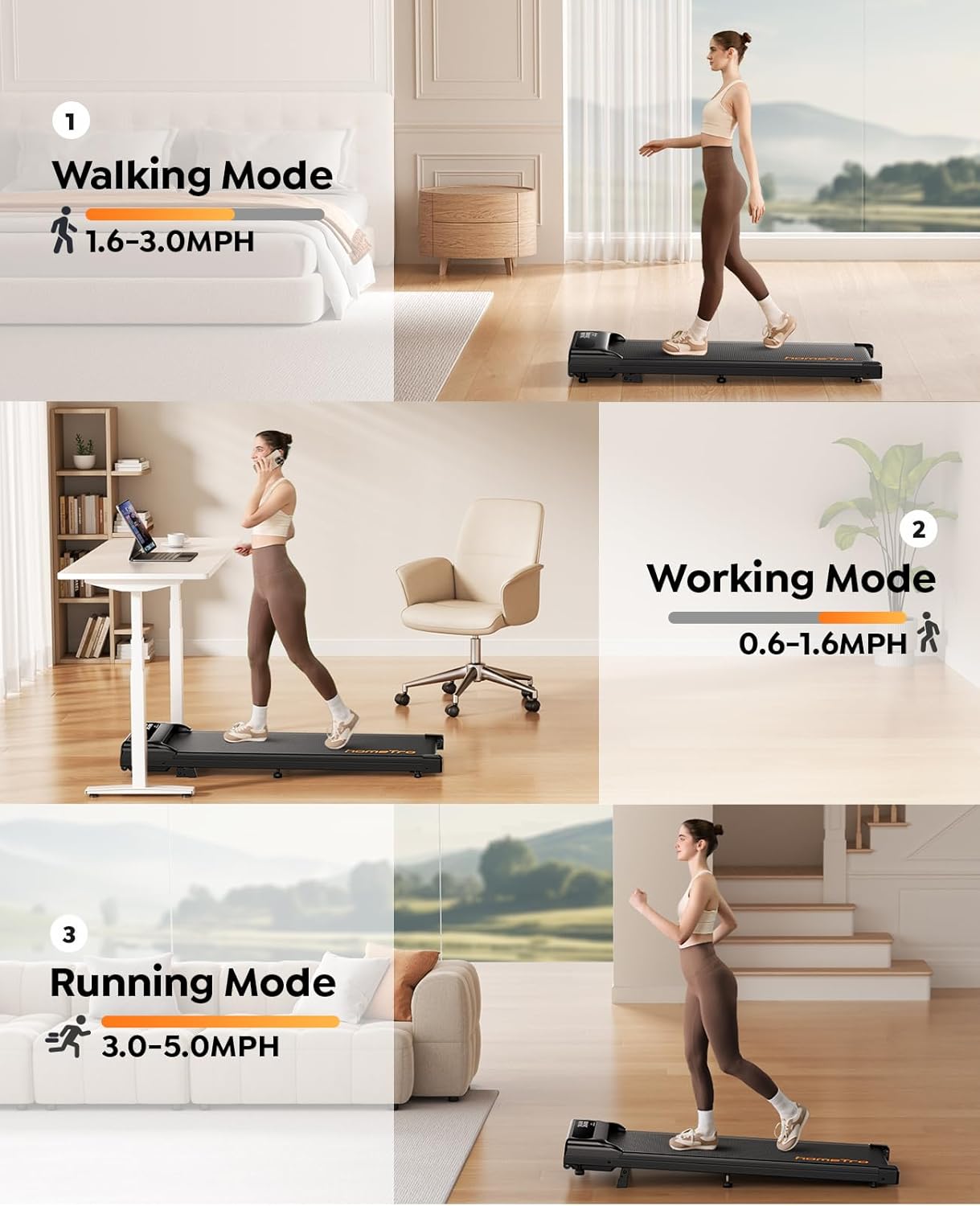
Figure 5.2: Treadmill Usage Modes
5.4 Official Product Video
Video 5.1: This video demonstrates the key features of the HomeTro Walking Pad Treadmill, including its compact size, incline adjustment, app connectivity, and various usage scenarios like walking, working, and running. It also highlights its portability and quiet operation.
6. Maintenance
Regular maintenance ensures the longevity and optimal performance of your HomeTro Walking Pad Treadmill.
- Cleaning: Wipe down the treadmill with a damp cloth after each use to remove sweat and dust. Do not use abrasive cleaners.
- Belt Lubrication: The running belt requires periodic lubrication to reduce friction and extend its lifespan. Use the provided silicone oil. Refer to the user manual for specific instructions on how often to lubricate and the proper application method.
- Belt Tension: Check the tension of the running belt periodically. If the belt slips or feels loose, adjust it according to the instructions in the full user manual.
- Storage: When not in use, the treadmill can be easily stored under a sofa or in a corner due to its compact design and built-in wheels.

Figure 6.1: 5-Layer Anti-Slip Belt for Enhanced Comfort
7. Troubleshooting
If you encounter issues with your treadmill, refer to the following common problems and solutions:
| Problem | Possible Cause | Solution |
|---|---|---|
| Treadmill does not power on. | Power cord not properly connected; Power switch off; Circuit breaker tripped. | Ensure power cord is securely plugged in. Check the main power switch on the treadmill. Reset the circuit breaker if necessary. |
| Running belt slips or hesitates. | Belt too loose; Insufficient lubrication. | Adjust belt tension using the provided hex wrench (refer to full manual). Apply silicone oil lubricant to the belt. |
| Abnormal noise during operation. | Loose components; Lack of lubrication. | Check for any loose screws or parts and tighten them. Lubricate the running belt. |
| Remote control not responding. | Battery low or dead; Remote not paired. | Replace the remote control battery. Refer to the manual for remote pairing instructions. |
| App connection issues. | Bluetooth off; App not updated; Treadmill not discoverable. | Ensure Bluetooth is enabled on your device. Update the Fitshow app. Restart the treadmill and try connecting again. |
For issues not listed here or if problems persist, please contact customer support.
8. Specifications
| Feature | Detail |
|---|---|
| Brand | HomeTro |
| Model Name | HM3 |
| Motor Horsepower | 3.0 HP |
| Speed Range | 0.6 - 5 MPH |
| Maximum Incline | 9% (Manual Adjustment) |
| Maximum Weight Recommendation | 265 Pounds |
| Product Dimensions (LxWxH) | 45.67" x 19.1" x 7.09" |
| Item Weight | 37.3 Pounds |
| Material | Metal |
| Display Type | LED |
| Connectivity Technology | Power cord, Bluetooth (for app) |
| Assembly Required | No |
9. Warranty and Support
HomeTro provides a 12-month warranty for this product, ensuring quality and reliability. We are committed to customer satisfaction and offer 24-hour customer service to assist you with any questions or concerns.
Contacting Customer Service:
For support, please follow these steps:
- Log in to your Amazon account.
- Navigate to "Your Orders".
- Locate the Order ID for your HomeTro Walking Pad Treadmill.
- Click on "Contact Seller" to reach our support team.
We aim to provide prompt and helpful assistance.
Documents and downloads
Ask a question about this manual
Ask about setup, troubleshooting, compatibility, parts, safety, or missing instructions. Manuals+ will review the question and use this page’s manual context to help answer it.