
Introduction
The SODI Ultra Compact Foldable Laptop Stand is designed to enhance your computing experience by providing an ergonomic and portable solution for your laptop or tablet. Crafted from durable aluminum, this stand offers adjustable height settings, improved heat dissipation, and a stable platform for devices ranging from 10 to 16 inches. Its lightweight and compact design makes it ideal for both desk and travel use.

Image: The SODI Ultra Compact Foldable Laptop Stand in its light gray finish.
Setup Instructions
Follow these steps to set up your SODI Foldable Laptop Stand:
- Unfold the Stand: Gently pull the two main arms of the stand apart until they form an 'H' shape. The spring-loaded mechanism will assist in this process.
- Extend the Feet: Pull out the two feet at the bottom of the stand to provide a stable base.
- Adjust Height: The stand features a spring-loaded arm that allows for 6 height adjustments. Press the release buttons on the side of the arms and adjust to your desired ergonomic height. Ensure both sides are set to the same level for stability.
- Place Device: Position your laptop or tablet on the stand, ensuring it rests securely on the anti-slip silicone pads. Adjust the rubber foot pads to fit your device's thickness for optimal grip.

Image: Visual guide for unfolding and setting up the stand, including its compact and open dimensions.
Video: Demonstration of setting up the SODI BI-Foldable Laptop Stand for desk use, showcasing its quick deployment and stability.
Operating Instructions
The SODI Laptop Stand is designed for straightforward operation to provide an optimal viewing and typing experience.
- Ergonomic Positioning: Adjust the stand's height to bring your laptop screen to eye level. This helps maintain a straight posture and reduces strain on your neck and back.
- Stability: The H-frame design and anti-slip silicone pads ensure your device remains stable during use, even while typing.
- Heat Dissipation: The open design of the stand promotes airflow around your laptop, preventing overheating and maintaining optimal performance.
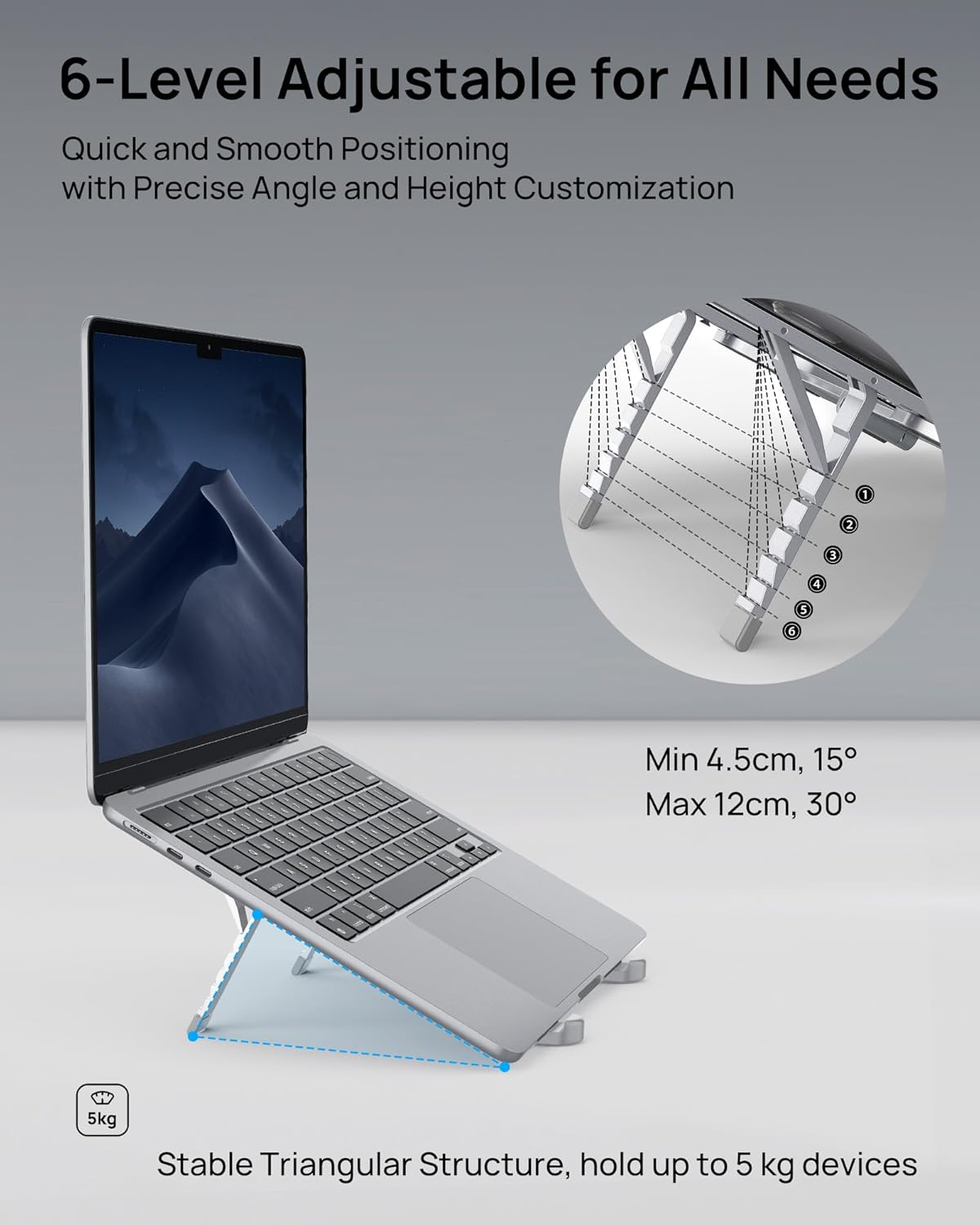
Image: Illustration of the 6-level adjustable height and angle, demonstrating how to achieve ergonomic positioning.

Image: Visual representation of improved posture and reduced strain when using the stand.
Video: A demonstration of the SODI Foldable Laptop Holder in use on a desk, highlighting its stability during typing.
Maintenance
To ensure the longevity and optimal performance of your SODI Laptop Stand, follow these simple maintenance guidelines:
- Cleaning: Wipe the stand with a soft, damp cloth to remove dust and smudges. Avoid abrasive cleaners or solvents that could damage the aluminum finish or silicone pads.
- Inspection: Periodically check the hinges and adjustment mechanisms for smooth operation. Ensure all anti-slip pads are securely attached.
- Storage: When not in use, fold the stand into its compact form and store it in the provided carrying pouch to protect it from scratches and dirt.

Image: Details of the stand's protective features, including anti-fall pads, anti-slip silicone, and aluminum alloy construction.
Troubleshooting
If you encounter any issues with your SODI Laptop Stand, refer to the following common solutions:
- Stand feels unstable: Ensure both adjustable arms are locked into the same height setting. Verify that your laptop or tablet is centered on the stand and that the rubber foot pads are adjusted to securely hold your device.
- Difficulty adjusting height: Ensure no weight is on the stand when attempting to adjust the height. Press the release buttons firmly and apply gentle pressure to move the arms.
- Device sliding: Confirm that the anti-slip silicone pads are clean and free of debris. Ensure the rubber foot pads are properly extended and gripping the front edge of your device.
Specifications
| Brand | SODI |
| Model Number | 314 |
| Color | Light Gray |
| Material | Aluminum Alloy |
| Compatible Devices | Laptops, Tablets (10-16 inches) |
| Item Dimensions (Folded) | 5 x 1.73 x 0.83 inches (12.7 x 4.4 x 2.1 cm) |
| Item Weight | 6.3 oz (185 Grams) |
| Adjustable Height | Yes (6 levels) |
| Special Features | Foldable, Ergonomic, Heat Dissipation, Anti-slip |

Image: The stand demonstrating its wide compatibility with various laptop and tablet sizes.
Warranty Information
The SODI Ultra Compact Foldable Laptop Stand comes with a 2-Year Manufacturer Warranty. This warranty covers defects in materials and workmanship under normal use. Please retain your proof of purchase for warranty claims. For specific terms and conditions, refer to the warranty card included with your product or contact SODI customer support.
Support
For further assistance, technical support, or warranty inquiries, please contact SODI customer service through the following channels:
- Email: support@sodi.com
- Website: Visit the official SODI website for FAQs and additional resources.
- Online Store: You can also find support information on the SODI Store on Amazon.
