Introduction
This manual provides detailed instructions for the setup, operation, and maintenance of your KWANWA Digital Alarm Clock Model EJ319B. Please read this manual thoroughly before using the product to ensure proper function and longevity.
Safety Information
- Do not expose the device to extreme temperatures, direct sunlight, or high humidity.
- Avoid dropping or subjecting the clock to strong impacts.
- Use only the provided 5V AC adapter.
- Keep out of reach of children.
- Do not attempt to disassemble or repair the device yourself. Contact customer support if issues arise.
Package Contents
Verify that all items are present in the package:
- KWANWA Digital Alarm Clock (Model EJ319B)
- 5V AC Power Adapter
- USB Power Cable (1.5m)
- User Manual (this document)

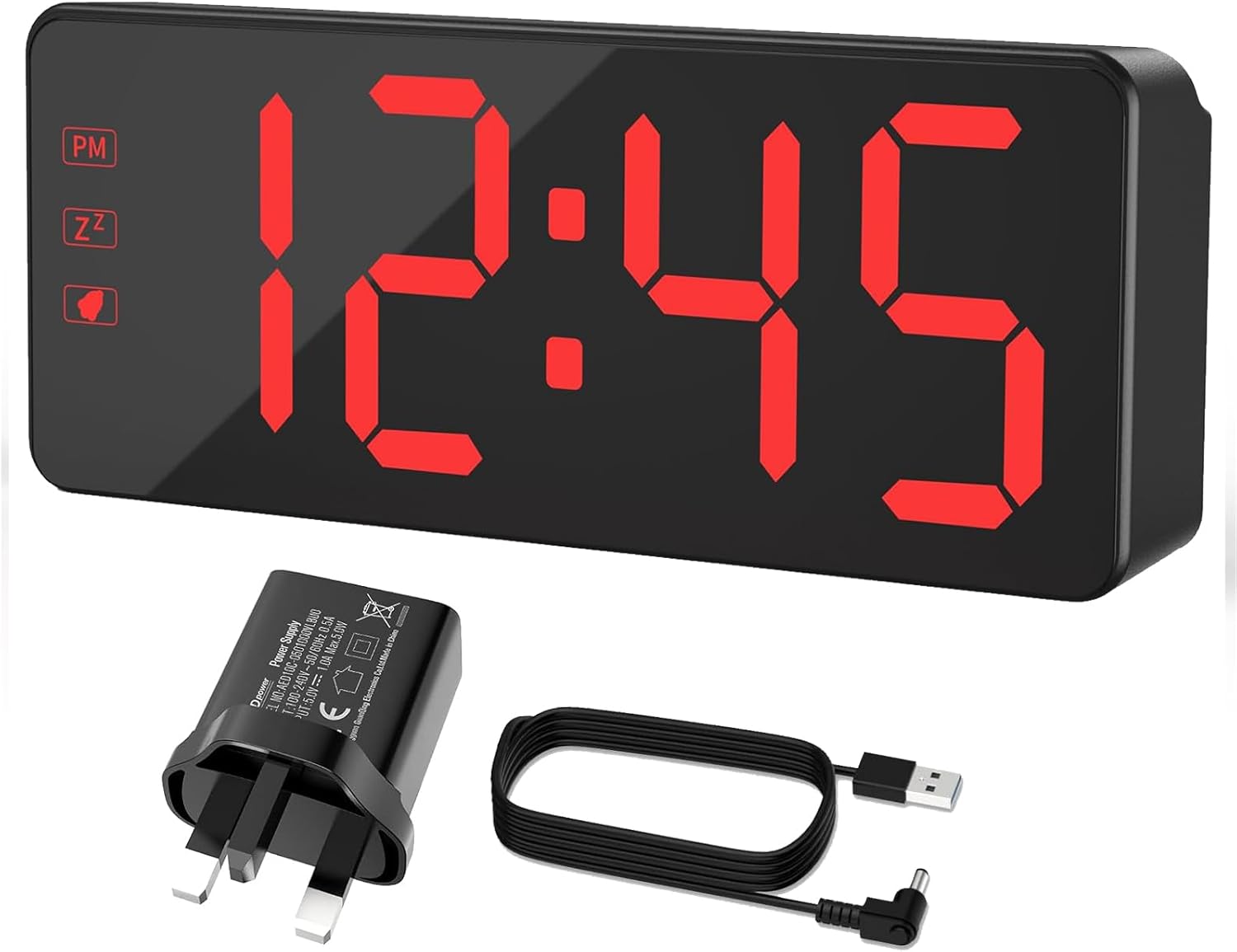
Product Overview
The KWANWA Digital Alarm Clock EJ319B features a large LED display for clear visibility and user-friendly controls.


Controls and Ports:

- TIME SET Button: Used to enter time setting mode.
- AL SET Button: Used to enter alarm setting mode.
- UP / 12/24 Button: Used to increase values during setting; toggles between 12-hour and 24-hour format.
- DOWN / AL ON/OFF Button: Used to decrease values during setting; toggles the alarm on or off.
- SNOOZE / DIMMER Button (Top): Activates snooze during an alarm; adjusts display brightness.
- DC 5V IN Port: Connects to the power adapter for main power.
- Battery Compartment (Back): Holds 3x AA batteries for backup power (batteries not included).
Setup
1. Power Connection:
- Connect the USB power cable to the DC 5V IN port on the back of the alarm clock.
- Plug the other end of the USB cable into the provided 5V AC power adapter.
- Plug the AC power adapter into a standard wall outlet.
Note on Power Management: When powered by the AC adapter, the display remains continuously active. If operating on battery power (3x AA, not included), the display will automatically turn off after 10 seconds to conserve battery life. Press any button to temporarily activate the display.

2. Battery Installation (Optional Backup):
For backup power during outages, install 3x AA batteries (not included) into the battery compartment on the back of the clock. This will save your settings but the display will not be continuously lit.
Operating Instructions
Setting the Time:
- Press and hold the TIME SET button until the hour digits begin to flash.
- Use the UP or DOWN buttons to adjust the hour.
- Press TIME SET again to move to minute adjustment. The minute digits will flash.
- Use the UP or DOWN buttons to adjust the minutes.
- Press TIME SET once more to confirm and exit time setting mode.
Setting 12/24-Hour Format:
In normal time display mode, press the UP / 12/24 button to toggle between 12-hour (with PM indicator) and 24-hour formats.
Setting the Alarm:
- Press and hold the AL SET button until the alarm hour digits begin to flash.
- Use the UP or DOWN buttons to adjust the alarm hour.
- Press AL SET again to move to alarm minute adjustment. The minute digits will flash.
- Use the UP or DOWN buttons to adjust the alarm minutes.
- Press AL SET once more to confirm and exit alarm setting mode.
Turning Alarm On/Off:
In normal time display mode, press the DOWN / AL ON/OFF button to toggle the alarm function. An alarm icon will appear on the display when the alarm is active.
Snooze Function:
When the alarm sounds, press the large SNOOZE / DIMMER button on top of the clock. The alarm will pause for 7 minutes and then sound again. The alarm will automatically stop after 120 seconds if not snoozed or turned off.

Adjusting Display Brightness:
In normal time display mode, press the SNOOZE / DIMMER button on top of the clock to cycle through three brightness levels: High, Medium, and Low (Dim).
The clock also features an automatic night mode, which dims the display between 8:00 PM and 6:00 AM for comfortable viewing in low light conditions.

Maintenance
- Cleaning: Wipe the clock with a soft, dry cloth. Do not use abrasive cleaners or solvents.
- Battery Replacement: If using backup batteries, replace them annually or when the display shows signs of dimming or erratic behavior during power outages. Ensure correct polarity when inserting new batteries.
- Storage: If storing the clock for an extended period, remove the backup batteries to prevent leakage.
Troubleshooting
| Problem | Possible Cause | Solution |
|---|---|---|
| Display is off or dim (AC power) | Power adapter not connected or faulty; power outlet not working. | Ensure the power adapter is securely plugged into the clock and a working wall outlet. Try a different outlet. |
| Display is off (battery power) | This is normal behavior to conserve battery. | Press any button to temporarily activate the display. For continuous display, use AC power. |
| Alarm does not sound | Alarm is not set or turned off. | Verify the alarm time is set correctly and the alarm function is enabled (alarm icon visible). |
| Time/settings reset after power outage | Backup batteries are not installed or are depleted. | Install 3 new AA batteries for backup power. |
Specifications
| Brand | KWANWA |
| Model Number | EJ319B |
| Color | Red Display |
| Product Dimensions (L x W x H) | 18 x 3.81 x 7.6 cm (7.1 x 1.5 x 3 inches) |
| Weight | 300 grams |
| Material | Plastic |
| Display Type | Digital LED |
| Special Features | Large screen, adjustable brightness (3 levels + auto night mode), auto-ascending alarm volume, snooze function (7 minutes), 12/24-hour format. |
| Power Source | AC Powered (5V adapter included) with 3x AA battery backup (batteries not included). |
| Usage Environment | Indoor |
Warranty and Support
KWANWA products are designed for reliability and ease of use. For any questions, technical support, or warranty claims, please refer to the contact information provided with your purchase or visit the official KWANWA website.
Please retain your proof of purchase for warranty purposes.


