
Introduction
Welcome to the Ninja Grand Kitchen System KS500 instruction manual. This guide provides essential information for the safe and effective operation, maintenance, and troubleshooting of your new kitchen system. Please read all instructions carefully before use and retain this manual for future reference.
The Ninja Grand Kitchen System KS500 is a versatile 1200-watt appliance designed for blending, food processing, and nutrient extraction. It includes a full-sized pitcher, a food processor bowl, and a single-serve cup to handle a variety of culinary tasks.
What's Included
Your Ninja Grand Kitchen System KS500 package includes the following components:
- 1200-Watt Motor Base
- 72 oz. Full-Size Pitcher with Pour Spout Lid (64 oz. max liquid capacity)
- Stacked Blade Assembly (for 72 oz. pitcher)
- 18 oz. Single-Serve Cup with Spout Lid
- Pro Extractor Blades Assembly (for single-serve cup)
- 8-Cup Food Processor Bowl with Flat Lid
- Chopping Blade Assembly (for food processor bowl)
- Dough Blade Assembly (for food processor bowl)
- Inspiration Guide with 15 Recipes

Image: All components of the Ninja Grand Kitchen System KS500, including the motor base, pitcher, food processor bowl, single-serve cup, and various blade attachments.
Setup
Before First Use
- Remove all packaging materials and promotional labels from the appliance.
- Wash the pitcher, food processor bowl, single-serve cup, lids, and blade assemblies in warm, soapy water. Rinse thoroughly and air dry. All removable parts are top-rack dishwasher safe.
- Wipe the motor base with a clean, damp cloth. Do not immerse the motor base in water.
Assembly
Ensure the motor base is placed on a clean, dry, and level surface. Always ensure the unit is unplugged before assembling or disassembling components.
Assembling the 72 oz. Pitcher
- Place the motor base on a flat surface.
- Carefully place the Stacked Blade Assembly onto the drive gear inside the 72 oz. pitcher.
- Add ingredients to the pitcher. Do not exceed the MAX LIQUID fill line (64 oz.).
- Place the pitcher onto the motor base, aligning the arrow on the pitcher with the arrow on the base. Turn clockwise until it clicks into place.
- Secure the Pour Spout Lid onto the pitcher by aligning the arrow on the lid with the arrow on the pitcher handle. Press down firmly until it clicks.
Assembling the 8-Cup Food Processor Bowl
- Place the motor base on a flat surface.
- Place the 8-cup food processor bowl onto the motor base, aligning the arrow on the bowl with the arrow on the base. Turn clockwise until it clicks into place.
- Carefully place either the Chopping Blade Assembly or the Dough Blade Assembly onto the drive gear inside the bowl.
- Add ingredients to the bowl.
- Secure the Flat Lid onto the food processor bowl by aligning the arrow on the lid with the arrow on the bowl handle. Press down firmly until it clicks.
Assembling the 18 oz. Single-Serve Cup
- Add ingredients to the 18 oz. single-serve cup.
- Screw the Pro Extractor Blades Assembly onto the open end of the cup until it is tightly sealed.
- Invert the cup and place it onto the motor base, aligning the tabs on the cup with the slots on the base. Turn clockwise until it clicks into place.
Operating Instructions
The Ninja Grand Kitchen System KS500 features a powerful 1200-watt motor and intuitive controls for various blending and processing tasks.

Image: The Ninja Grand Kitchen System KS500 showcasing its versatility with different attachments for blending, extracting, chopping, and mixing.
Control Panel Overview
The control panel includes manual speed settings and Auto-iQ programs:
- POWER (⏸): Turns the unit on or off.
- LOW: Provides a continuous low-speed blend.
- HIGH: Provides a continuous high-speed blend.
- PULSE: Offers controlled chopping and blending. Press and hold for short bursts.
Auto-iQ Programs
The system features 4 intelligent preset programs that combine unique pulsing, blending, and pausing patterns to deliver consistent results. Simply select the desired program and let the system do the work.

Image: Examples of results from using the preset programs, including smoothies, frozen drinks, salsa, and dough.
- SMOOTHIE: Ideal for creating smooth, creamy beverages from fresh or frozen fruits and liquids.
- EXTRACT: Designed to break down whole fruits, vegetables, and ice for nutrient-rich drinks.
- CHOP: Perfect for evenly chopping ingredients like vegetables, nuts, and herbs.
- DOUGH: Specifically programmed for mixing and kneading dough for various recipes.
Using the 72 oz. Full-Size Pitcher

Image: The 72 oz. pitcher filled with berries, demonstrating its capacity for large batches.
The 72 oz. pitcher, equipped with Total Crushing Blades, is designed for:
- Blending large batches of smoothies.
- Crushing ice into snow for frozen drinks and cocktails.
- Creating milkshakes and other blended beverages.
After assembly and adding ingredients, select a manual speed (LOW, HIGH, PULSE) or the SMOOTHIE/EXTRACT Auto-iQ program.
Using the 8-Cup Food Processor Bowl

Image: The 8-cup food processor bowl with dough, illustrating its capability for food preparation.
The 8-cup food processor bowl is ideal for:
- Evenly chopping vegetables, fruits, and nuts using the Chopping Blade Assembly.
- Making smooth purees for sauces and dips.
- Processing up to 2 lbs. of dough using the Dough Blade Assembly.
After assembly and adding ingredients, select a manual speed (LOW, HIGH, PULSE) or the CHOP/DOUGH Auto-iQ program.
Using the 18 oz. Single-Serve Cup
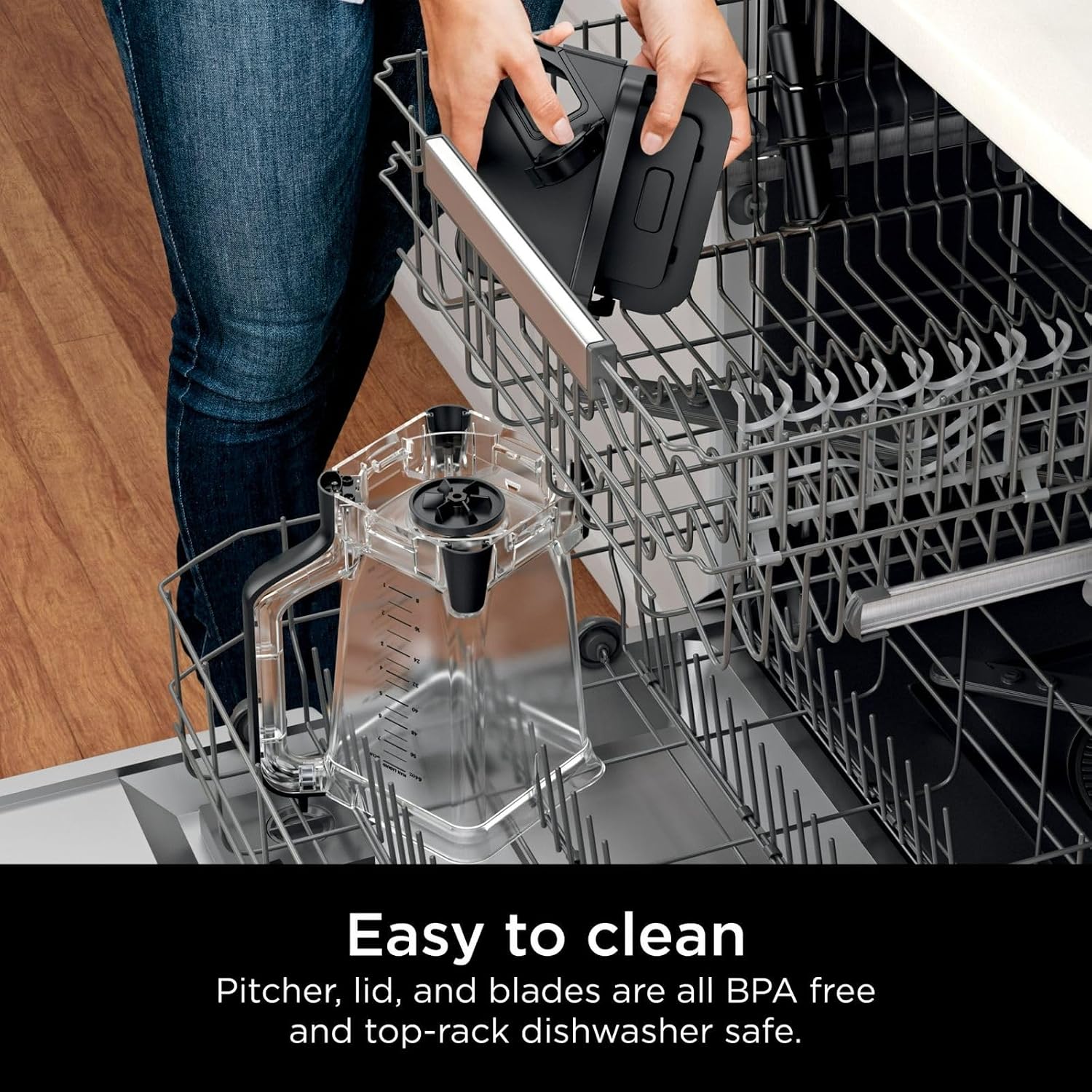
Image: The single-serve cup attached to the motor base, ready for blending a personal drink.
The 18 oz. single-serve cup allows you to:
- Blend your favorite drinks directly in the cup.
- Enjoy your blended beverages on the go by screwing on the spout lid.
After assembly and adding ingredients, select a manual speed (HIGH, PULSE) or the SMOOTHIE/EXTRACT Auto-iQ program.
Maintenance and Cleaning
Proper maintenance ensures the longevity and optimal performance of your Ninja Grand Kitchen System KS500.

Image: The pitcher and lid being placed into a dishwasher, highlighting the ease of cleaning.
Cleaning
All removable parts (pitcher, food processor bowl, single-serve cup, lids, and blade assemblies) are BPA-free and top-rack dishwasher safe. For best results, rinse parts immediately after use.
- Hand Washing: Wash components in warm, soapy water using a non-abrasive cloth or sponge. Exercise caution when handling blade assemblies as the blades are sharp.
- Dishwasher: Place all removable parts on the top rack of your dishwasher.
- Motor Base: Wipe the motor base clean with a damp cloth. Do not immerse the motor base in water or any other liquid.
Storage
Store the appliance upright with the pitcher, bowl, or cup assembled on the motor base, or store components separately in a safe place where they will not be damaged.
Troubleshooting
If you encounter issues with your Ninja Grand Kitchen System KS500, please refer to the following common solutions:
- Unit does not turn on: Ensure the power cord is securely plugged into a working electrical outlet. Verify that the pitcher, food processor bowl, or single-serve cup is correctly assembled and locked onto the motor base. The unit has safety features that prevent operation if components are not properly secured.
- Ingredients are not blending/processing: Ensure you have not overfilled the container. If ingredients are too thick, add more liquid. Use the PULSE function to break down larger pieces or dislodge ingredients from the blades.
- Motor sounds strained: This may indicate that the load is too heavy. Reduce the amount of ingredients or add more liquid. Do not continuously operate the unit if the motor sounds strained.
- Lid is difficult to remove: Ensure the unit is off and unplugged. Press the release button (if applicable) or twist the lid counter-clockwise firmly.
If problems persist after attempting these solutions, please contact customer support.
Specifications
| Brand | Ninja |
| Model | KS500 |
| Power | 1200 Watts |
| Capacity (Pitcher) | 72 oz. (64 oz. max liquid) |
| Capacity (Food Processor Bowl) | 8 cups |
| Capacity (Single-Serve Cup) | 18 oz. |
| Control Type | Manual (Low, High, Pulse), Auto-iQ Programs (Smoothie, Extract, Chop, Dough) |
| Material (Container) | Plastic (BPA-free) |
| Special Features | Multiple accessories, Pour spout, Adjustable speed control, Removable blades, Programmable |
| GTIN/UPC | 703670940378 |
Warranty Information
The Ninja Grand Kitchen System KS500 comes with a 90-day limited warranty. Please refer to the warranty card included in your product packaging for full details regarding coverage, terms, and conditions. Keep your proof of purchase for warranty claims.
Customer Support
For further assistance, product registration, or to inquire about replacement parts, please visit the official Ninja website or contact their customer service department. Contact information can typically be found on the product packaging or the warranty card.
