
1. Overview
The TRENDnet Industrial 10G SFP+ Media Converter, model TI-F711SFP, is an IP50-rated device designed for extreme industrial environments. It converts 10G SFP+ to 10G Ethernet, supporting throughput speeds from 100Mbps to 10G Ethernet. The unit features hardened components, 9-60V DC power input with overload current protection, and an alarm relay for power failure detection. DIP switches allow configuration of energy efficiency and Link Fault Pass Through (LFPT).
Key Features:
- Device Interface: 1 x 10G Ethernet Port (100Mbps/1G/2.5G/10G), 1 x 10G SFP+ Port (1G/10G), 3-Pin Power Terminal Block, 3-Pin Alarm Relay Terminal Block, LED Indicators, DIP Switch.
- Industrial Hardened Design: IP50 rated housing, resistant to vibration and shock, operating temperature range of -40° to 75° C (-40° to 167° F).
- Power Input: Dual 48V 9-60V DC power input with overload current protection. (Power supply sold separately: TI-M6024, 48VDC3000).
- DIP Switches: Configurable for LFPT (Link Fault Pass Through) on/off and Converter mode / Switch mode.
- Link Fault Pass Through (LFPT): Identifies link faults to remote LFPT-enabled media converters.
- Surge Protection: 6kV Ethernet surge protection.
- Mounting Options: Includes DIN-Rail mount and wall mount hardware.
- Compliance: NDAA + TAA Compliant.

Figure 1: Labeled diagram of the TI-F711SFP Industrial 10G SFP+ Media Converter, highlighting its grounding point, LED indicators, DIP switch, Ethernet port, SFP+ port, power port, 3-pin power terminal block, 3-pin alarm relay terminal block, and DIN-Rail mount.

Figure 2: An application diagram illustrating the use of the TI-F711SFP Industrial Media Converter to establish a network connection between two buildings, utilizing fiber media conversion.
2. Package Contents
Verify that your package contains the following items:
- TI-F711SFP Industrial 10G SFP+ Media Converter
- Removable terminal blocks
- DIN-Rail / wall mount kit
3. Physical Description
The TI-F711SFP features a robust black metal housing with various ports, indicators, and configuration switches on its front and rear panels.
Front Panel:
- LED Indicators: Display link/activity status for both Ethernet and SFP+ ports.
- DIP Switch: Two-position switch for configuring operational modes.
- 10G Ethernet Port: RJ-45 connector supporting 100Mbps, 1G, 2.5G, and 10G speeds.
- 10G SFP+ Port: Slot for a 1G or 10G SFP+ transceiver module (module sold separately).

Figure 3: Front view of the TI-F711SFP, showing the LED indicators, DIP switch, 10G Ethernet port, and 10G SFP+ port.
Rear Panel:
- PWR 1 / PWR 2: Dual power input terminals (9-60V DC).
- ALARM: 3-pin alarm relay terminal block.
- Grounding Point: Screw terminal for chassis grounding.

Figure 4: Rear view of the TI-F711SFP, detailing the dual power input terminals (PWR 1, PWR 2), the alarm relay terminal block, and the grounding point.
4. Installation
4.1 Mounting
The TI-F711SFP can be mounted on a standard DIN-Rail or directly to a wall using the included mounting kit.
- DIN-Rail Mount: Attach the device to a 35mm DIN-Rail by hooking the top edge and pushing the bottom until it clicks into place.
- Wall Mount: Use the provided wall mount brackets and screws to secure the device to a flat surface.
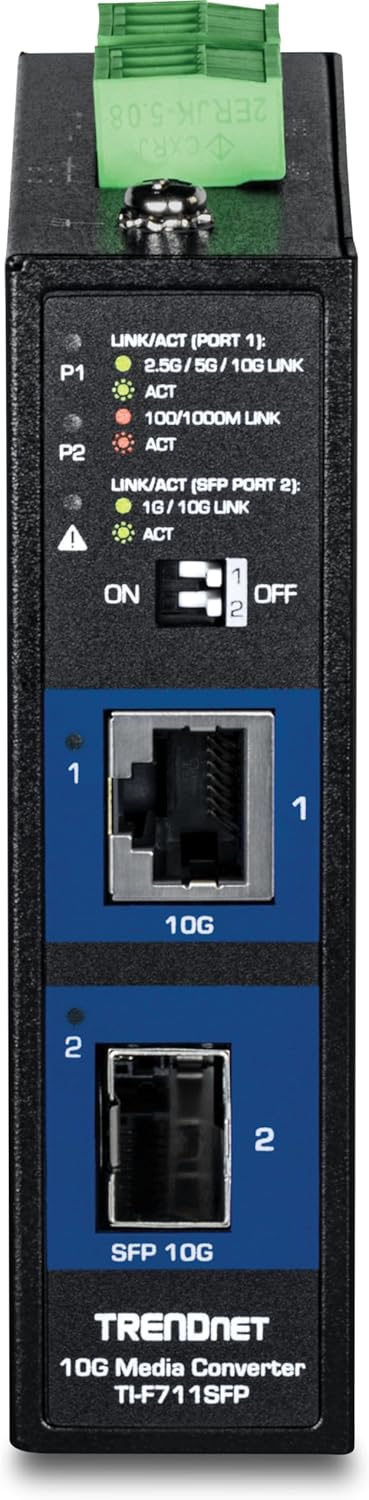
Figure 5: The TI-F711SFP media converter securely mounted on a DIN rail, demonstrating its industrial installation capability.
4.2 Power Connection
Connect a compatible 9-60V DC power supply (sold separately) to the 3-pin power terminal block on the rear panel. The device supports dual power inputs for redundancy. Ensure correct polarity (+/-) when connecting the power wires.
4.3 Grounding
For optimal performance and safety, connect a grounding wire from the grounding screw terminal on the rear panel to a proper earth ground.
5. Operation
5.1 DIP Switch Configuration
The DIP switch on the front panel allows for two main configurations:
- Switch 1 (LFPT): Toggles Link Fault Pass Through (LFPT) functionality on or off. When enabled, a link fault on one port is passed through to the other port, allowing connected devices to detect the fault.
- Switch 2 (Mode): Selects between Converter mode and Switch mode.
5.2 LED Indicators
The LED indicators provide visual status of the device's operation:
- LINK/ACT (Port 1 - Ethernet): Indicates link status and activity for the Ethernet port.
- LINK/ACT (Port 2 - SFP+): Indicates link status and activity for the SFP+ port.
- PWR: Indicates power status.
5.3 Connecting Devices
Connect your 10G Ethernet device to the RJ-45 port and an SFP+ transceiver (with appropriate fiber optic cable) to the SFP+ port. Ensure all connections are secure and the DIP switches are configured as required for your network setup.
6. Maintenance
The TI-F711SFP is designed for industrial environments with minimal maintenance requirements. Its IP50 rating provides protection against dust ingress. The hardened design allows operation in extreme temperatures from -40° to 75° C (-40° to 167° F) and withstands high levels of vibration and shock. Regular inspection of cable connections and power supply integrity is recommended.
The device also features 6kV Ethernet surge protection, enhancing its durability in harsh conditions.
7. Troubleshooting
If you encounter issues with your TI-F711SFP, consider the following:
- No Power: Verify that the power supply is correctly connected to the terminal block and is providing the specified voltage (9-60V DC). Check the PWR LED indicator.
- No Link: Ensure that Ethernet cables and SFP+ transceivers/fiber optic cables are securely connected and are compatible with the device. Check the LINK/ACT LEDs for both ports.
- Incorrect Throughput: Confirm that the connected devices are operating at the expected speeds and that the DIP switch settings are appropriate for your network configuration.
- Network Issues: If using LFPT, ensure it is configured correctly on both the TI-F711SFP and the remote media converter.
For further assistance, refer to the technical support section.
8. Specifications
| Feature | Description |
|---|---|
| Brand | TRENDnet |
| Model Number | TI-F711SFP |
| Hardware Interface | Ethernet |
| Product Dimensions | 4.7"L x 3.9"W x 1.2"H |
| Item Weight | 11.8 Ounces |
| Data Link Protocol | IEEE 802.3, IEEE 802.3ae, IEEE 802.3an, IEEE 802.3az, IEEE 802.3bz |
| Data Transfer Rate | 20 Gigabytes Per Second (Full Duplex) |
| Compatible Devices | Power supply sold separately (models: TI-M6024, 48VDC3000) |
| Built-In Media | DIN-Rail / wall mount kit, Removable terminal blocks |
| UPC | 710931163063 |
| ASIN | B0DZ4FR9WT |
9. Warranty Information
The TRENDnet TI-F711SFP Industrial 10G SFP+ Media Converter comes with a 3-year warranty. Please retain your proof of purchase for warranty claims.
10. Technical Support
TRENDnet provides reliable technical support. Our team of advisors, support, and technical experts are available during normal business hours to assist with any inquiries or issues you may have. For support, please visit the official TRENDnet website or refer to the contact information provided with your product documentation.


