
1. Important Safety Instructions
Please read all safety instructions carefully before using your MOVA V50 Ultra Complete Robot Vacuum and Mop. Failure to follow these instructions may result in electric shock, fire, or serious injury.
- This appliance is for indoor use only. Do not use outdoors or on wet surfaces.
- Do not allow children or pets to operate the robot. Supervise children when the robot is in use.
- Keep hair, loose clothing, fingers, and all parts of the body away from openings and moving parts.
- Do not pick up anything that is burning or smoking, such as cigarettes, matches, or hot ashes.
- Do not use to pick up flammable or combustible liquids, such as gasoline, or use in areas where they may be present.
- Ensure the power cord is not damaged. If damaged, it must be replaced by the manufacturer or a qualified service agent.
- Always turn off the robot and disconnect from the base station before performing any maintenance or cleaning.
- Do not use the robot in areas with exposed electrical outlets or standing water.
2. Package Contents
Verify that all components listed below are included in your package:

Image: An exploded view diagram illustrating the MOVA V50 Ultra Complete robot vacuum, its base station, and all accompanying accessories, including brushes, mop pads, dust bags, cleaning solutions, and user manual.
- 1x Robot Vacuum Cleaner
- 1x Base Station
- 1x Base Station Ramp Extension Plate
- 2x Dust Bags (1x pre-installed)
- 2x Mop Pad Holders
- 2x Mop Pads (pre-installed)
- 1x Pet Odor Cleaning Solution (200ml)
- 1x General Cleaning Solution (1L)
- 1x User Manual
- 1x Washboard Filter (pre-installed)
- Automatic Dosing Module for Cleaning Solution - Two Compartments (pre-installed)
3. Product Overview
3.1. Components

Image: The MOVA V50 Ultra Complete robot vacuum positioned in front of its sleek, black automatic base station, showcasing its compact design and integrated charging/cleaning capabilities.
The MOVA V50 Ultra Complete consists of the robot vacuum cleaner and a multifunctional base station. The robot features a top-mounted LiDAR sensor for navigation, front-facing sensors for obstacle detection, and a combination of main and side brushes on its underside for cleaning. The base station handles automatic dust collection, mop washing, and drying.
3.2. Key Features
- FlexiRise Navigation: The DToF sensor retracts in tight spaces (e.g., under furniture) for compact navigation and extends in open areas for enhanced visibility and precise route planning.
- Synchronous Obstacle Overcoming (StepMaster System): Features retractable legs that lift the chassis to easily traverse obstacles like steps, thresholds, door rails, and U-shaped furniture legs up to 6 cm high. Can overcome single vertical steps up to 4.2 cm.
- 24,000 Pa Suction Power: Provides strong suction for effective cleaning of carpets and hard floors, removing hair, dirt, and debris.
- Thermal Mopping with DuoSolution System: Utilizes hot water mopping to dissolve stubborn stains. The DuoSolution system allows for automatic spraying of general cleaning solution or pet odor remover onto the mop pad.
- OmniDry System: The base station automatically dries and deodorizes the mop pads and dust bag, preventing mold and extending lifespan. Mop pads dry in 1 hour.
- JetSpray Dryboard: An improved washboard with 20 spray nozzles for even water distribution and enhanced cleaning. A central filter collects dirt and removes used water.
- Triple Anti-Tangle Mechanisms: Includes the TroboWave DuoBrush and other features to prevent hair tangles, improving cleaning efficiency and reducing maintenance.
4. Initial Setup
- Unpacking: Carefully remove all components from the packaging. Remove any protective films or packing materials from the robot and base station.
- Base Station Placement: Place the base station on a hard, level surface against a wall, ensuring there is at least 0.5 meters of clear space on both sides and 1.5 meters in front. Ensure it is near a power outlet and has stable Wi-Fi signal.
- Initial Charging: Place the robot onto the base station. The robot will automatically begin charging. For optimal battery life, allow the robot to fully charge before its first use.
- App Installation and Connection: Download the official MOVA app from your smartphone's app store. Follow the in-app instructions to create an account and connect your MOVA V50 Ultra Complete to your home Wi-Fi network.
- First Mapping Run: Once connected, initiate a mapping run through the app. The robot will navigate your home to create a detailed map, which is essential for efficient cleaning and advanced features. Ensure all doors are open and obstacles are cleared during this process.
5. Operating Instructions
5.1. Cleaning Modes
The MOVA V50 Ultra Complete offers various cleaning modes accessible via the MOVA app:
- Auto Clean: The robot intelligently cleans the entire mapped area.
- Zone Clean: Select specific rooms or custom zones on the map for targeted cleaning.
- Spot Clean: Direct the robot to clean a specific small area with concentrated effort.
- Scheduled Clean: Set up recurring cleaning schedules for convenience.
5.2. Mopping Function

Image: The MOVA V50 Ultra Complete robot vacuum actively mopping a floor, with visual effects illustrating the thermal mopping and DuoSolution system applying cleaning agents for effective stain removal.
To use the mopping function, ensure the mop pads are attached and the water tanks in the base station are filled. The DuoSolution system allows you to use either the general cleaning solution or the pet odor remover. The robot will automatically dispense the solution and use hot water for thermal mopping.
5.3. Suction Power Adjustment

Image: A cutaway diagram showcasing the internal fan and airflow path of the MOVA V50 Ultra Complete, emphasizing its robust 24,000 Pa suction power and HEPA self-cleaning mechanism for efficient dust collection.
You can adjust the suction power through the MOVA app to suit different floor types and cleaning needs. Higher suction is recommended for carpets or heavily soiled areas, while lower suction can be used for quieter operation on hard floors.
5.4. Obstacle Avoidance and Navigation
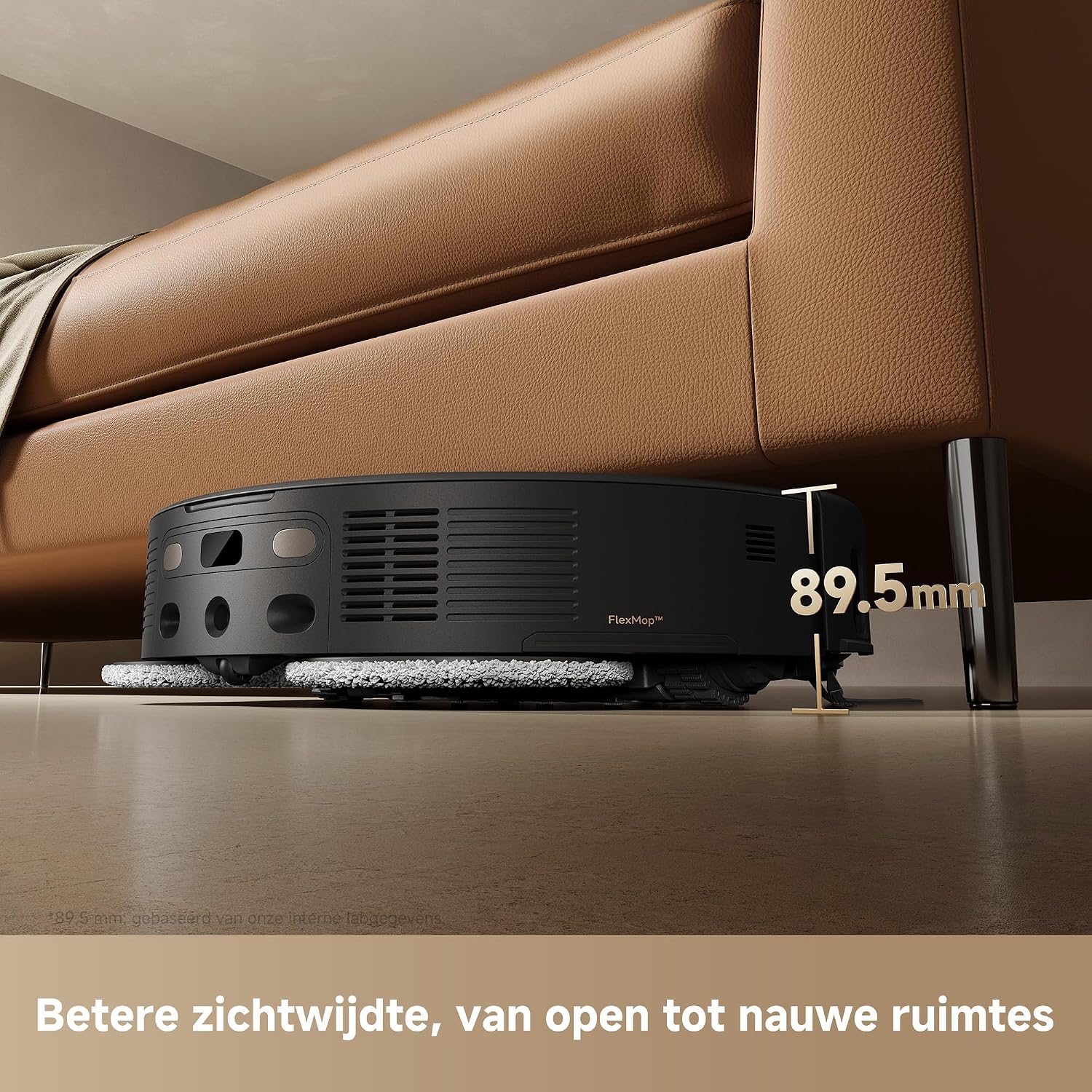
Image: The MOVA V50 Ultra Complete robot vacuum positioned under a low-clearance sofa, with a measurement indicating its height of 89.5mm, demonstrating its ability to reach difficult-to-access areas.

Image: A series of three images showing the MOVA V50 Ultra Complete robot vacuum overcoming various obstacles: a vertical step of 4.2 cm, U-shaped furniture legs, and a general hurdle, illustrating its StepMaster system's capability.
The robot utilizes FlexiRise Navigation to adapt its DToF sensor height for optimal scanning in both open and tight spaces. The StepMaster System allows the robot to raise its chassis to overcome obstacles like thresholds and small steps, ensuring comprehensive cleaning without getting stuck.
6. Maintenance
Regular maintenance ensures optimal performance and extends the lifespan of your MOVA V50 Ultra Complete.
6.1. Dust Bin and Filter Cleaning
The robot's internal dust bin should be emptied after each cleaning cycle. The HEPA filter should be cleaned weekly by tapping it to remove dust. Replace the HEPA filter every 3-6 months, or as needed, depending on usage.
6.2. Main Brush and Side Brush Cleaning

Image: A close-up view of the underside of the MOVA V50 Ultra Complete, highlighting its main brush and side brush with visible hair strands, demonstrating the triple anti-tangle mechanisms at work.
Inspect the main brush and side brushes weekly for tangled hair or debris. Use the cleaning tool provided to cut and remove any tangled hair. The triple anti-tangle mechanisms help reduce hair wrapping, but regular checks are still recommended. Replace brushes if they show signs of wear.
6.3. Mop Pad Cleaning and Replacement
The mop pads are automatically cleaned and dried by the base station after each mopping cycle. For thorough cleaning, remove the mop pads periodically and hand wash them with mild detergent. Replace mop pads every 1-3 months, depending on usage and wear.
6.4. Base Station Maintenance

Image: A transparent view of the MOVA V50 Ultra Complete base station, illustrating the internal airflow and components of the OmniDry system, which dries and deodorizes the mop pads and dust bag using 60°C hot air.
Empty the dust bag in the base station when indicated by the app (approximately every 30-60 days). Clean the clean water and dirty water tanks regularly. The OmniDry system helps keep the mop pads and dust bag dry and odor-free, but ensure the system is functioning correctly.
6.5. Sensor Cleaning
Wipe all sensors (LiDAR, cliff sensors, wall sensors, and charging contacts) on the robot and base station with a clean, dry cloth monthly. Dirty sensors can affect navigation and cleaning performance.
7. Troubleshooting
If you encounter issues with your MOVA V50 Ultra Complete, refer to the table below for common problems and solutions.
| Problem | Possible Cause | Solution |
|---|---|---|
| Robot not charging | Charging contacts are dirty; Base station not powered; Robot not properly docked. | Clean charging contacts on robot and base station. Ensure base station is plugged in. Re-dock the robot manually. |
| Poor cleaning performance | Dust bin full; Brushes tangled; Filter clogged; Mop pads dirty. | Empty dust bin. Clean main and side brushes. Clean or replace filter. Clean or replace mop pads. |
| Robot gets stuck frequently | Too many obstacles; Sensors are dirty; Robot is on a dark surface (cliff sensors). | Clear obstacles from the cleaning path. Clean all sensors. Use no-go zones for dark carpets/cliffs. |
| App connection issues | Weak Wi-Fi signal; Incorrect Wi-Fi password; Router issues. | Ensure strong Wi-Fi signal near base station. Re-enter Wi-Fi password. Restart your router and the robot. |
| Mop pads not drying | OmniDry system blocked; Base station vents obstructed. | Ensure no debris is blocking the OmniDry system's air vents. Clean the base station's drying area. |
8. Technical Specifications
| Feature | Detail |
|---|---|
| Brand | Mova |
| Model Number | RLV72LE-1 |
| Color | Black (Nero) |
| Product Dimensions (Robot + Base) | 42 x 47 x 45.5 cm |
| Weight | 25 kg |
| Suction Power | 24,000 Pa |
| Power Source | Battery |
| Battery Type | Lithium-ion |
| Special Features | FlexiRise Navigation, Synchronous Obstacle Avoidance, Thermal Mopping with DuoSolution System, JetSpray Dryboard, Automatic Maintenance Base |
9. Warranty and Support
9.1. Warranty Information

Image: The MOVA V50 Ultra Complete robot vacuum and base station, accompanied by a prominent badge indicating a '3 Year Warranty' and 'Reliable Quality', highlighting the product's durability and manufacturer support.
The MOVA V50 Ultra Complete comes with a 3-year warranty, ensuring reliable quality and peace of mind. Please retain your purchase receipt as proof of purchase for warranty claims. For specific terms and conditions of the warranty, refer to the official MOVA website or contact customer support.
9.2. Customer Support
For further assistance, technical support, or to inquire about replacement parts, please visit the official MOVA website or contact their customer service team. Contact details can typically be found on the MOVA website or in your purchase documentation.