
Introduction
The AXFEE Bluetooth 5.4 HiFi Receiver is a versatile 2-in-1 device designed to integrate both Bluetooth transmitter and receiver functions. This adapter allows you to wirelessly stream audio to or from various devices, enhancing your home stereo, speaker, car audio, TV, or tablet experience. Featuring NFC connectivity for quick pairing and support for TF card playback, it offers a convenient and high-quality audio solution.
This manual provides detailed instructions for setting up, operating, and maintaining your device, along with troubleshooting tips and technical specifications.
Package Contents
Please check the package contents upon unboxing to ensure all items are present:
- 1 x AXFEE NFC Bluetooth Receiver
- 1 x Type-C Power Cable
- 1 x 3.5mm Audio Cable
- 1 x Red and White RCA Lotus Cable
- 1 x User Manual
Product Overview
The AXFEE Bluetooth 5.4 HiFi Receiver is a compact and feature-rich audio adapter. Key features include:
- 2-in-1 Functionality: Operates as both a Bluetooth transmitter (TX) and receiver (RX).
- Bluetooth 5.4 Technology: Ensures stable and high-fidelity audio transmission with a range of up to 10 meters.
- NFC One-Touch Connection: Simplifies pairing with NFC-enabled devices.
- TF Card Playback: Supports MP3, FLAC, WMA, WAV, and APE formats from TF cards up to 64GB.
- Wide Compatibility: Connects to smartphones, tablets, Bluetooth speakers, amplifiers, TVs, and personal computers.
- Memory Function: Automatically reconnects to previously paired devices.
- Type-C Power Supply: Plug and play operation for ease of use.

Image: Main view of the AXFEE Bluetooth 5.4 HiFi Receiver, showcasing its compact design and control panel.
Setup
1. Powering On the Device
Connect the provided Type-C power cable to the device's charging port and plug the other end into a DC 5V/500mA power source (e.g., a USB wall adapter, computer USB port, or power bank). The device is plug and play and will power on automatically.
2. Connecting Audio Cables
Depending on your audio setup, use either the 3.5mm audio cable or the Red and White RCA Lotus Cable to connect the AXFEE receiver to your audio system (e.g., speakers, amplifier, TV, car stereo).
- For 3.5mm input/output: Connect one end of the 3.5mm audio cable to the AUX port on the AXFEE device and the other end to the audio input/output port of your target device.
- For RCA input/output: Connect the RCA cable to the corresponding red and white RCA ports on the AXFEE device and your audio system.

Image: The AXFEE Bluetooth receiver connected to a speaker and a smartphone, illustrating its use in receiver mode for wireless music listening.
3. NFC One-Touch Pairing (Receiver Mode)
For quick pairing in receiver mode (RX), ensure your mobile phone supports NFC functionality:
- Switch the AXFEE device to Receiver Mode (RX).
- Activate the NFC function on your mobile phone.
- Hold your phone close to the NFC receiver area on the AXFEE device. A connection will be established automatically with a single touch.

Image: A smartphone being tapped against the AXFEE Bluetooth receiver to initiate an NFC one-touch connection.
Operating Modes
1. Receiver Mode (RX)
In RX mode, the device receives audio wirelessly from your Bluetooth-enabled source (e.g., smartphone, tablet) and outputs it to a non-Bluetooth audio system (e.g., wired speakers, car stereo).
- Set the device to RX mode. The blue indicator light will illuminate and flash.
- On your mobile phone or tablet, activate Bluetooth and search for the device named "GT777".
- Select "GT777" to connect. Once connected, the blue indicator light will remain steady.
- Audio from your phone will now play through the connected audio system.
2. Transmitter Mode (TX)
In TX mode, the device transmits audio wirelessly from a non-Bluetooth source (e.g., TV, computer) to a Bluetooth-enabled receiving device (e.g., Bluetooth headphones, Bluetooth speaker).
- Set the device to TX mode. The red indicator light will illuminate and flash.
- Ensure your Bluetooth receiving device (e.g., headphones) is in pairing mode.
- The AXFEE device will automatically search for and connect to nearby Bluetooth audio players. Once connected, the red indicator light will remain steady.
- Audio from your source device will now transmit to your Bluetooth receiving device.
3. TF Card Playback
The device supports direct audio playback from a TF card (MicroSD card) up to 64GB.
- Insert a TF card containing supported audio files (MP3, FLAC, WMA, WAV, APE) into the TF card slot on the device.
- Long press the [M/☀] key to switch between wireless (Bluetooth) and TF card playback modes.
- Use the playback controls on the device to manage your music.

Image: The AXFEE Bluetooth receiver highlighting the TF card slot, mode switch, and RGB ambient lighting.
Maintenance
To ensure the longevity and optimal performance of your AXFEE Bluetooth receiver, follow these maintenance guidelines:
- Cleaning: Use a soft, dry cloth to clean the device. Avoid using harsh chemicals, solvents, or abrasive cleaners.
- Storage: Store the device in a cool, dry place away from direct sunlight, extreme temperatures, and humidity when not in use.
- Handling: Handle the device with care. Avoid dropping it or subjecting it to strong impacts.
- Power Supply: Always use the provided Type-C power cable or a compatible 5V/500mA power source. Do not exceed the charging limit voltage of 5.25V.
Troubleshooting
If you encounter issues with your AXFEE Bluetooth receiver, refer to the following common problems and solutions:
- Device does not power on:
- Ensure the Type-C power cable is securely connected to both the device and a working power source.
- Verify that the power source is providing 5V/500mA.
- Cannot pair in RX mode:
- Confirm the device is set to RX mode (blue indicator light flashing).
- Ensure Bluetooth is enabled on your mobile phone/tablet.
- Make sure the device name "GT777" is visible in your phone's Bluetooth settings. If not, try restarting both devices.
- Ensure the device is within the 10-meter transmission range.
- Cannot connect in TX mode:
- Confirm the device is set to TX mode (red indicator light flashing).
- Ensure your Bluetooth receiving device (e.g., headphones, speaker) is in pairing mode and discoverable.
- Place the receiving device close to the AXFEE transmitter.
- No audio output/input:
- Check all audio cable connections (3.5mm or RCA) are secure and correctly plugged into the appropriate input/output ports.
- Verify the volume levels on both the AXFEE device (if applicable) and your connected audio system/source device.
- Ensure the correct input source is selected on your audio system (e.g., AUX, Line In).
- TF card not playing:
- Ensure the TF card is inserted correctly.
- Verify that the audio files on the TF card are in a supported format (MP3, FLAC, WMA, WAV, APE).
- Confirm the device is switched to TF card playback mode by long-pressing the [M/☀] key.
- Check if the TF card capacity exceeds 64GB.
Specifications
| Feature | Description |
|---|---|
| Model Name | Q1-N-4803620 |
| Bluetooth Version | 5.4 |
| Radio Protocols | AVRCP, A2DP |
| Connectivity Technology | RCA, 3.5mm AUX, Bluetooth |
| Audio Output Type | Bluetooth, RCA |
| Audio Input | 3.5mm AUX, RCA |
| Audio Output Mode | Stereo, Surround |
| Number of Channels | 2 |
| Charging Port | USB-C |
| Input Voltage/Current | DC 5V/500mA |
| Charging Limit Voltage | 5.25 V |
| Supported TF Card Capacity | ≤64GB |
| Supported TF Card Formats | MP3, FLAC, WMA, WAV, APE |
| Frequency Range | 2.402GHz-2.480GHz |
| Frequency Response | 10Hz-20KHz |
| Transmission Range | 10 meters (barrier-free) |
| Material | Plastic |
| Special Features | NFC One-Touch Connection, RGB Ambient Light |
| Compatible Devices | Smartphone, tablet, Bluetooth speaker, amplifier, TV, personal computer |
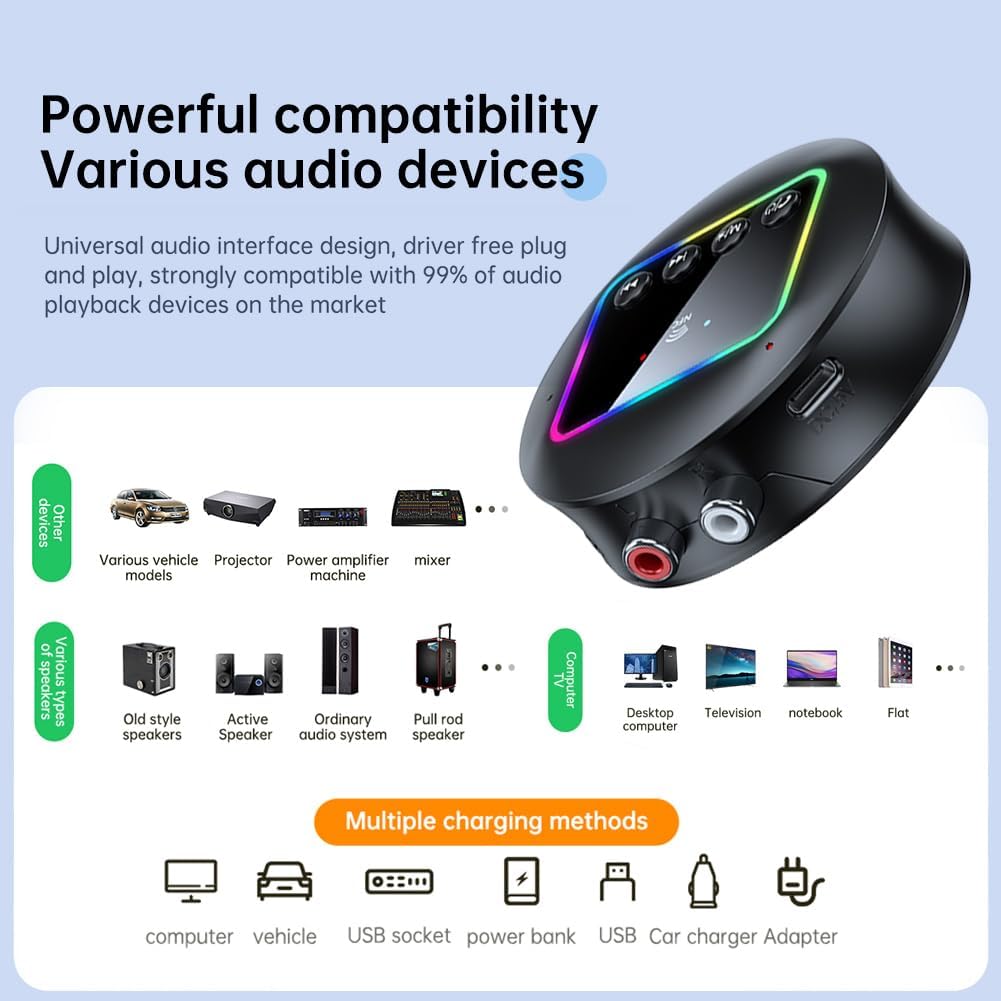
Image: An illustration demonstrating the wide compatibility of the AXFEE Bluetooth receiver with various audio devices and multiple charging methods.
Safety Information and Warnings
Please read and adhere to the following safety guidelines:
- Voltage Limit: The charging limit voltage is 5.25V. Always determine your input voltage before connecting the power supply to avoid potential damage to the device.
- Power Source: Use only compatible power adapters that provide DC 5V/500mA.
- Environment: Do not expose the device to water, moisture, or extreme temperatures.
- Disassembly: Do not attempt to disassemble or modify the device. This will void the warranty and may cause damage or injury.
Support
For any questions, concerns, or technical assistance regarding your AXFEE Bluetooth 5.4 HiFi Receiver, please contact our customer support. We are committed to providing a satisfactory solution.
Contact information is typically found on the product packaging or the retailer's website.