
1. Introduction
Thank you for choosing the DEWENWILS 300W Matter Low Voltage Landscape Transformer. This device is designed to safely convert 120V AC household current to 12V or 14V AC, providing power for your outdoor landscape lighting. With Matter compatibility, it integrates seamlessly with various smart home platforms, offering convenient control and automation for your lighting system.
This manual provides detailed instructions for installation, operation, and maintenance to ensure safe and efficient use of your transformer. Please read it thoroughly before installation and keep it for future reference.
2. Safety Information
Always follow basic safety precautions when installing and operating electrical equipment. Failure to do so may result in serious injury or property damage.
- For outdoor use only.
- Disconnect power at the circuit breaker before installing or servicing.
- Do not immerse the transformer in water.
- Mount the transformer at least 1 foot (30 cm) above ground level.
- Ensure all connections are secure and protected from moisture.
- Do not overload the transformer. The total wattage of connected lights must not exceed 300W.
- Use only with low voltage landscape luminaires and fittings.
- This device complies with Part 15 of the FCC Rules. Operation is subject to the following two conditions: (1) This device may not cause harmful interference, and (2) this device must accept any interference received, including interference that may cause undesired operation.
- Reduce the risk of electric shock; install only on a circuit protected by a GFCI.
3. Product Overview
The DEWENWILS 300W Matter Low Voltage Landscape Transformer is designed for robust outdoor performance and smart home integration.

Figure 3.1: Front view of the DEWENWILS 300W Matter Low Voltage Landscape Transformer.
Key Components:
- Main Enclosure: Durable, weatherproof housing.
- Matter Control Panel: Interface for smart home integration and manual zone control.
- Output Terminals: Three independent zones for connecting low voltage lighting wires.
- Antenna: For Wi-Fi and Matter connectivity.
- Lockable Latch: For securing the enclosure.
4. Features
This transformer offers advanced features for modern landscape lighting control:
- Multi-Platform Compatibility: Works with major smart home apps including Apple Home, Alexa, Google Home, and SmartThings via Matter.
- 3-Zone Independent Control: Features three individually controlled output channels (up to 300W total), allowing separate power for different lighting areas. Customize voltage per zone (12V or 14V) from your app.
- APP Schedule & Voice Control: Set custom lighting schedules for automatic on/off control and use voice commands with Alexa, Siri, and Google Assistant.
- Multi-Voltage Output (12V/14V): Safely converts 120V AC to 12V or 14V AC, supporting a wide range of low voltage landscape lighting types.
- Certified Safe & Energy Efficient: FCC-certified with overcurrent and overload protection, ensuring device safety and minimal energy waste.
- Upgraded Clamp-Connect Terminals: Allows for quick and tool-free wiring of 12V or 14V landscape lights.

Figure 4.1: Voice control capabilities with Siri, Alexa, and Google Assistant.
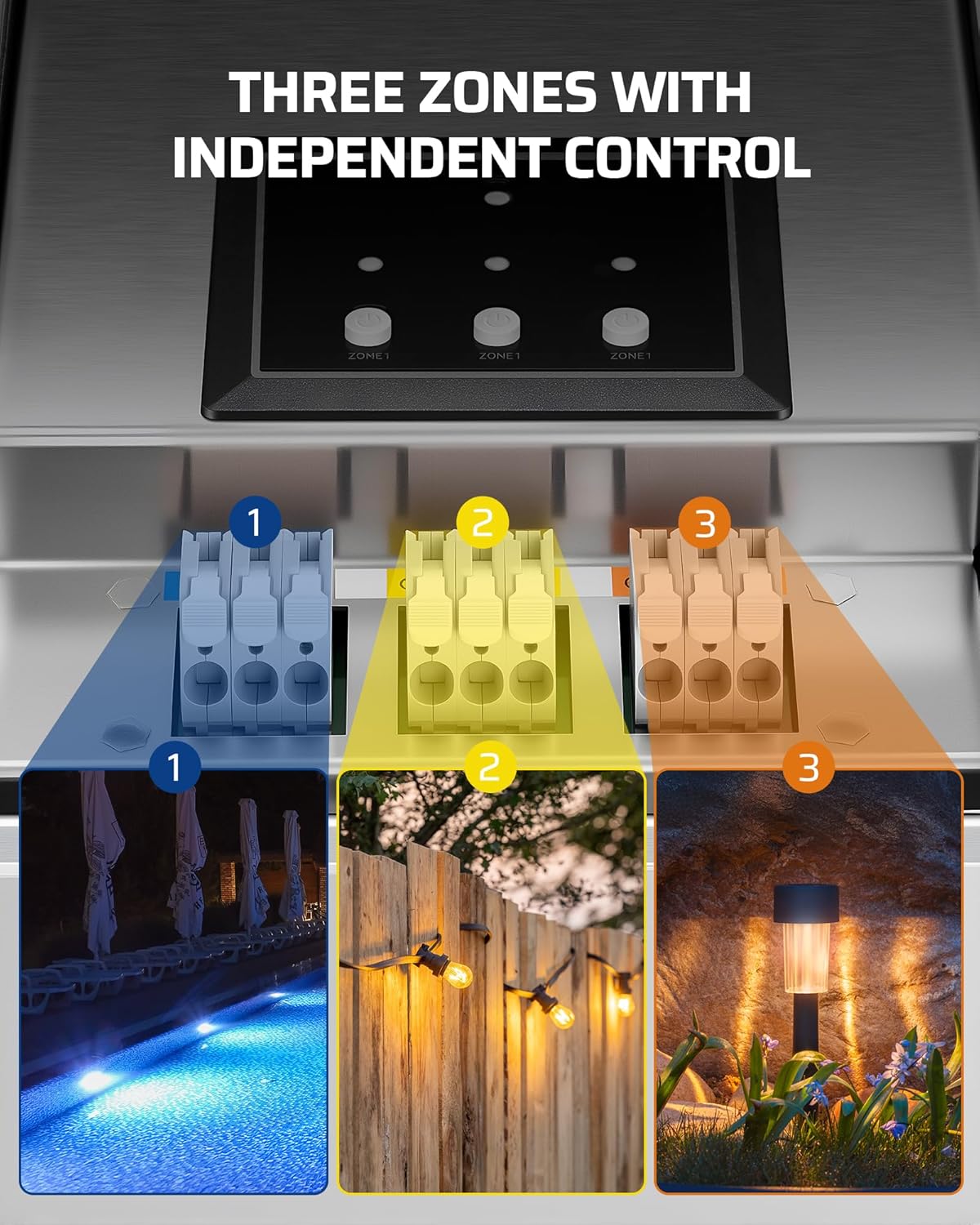
Figure 4.2: Three zones with independent control for diverse lighting needs.

Figure 4.3: Low voltage converter function, showing 120V AC input and 12V/14V AC output.
5. Package Contents
The package includes the following items:
- DEWENWILS 300W Matter Low Voltage Landscape Transformer
6. Setup
6.1 Mounting the Transformer
- Choose a suitable outdoor location near a GFCI outlet.
- Mount the transformer vertically on a wall or post, ensuring it is at least 1 foot (30 cm) above ground level.
- Use appropriate screws and anchors for secure installation.

Figure 6.1: Safe and weatherproof mounting considerations.
6.2 Wiring Landscape Lights
Connect your low voltage landscape lights to the transformer's output terminals.
- Open the transformer's front cover.
- Identify the three independent output zones (Zone 1, Zone 2, Zone 3).
- For each lighting run, strip the insulation from the ends of your low voltage cable.
- Insert the bare wire ends into the corresponding clamp-connect terminals for your desired zone (COM and 12V or 14V). The upgraded clamp-connect terminals allow for tool-free wiring.
- Ensure a secure connection for each wire.
- Close the transformer's front cover and secure the latch.

Figure 6.2: Upgraded clamp-connect terminals for easy wiring.
6.3 Matter Setup and App Connection
To enable smart control, connect your transformer to your preferred Matter-compatible smart home platform.
- Ensure you have a Matter-certified hub/controller (e.g., HomePod, Echo Dot, Nest, SmartThings Hub) connected to your home network.
- Open your chosen smart home app (Apple Home, Alexa, Google Home, SmartThings).
- Follow the app's instructions to add a new Matter device. This typically involves scanning a QR code located on the transformer itself or in the packaging/user manual.
- Once connected, you can control the transformer and its zones through the app.

Figure 6.3: Easy setup by scanning the Matter QR code.

Figure 6.4: Selected Matter-compatible hubs required for platform integration.
7. Operating
7.1 Manual Control
The transformer features physical buttons on its control panel for basic manual operation of each zone.
- Press the corresponding ZONE button to manually turn a zone ON or OFF.
7.2 App Control and Scheduling
Utilize your smart home app for advanced control and automation.
- On/Off Control: Toggle individual zones on or off from your smartphone or tablet.
- Scheduling: Set specific times for your lights to turn on and off. You can create daily, weekly, or custom schedules.
- Astronomical Timing: Some apps allow for astronomical timing functions, enabling lights to automatically turn on at dusk and off at dawn based on your location.
- Voltage Customization: Adjust the output voltage for each zone between 12V and 14V directly from the app to suit different lighting requirements.

Figure 7.1: Setting schedules for automatic lighting control.

Figure 7.2: Astronomical timing for automatic on/off at dusk/dawn.
7.3 Voice Control
Once integrated with your smart home platform, use voice commands through compatible devices (e.g., Amazon Echo, Google Home, Apple HomePod) to control your lights.
- Example commands: "Alexa, turn on the garden lights," "Hey Google, set pathway lights to 12V," "Siri, turn off all landscape lights."
8. Maintenance
The DEWENWILS transformer is designed for minimal maintenance. Regular checks can ensure its longevity and optimal performance.
- Cleaning: Periodically wipe down the exterior of the transformer with a damp cloth to remove dirt and debris. Do not use abrasive cleaners or solvents.
- Inspections: Annually inspect the wiring connections for any signs of wear, corrosion, or loose connections. Ensure the enclosure door is securely latched.
- Weather Protection: While weatherproof, ensure the transformer is not submerged in water and that its mounting location allows for proper drainage.
9. Troubleshooting
If you encounter issues with your DEWENWILS transformer, refer to the following common problems and solutions:
| Problem | Possible Cause | Solution |
|---|---|---|
| Lights not turning on. | No power to transformer; Overload; Loose wiring; Faulty lights. | Check GFCI outlet and circuit breaker. Reduce connected wattage. Inspect and tighten all wire connections. Test individual lights. |
| App connection issues. | No Matter-certified hub; Incorrect QR code scan; Wi-Fi interference; Outdated app. | Ensure a Matter-certified hub is present and online. Rescan QR code carefully. Check Wi-Fi signal strength. Update your smart home app to the latest version. Refer to your hub's documentation for Matter device pairing. |
| Lights flicker or are dim. | Voltage drop due to long wire runs; Loose connections; Overload. | Use thicker gauge wire for longer runs. Check and tighten all connections. Ensure total wattage is within limits. |
| One zone not working. | Loose wiring for that zone; Zone overloaded; Faulty lights in that zone. | Check wiring for the specific zone. Ensure the zone's wattage is not exceeded. Test lights connected to that zone. |
If problems persist after attempting these solutions, please contact DEWENWILS customer support.
10. Specifications
| Specification | Value |
|---|---|
| Model Number | TD-300S-12WF-2 WiFi-M |
| Power Source | AC |
| Input Voltage | 120V AC |
| Output Voltage | 12V / 14V AC |
| Max Output Power | 300W |
| Number of Zones | 3 Independent Zones |
| Mounting Type | Wall Mount |
| Certification | FCC |
| Package Dimensions | 19 x 10 x 8 inches |
| Item Weight | 15.65 Pounds |
11. Warranty and Support
For warranty information or technical support, please refer to the product packaging or contact DEWENWILS customer service directly. Keep your purchase receipt for warranty claims.
DEWENWILS Customer Service: Please visit the official DEWENWILS website for contact details and support resources.