
1. Introduction
Thank you for choosing the SANODESK FQ2 Electric Sit-Stand Desk. This manual provides essential information for the safe assembly, operation, and maintenance of your new desk. The FQ2 desk is designed to enhance your workspace with its adjustable height, intelligent control system, and robust construction, promoting a healthier work environment.

Image: The SANODESK FQ2 Electric Sit-Stand Desk in a home office, showcasing its clean white design and dual monitor setup.
2. Safety Information
- Ensure all components are securely fastened before use.
- Keep children and pets away from the desk during operation to prevent injury.
- Do not overload the desk beyond its maximum weight capacity.
- Avoid placing liquids directly on the control panel or near electrical components.
- Anti-Collision System: The desk is equipped with an anti-collision feature. If the desk encounters an obstacle during height adjustment, it will automatically stop and reverse slightly to prevent damage or injury. Ensure the area above and below the desk is clear before adjusting the height.
3. Package Contents
Please verify that all parts are present before beginning assembly. If any parts are missing or damaged, please contact customer support.
- Desktop (120x60 cm, White)
- Desk Legs (2 units)
- Control Box
- Control Panel with Memory Presets
- Power Adapter and Cable
- Hardware Kit (screws, Allen keys, etc.)
- Headphone Hook
- Cup Holder

Image: The SANODESK FQ2 features a single-piece desktop for enhanced durability and stability, unlike multi-piece alternatives.
4. Setup Instructions
Follow these steps to assemble your SANODESK FQ2 Electric Sit-Stand Desk. It is recommended to have two people for assembly.
- Unpack Components: Carefully remove all parts from the packaging and lay them out on a clean, soft surface to prevent scratches.
- Attach Desk Legs: Position the desktop upside down. Attach the desk legs to the designated mounting points on the underside of the desktop using the provided screws. Ensure they are aligned correctly and tightened securely.
- Install Control Box: Mount the control box to the underside of the desktop using the provided screws. Connect the motor cables from the desk legs to the control box.
- Install Control Panel: Attach the control panel to the front edge of the desktop, typically on the right side, using the provided screws. Connect the control panel cable to the control box.
- Connect Power: Plug the power adapter into the control box, then plug the power cable into a wall outlet.
- Attach Accessories: Install the headphone hook and cup holder to your preferred locations on the desktop edge.
- Cable Management: Use the included cable ties or clips to organize and secure all cables, preventing them from dangling or getting caught during height adjustments.
- Initial Reset (First Use): After assembly, perform an initial reset. Press and hold the 'Down' button until the desk reaches its lowest position, then release. Press and hold the 'Down' button again until the desk slightly lowers, then rises a small amount. This confirms the reset is complete.
5. Operating Instructions
The SANODESK FQ2 features an intuitive control panel for easy height adjustment and memory functions.
5.1 Control Panel Overview

Image: The control panel of the SANODESK FQ2, showing the up/down buttons and four programmable memory presets.
- Up/Down Arrows (▲ / ▼): Press and hold to continuously adjust the desk height up or down. Release to stop at the desired height.
- Memory Presets (1, 2, 3, 4): These buttons allow you to save and recall your preferred sitting and standing heights.
- Display: Shows the current height of the desk in centimeters. The display automatically dims to save energy when the desk is idle.
5.2 Adjusting Height
Use the up (▲) and down (▼) arrow buttons to manually adjust the desk to any height between 75 cm and 110 cm.

Image: The SANODESK FQ2 desk demonstrating its flexible height adjustment range from 75 cm (sitting) to 110 cm (standing).
5.3 Setting Memory Presets
To save a specific height:
- Adjust the desk to your desired height using the up/down arrows.
- Press the 'M' button (or similar memory set button, if present, otherwise proceed to step 3).
- Press one of the numbered preset buttons (1, 2, 3, or 4) within 3 seconds. The display will show 'S-' followed by the number, indicating the height is saved.
To recall a saved height, simply press the corresponding numbered preset button (1, 2, 3, or 4). The desk will automatically move to the saved position.
6. Maintenance
Proper care will ensure the longevity of your SANODESK FQ2 desk.
- Cleaning: Wipe the desktop and frame with a soft, damp cloth. Avoid abrasive cleaners or harsh chemicals that could damage the surface.
- Regular Checks: Periodically check all screws and bolts to ensure they remain tight. Retighten if necessary.
- Cable Management: Ensure cables are not pinched or tangled, especially during height adjustments.
7. Troubleshooting
If you encounter any issues with your desk, please refer to the following common problems and solutions:
| Problem | Possible Cause | Solution |
|---|---|---|
| Desk does not move. | Power cable disconnected, control box issue, motor issue. | Check power connections. Perform a reset (see Setup Instructions). Contact support if issue persists. |
| Desk moves unevenly. | Uneven load, loose connections, motor synchronization issue. | Ensure weight is evenly distributed. Check all connections. Perform a reset. |
| Error code displayed. | Overload, motor fault, sensor issue. | Refer to the specific error code in the full manual (if available) or perform a reset. Reduce load if overloaded. |
| Anti-collision system triggers too easily/not at all. | Sensitivity setting, sensor obstruction. | Ensure no obstructions. Some models allow sensitivity adjustment (refer to full manual). |
8. Specifications
Key technical details for the SANODESK FQ2 Electric Sit-Stand Desk:
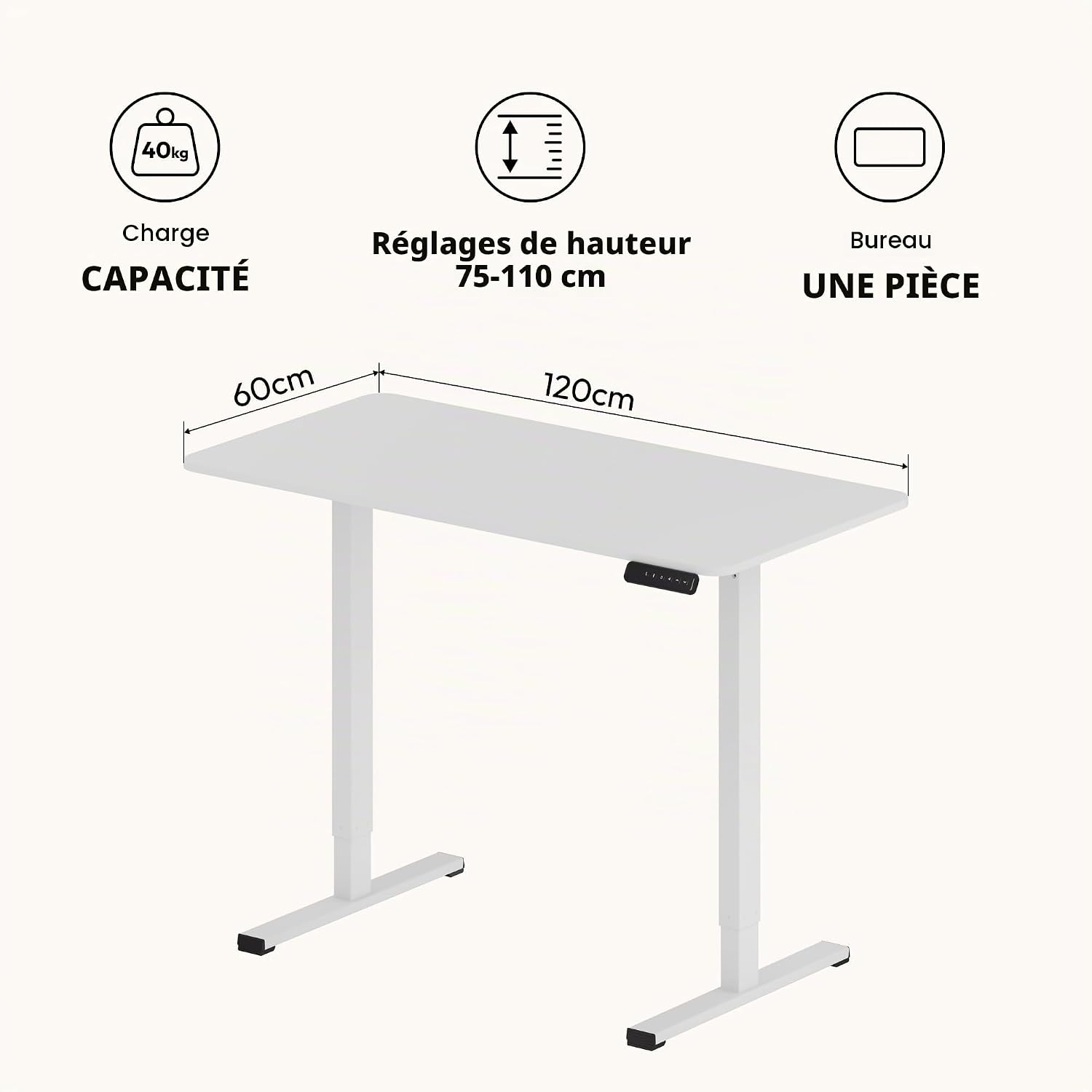
Image: Visual representation of the SANODESK FQ2 desk's dimensions (120x60 cm), height adjustment range (75-110 cm), and weight capacity (40 kg).
| Feature | Detail |
|---|---|
| Model | FQ2 |
| Desktop Dimensions (L x W) | 120 cm x 60 cm |
| Height Adjustment Range | 75 cm - 110 cm |
| Desktop Material | Wood (20 mm thickness) |
| Frame Material | Alloy Steel |
| Color | White |
| Weight Capacity | Up to 60 kg (132 lbs) |
| Special Features | Anti-Collision System, 4 Memory Presets |
| UPC | 840460446877 |
| ASIN | B0DZ29VY33 |
| Country of Origin | China |
9. Warranty and Support
SANODESK products are manufactured to high-quality standards and come with a limited warranty. For specific warranty details, please refer to the documentation included with your purchase or visit the official SANODESK website.
If you require technical assistance, have questions about assembly, or need to report a missing/damaged part, please contact SANODESK customer support through the retailer where you purchased the product or via the contact information provided on the SANODESK official website.

