
Introduction
Welcome to the user manual for your new AOLON Mars R3 Smartwatch. This guide provides detailed instructions on how to set up, operate, maintain, and troubleshoot your device. The Mars R3 Smartwatch features a 3D flexible surface design, high-definition Bluetooth calling capabilities, and comprehensive notification display. It is designed to keep you connected and track your daily activities with ease.
Key features include:
- True IP68 waterproof rating for enhanced durability.
- 3D flexible surface design for a sleek aesthetic.
- HD Bluetooth calls, allowing you to answer calls directly from your wrist.
- Large screen display for clear viewing of messages and notifications.
- Support for custom photo wallpapers and a variety of default clock displays.
- Integrated activity tracking features.
Product Overview
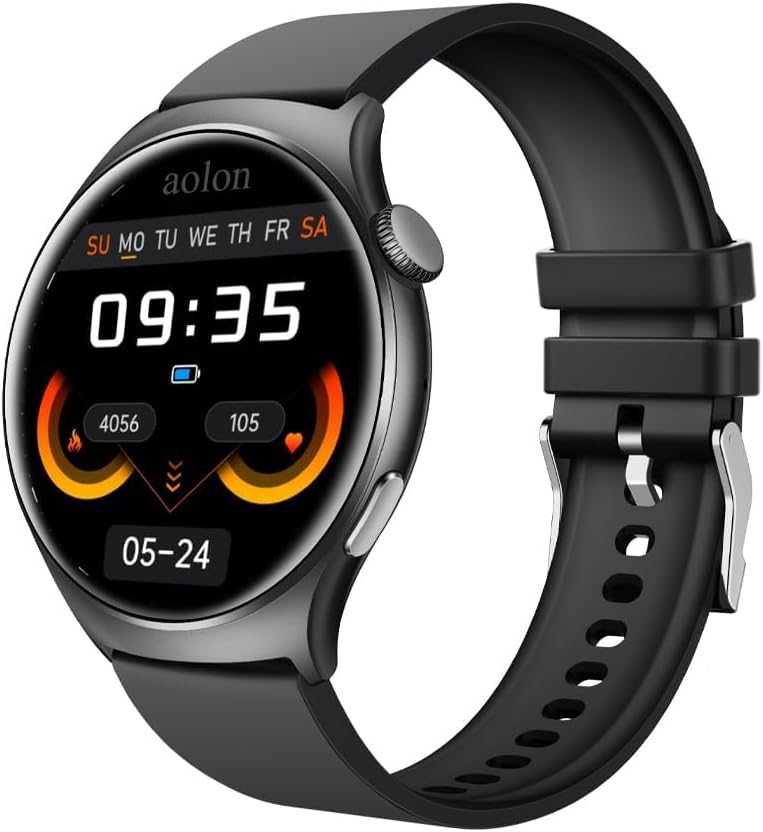
Figure 1: The AOLON Mars R3 Smartwatch, showcasing its round display and black silicone strap. The screen displays the current time, date, and various health metrics.
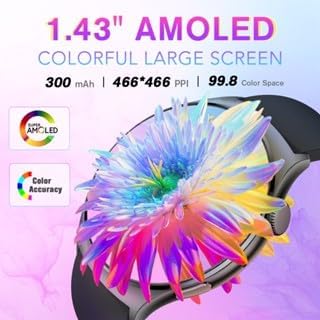
Figure 2: The 1.83-inch AMOLED colorful large screen of the Mars R3 Smartwatch, highlighting its vibrant display capabilities and high resolution.

Figure 3: The Bluetooth call feature of the Mars R3 Smartwatch, demonstrating how users can answer or hang up calls directly from their wrist, seamlessly switching between the watch and mobile phone.
Setup
1. Initial Charging
Before first use, fully charge your Mars R3 Smartwatch. Connect the magnetic charging cable to the charging contacts on the back of the watch and plug the USB end into a standard USB power adapter (not included) or a computer USB port. The watch display will indicate charging status.
2. Powering On/Off
- To Power On: Press and hold the side button until the AOLON logo appears.
- To Power Off: Press and hold the side button, then select the 'Power Off' option on the screen.
3. App Installation and Pairing
To unlock the full functionality of your smartwatch, you need to install the companion application on your smartphone. The watch operates with an Android 7.0 based system, ensuring broad compatibility.
- Scan the QR code provided in the watch's quick start guide or search for the official AOLON smartwatch app in your smartphone's app store (Google Play Store for Android, Apple App Store for iOS).
- Download and install the app.
- Enable Bluetooth on your smartphone.
- Open the AOLON app and follow the on-screen instructions to pair your Mars R3 Smartwatch. Ensure the watch is powered on and within Bluetooth range of your phone.
- Confirm the pairing request on both your phone and the smartwatch.
Operating Instructions
1. Basic Navigation
- Touchscreen: Swipe left, right, up, or down to navigate through menus and screens. Tap to select an item.
- Side Button: Press to return to the home screen or wake the display. Long press for power options.
2. Making and Receiving Calls
The Mars R3 Smartwatch supports HD Bluetooth calls, allowing you to manage calls directly from your wrist.
- To Answer a Call: When a call comes in, tap the green answer icon on the watch screen.
- To Decline a Call: Tap the red decline icon on the watch screen.
- To Make a Call: Access the dialer or contacts list through the watch's menu. Tap to dial a number or select a contact. Ensure your watch is connected to your phone via Bluetooth.
3. Notifications
Receive and view notifications from your smartphone directly on your smartwatch screen.
- Ensure notification permissions are enabled in the AOLON app on your smartphone.
- Swipe down from the top of the watch face to view recent notifications.
- Messages from social media applications will display their content on the large screen.
4. Activity Tracking
The smartwatch automatically tracks various activities and health metrics.
- View daily steps, distance, and calories burned directly on the watch face or in the activity tracking menu.
- Detailed historical data and additional health insights are available in the companion app.
5. Customizing Watch Faces
Personalize your smartwatch with various watch faces.
- On the Watch: Long press the current watch face to enter the watch face selection menu. Swipe left or right to browse available faces and tap to select.
- Via App: Use the 'App Jam Display Market' within the AOLON app to explore a wider range of watch faces. You can also set your own photos as wallpaper through the app.
Maintenance
1. Cleaning Your Smartwatch
Regular cleaning helps maintain the appearance and functionality of your device.
- Wipe the screen and body with a soft, lint-free cloth. If necessary, dampen the cloth slightly with water.
- Do not use harsh chemicals, abrasive cleaners, or solvents, as these can damage the watch's finish and seals.
- Clean the charging contacts periodically with a dry cloth to ensure good connection.
2. Water Resistance (IP68)
The Mars R3 Smartwatch has a True IP68 waterproof rating, meaning it is protected against dust ingress and can withstand immersion in water up to 1.5 meters for up to 30 minutes.
- It is suitable for everyday use, including hand washing, rain, and brief immersion.
- Avoid using the watch in hot water, saunas, or steam rooms, as steam can penetrate seals.
- Do not press buttons underwater.
- After exposure to water, especially saltwater, rinse the watch with fresh water and dry it thoroughly before charging.
3. Battery Care
- Avoid fully discharging the battery frequently.
- Charge the watch regularly, ideally before the battery level drops too low.
- Store the watch in a cool, dry place if not used for extended periods, with the battery charged to about 50%.
Troubleshooting
1. Watch Not Turning On
- Ensure the watch is fully charged. Connect it to the charger for at least 30 minutes.
- Check the charging cable and adapter for damage.
- Try a different USB port or power adapter.
2. Unable to Pair with Phone
- Ensure Bluetooth is enabled on your phone and the watch.
- Make sure the watch is within close proximity to your phone.
- Restart both your phone and the smartwatch.
- Forget the device in your phone's Bluetooth settings and try pairing again through the AOLON app.
- Ensure the AOLON app has necessary permissions enabled (e.g., location, Bluetooth).
3. Notifications Not Appearing
- Verify that notification permissions are granted to the AOLON app in your phone's settings.
- Check if the app's notification settings are configured correctly for the desired applications.
- Ensure the watch is connected to the phone via Bluetooth.
- Disable and re-enable notifications in the app.
4. Inaccurate Activity Tracking
- Ensure the watch is worn snugly on your wrist, not too loose or too tight.
- Update the AOLON app to the latest version.
- Calibrate the watch if an option is available in the app.
Specifications
| Feature | Specification |
|---|---|
| Model Number | aolon |
| Screen Size | 1.83 Inches |
| Standing Screen Display Size | 1.83 Inches |
| Shape | Rectangular |
| Operating System | Android7.0 |
| Memory Storage Capacity | 128 MB |
| RAM Memory Installed Size | 128 MB |
| Connectivity Technology | Bluetooth |
| Wireless Communication Standard | Bluetooth |
| Battery Capacity | 244.98 Milliamp Hours |
| Battery Cell Composition | Lithium Ion |
| Special Feature | Activity Tracker |
| GPS | No GPS |
| Item Weight | 1.96 ounces (55.5 Grams) |
| Package Dimensions | 1.1 x 0.28 x 0.26 inches |
| What's in the Box | Smartwatch |
Warranty and Support
Warranty Information
Specific warranty details for your AOLON Mars R3 Smartwatch are typically provided with your purchase documentation or can be found on the official AOLON website. Please retain your proof of purchase for warranty claims.
Customer Support
For further assistance, technical support, or inquiries regarding your AOLON Mars R3 Smartwatch, please visit the official AOLON website or contact their customer service department. You can often find FAQs, troubleshooting guides, and contact information on the manufacturer's support pages.
Visit the AOLON Store: AOLON Official Store