Introduction
The CofunKool H720 is a professional 3-in-1 system conference camera designed for various communication needs, including online meetings, classes, and live streaming. It integrates a 1080P HD camera, quad-microphone array with noise cancellation, and a 3W stereo speaker into a single, compact unit. This manual provides detailed instructions for setting up, operating, maintaining, and troubleshooting your H720 webcam to ensure optimal performance.
Package Contents
- CofunKool H720 3-in-1 Webcam (with integrated USB cable)
Setup
1. Physical Installation
The H720 webcam features a versatile mounting system that allows it to be securely placed on various displays or surfaces.
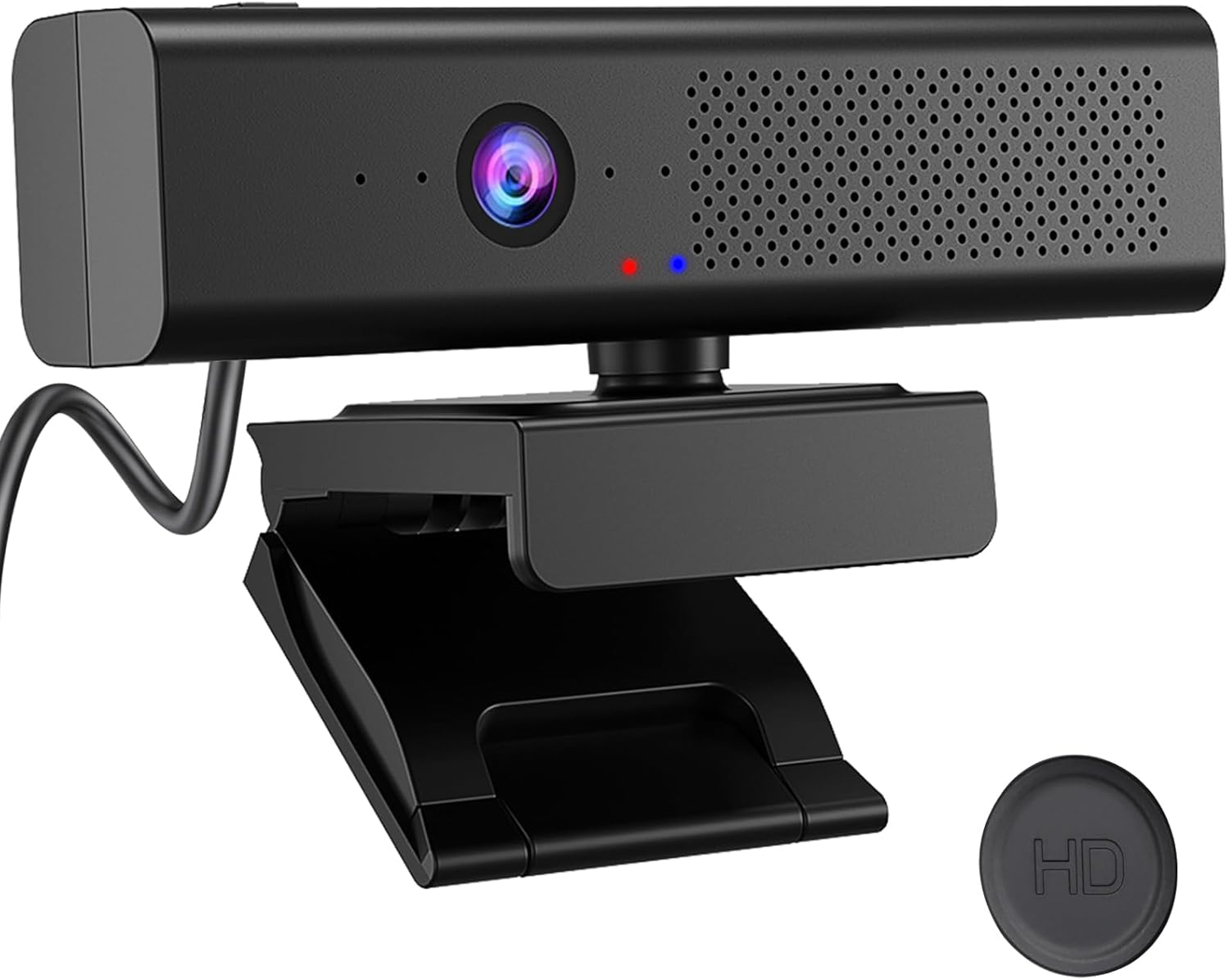
Front view of the CofunKool H720 3-in-1 Webcam, showcasing its integrated camera, speaker grille, and microphone array.
To mount the webcam:
- Open the flexible clip/base of the webcam.
- Place the webcam on top of your monitor, laptop screen, or a flat surface. Ensure the front of the webcam faces you.
- Adjust the clip to firmly grip the top edge of your display. The friction-grip base provides stability.
- Utilize the 360-degree rotatable neck and ball-mount to adjust the camera angle horizontally and vertically for optimal framing.

The webcam's flexible base allows for secure mounting on various displays, with a 360-degree rotatable neck for versatile positioning.
2. Connecting to Your Computer
The CofunKool H720 is a plug-and-play device, requiring no additional driver installation for most operating systems.
- Locate an available USB Type-A port on your desktop computer or laptop.
- Plug the integrated USB cable from the webcam into the USB port.
- Your operating system (Windows, macOS, Android, Linux) should automatically recognize the device.

The webcam connects via a standard USB Type-A 2.0 cable, offering plug-and-play compatibility with various systems.
Operation
1. Basic Use
Once connected, the H720 webcam will be available as an audio and video input device in your communication applications (e.g., Zoom, Microsoft Teams, Skype, Google Meet).
- Open your preferred video conferencing or streaming software.
- In the application's settings, select the CofunKool H720 as your camera, microphone, and speaker device.
- The blue operational LED indicator on the webcam will illuminate when the camera is active.
2. Key Features
1080P Full HD Camera
The integrated camera delivers crisp 1080P Full HD video resolution, ensuring clear visuals for your calls and streams.

Visual comparison demonstrating the superior clarity of 1080P Full HD video provided by the webcam.
Quad-Mic Noise Cancellation
Equipped with four omnidirectional microphones and advanced echo cancellation technology, the H720 effectively reduces up to 95% of background noise, ensuring your voice is heard clearly.

Illustration showing the effect of noise cancellation, transforming noisy audio into clear, natural sound.
3W Stereo Speaker
The built-in 3-watt stereo speaker delivers high-quality audio, allowing you to hear participants clearly without external speakers.

The webcam features a built-in 3-watt HiFi speaker, providing stereo surround sound for an immersive audio experience.
90° Wide-Angle Field of View
The 90-degree wide-angle lens captures a broader view, ideal for group meetings or presentations where multiple people need to be in frame without distortion.

A visual representation of the 90-degree wide field of view, suitable for capturing multiple participants in a meeting setting.
Magnetic Privacy Cover
A magnetic privacy cover is included to ensure your privacy when the camera is not in use. Simply attach it over the lens.

The webcam comes with a magnetic privacy cover to protect your privacy when the camera is not actively being used.
Tactile Mute Button and LED Indicators
The webcam features a tactile mute button on the top-left. Pressing this button instantly mutes the microphones, indicated by a red LED light. When the light is off, the microphone is active and picking up sound.

The mute button, when pressed, activates a red light, indicating that the microphone is muted for enhanced privacy during calls.
Maintenance
To ensure the longevity and optimal performance of your CofunKool H720 webcam, follow these maintenance guidelines:
- Cleaning the Lens: Gently wipe the camera lens with a soft, lint-free cloth. For stubborn smudges, use a lens cleaning solution specifically designed for optical surfaces. Avoid abrasive materials or harsh chemicals.
- Cleaning the Body: Use a dry or slightly damp soft cloth to clean the exterior of the webcam. Do not use liquid cleaners directly on the device.
- Storage: When not in use for extended periods, store the webcam in a cool, dry place, away from direct sunlight and extreme temperatures. Use the magnetic privacy cover to protect the lens.
- Cable Care: Avoid bending or kinking the USB cable excessively. Do not pull the cable to disconnect the webcam; always grasp the USB connector.
Troubleshooting
If you encounter issues with your CofunKool H720 webcam, refer to the following common troubleshooting steps:
- Webcam Not Detected:
- Ensure the USB cable is securely plugged into both the webcam and your computer.
- Try plugging the webcam into a different USB port on your computer.
- Restart your computer.
- Check your operating system's device manager (Windows) or system information (macOS) to see if the webcam is listed.
- No Video Output:
- Verify that the magnetic privacy cover is removed from the lens.
- Ensure the webcam is selected as the primary camera in your video conferencing application's settings.
- Check privacy settings in your operating system that might be blocking camera access for certain applications.
- No Audio (Microphone/Speaker):
- Ensure the webcam's mute button is not activated (red LED should be off).
- Verify that the CofunKool H720 is selected as the microphone and speaker device in your application's audio settings.
- Check your computer's sound settings to ensure the webcam's microphone and speaker are enabled and not muted.
- Adjust volume levels in both your application and operating system.
- Poor Video Quality:
- Ensure adequate lighting in your environment.
- Clean the camera lens as described in the Maintenance section.
- Check your internet connection speed, as low bandwidth can affect video quality in online calls.
Specifications
| Feature | Specification |
|---|---|
| Brand Name | CofunKool |
| Model Number | H720 |
| Item Weight | 10.5 ounces |
| Package Dimensions | 6.69 x 3.11 x 2.95 inches |
| Video Capture Resolution | 1080p |
| Photo Sensor Technology | CMOS |
| Maximum Focal Length | 500000 Millimeters |
| Maximum Aperture | 2.7 f |
| Connectivity Technology | USB |
| Special Features | 4 Mics, Low Light, Mute, Speakers |
| Supported Audio Format | AAC, MP3 |
| Video Capture Format | MP4 |
Warranty and Support
This product comes with a standard manufacturer's warranty. For specific warranty terms and conditions, please refer to the documentation included with your purchase or visit the official CofunKool website. If you require technical support or have questions not covered in this manual, please contact CofunKool customer service through their official support channels.
For additional information and support, you may visit the CofunKool Store on Amazon: CofunKool Store


